

No matter what industry you’re in, you’ll find tons of great AI marketing tools to help you get ahead. But in this article, we’re going to zoom in on one use case that’s particularly handy for consumer goods brands–product photography.
Here are my top picks of the best AI product photography tools:
- Pebblely
- Flair AI
- Claid AI
- Magic Studio
- Mokker AI
- Adobe Firefly
- Photoroom
Before we take a closer look at each tool, let’s start with a quick overview of how AI is transforming the way we create and enhance product photos.
How product photography is evolving in the age of AI
Back in the day, creating product photos required a team of professional photographers, along with expensive equipment, props, and a specially-designed photo studio to make the products pop. In other words, it was a lot of work!
But thanks to AI tools, small businesses and busy marketing departments alike can now turn out stunning product shots in a fraction of the time (and at a much lower cost).
- Here are some of the most notable ways AI is streamlining product photography process:Automated image enhancement – AI tools can enhance lighting, color correction, and sharpness automatically, improving image quality without manual effort
- Background removal – AI quickly removes or replaces backgrounds, creating clean, uniform images for ecommerce with minimal time and cost
- Virtual staging – AI generates realistic virtual environments, allowing products to be showcased in diverse settings without needing physical props or spaces
All in all, AI reduces the need for time-intensive manual work, giving consumer packaged goods (CPG) brands the freedom to create stunning product photos that truly reflect their brand.
You can check out our Impact of AI report if you’d like to dive deeper into how AI is leaving its mark on the industry.
Before we dive in, a word of warning. New regulations like the EU AI Act mean brands and agencies need to be transparent in how they use these tools. That means staying up-to-date with the latest disclosure best practices.
Supercharge your content creation process
Get point-and-click feedback on your creatives with Filestage.
Seven best AI product photography tools
There are lots of AI product photography tools claiming to make marketers’ lives easier. So it can be a challenge to find which ones are actually worth a shot.
To make sure you get a good grasp of what each tool offers, I’ll start by giving you a general overview before diving into key features and pricing. This should help you make an informed decision on which tool to choose for your AI product photos.
Let’s dive in!
1. Pebblely
Source: Pebblely
Small-to-medium sized businesses rarely have the budget for an in-house design team. That’s why more marketing teams are choosing simplified (but still effective) tools for AI content creation.
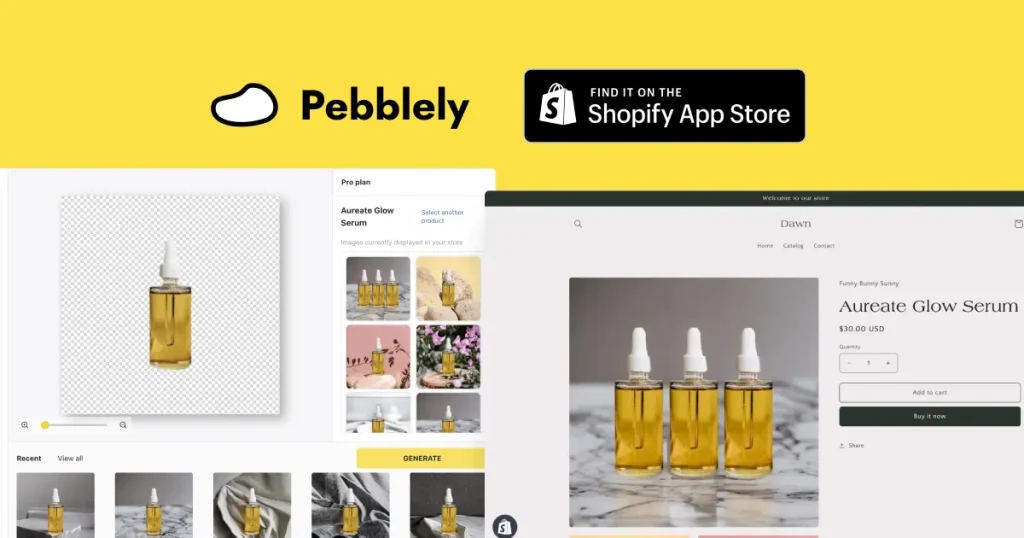
Pebblely is an AI-powered product photo platform designed to help you create eye-catching product images quickly and efficiently. All you need to do is upload your product images, specify the kind of background you’re after, and let Pebblely do the rest.
The site offers lots of documentation too, so you can learn how to use its features in a flash. Speaking of which …
Key features
- Mobile-friendly platform – Quickly generate product photos on the go without needing to download an app
- Automatic background removal – Pebblely automatically removes the background from existing product images, so you can make a single shot go a whole lot further
- Natural lighting – Pebblely’s photos are generated using natural lighting and intuitive shadow effects, making your image look less artificial
- Customizable settings – Choose from 17 predefined themes or create a custom background, adding a personalized touch to each product image
- Version history – Revise, edit, and download past product imagery at a time that suits you best
Pricing
Pebblely offers a pretty affordable service, with a few different pricing plans to fit with different demands and budgets.
The basic plan starts at just $19 per month (or $179 per year) while its Bespoke service starts at $3000 and comes with its own custom AI.
2. Flair AI

Source: Future tools
Flair AI is a cutting-edge AI image generator revolutionizing the way we create product photos for consumer goods marketing.
The platform itself is packed with useful features (which we’ll get to in just a sec) but above all, people love this tool thanks to its intuitive interface. The delightful drag-and-drop editor is a breeze to work with, empowering both amateurs and professionals to create stunning product shots.
Key features
- Top quality templates – Kickstart your product image designs with a variety of preset, customizable templates
- Real-time collaboration – As one of the most collaborative tools on the list, Flair AI allows multiple users to work together on projects simultaneously
- 3D models and props – Stage your photoshoot set digitally with a range of 3D assets
- Autocomplete prompting – Flair AI helps you write prompts faster and create detailed AI generated backgrounds
Pricing
Flair AI offers a pretty comprehensive free plan to help you get started. For unlimited projects and image generation, prices start at $10 per month (bargain!).
There’s also an Enterprise plan available with custom pricing, offering unlimited API access, a dedicated success manager, and more.
3. Claid AI

Source: Tech.eu
Next up we’ve got Claid AI, a sleek and stylish AI photo tool that specializes in product marketing within an ecommerce environment. For example, it offers tailored solutions to meet marketplace standards for the likes of Amazon and Etsy.
Claid AI’s intuitive interface makes it the perfect tool for beginners or teams in a time crunch (so, essentially everyone).
Let’s check out some of the other features this product photography tool has to offer.
Key features
- Easy image enhancement – Improve image quality, including resolution, color, and shadows with a couple quick clicks
- Automated UGC editing – Make the most of your user-generated content with automated editing features
- Smart frame removal –Claid AI can detect and take out any unwanted borders from your images, so all eyes are on the product
- Background image generator – Simply type in the details of your desired background and let AI produce the goods
Pricing
Claid AI has a free plan that allows you to upload five images. After that, there’s a Basic plan that starts at $19 per month and a Professional plan from $49 per month.
4. Magic Studio

Source: Simplifying DIY Design
Looking for an AI product image generator that’s easy and, dare I say, fun to use? Well, Magic Studio’s got just the trick!
This software fuses modern UX with an impressive selection of tools and templates to help you create AI generated backgrounds like a pro, no matter your experience level.
Let’s take a look at some of its standout features.
Key features
- Version history – Bookmark important images for fast and easy download in the future
- Search filter – Magic Studio lets you filter your saved images by product, which is a game changer if you’re advertising many different products at once
- Template mockups – Get greater control over your product image by moving the product around to fit perfectly into your desired background
Pricing
Magic Studio offers a free version with 20 credits and access to some basic tools.
For professional projects, you’re looking at around $49.99 per month (or $299.99 per year with an annual contract). This gives you access to unlimited product photos, high resolution downloads, magic erasers, and more.
5. Mokker AI

Source: AI Finders
If you need to create a constant stream of product photos for digital, social media, print marketing, or anything else, Mokker AI might just be the tool for you.
Mokker AI, like all the best product photography software, makes it easy to remove and generate backgrounds in an instant. But it’s also packing some extra unique features that help marketing teams ideate and deliver unique product imagery en masse. Let’s check ‘em out!
Supercharge your content creation process
Get point-and-click feedback on your creatives with Filestage.
Key features
- Moodboard – This nifty feature allows you to upload a reference image (or up to six of them) to guide the AI in creating product images with a specific style, aesthetic, or theme
- Batch processing capabilities – Edit multiple images at once to speed up the process for large-scale projects and campaigns
- Preset image formats – Mokker supports various output dimensions, making it easy to create everything from web banners to social media stories
- Workflow integration – This tool seamlessly integrates with most popular existing content management systems for a smoother workflow across the board
Pricing
Mokker AI offers a few flexible plans, starting with a free version that allows you to upload 20 photos at once.
There’s a Starter plan for $13 per month that allows for 500 photo uploads and creates custom prompts. For unlimited photo uploads, you’re looking at $29 per month for their Team plan. Finally, there’s a large-scale Organizational plan for $83.25/ user per month.
6. Adobe Firefly

Source: Adobe
While Photoshop is the OG photo editing tool for marketing teams, Adobe Firefly makes the entire process much more intuitive. And since lots of marketers already work with Adobe Suite, this AI image generation tool is often a no-brainer for their product photos.
While this AI graphic design tool isn’t specifically for product marketing, it boasts a wide range of features that can create some stellar product shots.
Let’s take a closer look at what to expect from Adobe Firefly!
Key features
- Compatible with over 100 languages – No matter your preferred lingo, you can turn text into stunning images without a Google Translate tab in sight
- Multi image output – Generate multiple images using only one prompt (and one credit)
- Fast mode – This is one of the tool’s newest features, allowing you to quickly ideate, generate, and develop quality images (perfect for creating eye-catching backgrounds!)
- Seamless integrations – This AI image generator slots right into your workflow, by intuitively integrating with all other Adobe products
Pricing
Adobe Firefly is one of the most affordable image generators on the market. Its free plan comes with 20 credits per month and gives you instant access to all tools – just watch out for the watermarks!
The premium plan starts at just $5 per month and offers 100 credits for larger scale product photography projects.
7. Photoroom
Source: Photoroom
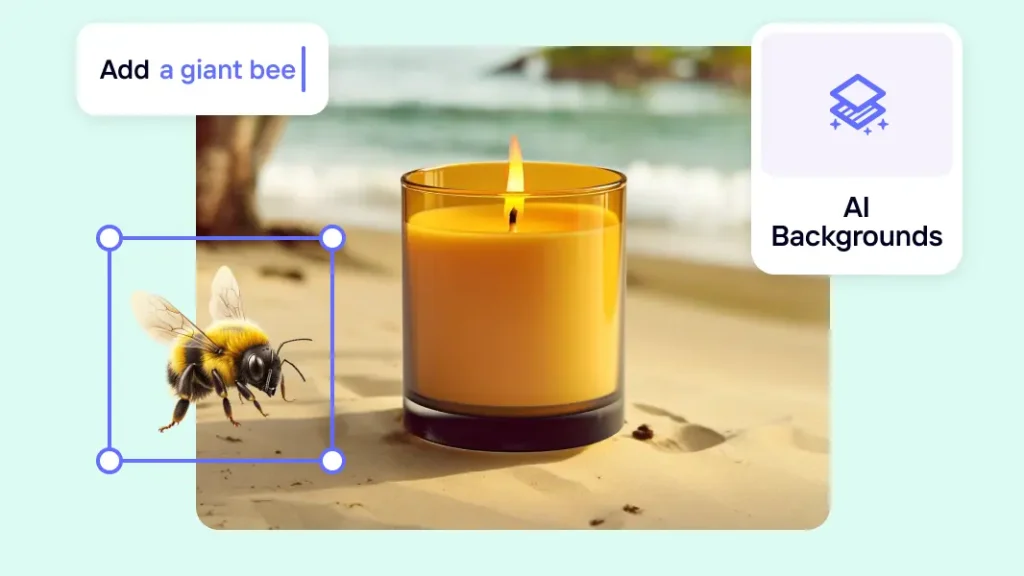
Photoroom is a tool specially designed for online retailers who need to create large batches of product photos. Its background removal tool is easy to use with quality results, and it also allows you to edit multiple images at once.
Something to note about this tool is that it doesn’t really specialize in background generation, so it won’t offer the same range of background generation features as some of the other tools on this list. This one’s all about creating sleek, high-quality images that put all the focus on your products.
Key features
- Magic retouch – Cluttered product imagery is never a good look, which is what makes Photoroom’s speedy object removal feature such a hit
- Mobile app – Upload and edit photos from anywhere for a more productive project workflow
- Easy exporting – Downloading large files is a real pain in the elbow, but with Photoroom you can just resize them instead
Pricing
Photoroom offers a basic Free plan, with up to 250 image exports. Then they have a Pro plan and a Teams plan starting from $69 per month.
This tool also offers an Enterprise plan with tailored pricing, depending on your personal requirements.
Final thoughts
Product photography is the art of creating stunning imagery that sells. AI has opened up a world of opportunities for consumer packaged goods brands and small businesses that need to create impactful product photos without a ton of expensive equipment.
I hope this article helps you pick the perfect AI product photography tool for your team. And if you’d like to speed up the way you review all your AI generated images with Filestage, get started with a free trial today.