
TL;DR
The average content approval takes eight days, but a structured workflow can cut that down by centralizing feedback and eliminating email chaos. When you define key stakeholders upfront, set clear approval stages and due dates, and leave clear feedback on each version. This way, you make sure nothing gets missed before final sign-off. Teams that switch to dedicated approval software like Filestage often reduce back-and-forth to just a couple of versions per asset, while still meeting brand, legal, and regulatory standards across all their content.
Why a clear content approval workflow is essential for modern marketing teams
According to EMARKETER, 67% of US marketing professionals say their teams regularly miss important cultural moments because review and approval timelines move too slowly.
That is the real cost of a messy approval process. When feedback sits in inboxes, approvals happen in sequence, or nobody knows who has the final say, teams ship late. And late content usually means lower impact, more rework, and more internal friction.
A solid content approval workflow fixes the basics. It makes ownership clear, keeps feedback tied to the right version, and shows what is blocked and why. Teams spend less time chasing approvals and more time producing work that is ready to publish.
In this guide, I’ll walk you through how to create and manage a creative content approval workflow for smooth and seamless sign-off every time.
What is a content approval workflow?

A content approval workflow is a structured process that teams use to make sure marketing assets meet certain quality standards before they’re published or shared with the public. Think of it like a roadmap, with the final destination being high-quality content that your company is proud to put its name to.
Having a structured content approval workflow in place can remove the chaos of the review process and save you time.
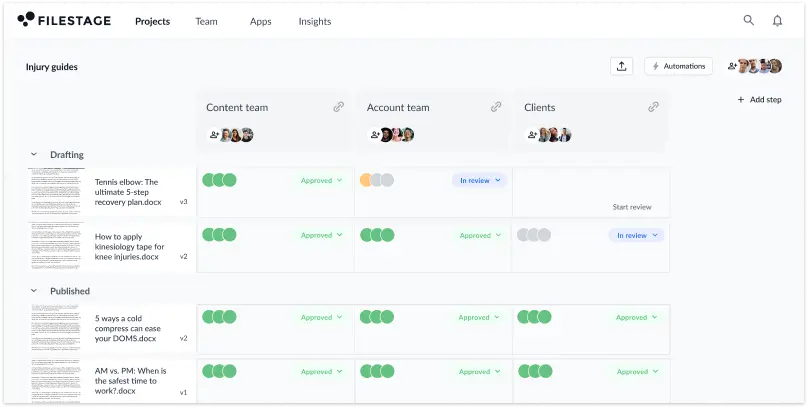
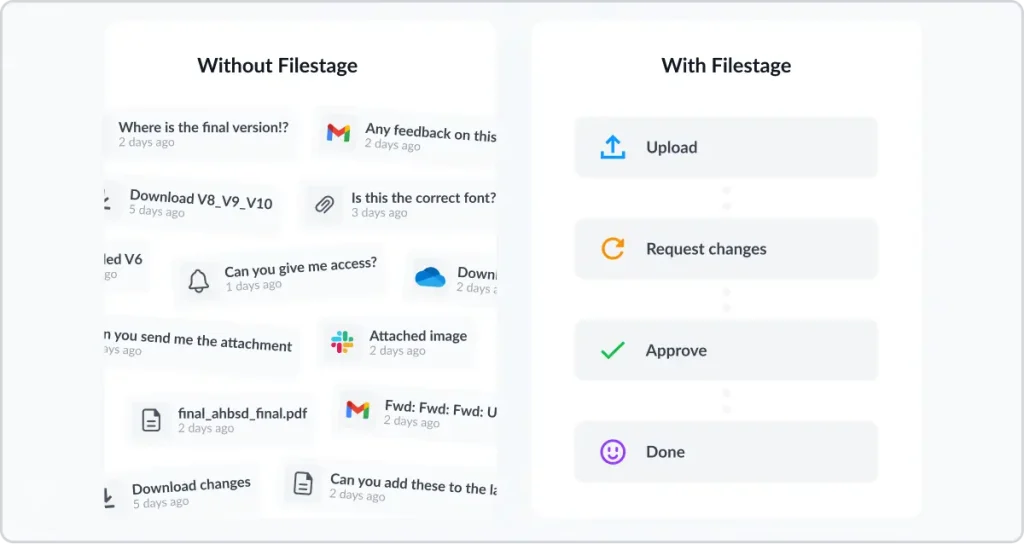
(Spoiler: your approval workflow could look like the image below if you invest in online proofing software like Filestage).
See how Filestage can speed up your approvals
Enjoy a free, 30 minutes consultation with our experts, tailored to your team and use cases.
Four reasons why your current content approval process isn’t working
Many marketers and agencies are still managing their content approvals across multiple tools – think email, Slack, SharePoint, and even WhatsApp (yikes).
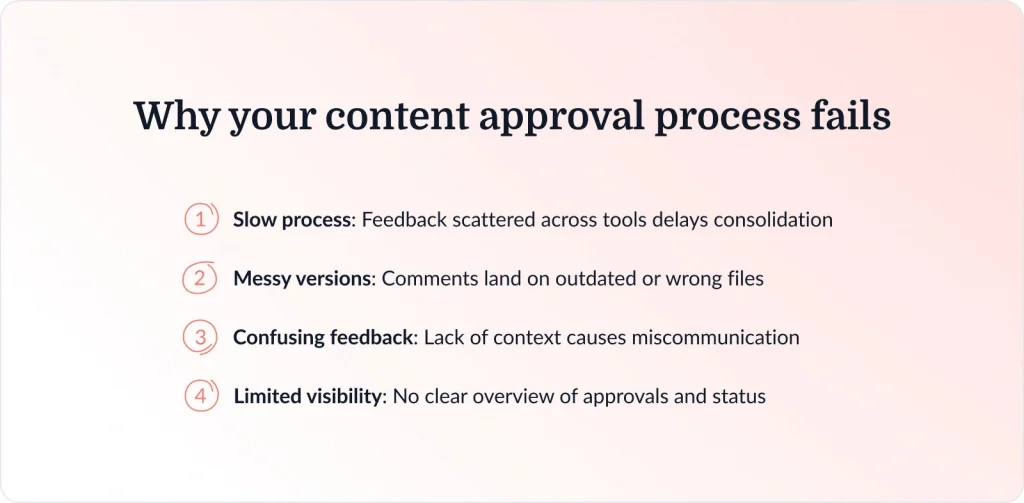
And that can lead to a whole world of problems. Here are four you’re probably all too familiar with:
- It’s slow: Collecting content feedback via email and other platforms takes forever because you have to consolidate it in one place.
- It’s messy: Stakeholders start leaving feedback on the wrong content version, and you waste hours digging through your emails to find the latest asset.
- It’s confusing: There’s no context when you share creative feedback by email or Slack, so you get bombarded with screenshots and timecodes (or waste hours on follow-up questions).
- It’s opaque: Without a clear dashboard, it’s almost impossible to keep track of which content assets have been approved and who approved them.
That was the case for Story, a French marketing agency. Creative Director, Melissa Abrini says,

“Before Filestage, our review process was pretty chaotic. Feedback came flying in from all directions – emails, Slack, PowerPoint decks, even WhatsApp (yes, really). It felt like one’s entire role was just to track down comments, consolidate input, and try to maintain a smooth workflow.”
Melissa Abrini, Creative Director at Story
What a proper content approval workflow looks like
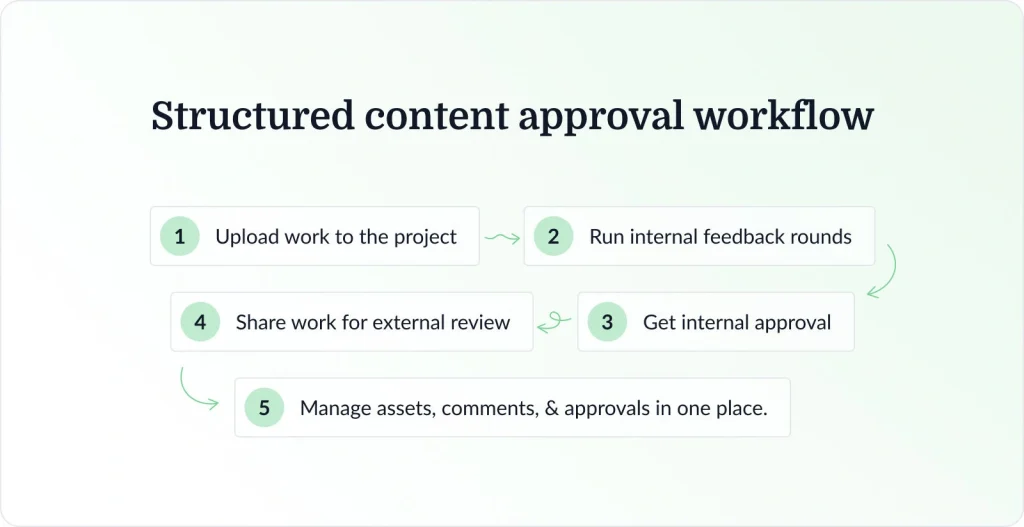
Now Story has a structured content approval workflow in Filestage. Here’s what their approval process looks like:
- Upload work to the Filestage project
- Run internal feedback rounds in Filestage
- Get internal approval
- Share work for external review
- Manage every asset, comment, and approval status in one place
And if you’re curious about how much time and money an efficient content approval workflow can save your team, take a look at Story’s results.
Story's journey in numbers
Feedback is clearer and more collaborative in Filestage
Less back and forth means more time for new projects
Efficient review process boosts client satisfaction
Now let’s take a closer look at the benefits.
How content approval processes can help your marketing team get better results
An effective content approval workflow doesn’t just save you time (and keep you sane). It also helps your marketing team to get better results.
Here’s how:
- Faster sign-offs – A proper approval workflow reduces time-wasting repetitive tasks like chasing and consolidating feedback.
- Fewer mistakes – Having a structured approval process reduces the chances of errors, inconsistencies, or missed stakeholders.
- Better brand governance – A content approval process makes sure every asset is consistent and up to your brand’s standards.
- Less confusion – A proper workflow means that everyone knows their role in the approval process and can do their jobs with ease.
How to create a five-step content approval workflow in Filestage

To make creating your content approval workflow as simple as possible, I’ve broken the process down into five simple steps:
- Step 1: Define your stakeholders
- Step 2: Outline the approval stages
- Step 3: Set due dates to keep approvals on track
- Step 4: Tick off comments as you work on the next version
- Step 5: Get one-click approval with timestamps
Let’s take a look at each of these steps in more detail and how to set them up in approval software like Filestage.
1. Define your stakeholders
Different projects will require different stakeholders to be involved in the content approval process. By figuring out who needs to review the content from the get-go, you’ll save yourself the headache of having people join the review process at the last minute only to mess everything up!
For instance, if the content in question is a packaging design, your approvers could include the following teams:
- Product
- Compliance
- Design
- Translation
Don’t fall into the trap of involving too many approvers, though. Streamline your list as much as possible, as the fewer people involved, the quicker your content will be approved!
2. Outline the approval stages
Next, you need to decide on a logical order for getting your content approved. For example, if you work with clients, they shouldn’t enter the approval process until you have gotten the green light from internal teams.
Now you can add your reviewers to the relevant approval stage, and they can start giving feedback on your content.
Remember the reviewers we mentioned in point one? Well, this is how your packaging design approval workflow would look in Filestage:

3. Set due dates to keep approvals on track
This is a big one. Our report on The State of Creative Collaboration in 2023 found that waiting to receive feedback is the number one problem slowing teams down in the creative process. Not only is it frustrating, it also means you end up wasting precious time chasing people.
Setting a clear deadline for every step in the content approval process helps reviewers to prioritize and keep your workflow on track.
With Filestage, you can add due dates to your files so that stakeholders know exactly when you expect their feedback. And the best bit: they’ll be sent automatic reminders as the deadline approaches.
No more chasing. No more missed deadlines.

4. Tick off comments as you work on the next content version
With multiple amends at every stage of the approval process, it’s easy to lose track of what still needs doing. The last thing you want is for your content approval workflow to be derailed because you missed an important suggestion.
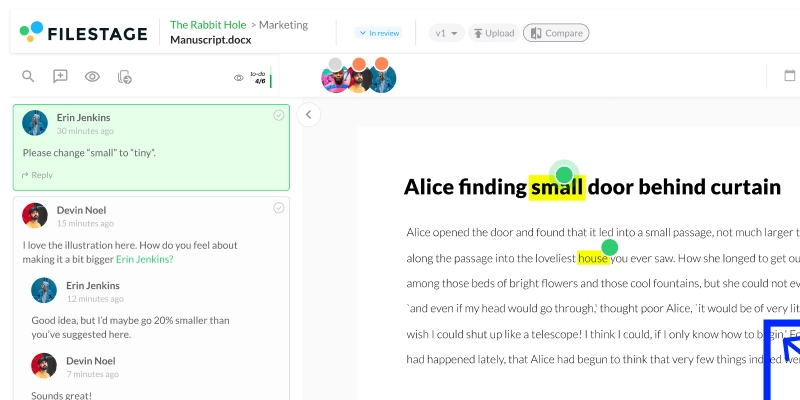
Create a to-do list (in Filestage, the comment sidebar doubles up as one), and as you work on the next version, you can tick off each comment as you go along. That way, you’ll be confident that you’ve addressed everyone’s feedback.
5. Get one-click approval with timestamps
When you’re working with so many reviewers, there are plenty of opportunities for speed bumps and delays.
Keep things moving by making the process of approving content as simple as one click!
In Filestage, once your reviewers are happy with the content, all they have to do is hit “Approve”. You’ll get a notification confirming they’ve given their seal of approval, which means you can publish content with confidence instead of chasing people to check that they’re happy.

If you want to learn more about how to create a successful workflow, check out the video below:
See how Filestage can speed up your approvals
Enjoy a free, 30 minutes consultation with our experts, tailored to your team and use cases.
Three types of content approval workflow
Let’s take a look at three examples of approval workflows for three different content creation processes. The main differences are the type of stakeholders and the number of review steps involved.
1. Blog post approval process
Here’s an example of a typical content approval process for blog content:
- Approval step one – Your content editors review the content for accuracy and tone of voice. You make any requested changes until they give their approval.
- Approval step two – Your SEO team makes sure the content is well-optimized and follows best practices.
- Approval step three – The client (if needed) makes sure they’re happy with it before it goes live.
Depending on the type of blog post you’re creating, you may also need to bring in the design team, the wider marketing team, or specialist teams if the content sits in their domain.
Check out the video to see how you can create an efficient content approval workflow for blogs and other documents.
2. Video content approval process
Here’s an example of an approval workflow for video content:
- Approval step one – Your extended creative team gives the green light that they’re happy with the final cut.
- Approval step two – Your project manager makes sure the video content meets all the requirements set out in the brief.
- Approval step three – The brand and marketing manager checks that the content adheres to brand guidelines and fits in with the wider marketing strategy.
- Approval step four – The client (if needed) gives their final approval before your video goes live.
Again, this can vary depending on the type of video content you’re creating. If it’s social video content, then your social team will likely need to be involved. If it’s a recruitment video, then your HR team might have final approval.
Our social media manager shares his top tip on setting up a video editing workflow using Filestage, give it a watch.
3. Social media approval process
Here’s an example of a social media approval workflow:
- Approval step one – The head of social reviews the post first to check for content quality
- Approval step two – The marketing and product teams check that it fits with wider business goals.
- Approval step three – Your legal team makes sure the post is compliant and won’t damage the company’s reputation.
If the social media posts you’re creating have a design aspect to them, then your creative team might need to be brought into the workflow. Or your PR team may need to be included to check that the messaging is right.
Once you’ve got nothing but green lights, it’s time to publish your content!
And if you want to see the social media content approval process in action, check out the tutorial below.
How to use AI in your content approval workflow
Love it or hate it, AI content marketing is here to stay. But with so many marketers using AI to create content, an airtight content approval workflow is more necessary than ever.
Sure, AI means you can crank out content way faster, but your brand needs to stay consistent across different touchpoints and channels. That means every asset needs to be checked before it goes live.
Interestingly, AI can be a lifesaver here. Enter Filestage’s AI reviewers.
You can add a dedicated AI reviewer to your projects to check your content against:
- Industry compliance standards – AI will highlight any content that may not comply with specific industry regulations standards like FDA.
- Your brand guidelines – AI will automatically flag any inconsistencies in your content that go against your brand style guide.
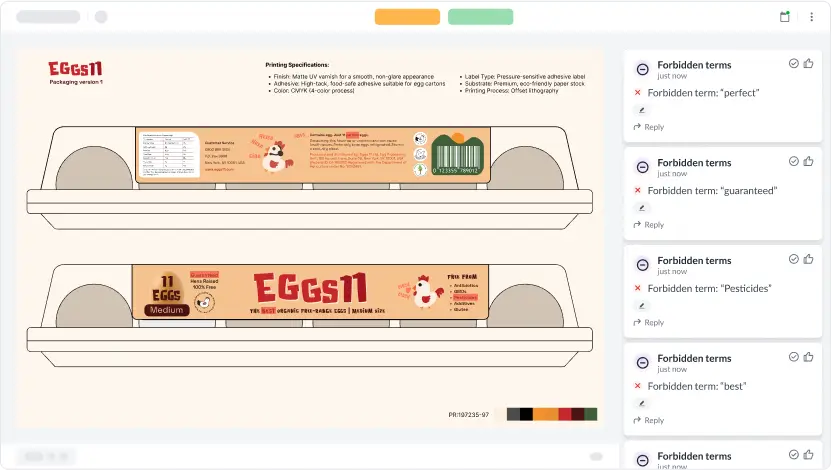
Here’s how to use them in your content approval workflow:
- Upload your content to the dedicated project
- Add your AI reviewer of choice to the first reviewer group to do the initial review
- Check the comments from the AI reviewer and make changes
- Share the updated version with your human reviewers in the next reviewer group
- Implement their feedback and get the final approval
Final thoughts
A streamlined and efficient content approval workflow helps you to save time, improve productivity, and ultimately publish the best content possible. And with the right content approval software, you’ll be able to automate manual tasks and create a simple, speedier approval process for everyone involved.
If you’d like to see for yourself how Filestage could help with your content approval workflow, you can start a free trial here →
FAQ
What is an example of a content approval workflow?
A simple example of a content approval workflow process looks like this:
1. A content writer submits a first draft.
2. The content manager reviews the file and leaves feedback.
3. The updated draft goes to brand and subject matter experts for feedback.
4. Legal or compliance teams review and give final approval.
5. The approved content is scheduled and published.
In well-designed content approval workflows, each review stage, owner, and due date is clear, so nothing stalls or gets lost.
What are some best practices for content approval workflows?
Best practices for content approval workflows include defining roles upfront, limiting approvers per stage, and centralizing all comments and decisions in a single system. Keep feedback in context on the file rather than email, use version control to prevent confusion, and set realistic deadlines for each stage. Following these practices ensures content approval workflows are faster, clearer, and scalable across teams.
What performance metrics should you track in a content approval workflow?
To optimize a content approval workflow, track cycle time per asset, time spent in each review stage, and the number of versions required for final approval. Also track rework rate, the frequency of changes caused by missing inputs or unclear requirements, and on-time completion rate to monitor missed deadlines. These metrics help track progress, minimize delays, and identify recurring tasks that can be standardized.
What roles should be clearly assigned in a content approval workflow?
A content approval workflow runs smoother when you assign roles, not just names. Assign a content manager to oversee the approval process, reviewers for internal checks, and subject matter experts to ensure factual accuracy. Include quality assurance to verify consistency before approvals, and for regulated or sensitive content, assign legal reviewers as a distinct role. Clear ownership ensures tasks are assigned efficiently, reduces back-and-forth, and keeps stakeholders aligned.
What documentation should you keep for audits in a content approval workflow?
For regulated industries, your content approval workflow should produce audit trails that show version control, what changed, who approved, and when final sign-off happened. Keep a record of comments, review decisions, and proof that legal and regulatory standards were checked before publishing content. In Filestage, teams can keep files, versions, comments, and approval decisions in one place. You can also download review reports to audit your entire content approval workflow.
How can a content approval workflow fit into an existing content creation process?
Most teams don’t need to rebuild their entire content creation process. They just need to add a clear review and approval step. Define when content reviews should happen for blog posts, social media posts, and email campaigns, then standardize the steps between content production and publishing. For multiple workflows across departments, keep the final approval step consistent, so sign-off always has the same meaning. Filestage makes this easy by centralizing the review and approval process for all content types. Reviewers can leave their feedback in one place, submit their approval with one click, and project managers can see the clear approval status of each file.