Whenever I come across creative work that misses the mark, I can’t help but think about the review process behind it. Maybe even more so since our research revealed that 3 in 4 people say they could create better work if they spent less time managing feedback.
And while crap creative might be the most visible consequence of a flawed approval process, the hidden costs (wasted time, frustrated teams) can be even more damaging to business performance.
But panic not! Because in this article, I’m going to help you ace your creative asset reviews with a smart, simple feedback and approval template. One that makes collaboration smoother and ensures every creative asset is on point.
Before we get stuck into the practical steps, let’s quickly outline what a creative asset approval template is, and why it’s so important for producing high-quality content.
Why you need a feedback and approval template for your creative assets
Picture this: A designer sends a new visual into the team chat. Someone leaves a comment in Slack while someone else replies by email. Before you know it, there are multiple versions floating around, and no one can keep track. Then, by the time feedback is consolidated (if it ever is), deadlines have crept up and the creative vision has been blurred beyond recognition.
That scenario right there is exactly what we want to avoid. And that’s where a feedback and approval template comes in. It helps project management and creative teams cut through the chaos by providing a clear, repeatable process for reviewing assets.
Cut feedback and approval time by 30%
Share content, get feedback, and manage approvals with Filestage.
Five benefits of using a creative asset feedback and approval template
Let’s take a closer look at some of the key benefits that come with implementing a feedback and approval template in your creative workflow.
1. Keep projects organized and transparent
When you’ve got multiple campaigns or assets on the go, a clear structure is your best friend. Turns out, it’s hard to miss deadlines or have a file version go rogue when every part of your review process is predetermined. Who would’ve thought?
2. Speed up approvals
Ain’t nobody got time to chase feedback through endless Slack threads and emails. With a trusty template, reviewers know exactly when and where to have their input. That clarity reduces hiccups, keeps things moving, and gets your assets approved much faster.

3. Enhance collaboration across teams
When roles and responsibilities are clearly outlined, there’s no question mark hanging over who needs to review or by when. Naturally, this makes it easier to manage deadlines and dodge those dreaded “I never saw this?” moments.
By keeping everyone accountable with a solid a good template, you allow creative collaboration to flourish. So everyone can have their say and nobody breaks out in a stress rash.
4. Protect brand consistency
Off-brand marketing is weird, and you should avoid it at all costs. With a checklist built into your template, you (and your customers) can rest assured that every asset gets reviewed against the same brand and quality standards. Look forward to sweet harmony between your visuals, your messaging, and your overall vibe.
5. Scale up without getting bogged down
If, through some sort of new-age sorcery, you manage to grow your output without a feedback and approval process, you best be prepared for your approval process to become even more unhinged. Dun dun dunnn!
On the other hand, you’ll find it a lot easier to scale projects and client lists if you’ve got a strong, repeatable feedback workflow. Trust me, your project management teams will thank you.
The core elements of a feedback and approval template
A well-designed feedback and approval template brings structure to what can otherwise be an unpredictable, unfun process. It’s your framework for keeping creative reviews organized, transparent, and productive.
Here are the key elements every solid template should include:
- Asset details – Basic details like the project name, file type, owner, and version number to keep things organized.
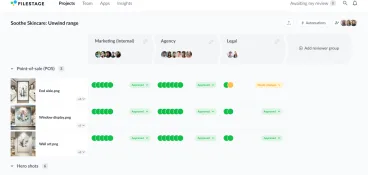
- Reviewer groups – Clear roles outlining who needs to review (design, marketing, brand, legal, leadership, etc.). I’ll come back to this part in just a sec!
- Feedback fields – Space for reviewers to leave clear, actionable comments.
- Approval status – A simple, visual way to keep track of your approval process.
- Quality checklist – A predetermined list of criteria to see that every asset meets brand, technical, and compliance standards.
When all these elements come together, you get a smooth creative process that helps your team deliver the goods every single time.
Who to involve in reviewing assets
Planning your reviewer groups is a balancing act. You want enough eyes on your asset to catch mistakes and strengthen the message. But at the same time, you need to watch that you don’t have everyone in the agency giving their two cents, as that’s when feedback becomes contradictory and impossible to manage.
As a rule of thumb, you should look to involve one key reviewer from each of the most relevant departments. That way, each reviewer group can bring their unique expertise into the mix without overwhelming creative teams.
Here are the core reviewer groups most teams rely on when approving assets:
Group one – Creative, marketing, or brand team
These are your core collaborators who help shape the message, visuals, and tone. Their focus should be on whether the work delivers on the brief, speaks to the right audience, and stays true to your brand’s look and feel.
Group two – Legal or compliance people
The best work in the world could still go up in flames if it doesn’t go through a fine-tooth legal check. This is especially true for industries where compliance is a huge deal (like finance, healthcare, or education).
In short, legal teams are there to make sure no claim or image steps out of line.
Group three – Other key stakeholders
Leadership or clients usually check that the work aligns with business goals, budget, and strategy. Ideally, they should only have minor tweaks at this stage. Their approval marks the official green light and your official sigh of relief. Ahh.

Sample feedback and approval template
Alright, now it’s time to put all of our elements into practice with a sample template.
The aim here is to give you a solid, reliable process that you can use in your day-to-day workflows. I’ll also include some examples to give you an idea of how the feedback and approval template comes to life.
Let’s take a look.
1. Asset details
Outlining the details of your project might seem like a no-brainer, but you’d be surprised how many teams work without a clear naming structure. Including detailed information gets your review process off to a smooth start, ensuring your reviewers can quickly identify the correct file and version.
Example:
- Campaign: Summer social media campaign
- Asset: Instagram story video
- Owner: Jane Doe, Designer
- Version: v3_Internal
- Feedback due: October 28
Tip: Timebox reviews and set clear deadlines to keep stakeholders on track. You can automate this in Filestage.

2. Reviewer groups and feedback rounds
Not all feedback comes from the same source. More importantly, not all team members need to review at the same time. Structuring reviewer groups and rounds will help keep your project moving along smoothly without too much contradicting feedback.
Recap of common reviewer groups:
- Creative, brand, marketing: Focus on visuals, messaging, and alignment with campaign goals.
- Legal compliance: Ensure all disclaimers, copyrights, and regulations are followed.
- Key stakeholder sign-off: Provide final approval, ensuring the work meets it’s business objectives.
Example of review rounds:
- Round one: Creative feedback
- Round two: Legal review
- Round three: Key stakeholder, final approval
Tip: Create a visual overview of reviewer groups so everyone knows who needs to review what and when. Here’s an example of how that looks in Filestage.

Cut feedback and approval time by 30%
Share content, get feedback, and manage approvals with Filestage.
3. Feedback fields
Now for the meat and potatoes of your feedback and approval template. Reviewers need somewhere to leave actionable, precise comments that the team can implement efficiently. Ideally in one place, in real time.
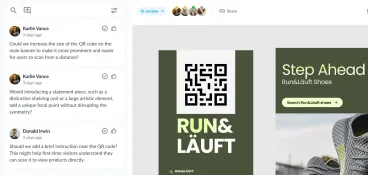
If you’re smart, you’ll have a design feedback tool that allows reviewers to leave feedback directly at specific timestamps, frames, or sections of the design. This will make life easier for everyone involved, trust me!
Tips for effective feedback fields:
- Encourage specific, actionable suggestions rather than vague statements
- Consolidate feedback before sharing it with the design teams
- Set clear deadlines for each round of feedback
Here are a few quick examples of how to give more precise, productive feedback:
- “
The logo looks weird.”= “Move the logo to the left at timestamp 0:04.” “I don’t like the copy.”= “Adjust the headline to better match the campaign message.”“Can we make it pop?”= “Change the background color to align with the brand palette.”“It feels a bit slow.”= “Trim the intro by 2 seconds to make it punchier.”
Tip: For maximum clarity (and fewer reworks), choose a design feedback tool that lets reviewers annotate creative assets directly on the file. Here’s an example of how that works in Filestage.

4. Status tracker
If you’ve been in the marketing business for a while (or like, a week), I’d be willing to bet you’ve encountered an asset that goes MIA mid-review. Nobody knows who’s got it, if it’s been approved, or whether it’s just sitting in someone’s inbox gathering dust. A project management nightmare!
A clear tracking process is designed to boost visibility across the board, so you can meet deadlines more easily, even with multiple stakeholders.
Sample review statuses:
- In review: Feedback is being collected
- Needs changes: Revisions required based on reviewer comments
- Approved: Asset is finalized and ready to launch
Tip: Make this information super visual and easily accessible to everyone involved in the creative review process. That way, stakeholders always know the project status (and who’s holding things up).

5. Checklist
Reviewing your content is about maintaining quality, in one way or another. To do that well, you need to define what quality actually looks like for your brand or client. Well hello there, creative checklists.
To make sure your output is in tip-top shape every time, ask yourself what are the non-negotiable boxes every asset needs to tick before it goes out into the world.
Here’s an example checklist to help you get started:
- Aligns with campaign brief and objectives
- Follows brand guidelines (tone, visuals, logo usage)
- Legal/compliance requirements verified
- File specs are correct (format, size, resolution)
- All reviewer comments addressed
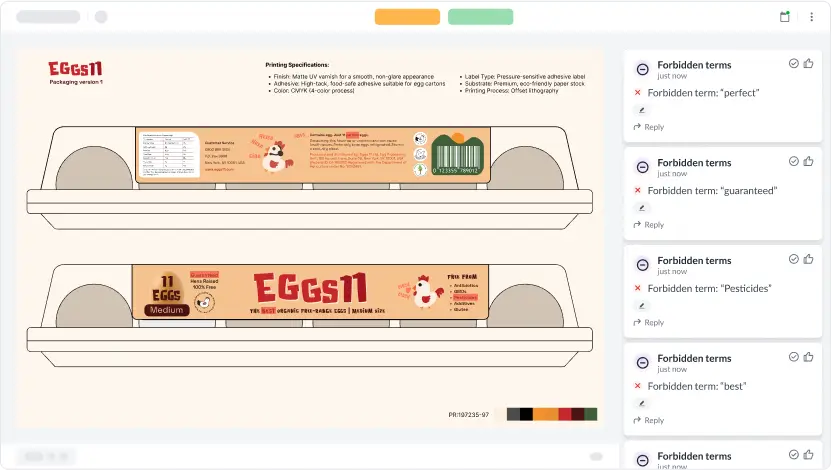
Tip: Use Filestage’s AI reviewers as an extra pair of eyes to speed up approvals and keep content accurate. You can check your creative work against your brand guidelines, file specs, or industry regulations to make sure everything is just right before sign-off.
How to approve creative assets faster with Filestage
By now, it’s clear that there are a lot of moving parts in standard approval workflows. So if you value your sanity, even a little bit, you should really consider using a review and approval tool like Filestage to help manage the whole show.
Filestage streamlines the entire creative review process, giving marketing teams one centralized hub to share assets, collect feedback, and keep track of progress. It essentially builds your feedback template right into your approval workflows, so it’s ready to go for every project.
Here are just a few ways that Filestage can help you reach approval faster:
- Project templates – Standardize your approvals with automated templates that define reviewer groups, approval stages, and deadlines with a few clicks.
- AI reviewers – Automatically check assets against brand guidelines to catch logo, color, or tone inconsistencies before human review.
- Centralized feedback – Collect clear, time-stamped comments directly on files, so all feedback lives in one place. Everyone can comment in real time, and design teams can even turn comments into a shareable checklist to manage requested changes.
- Version control – Keep every file version organized and compare changes at a glance, without having to sift through a load of confusing filenames. Bye-bye, version 3.5_final_final!
Final thoughts
Creative reviews don’t have to be chaotic. With the right framework in place, your feedback and approval process will be fast and focused. All while helping you deliver assets that you can be proud of.
I hope this article helps you bring more structure and clarity to your creative reviews. And if you’d like to see how Filestage helps teams deliver their best work on time, every time, start your free trial today.