
Creative feedback is a tricky thing. One person thinks they’re being helpful, and the other smiles politely while their brain whispers, “Bold of you to assume I’m emotionally prepared for this.” And there’s a scientific reason for that: your brain’s threat detector, the amygdala, can’t tell the difference between constructive criticism and an actual threat.
When deadlines are breathing down your neck, that’s the last kind of energy you want floating around a project. Good feedback helps the work progress and gives creators a clearer sense of what to improve.
So let’s break it down in a way that actually helps, without sending your colleagues (or their amygdalas) into a mild existential crisis.
What is creative feedback?
Creative feedback is the conversation that helps creative work move closer to the goal in the brief. It’s how a client, a colleague, a creative team, or even a direct report shares thoughts based on their context, expertise, or understanding of the audience. Whether it’s copy, a visual concept, or an early idea, the aim is to guide the creator without flattening their creativity.
Done well, this kind of feedback supports improvement and strengthens the creative process. Done badly, it becomes bad feedback that feels personal, confusing, or simply unhelpful. And that makes a big difference to the quality of the final work.
If you want more on how approval fits into the wider review journey, Filestage has a useful guide on the creative approval process.
Why creative feedback is important
Strong feedback helps people focus on the next steps instead of guessing what the reviewer meant. It also gives the feedback giver a clearer way to communicate necessary changes without drifting into opinion, vague wording, or negative feedback that stalls the conversation.
When teams provide feedback in a thoughtful way, creatives hear direction rather than criticism. That clarity encourages problem solving, supports improvement, and offers solutions that move the project forward. It also helps everyone stay on track by identifying what truly matters in the review.
Cut feedback and approval time by 30%
92% of files get signed off in just two review rounds.
Benefits for creative work and teams
Good feedback does more than tidy up a paragraph or punch up a visual. It shapes the entire collaborative environment.
- Clearer direction – creators know what point to work toward and can align with the creative brief instead of guessing
- Fewer review rounds – specific comments and identified action items guide updates more effectively
- More confident decision-making – the team shares a sense of what “good” looks like, which lightens the creative review
- Smoother collaboration – constructive criticism doesn’t drag people down. It creates a healthier conversation between creatives and reviewers
For more details on how review stages fit together, check out Filestage’s article on the creative review process.
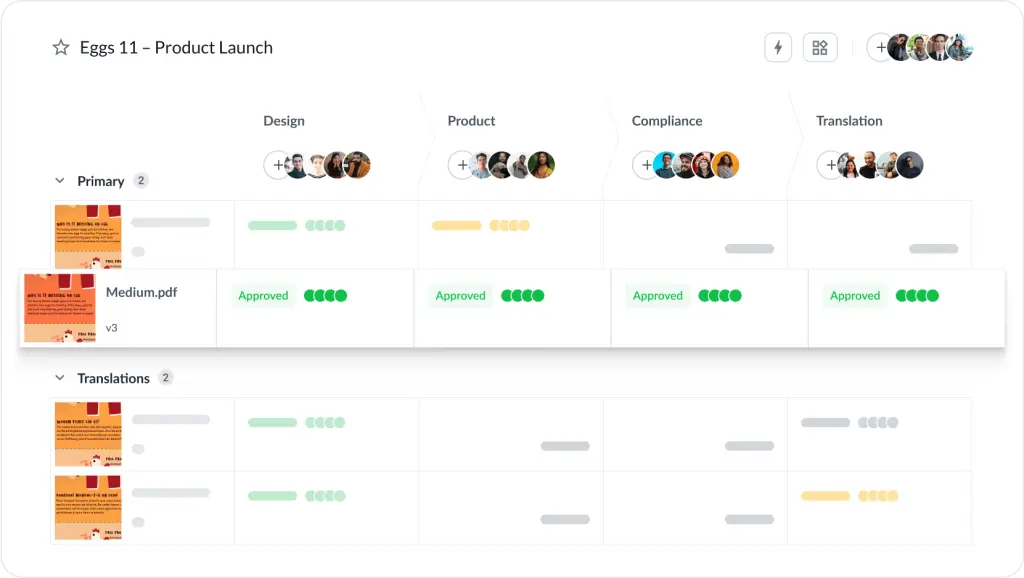
And here’s a snapshot of how a structured creative review workflow looks in Filestage.
Common pitfalls when feedback is poorly done
Things go off track fast when feedback is vague or contradictory, or if it feels personal. A few classic offenders:
- Vague comments – “Make it pop.” “Feels off.” “Could be stronger.” “Not quite right.” are more like riddles than clear directions
- Comments that get personal – if the criticism seems aimed at the person rather than the creative work, it becomes negative in a way that stalls progress
- Conflicting feedback – when design teams, clients, or stakeholders disagree, creatives end up choosing who to disappoint
- Late or scattered reviews – notes left outside the tool or outside the set review window force unnecessary rework
- Subjective preferences – “I like this font better.” If it’s not tied to the brief, it’s just personal preference disguised as direction
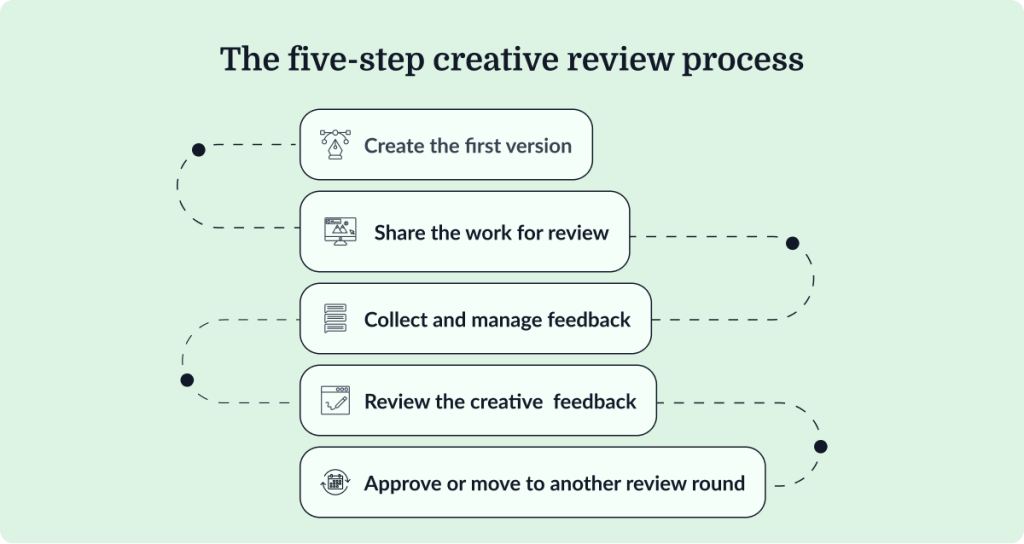
The five steps of the creative review process
Most teams follow a similar pattern, even if the terminology changes slightly. Here’s how it usually plays out:
1. Create the first version
The creator builds the work based on ideas in the brief, using their expertise to interpret the goal.
2. Share the work for review
The file gets sent to reviewers, often through a dedicated tool that keeps everything in one place.
3. Collect and manage feedback
Reviewers add notes, discuss aspects of the work, and identify what needs rethinking.
4. Revise the work
Creators work through comments, making changes and clarifying where needed.
5. Approve or move to another round
Stakeholders deliver a clear decision so the project doesn’t drift back into review limbo.
If you’re building this workflow around design or visual projects, you might find Filestage’s guide to design feedback tools helpful.
Cut feedback and approval time by 30%
92% of files get signed off in just two review rounds.
How to give effective creative feedback – three tips
Giving creative feedback that’s helpful and actionable is a skill. But it’s a learnable one. These three principles make the biggest difference.
1. Keep feedback focused on the work
Feedback should always address the creative output, not the person behind it. Personal criticism adds tension, derails conversations, makes future collaboration harder, and gets our amygdalas all out of whack.
So, instead of “You didn’t follow the brief”, something like “This section doesn’t match the objective in the brief” keeps things neutral and easier to act on.
2. Give specific examples and action items
Creators make stronger updates when they know exactly what needs attention. Instead of vague suggestions, point to specific sections or elements.
For example:
“The intro paragraph feels a little flat. Expanding the first sentence might help readers understand what’s at stake.”
Specific direction reduces confusion and cuts down on revision rounds. Using a creative feedback management tool like Filestage helps you make every comment actionable. Reviewers can annotate creative work directly on the file so that it’s clear what exactly needs to change.

3. Watch your tone and wording
Tone shapes how people receive your comments. Even accurate feedback can sting if it’s delivered sharply. Friendly language encourages collaboration instead of defensiveness.
Something like “Could we tighten this headline so it hits harder?” lands far better than a blunt “This doesn’t work.”
How to streamline creative feedback with Filestage
Filestage gives you one place to share files, gather comments and feedback, keep versions tidy, and move projects through review without the usual chaos and endless email chains.
Here’s how it lightens the load:
- Centralized comments – reviewers leave feedback directly on videos, images, PDFs, and more, with each comment anchored to a spot in the content
- Clear versioning – creators can upload fresh versions without losing earlier drafts
- Organized stages – teams set up stages for internal or external review, so work moves forward in the right order
- Straightforward approvals – reviewers hit “Approve” when the file is ready, locking in decisions
For structured workflows, you might find Filestage’s creative asset feedback and approval templates helpful, along with the guide to the best visual feedback tools.
Final thoughts
Creative feedback doesn’t need to spark a threat response in the amygdala or slow down your day. When reviewers stay focused on the work, communicate with clarity, and lead with empathy, they create an environment where the brain can process suggestions logically, not defensively. This allows creators to adapt without second-guessing every word, helping everyone work with more confidence and produce stronger results.
Filestage brings all your feedback into one organized space, so comments stay tidy, versions stay clear, and deadlines feel far more manageable. By removing the chaos of messy email chains and scattered comments, you’re actively disarming the brain’s panic button. A smoother workflow makes every review cycle faster and less emotionally charged.
Ready to get started? Jump into Filestage’s free trial and feel how much lighter creative feedback becomes when it’s all in one tidy place.
Start a free trial with Filestage →
Common questions about creative feedback
How to give creative writing feedback?
Creative writing often carries a personal touch, so feedback works best when it highlights where pacing slows, where meaning needs clarity, or where the tone drifts away from the intent. Pointing to specific sentences helps the writer improve without feeling overwhelmed.
What is an example of constructive feedback?
Constructive feedback highlights an issue, explains why it matters, and suggests a constructive way forward. For example: “The call-to-action at the end feels disconnected from the benefits you mentioned earlier. Bringing the wording closer to those points could help readers understand the value more clearly.”
What are the 5 R’s of feedback?
Most versions of the 5 R’s include:
Role – speak from the perspective you’re responsible for
Reason – explain why the change matters
Respect – keep the tone supportive
Relevance – tie comments back to the brief
Response – leave space for questions or follow-up
What are the 3 C’s of feedback?
The 3 C’s usually refer to:
Clarity – be direct and precise
Context – link your comment to a goal or requirement
Care – phrase feedback in a way that supports the creator rather than knocking them down