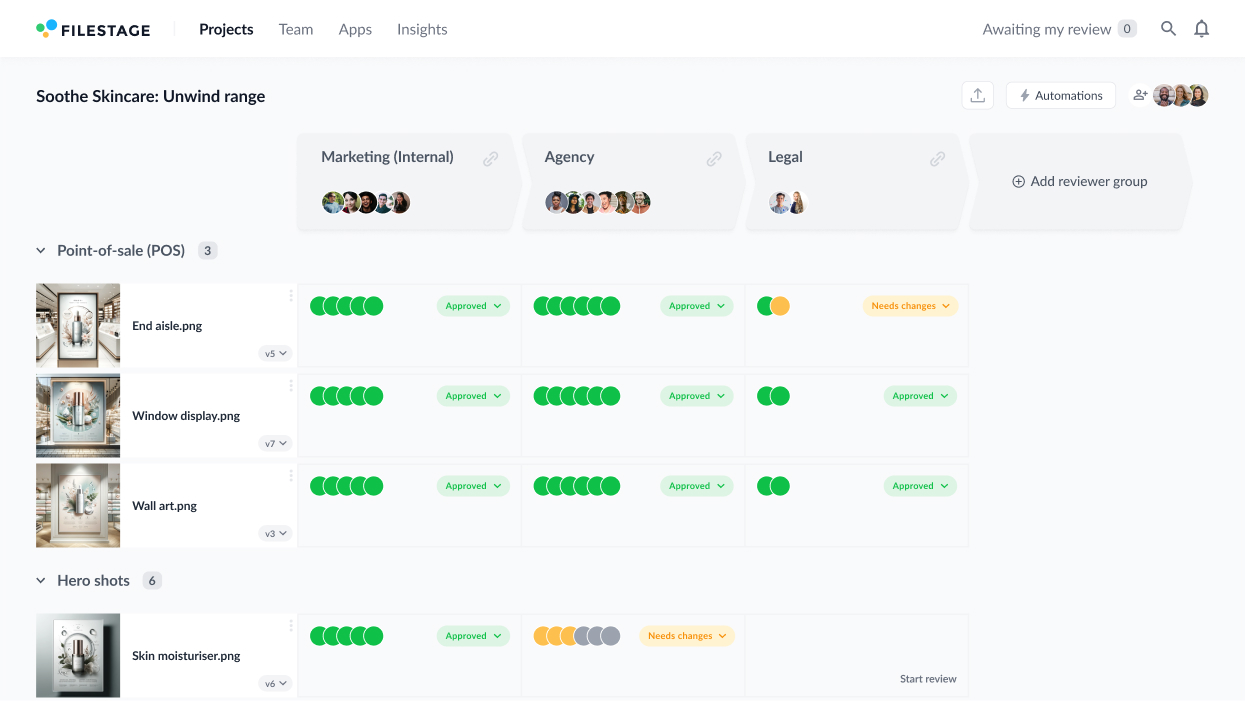

Looking to future-proof your project approval workflow? A scalable project approval process is essential for staying efficient as your team grows and your projects become more complex.
By standardizing workflows, centralizing feedback, and automating repetitive tasks, you can make sure every project deliverable is reviewed and approved smoothly.No matter how many projects you’re juggling at once!
And with tools like Filestage, you can streamline the entire process, saving time and reducing stress for everyone involved.
Here’s how to build a scalable approval process that evolves with your team and keeps project approvals running like clockwork.
1. Map out your project approval workflow
Start by outlining the steps required to review and approve projects. A clear workflow will keep things consistent across all your projects, no matter their size or complexity. And once you’ve set it out, it can be repeated for future projects.
Here’s how to map out your workflow.
Identify the deliverables that need approval
Take a look at the project scope and make a note of every deliverable that’s going to need to be approved. This might include reports, designs, images, videos, presentations or any other project files that need to be reviewed and signed off before they can go live.
By identifying these upfront, you’ll make sure no file gets overlooked during the review process.
Once that’s done …
Outline your review stages
Now’s the time to decide on a logical order for reviewing and approving your project files.
As a general rule, you can:
- Start with the project team to check the content meets initial requirements
- Move to management to check the content aligns with broader goals
- Run it past specialists for feedback in their niche
- End with clients or senior leadership to secure final approval
Clearly outlining these stages will mean feedback flows in the right sequence, reducing confusion and backtracking.
More on this in the next step!
Assign deadlines for each stage to keep things on track
Delays in receiving feedback are one of the biggest obstacles in the approval process. In fact, our State of Creative Collaboration report found that waiting on feedback is the number one issue slowing teams down.
When you’re working on a single project, it’s a pain. When you’re working on several, it can lead to a whole host of problems.
Setting a clear deadline for every stage of the project approval process helps reviewers prioritize and keeps your workflow moving in the right direction. With Filestage you can add due dates to your files so stakeholders know exactly when their feedback is needed.

They’ll be sent automatic reminders as the deadline approaches to remind them there are files pending approval.
Which means no more chasing and no more missed deadlines!
Save these workflows as project templates
Once you’ve established a process that works, save it as a reusable template. With Filestage, you can create custom workflows for different project types. Add stakeholders at each review stage and set deadlines to make sure everything stays on track.
And since the workflows can be saved as project templates and reused again and again, scaling to more projects is effortless – with minimal set-up and seamless sign-off every time.
2. Identify key stakeholders
To build a smooth and scalable project approval process, take time to identify who needs to be involved and define their roles upfront. Clear responsibilities help avoid bottlenecks and confusion, with the right people looped in every time.
Plus, by setting this structure from the start, you can reuse it across projects with minimal adjustments.
Here’s what you need to do.
List everyone who needs to review or approve files
Depending on the project’s scope, stakeholders might include:
- Team members
- Team leads
- Project managers
- Creative and design teams
- Marketing, brand, and product teams
- Legal/compliance teams
- Senior leadership or clients
Streamline this list as much as possible – fewer people generally means quicker approvals. Try to focus on including only those who absolutely need to be involved.
Group stakeholders
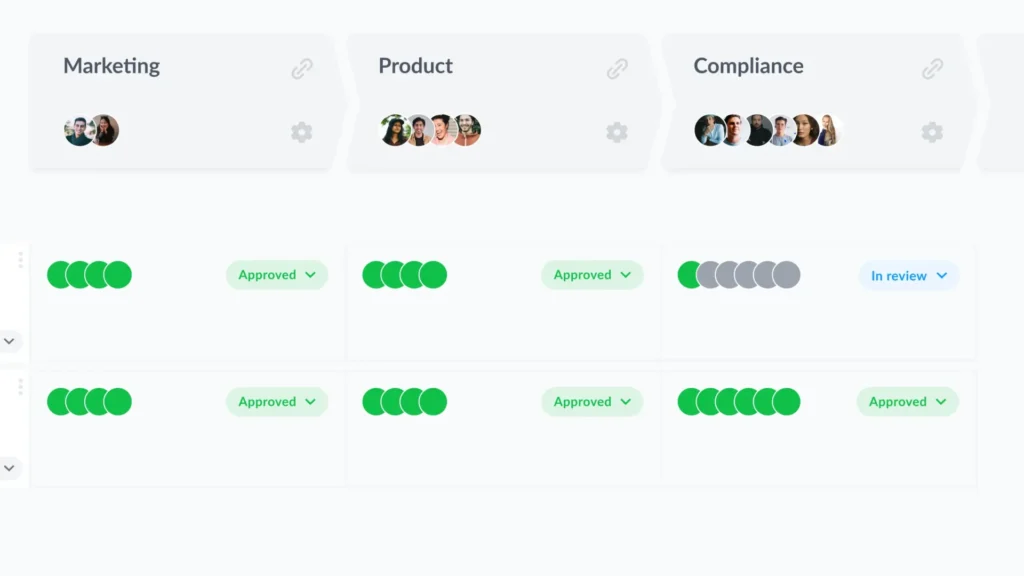
Once you’ve identified your key stakeholders, the next step is to define their roles and responsibilities. Group stakeholders into tiers based on their level of involvement. Who needs to review the content, and who is responsible for final approval?
- Reviewers – These are typically the teams closest to the project, such as design, content, or marketing. Their role is to provide detailed feedback to make sure the deliverable meets requirements.
- Approvers – These might include senior leadership, clients, or specialized teams like legal or compliance, whose sign-off is needed to finalize the project.
Filestage makes this process simple by letting you group stakeholders into reviewer groups and assign them to a specific project approval stage in the workflow. That way, everyone knows exactly when and how to contribute.
Clarify what each stakeholder is responsible for
Before kicking off the review process, it’s essential to assign clear responsibilities to each stakeholder based on their expertise. This way, everyone knows their role and focuses on the areas where they can add the most value.
For example:
- Design team – Focus on visuals and branding
- Compliance team – Review legal and regulatory aspects
- Senior leadership or clients – Assess alignment with business objectives and provide final approval of the final version
Encouraging stakeholders to stick to their areas of expertise prevents unnecessary delays and misaligned feedback. After all, you don’t want the legal team commenting on design choices or designers diving into compliance issues!
As the project progresses, be clear when it’s time to transition from feedback to sign-off. Let stakeholders know when you’re no longer looking for input but instead need formal approval to move forward.
3. Set clear review criteria
There’s nothing like ambiguity for slowing approvals. Without crystal-clear review criteria you end up with a whole load of confused stakeholders, leading to non-stop back-and-forth, misaligned feedback, and critical delays.
A standardized, pre-defined criteria makes it easy for teams to stay aligned and deliver consistent quality on every project. No matter how complex they are!
Here’s what to do.
Spell out exactly what you’re looking for from stakeholders
To make reviews efficient and productive, it’s important to clearly outline what you need from stakeholders during each review round. Providing specific prompts helps focus their feedback and helps make sure project deliverables meet your standards.
Here are some examples to guide reviewers:
- Does this align with brand guidelines?
- Is the content accurate and fact-checked?
- Are there any formatting or visual errors?
- Does it meet client requirements?
- Is this ready to go live, or does it need further revisions?
Targeted questions like these help reviewers provide actionable, relevant feedback while avoiding vague or conflicting comments. By making sure everyone is on the same page, you can keep the review process streamlined and your project moving forward nicely.
Share these criteria with stakeholders before reviews begin
To avoid confusion, provide reviewers with this criteria upfront, as it gives them a clear framework to follow. With Filestage, you can attach review criteria and project approval requirements directly to files or projects, so reviewers always have them on hand as a reference point.
4. Use a capable project approval tool to centralize feedback
Scattered feedback is the nemesis of any project. When one stakeholder emails you their comments, another shares their notes on Slack, and someone else talks you through their thoughts on a Zoom call, keeping track of it all becomes a logistical nightmare.
Now imagine the chaos you’re in for as your team scales.
The best thing you can do to make your review and approval process scalable is to choose a single platform to collect, track, and resolve feedback. A centralized approval platform prevents feedback from slipping through the cracks, even as the number of projects and reviewers grows.
Enter Filestage.
How Filestage helps
Filestage is a powerful project approval tool that centralizes your feedback and approval process, helping teams collaborate seamlessly and scale with confidence.

Here’s how it helps:
- All-in-one platform – Collect feedback and approval on documents, videos, images, and other file types in one place
- Real-time comments – Reviewers can leave in-context comments and annotations directly on files for other stakeholders to see and discuss in real time
- Version control – Automatically track file versions so that reviewers are always commenting on the latest version
- Automated workflows – Create and use project templates, and automatically notify stakeholders when it’s their turn to review
- Access for all stakeholders – Internal and external stakeholders can review files without needing to sign up or install software
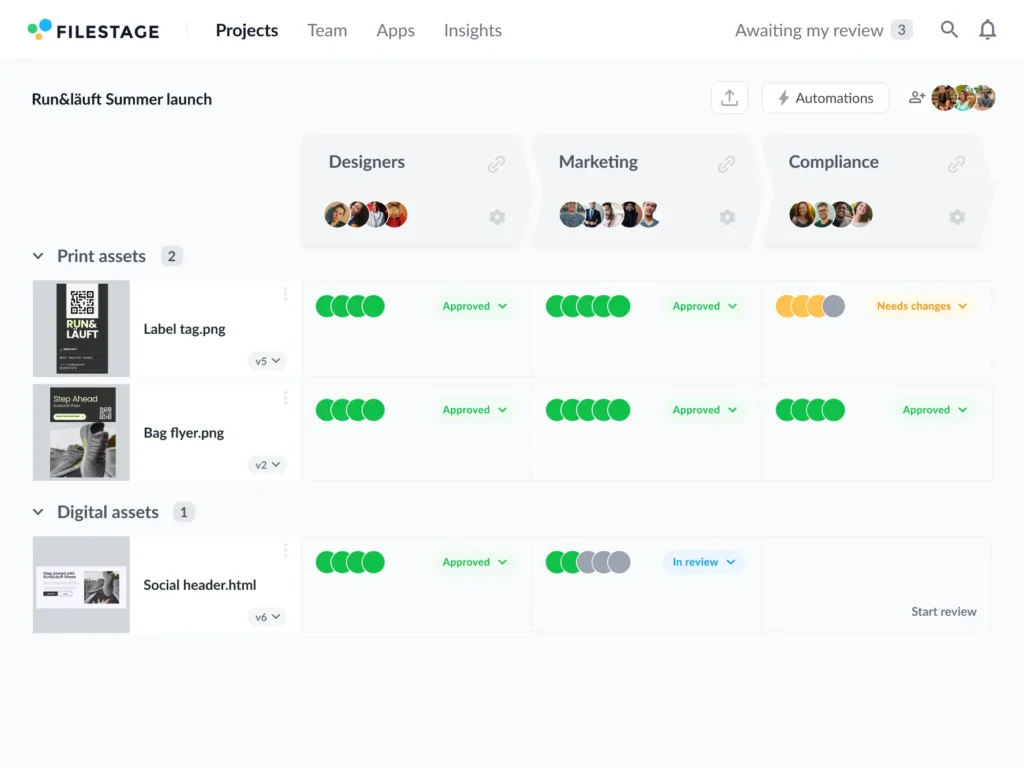
- Approval tracking – Easily see who has approved or provided feedback at each stage, and who you’re still waiting on, so you know exactly who to follow up with
- Consolidated feedback – Combine feedback from multiple reviewers into one clear checklist
With Filestage, you gain complete control over your review and approval process, reducing chaos as your team and workload scales.
Discover more project management tools to streamline your workflows.
5. Harness the power of automation
As your business grows and project requests become more complex, automation becomes your secret weapon for scaling efficiently. By taking repetitive, manual tasks off your plate, automation frees up your team’s time, reduces the chances of human error, and makes sure every project follows the same streamlined process.
Here’s how to use workflow automation software like Filestage to scale your project approval processes:
- Use templates – Filestage’s project templates make it easy to apply the same approval structure to multiple projects, with pre-set workflows, deadlines, and stakeholders.
- Automate notifications – With Filestage you can automate notifications to remind reviewers of pending tasks – no more chasing!
- Track approval statuses – With Filestage, automated real-time tracking shows approval statuses at a glance.
6. Keep an organized record of approvals for future reference
When you’re spinning a lot of plates, it’s all too easy to lose track of who’s approved what. But the last thing you want is to be questioned on a deliverable without a proof of approval from key stakeholders.
Keeping an organized record of approvals isn’t just about staying on top of things – it’s about protecting your team and ensuring accountability.
Organized records make it easy to track progress, revisit decisions, and avoid unnecessary confusion. They’re especially important as your workload increases and the number of stakeholders involved grows.
Here are some steps to take:
- Confirm approvals clearly – Use signatures, emails, or system status updates to make sure every sign-off is documented
- Archive everything – Store feedback, files, and approval histories in a centralized location for quick reference
- Share a final summary – Provide stakeholders with a consolidated record of all approvals to close the loop and keep things transparent
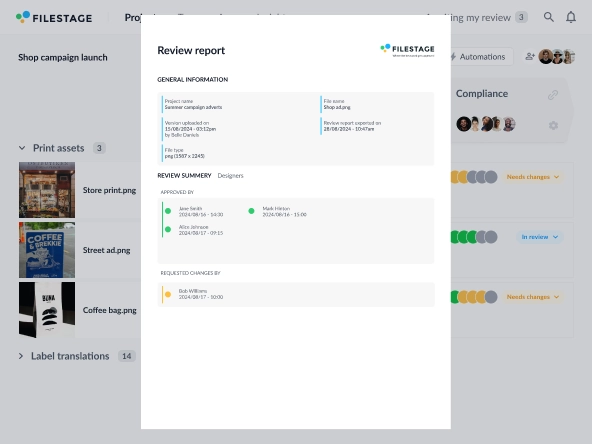
Filestage automatically archives every version of your files, along with all feedback and approvals. This creates a complete digital audit trail, showing exactly who approved what and when.
If you ever need to revisit a file, check a decision, or track changes, everything is organized and accessible in one place – saving you time and headaches when it matters the most.
7. Review and refine your project approval process
There’s always room for improvement, and as your business evolves, your team’s needs, goals, and workflows will change too. Take time to regularly review your project approval process so that it keeps working the way you need it to.
Here are some steps to take:
- Collect feedback from stakeholders on what works and what doesn’t
- Identify bottlenecks, delays, or recurring issues and adjust your processes to address them
- Update approval templates and review criteria to reflect new business goals, project types, or challenges
How Filestage helps
Filestage provides analytics on your project approval process, which you can use to pinpoint inefficiencies, identify bottlenecks, and make meaningful improvements to your workflows.
With Filestage, you can track exactly where your team is wasting time and take action to streamline the feedback and approval process across your entire organization.
By continuously refining and optimizing your approach, you’ll make sure your project approval process stays scalable and efficient as your workload grows.
Final thoughts
A scalable project approval process keeps your team productive, your projects organized, and your stakeholders happy – no matter how quickly you grow. Tools like Filestage make things much easier, giving you the power to create reusable templates, track approvals, and manage feedback in one intuitive platform.If you’d like to see for yourself how Filestage could help you build a scalable project approval process, you can start a free trial here →