TL;DR
- Social media approval software helps marketing teams review and approve content before it goes live.
- It centralizes feedback, file versions, and approvals in one place instead of scattered emails and chat messages.
- Teams can review many file types including social media posts, videos, images, and documents.
- Features like annotations, version comparison, and automated reminders help reduce approval delays.
- Clear approval workflows allow agencies and marketing teams to collect feedback from multiple stakeholders without confusion.
- Platforms like Filestage help teams move from draft to final approval faster by organizing feedback and sign-off in a structured workflow.
Why social media approval software is important
When it comes to creating social media posts, time is often of the essence. Chances are you’ve planned your social media calendar around specific dates, events, and product launches. And on top of that you’re creating reactive content that needs to go live ASAP.
Quite simply, you’ve got no time for setbacks.
But when it comes to getting approval from multiple stakeholders, there are risks of delays left, right, and center. Snail-pace responses. Crossed wires. Conflicting opinions.
Like I said – you haven’t got time for that!
That’s where social media approval software come in. The right social media approval software helps marketers manage content across multiple platforms, organize feedback on social content, and collaborate on campaigns that support a consistent social presence across different social channels.
In this guide I’ll give you the lowdown on social media approval software – what it is, what it can be used for, and how it can help you. Most importantly, I’ll talk you through how it can speed up your social media approval process.
What is social media approval software?
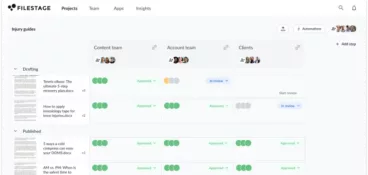
Social media approval software helps teams organize the social media approval process by centralizing feedback, revisions, and final sign-off in one structured workflow.
Instead of sharing drafts through email or chat, teams upload posts, assets, or campaign files into a shared review environment where stakeholders can leave comments, suggest changes, and approve the final version.
This creates a clear approval workflow where content moves through stages such as draft, review, revision, and final sign-off. As a result, marketing teams can coordinate feedback more easily and publish posts on schedule.
Many teams use these tools alongside native platforms like LinkedIn, Instagram, or TikTok to review posts before publishing. Rather than manually coordinating feedback across multiple social media accounts, teams manage the approval process in one organized environment.
See how Filestage can speed up your approvals
Enjoy a free, 30 minute consultation with our experts, tailored to your team and use cases.
What content can you review with social media approval software?
Social media approval tools support many types of social content, helping marketing teams collaborate on planning, content creation, and campaign organization before posts go live.
Let’s take a look at the types of social media content you can review with an approval tool like Filestage.
Or, if you haven’t got that far yet, check out our overview of the best social media content creation platforms.
Social media content calendars
Slideshows. Spreadsheets. Supporting documents. Planning is an essential part of your social content workflow, but getting feedback and approval on content calendars can be a nightmare. Reviewers struggle to explain themselves, leaving long-winded descriptions, and giving incorrect slide numbers or column letters and row numbers. Before long, you’re left trying to piece everything together.
There has to be an easier way.
With our document and live website review features, Filestage supports:
- Microsoft Office documents
- PowerPoint
- Excel
- Word
- Google documents
- Slides
- Sheets
- Docs
- Apple documents
- Keynote
- Numbers
- Pages
- PDF documents
Video assets
In the world of social media marketing, video content is king! But whether you’re creating YouTube videos, Instagram stories, or a video for LinkedIn articles, getting feedback on your video assets can be an ordeal.
Timecodes. Screenshots. More long-winded descriptions. And even more frustration when it comes to making heads or tails of it all.
Filestage supports a wide range of video formats, including:
- MOV (h.264, Apple ProRes, Avid DNxHD, DVCPro etc.)
- MP4
- 3GP
- AAC
- AVI
- FLC
- MPEG-2
- WMV
- MXF
Image assets
How much time have you wasted creating decks just to collect feedback on your image assets? And it can never just be a quick throw-together one, can it? You format the slides, add branding, and maybe include a summary slide or two so reviewers understand the context.
Fortunately, there’s a simpler way to review visual content.
Whether you’re gathering feedback on image posts, carousels, or cover photos, Filestage supports a wide range of image formats, including:
- JPG
- PNG
- TIF/TIFF
- AI
- PSD
- SVG
- GIF
- EPS
- WEBP
- NEF
- CR2
- DNG
- ARW
- HEIC
- TTF
- PSB
Existing social media channels
Sometimes you might need to reflect on work that’s already been posted. You can use Filestage’s live website feature to review content that’s currently live on your channels (or those of your competitors).
Filestage’s live website feature can help with:
- Auditing your new client’s previous posts
- Making notes on best practices from competitors
- Analyzing your recent activity to help you plan future content
- Reviewing your previous work ahead of a rebrand
Why do agencies and marketing teams use social media approval software?
The right software can make the social media approval process a lot smoother and more manageable for agencies and marketing teams.
These tools give marketers the ability to collaborate, manage content more efficiently, and save time when reviewing campaigns across multiple social channels.
Here’s how:
1. You share all your file formats in one platform
Sharing your content calendars, videos, images, and copy documents all in one place makes it easier for teams to collaborate, manage content, and keep their social media strategy organized for both you and your reviewers.
No more digging through email chains for attachments and no more requests for resharing files.
And in Filestage, every time a new version of a file gets uploaded, all the versions will be neatly stacked together, so everyone in your review process knows which is the latest. If someone opens an old version by mistake, they’ll see an alert letting them know it’s out of date.

2. You set due dates to make sure feedback arrives on time
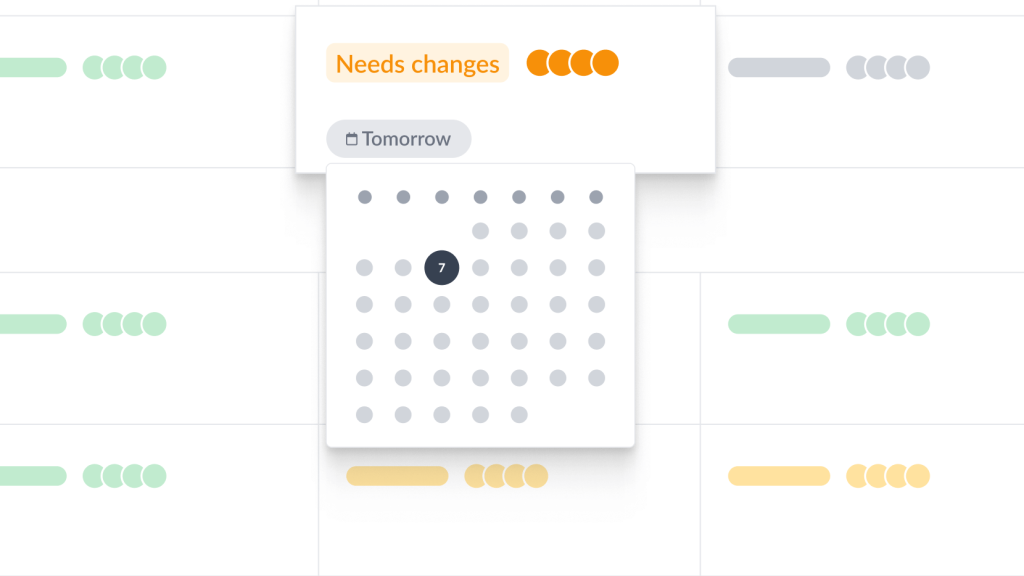
Setting due dates helps your reviewers to prioritize their workload and get feedback to you on time. Which means no more missed deadlines!
With Filestage, you can add due dates to each of your files and keep track of who’s got back to you and who hasn’t. And as the due date gets closer, your reviewers will get automated reminders – saving you the stress of chasing.
3. You see everyone’s feedback alongside your content
When you collect feedback by email or via chat, there’s a lot of work still left to do before you can action anything. For a start, you need to piece together exactly what each comment is referring to. Then you need to make sure all the feedback is aligned. And you have to repeat that struggle for every single Instagram, or LinkedIn post idea you get for your business. Talk about a waste of time!
That’s a lot of time spent on unnecessary admin.
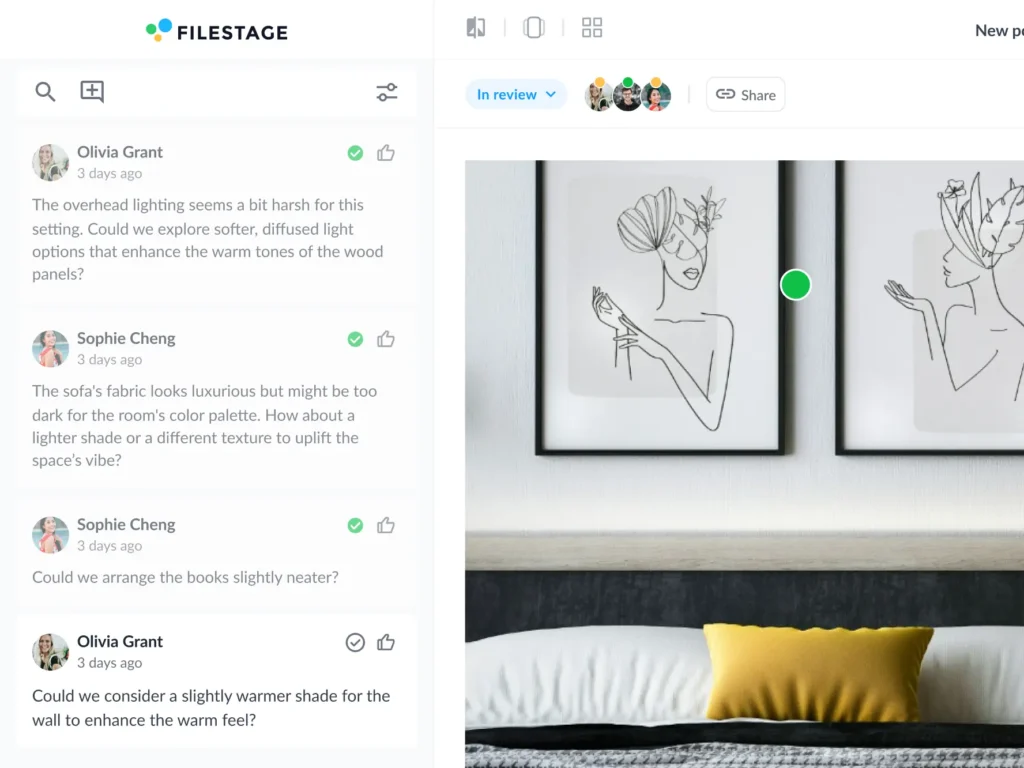
In Filestage, collecting feedback on social media content is quick and easy. Reviewers can add comments, annotations, and highlights right alongside your content, and they appear in real time. And for videos, comments are attached to a specific timecode, so it’s easy to see exactly what they’re referring to.
Everyone in the review step will be able to see each other’s feedback and discuss it in context, ironing out any disputes there and then.

4. You have a clear to-do list of what needs to be changed
With Filestage, the comment sidebar doubles as a to-do list, so you know exactly what needs to be changed before you can share the next version.
Work your way through the suggestions, ticking each one off as you go along, and by the time you’re done you can be confident that you’ve addressed everyone’s feedback.
And unlike with Google Docs or Word files where your comments disappear into oblivion once you’ve resolved them, in Filestage you have the option to show and hide resolved comments at any time, making it easy for you and your reviewers to go back and verify feedback and edits.
5. You can group feedback from different types of stakeholders
When you work in an agency or a marketing team, chances are you’re going to need to collect feedback from different types of stakeholders. That might include teammates, clients, product teams, and legal teams.
In Filestage, you can organize your approval process into review steps and gather feedback from different types of stakeholders separately. That way, you can keep feedback focused on specific, relevant topics, which helps to avoid situations where product managers or legal specialists are getting bogged down in creative feedback.
See how Filestage can speed up your approvals
Enjoy a free, 30 minute consultation with our experts, tailored to your team and use cases.
How does social media approval software help reviewers give feedback?
Social media approval software doesn’t just make your life easier. It benefits your reviewers too. Here’s how:
1. They add feedback right on top of your content
Just as it’s easier for you to understand feedback when it’s in context, it’s a lot easier for reviewers to explain themselves when they can do so right on top of your content.
With Filestage, reviewers can:
- Click anywhere to create a marker and add a comment
- Highlight text to give feedback on a specific word or sentence in a social post
- Strikeout text to show which parts should be deleted
- Draw on top of your content to make feedback clearer and more visual
- Add references and assets as attachments
2. They compare versions and comments side by side
There are times when your reviewers will want to compare two versions side by side. That might be to check that the latest update was worthwhile, or to check that their feedback has been addressed.
This is easy to do with Filestage. Reviewers can compare any two versions they want side by side, and they’ll have access to all the comments on that file too.
3. They have a personalized list of files awaiting their review
Searching back through long email chains and foraging through their downloads folder can put reviewers in a bad mood before they’ve even begun. And the last thing you want is for your content to be looked at from a place of negativity.
With Filestage, reviewers have a neatly organized, personalized list of files awaiting their review. Their part in the approval process couldn’t be easier. Happy reviewer, happy feedback. (Hopefully!)
How social media approval software speeds up sign-off
Your number one goal right now is to speed up your social media content approval process. So let’s look at exactly how an approval tool can do that.
Plus, check out the video to see how a specialized approval tool helps you overcome the three most common productivity killers.
Find files, versions, and feedback without getting lost in your inbox
With social media approval tools, everything’s stored in one place, so feedback and versions start to make sense immediately. This means no more time wasted trawling through your inbox or downloads folder. Or, even worse, asking someone to send another WeTransfer link because the original one timed out.
Less time wasted = more time saved = faster sign-off = hooray!
Get feedback on time without sending a single reminder email
Gone are the days of sending out follow-ups, chasing on Slack, or cornering someone in the office kitchen.
With Filestage, you can set due dates, and your review team will be sent automated reminders as the deadline approaches. This frees you up to focus on being productive while the feedback comes to you.
Make feedback faster and less stressful for your reviewers
The thought of having to try and explain yourself via long paragraphs of text is pretty unappealing – and that’s coming from a copywriter! So it’s no surprise that reviewers will put off getting back to you.
Filestage makes feedback faster, less stressful, and, dare I say… enjoyable! Reviewers have access to smart tools like markers, timecodes, annotations, and attachments, which dramatically cuts the amount of time they spend writing feedback.
Best social media approval tools for marketing teams
Many teams rely on dedicated tools to manage content approvals and maintain a consistent social presence across multiple platforms.
Some platforms focus on planning and scheduling posts, while others specialize in collecting feedback and approvals before social content goes live. Many of these tools also connect with native platforms, allowing teams to review posts before publishing them directly to their social media accounts.
Below are several tools that social media managers can use for approvals and collaboration.
Planable

Core use case
Planable is a social media collaboration and scheduling platform for marketing teams, agencies, and creators. It helps teams plan, review, approve, and publish social media posts from a shared workspace with visual previews of how content will appear on each platform.
Approval features
Contextual comments and annotations, customizable approval workflows, one-click approvals, shareable feedback links, approval inbox, and multiple content views including feed, calendar, grid, and list.
Limitations
Designed mainly for social media posts rather than broader marketing assets like videos, PDFs, or design files.
Pricing
Free plan and free trial available. Paid plans start at $33/workspace per month.
Buffer

Core use case
Buffer is a social media management platform that helps individuals, businesses, and agencies plan, schedule, and publish posts across multiple social networks from one workspace.
Approval features
Team collaboration tools, content approval workflows, shared publishing calendar, post previews, and role-based access for managing who can create, review, and approve posts.
Limitations
Focused primarily on scheduling and managing social media content rather than reviewing broader marketing assets like videos, PDFs, or design files.
Pricing
Free plan and free trial available. Paid plans start at $5 per month.
Hootsuite

Core use case
Hootsuite is a social media management platform used by businesses and enterprises to schedule posts, monitor conversations, manage messages, and analyze performance across multiple social networks from a single dashboard. It also includes basic analytics that help marketers track engagement and monitor how posts perform across different social channels.
Approval features
Team collaboration tools, shared content calendars, role-based permissions, message assignments, and approval workflows for reviewing posts before publishing.
Limitations
Primarily focused on social media management, analytics, and listening rather than detailed content review or approvals for broader marketing assets.
Pricing
Free trial available. Paid plans start at $199/user per month.
Gain
Core use case
Gain is a social media management platform built for agencies that manage multiple client accounts. It provides automated, fully customizable approval workflows for social media content.
Approval features
Customizable approval workflows, one-click client approvals, native post previews, automated reminders, and shared content calendars that track the status of each post.
Limitations
Primarily designed for social media workflows rather than reviewing broader marketing assets like videos, PDFs, or creative files.
Pricing
Free trial available. Paid plans start at $99 per month.
Sprout Social

Core use case
Sprout Social is a social media management platform used by businesses to plan content, schedule posts, engage with audiences, and analyze performance across multiple social networks. It also supports complex, multi-step approval workflows, which makes it suitable for larger teams and agencies that need structured review processes.
Approval features
Content scheduling tools, shared publishing calendars, team collaboration features, approval workflows for posts, and role-based permissions for managing who can review and publish content.
Limitations
Focused primarily on social media management and analytics rather than detailed review or approvals for broader marketing assets.
Pricing
Free trial available. Paid plans start at $199 per seat per month.
Filestage

Core use case
Filestage is an online proofing and approval platform designed to help teams review and approve marketing content faster. It supports many file types, allowing teams to review social media posts alongside other campaign assets like videos, images, PDFs, and web pages in the same approval workflow.
Approval features
Visual annotations, threaded comments, version comparison, automated reminders, structured approval workflows, and shareable review links for internal teams and external stakeholders. Together, these capabilities give marketing teams all the features they need to review social media content alongside other campaign assets.
Limitations
Filestage focuses on review and approval workflows rather than social media scheduling or publishing.
Pricing
Free plan and free trial available. Paid plans start at $199 per month.
Final thoughts
Social media approval software helps marketing teams organize feedback, manage file versions, and move content through a structured approval process before publishing. Instead of chasing comments across email, chat, and shared folders, teams can collect feedback and approvals in one place.
This makes it easier to coordinate input from teammates, clients, and other stakeholders while keeping projects on schedule and maintaining a consistent social presence.
If you’d like to see how a structured review workflow can speed up approvals, you can start a free trial of Filestage and experience the process for yourself.
FAQ
What is a social media approval workflow?
A social media approval workflow is the process teams use to review and approve posts before they go live. Content usually moves through stages like draft, internal review, client approval, and final scheduling. Using an approval tool keeps feedback in one place so teams can move from draft to publication without confusion.
How do agencies approve social media content?
Most agencies follow a structured review process. Creators prepare draft posts and share them with internal teams or clients for feedback. Stakeholders leave comments, suggest edits, and approve the content once revisions are complete. Using an approval platform helps keep feedback organized and avoids long email threads.
What tools help approve social media posts?
Several tools help teams review and approve social media content before it goes live. Social media management platforms like Planable, Buffer, Hootsuite, Gain, and Sprout Social include collaboration features. Dedicated approval platforms like Filestage focus specifically on collecting feedback and managing sign-off across marketing assets.
How do you manage social media approval workflows?
To manage social media approvals effectively, teams usually create a simple review process. Posts move through stages such as draft, review, revision, and final approval. Approval software centralizes feedback, tracks changes, and notifies stakeholders when their input is needed, helping teams publish content faster.