
TL;DR
An AI review assistant is software that analyzes files during your review process and leaves structured comments based on rules you define. It flags spelling errors, forbidden terms, missing logos, or incorrect QR codes in real time, improving review collection and saving hours of manual checking.
However, an AI review assistant cannot replace peer review, legal sign-off, or creative judgment. The right AI assistant for your team should support reviewers, deliver actionable insights, and help you move faster without losing control.
Why AI review assistants are a must have in 2026
I’ve watched content demand accelerate faster than most review processes can handle. In research from Adobe covering more than 1,600 marketers, 96% reported that content demand has at least doubled in the last two years. Nearly two-thirds said it has increased fivefold or more. And 71% expect it to grow more than five times again by 2027.
That scale is enormous, and it changes everything.
When teams publish at that speed, the traditional review process breaks down. Manual checks take hours. Feedback spreads across chat threads and shared documents. Review collection becomes fragmented and errors slip through the cracks.
An AI review assistant exists for this exact moment. It strengthens the review process without slowing it down. It improves accuracy, reduces repetitive checks, and helps reviewers focus on decisions that require context and judgment.
The question is not whether AI will appear in your workflow, but rather how you’ll use it. And where it should stop.
This article explains what an AI review assistant actually does, where it delivers the most benefit, where it falls short, and how to evaluate AI tools before you request reviews at scale.
What is an AI review assistant?
An AI review assistant is software that analyzes content during a structured review process and leaves comments or suggestions based on predefined rules and criteria.
It works across files such as:
- Documents and PDFs
- Images and packaging artwork
- Live website previews
- Marketing assets
Instead of relying on a generic AI assistant or open chat prompt, teams configure specific checks. The system then scans a file, analyzes the data, and generates precise insights in context. It might leave a comment that says:
- “Forbidden term found here.”
- “Missing mandatory logo.”
- “Possible grammar issue.”
- “QR code resolves to outdated URL.”
The key distinction matters.

An AI review assistant is not:
- A general-purpose AI assistant that schedules meetings or answers open-ended questions in chat.
- A basic spell-checker.
- A full AI content generator that writes blog posts or ad copy.
It sits inside the review process, not before it. Its job is to support review collection, peer review, and final approval workflows.
The principle is simple:
AI cannot replace people. It frees them to focus on real work.
Five things an AI review assistant can do really well
1. Catch spelling and grammar mistakes in real time at scale
Mechanical errors slow teams down. Reviewers spend time correcting typos instead of evaluating message quality.
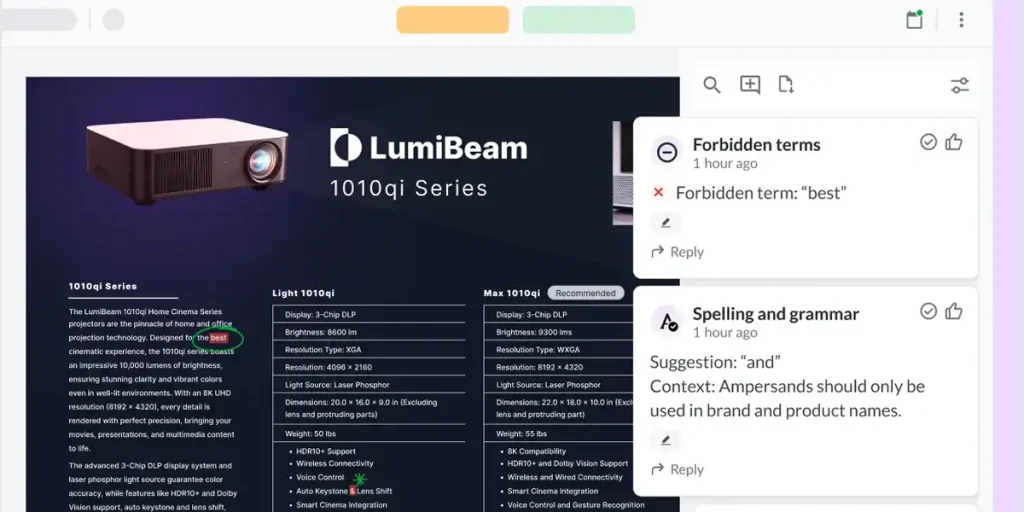
An AI review assistant scans documents and PDFs instantly, flagging grammar issues and punctuation errors. This improves accuracy before a human reviewer even opens the file.
The benefit is direct:
- Fewer embarrassing mistakes go live
- Reviewers save time
- High-quality reviews focus on substance
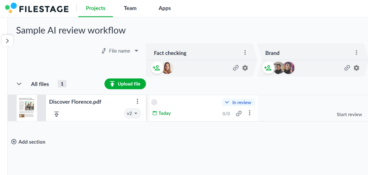
For example, Filestage’s AI reviewers automatically analyze uploaded files and leave contextual comments where issues appear. Reviewers then confirm or reject suggestions in a single click, keeping control while reducing repetitive corrections. AI handles mechanical checks while humans handle nuance.

See how AI reviewers in Filestage can speed up your approvals
Enjoy a free, 30 minutes consultation with our experts, tailored to your team and use cases.
2. Highlight forbidden terms and compliance wording
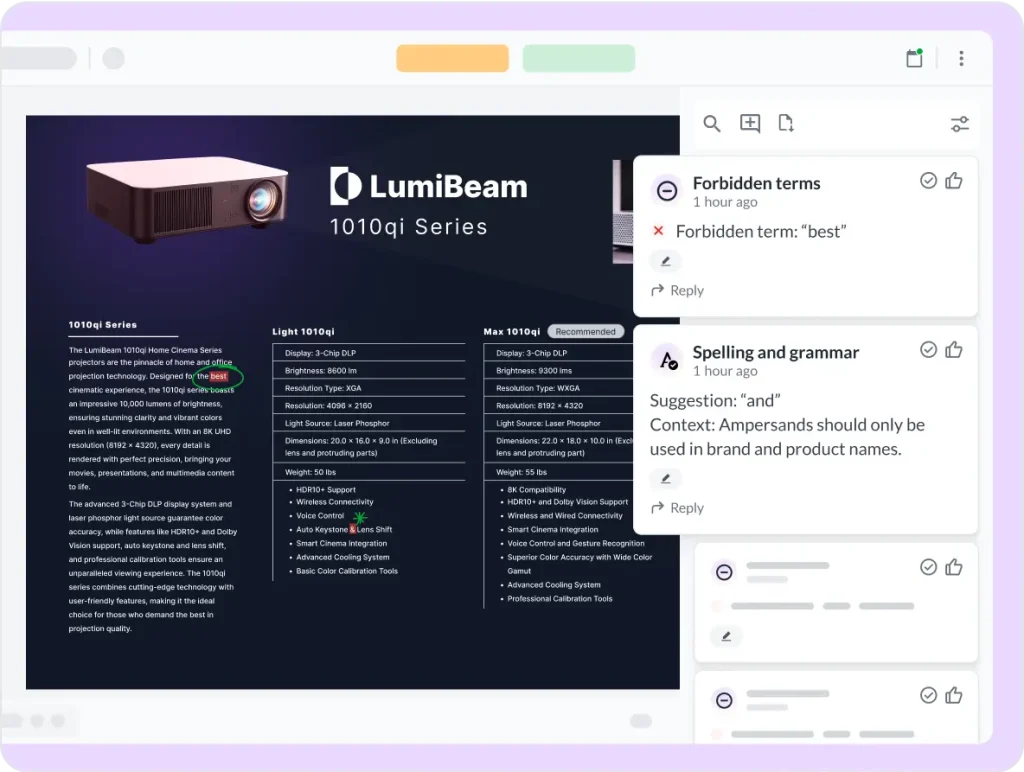
In regulated industries, wording matters. One phrase can cross the line from acceptable to non-compliant. An AI review assistant compares content against a predefined list of forbidden terms or high-risk phrases. It flags claims that violate internal policies or industry regulations. This protects the business and its customers, reducing legal risk and preventing repeated compliance comments during peer review.
Filestage’s AI reviewers allow teams to configure forbidden terms based on brand guidelines or regulatory demands. When a file is uploaded, the system runs analysis automatically and flags relevant issues in context.
The result: fewer review cycles and fewer late-stage escalations.
3. Check visuals for mandatory logos and images
A missing certification badge or outdated logo can trigger costly reprints.
An AI review assistant can scan images and PDFs to verify that required visual elements exist. It monitors placement, presence, and consistency.
Instead of relying on someone to find errors manually, the assistant flags them immediately. That increases efficiency and reduces production risk.
For example, teams use AI reviewers in Filestage to check for mandatory logos or visual elements before artwork moves to final approval. This step prevents mistakes that otherwise surface at the worst possible moment.

4. Validate QR codes and barcodes before print
QR codes look simple. They are not. A single incorrect link can redirect customers to the wrong site or a broken page.
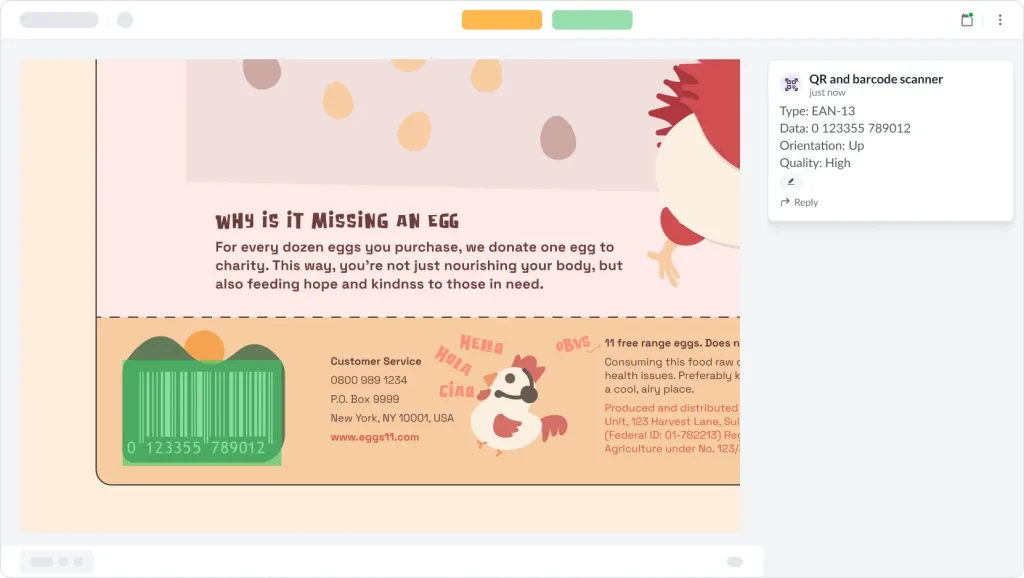
An AI review assistant can decode QR codes and barcodes embedded in packaging artwork. It analyzes the underlying data and confirms that URLs resolve correctly. This protects both customers and brand reputation, saving hours of manual testing across devices.
In a structured review process, AI runs these checks automatically when a file is uploaded. Reviewers then see comments directly attached to the asset, without having to run separate tools. That is how AI productivity tools increase control without adding friction.
5. Pre-screen content so humans can “talk less and deliver more”
This is where AI review assistants shine, by removing small, repetitive issues before peer review even begins. Instead of spending the first round correcting spelling, formatting, or missing disclaimers, reviewers focus on strategy, tone, and alignment with business goals. This improves review collection quality, accelerates the review process, and shortens the time between upload and approval.
When AI handles first-pass checks, human reviewers provide more relevant, actionable insights. They get to make decisions instead of corrections. That shift alone can save hours per project across large organizations.
See how AI reviewers in Filestage can speed up your approvals
Enjoy a free, 30 minutes consultation with our experts, tailored to your team and use cases.
Five things an AI review assistant can’t (or shouldn’t) do
1. Replace subject-matter experts or legal sign-off
AI can flag forbidden terms but it cannot interpret complex regulations or legal nuance.
It does not understand case law. It does not evaluate emerging marketing compliance standards.
It does not replace legal review in pharma, finance, or regulated journals.
Final sign-off should remain human. An AI review assistant supports legal teams. It does not assume their accountability.
2. Understand strategy, context, or brand nuance
AI analyzes patterns and data. It does not understand internal politics, campaign goals, or subtle brand positioning.
It cannot determine whether humor fits the moment or judge whether a message aligns with a broader narrative. AI might flag wording that’s technically allowed but strategically essential. It might miss tone issues that require institutional knowledge.
In short, humans own narrative. AI supports execution.
3. Judge creative quality or big ideas
An AI review assistant cannot determine whether a campaign will resonate in the real world. It does not discover cultural insight or evaluate originality. And it definitely does not assess emotional impact.
It can, however, suggest structural changes and generate summaries. It can also analyze language patterns. But it cannot judge whether a creative idea will move customers, differentiate the business, or win in a competitive market.
Creative direction stays human.
4. Make final approval decisions
An AI review assistant provides comments. It does not approve content.
It should never function as an automatic “approve/reject” engine. When teams treat AI suggestions as final decisions, accountability becomes unclear.
For audits, verified reviews, and compliance documentation, organizations still need named reviewers who explicitly approve content. A clear review and approval trail matters.
AI supports decision-making. Humans make the decision.
5. Operate safely without guardrails and transparency
AI tools vary widely in how they handle data.
Some generic AI assistants store prompts while others use uploaded content to train systems. That creates risk, especially when handling confidential files or regulated content. Any AI review assistant you evaluate should clearly explain:
- How it processes data
- Whether input and output are stored
- Who has access
- How long data is retained
- What security controls exist
Filestage, for example, states that AI-reviewed work is used only to provide feedback and is not used to train public models. Input and output data remain owned by the customer, and AI features align with regulatory expectations such as the EU AI Act.
Security and transparency must always remain foundational features, not optional ones.
How to evaluate AI review assistants
Choosing an AI review assistant requires more than comparing key features on a pricing page. You should evaluate how it fits into your review process and your organization.
Here are some key considerations I recommend keeping in mind:
1. Supported file types
Does the software support the formats you actually use?
If your team reviews PDFs, packaging artwork, website previews, and marketing documents, the assistant should analyze those file types directly. Otherwise, it creates extra steps.
In most cases, multi-format coverage increases value.
2. Customization with your own guidelines
A useful AI review assistant allows you to configure rules. For instance:
- Can you upload forbidden terms?
- Can you define mandatory images?
- Can you control wording checks?
If the system relies on a generic prompt instead of structured rules, the results will lack relevance.
3. Quality of feedback and UX
High-quality reviews depend on clarity. So, look at the output:
- Are comments contextual and clear?
- Do they appear directly on the file?
- Can reviewers accept or reject suggestions in a single click?
Vague AI comments simply waste your time and reduce trust.
4. Workflow and integration with approvals
AI should integrate into your content review process, not operate separately. Consider these questions when making your choice:
- Can you run AI automatically on upload?
- Can you assign tasks to reviewers afterward?
- Can you track approval status in the same system?
If the assistant works in isolation, teams revert to manual coordination in chat or project tools.
Platforms like Filestage integrate AI reviewers into structured approval workflows, combining analysis, comments, and approvals in one place.
5. Security, privacy, and compliance
Ask direct questions like:
- Is data encrypted?
- Is the platform secure?
- Are there audit trails?
- Does the organization document compliance controls?
For regulated industries, this evaluation step is critical.
6. Flexibility of AI models
Advanced organizations often require flexibility. So, you need to understand if your AI review assistant of choice can support your processes. Here are the key questions to ask:
- Can you configure multiple AI reviewers for different use cases?
- Is there a roadmap for additional AI features?
- Can enterprise customers integrate preferred models or private instances?
Flexibility makes sure you can scale your content operations without sacrificing efficiency or quality.
The best AI review assistant fits your content types, respects your data, and saves time for your reviewers without getting in the way.
Book a Filestage demo to see AI reviewers in action.
Example workflow: Using an AI review assistant for content approvals
Consider a marketing team preparing a multi-channel campaign: landing page, email, social posts, and packaging mockups.
They feed their AI review assistant:
- A forbidden terms list from legal
- Writing and brand guidelines
- Mandatory logos and QR codes for packaging
Step 1 – Creator uploads files and runs AI reviewers first
When the creator uploads each file, the dedicated AI reviewers automatically analyze the content. Depending on the reviewer you choose (you can add several to your project at a time), it scans your content and flags related issues. For instance, an AI grammar reviewer will check documents for spelling and grammar, flagging any errors. Meanwhile, a separate AI reviewer checks packaging PDFs to make sure barcodes are working properly.
AI leaves comments directly on the file.
Step 2 – Creator resolves obvious issues
The creator reviews the AI comments and makes corrections immediately. They update wording, fix broken links, and/or replace outdated logos.
The whole process takes minutes instead of hours.
Step 3 – Human reviewers focus on substance
Now the team requests reviews from stakeholders. Peer review begins on a cleaner version and reviewers focus on positioning, clarity, and alignment with campaign goals.
They provide actionable insights rather than mechanical corrections.
Review collection becomes more efficient because fewer trivial comments appear.
Step 4 – Compliance and final approval
Legal reviewers check flagged areas and confirm compliance, while approval states are recorded throughout the process.
Verified reviews and approval decisions remain tied to specific versions so the organization maintains control and documentation.
In this setup, AI moves fast and fixes things. Humans retain judgment and accountability.
See how AI reviewers in Filestage can speed up your approvals
Enjoy a free, 30 minutes consultation with our experts, tailored to your team and use cases.
Treat AI as a reviewer, not the creative director
An AI review assistant strengthens your review process. It handles repetitive checks and improves accuracy, helping teams save hours across projects.
From what I’ve seen, teams get the most value from AI when they treat it as infrastructure, not authority. They use it to catch mechanical issues early, reduce friction in review collection, and surface insights that would otherwise take hours to uncover.
But the distinction remains. It does not replace subject-matter experts or define strategy, and it does not make final approval decisions.
In my view, the smartest approach is simple: let AI move fast and fix things, but keep humans firmly in control of judgment and sign-off.
If you want to explore how AI reviewers fit into a modern approval workflow, start a free trial of Filestage and see how AI integrates directly into your review process.
FAQ
How is an AI review assistant different from generic AI chatbots?
An AI review assistant operates inside a structured review process. It analyzes specific files against predefined rules and leaves contextual comments. Generic AI assistants respond to prompts in chat and generate open-ended answers. They’re not designed for structured review collection or approval workflows.
Can AI review assistants work with existing review platforms?
Yes. The most effective AI review assistants integrate directly into review and approval software. Instead of operating as separate AI tools, they attach analysis and comments to files within the same system where reviewers manage tasks and approvals.
How much setup do we need before an AI assistant becomes useful?
Initial setup involves defining rules. Teams upload forbidden terms, compliance wording, and mandatory elements. Once configured, the assistant runs automatically on each file. Clear rules produce more relevant insights and higher-quality reviews.
What are early warning signs that our team is over-relying on AI during the review process?
Watch for these signals:
– Reviewers stop challenging AI suggestions
– Legal sign-off becomes automatic
– Strategic discussions disappear from peer review
– AI comments replace human judgment entirely
AI is there to support your team. It should never replace expertise, context, or accountability. When used correctly, an AI review assistant strengthens quality control without weakening ownership.