
TL;DR
Collaboration challenges creep in when feedback lives in too many places and teams rely on tools that weren’t built for creative work. The impact shows up quickly in slower approvals and frustrated teams. Clear briefs, tighter workflows, and the right collaboration setup help creative work move forward with confidence.
_________________________________________________________________________________________
Collaboration challenges show up fast in creative teams.
Let’s say a designer uploads a visual, someone comments in Slack, someone else replies by email, and a reviewer marks up a PDF that may not be the right version. By the time everyone’s weighed in, feedback is scattered across multiple channels. And the creator doesn’t know which direction to follow.
It’s no surprise that collaboration feels harder these days. Harvard Business Review reports that time spent on collaborative efforts and activities has climbed by more than 50% over the past two decades. Creative projects grow bigger and involve remote team members using many digital tools. But without the right tools or a clear organizational structure, teams end up talking more than creating.
In this guide, I unpack the common collaboration challenges, why they matter for project managers and team leaders, and practical fixes you can apply today.
What are collaboration challenges?
Collaboration challenges are the breakdowns that happen when people try to work collaboratively without context, process, or the right collaboration tools. Creative work needs a shared vision and clear direction. Remove those and watch as momentum fades.
You’re most likely to see problems surface during the review cycle. Missing context slows decisions, approvals drag, and feedback arrives in the wrong place. When communication skills vary or people don’t communicate effectively, team collaboration crumbles. And the entire team struggles to stay on the same page. All this leads to stalled projects and frustrated creative teams.
Why solving workplace collaboration challenges matters
Proper collaboration is non-negotiable in any team, but let’s focus on why it matters so much for marketing and creative teams. Unchecked, these issues drain time and push deadlines out of reach. Rework builds up, KPIs take a hit, and campaign launches stall. Employee morale also suffers, which becomes a real problem for project leaders and marketing strategy teams. After all, the project’s success hinges on efficient workplace collaboration and steady business processes.
The good news is that fixing things pays off quickly. A cleaner workflow tightens approval timelines and cuts down on unnecessary revision loops. With more seamless communication and the right project management tools, people spend less time on admin and regain space for creative thinking.
12 common collaboration challenges for creative teams plus fixes
Below are the most common challenges that derail creative teamwork, plus practical ways to turn things around.
1. Vague or incomplete briefs
A brief sets the tone for the whole project. When it’s vague or missing the details creators rely on, expectations drift, and the work loses direction.
Asana’s “Anatomy of Work” report backs this up: 87% of workers in companies with clear, connected goals feel prepared for customers, versus 37% without clarity.
Fix:
Create a reusable brief template with goals, audience, timelines, and acceptance criteria. Attach it to the asset so reviewers see the same context. Clear briefs help team leaders assign tasks and give project managers a solid basis for project management.
If you want more guidance on building stronger content workflows, take a look at Filestage’s post on content collaboration.
2. Scattered feedback across channels
Slack. Email. A random Teams message. An end-of-meeting conversation someone never documented. When comments live everywhere, they’re easy to lose. Reviewers contradict one another, and creators waste time piecing everything together. As a result, no one can communicate effectively.
Without collaborative tools or communication tools to bring comments together, remote team members end up relying on constant communication across multiple threads.
Fix:
Centralize comments on the asset. Use inline annotations. Pick collaborative tools and communication tools that bring feedback together and reduce constant communication across threads.
I’ll use Filestage as an example here.
Every feedback comment is neatly stacked on top of the file, so everyone can see who has said what and collaborate with ease. Plus, your project manager doesn’t have to spend hours consolidating stakeholder comments scattered across 10 different channels because everything is in a central project dashboard.

For more on building smoother feedback loops, check out Filestage’s guide to creative collaboration.
Supercharge your content collaboration
3. Version confusion and lost files
When a designer uploads “final_v7_LAST_FINAL” and three different people download three different versions, you know the team is in trouble. Without a controlled system, versions splinter quickly. Cue reworks, or worse, the wrong version of an asset going live.
Fix:
Use a unified platform that displays every version in order, with history, timestamps, and reviewer status. That will make collaboration easier and form a clear audit trail for every asset.
I’d also recommend letting people compare versions side by side so changes stand out instantly. You can do this quite easily with Filestage, the system will stack the latest versions next to each other and flag what’s changed.

Strong collaboration features reduce confusion and support a more collaborative environment for everyone involved.
If this is a recurring issue, our article on design collaboration can help.
4. Too many reviewers or conflicting direction
Creative work thrives when you get the right eyes on it (not every pair of eyes in the company). When reviewers overlap or contradict one another, project managers lose clarity and creators feel lost.
Fix:
Set reviewer roles before the first draft goes out. Identify who provides feedback, who makes decisions, and who simply needs visibility. A focused team effort keeps feedback aligned and helps project leaders guide conversations instead of reacting to scattered opinions.
I’d suggest visually mapping out your reviewer groups at the start of every creative project to make sure the right people collaborate at the right stage. If you’re using an online proofing tool like Filestage, you can create custom groups and control visibility so that reviewers only see the version they need to give their feedback on.
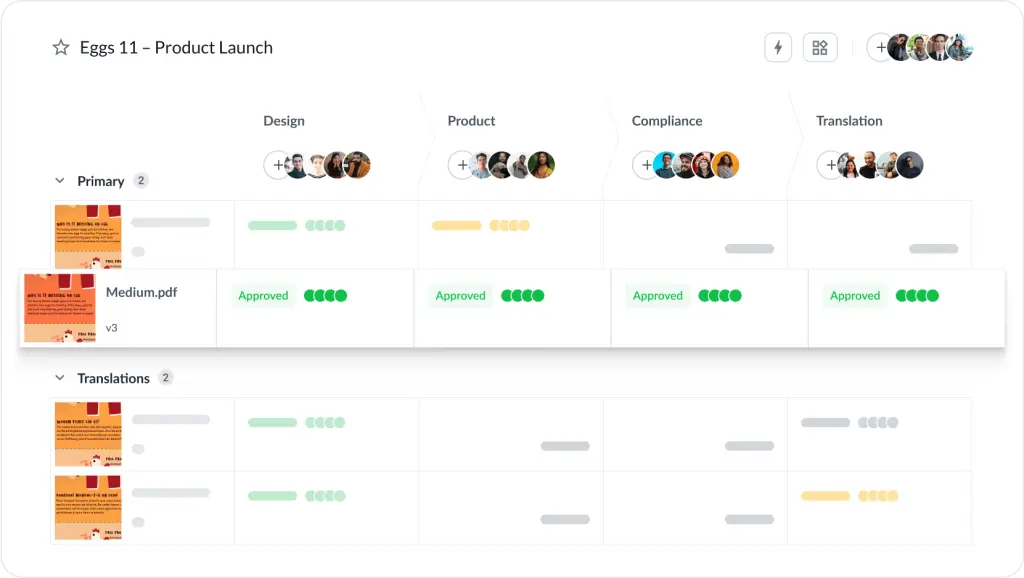
Another big plus is that they can see other reviewers’ comments, which reduces the risk of contradictory feedback.
5. Missing context for reviewers
A reviewer who jumps straight into commenting without seeing the brief, target KPI, or previous decisions might give feedback that feels disconnected from the project’s goals.
Fix:
Attach the brief, audience details, references, and acceptance criteria directly to the review. Add a short description outlining what the team should look for, such as accuracy, tone, pacing, or layout guidance.
This gives reviewers a shared understanding and helps them communicate effectively. It also encourages employees to communicate openly and share knowledge in ways that support better decisions.
6. Delayed feedback and slow approvals
Every creative team knows the pain of waiting for a sign-off that never seems to arrive. One stalled reviewer can block a whole campaign.
Fix:
Use deadlines, reminders, and clear approval stages. Automated notifications keep work moving, and transparent status indicators show who’s holding things up. For instance, with Filestage, you can set up automated due dates and reminders to keep creative projects on track.

Stronger habits like open communication and constructive feedback move reviews forward without adding extra meetings.
7. Cross-functional silos in collaboration tools
When teams don’t share information freely or when they use digital tools that don’t talk to one another, collaboration becomes a guessing game. Marketing might not see product updates. Product might not see customer insights. Designers may have no idea what the Sales team is hearing from prospects.
McKinsey estimates that knowledge workers lose about 20% of their week searching for siloed information. This is time that could be spent on creative thinking instead of detective work.
Fix:
Build shared libraries, align digital tools, and run quick status syncs that keep teams connected. When teams work collaboratively across different backgrounds, they uncover innovative solutions that would otherwise stay buried.
And for deeper strategies, Filestage has a solid guide to cross-team collaboration.
8. Remote team friction and time-zone gaps
Remote work has opened up global talent, but it also introduces time-zone delays and misaligned work rhythms. Managing a team with one employee in New York and another in Sydney means a 16-hour gap. Constant communication simply isn’t an option.
Fix:
Design an async-friendly workflow. Use recorded walk-throughs, annotated tools, and clear deadlines that respect different working hours. These habits create a smoother path for virtual collaboration across time zones and support seamless communication even when schedules don’t align.
For deeper async guidance, explore Filestage’s posts on remote collaboration tools and asynchronous collaboration.
9. Unclear or outdated processes
Some teams jump straight into the creative work without a defined workflow. Nobody knows when to hand off files, who approves what, or what “ready for review” actually means. That lack of structure slows everything down.
Fix:
Document your creative workflow from brief to delivery. Keep it lightweight and easy to follow. Clear processes act as key elements in driving innovation across creative teams and help people manage tasks with far less friction.
10. Collaboration overload
Not every task needs a meeting. And not every decision needs five voices. Too much collaboration slows momentum, especially when communication channels keep expanding without intention.
Fix:
Show your team when to collaborate and when to protect deep-work time. Block out quiet hours. Use instant messaging for small tasks, and reserve longer sessions for complex creative decisions that benefit from real-time discussion.
11. Ineffective tools or tools that don’t support creative work
General project management tools can help you assign tasks, but fall short when reviewing visuals, videos, layouts, or long-form content. Without the right collaboration features, creative teams spend more time managing files than shaping ideas.
Fix:
Choose tools designed for creative collaboration. Look for features that support markups, time-based comments, side-by-side comparisons, and approval steps. Make sure they integrate smoothly with the digital tools you already use so you don’t add extra admin work.
Teams often juggle project management, collaboration, and digital tools that don’t connect, which drags down progress instead of speeding it up.
Filestage’s in-depth comparison of content collaboration tools is a really helpful resource here.
12. Low engagement or mistrust in the team
If people don’t feel valued or heard, collaboration gets rocky fast. Creativity depends on trust across creators, managers, clients, and anyone else involved in shaping the work. When that trust slips, communication slows and people stop taking creative risks.
Gallup’s latest State of the Global Workplace report backs this up. Global employee engagement dipped to 21%, and disengagement cost the world economy $438 billion in 2024 — a huge hit that often stems from shaky processes, unclear expectations, and stalled collaboration.
Fix:
Build trust through open communication, peer-to-peer recognition, and recognition programs. Invest in professional development and encourage collaboration and constructive feedback so creative work becomes easier to sustain.
How Filestage reduces friction for creative teams
Filestage removes the obstacles that create collaboration challenges in the first place. Instead of spreading feedback across multiple online tools, you put everything in a single unified platform. Files, comments, versions, and approvals live together, so your team never needs to hunt for information.
And here’s how that can impact your marketing or creative team:
- Inline comments guide reviewers toward clearer feedback
- Version history eliminates confusion and time wasted looking for old iterations
- Automated reminders keep projects moving
- Structured approval steps help everyone understand what needs attention
Filestage also supports workplace collaboration by giving project management teams and creatives a single place to gather knowledge, share updates, and drive collaborative efforts across the whole team.
Implementation checklist: steps to improve common challenges in collaboration today
If you want quick wins that tighten your content workflow without overhauling everything at once, start with a few small changes.
Here are my recommendations to get the ball rolling:
- Create a brief template you can reuse for every creative project
- Limit reviewers by defining who gives feedback and who approves
- Add deadlines to every review round so progress doesn’t stall
- Put all comments on the asset to avoid scattered communication
- Use a single proofing platform to reduce version confusion
- Record or summarize meetings so asynchronous teammates stay aligned
Supercharge your content collaboration
Share, review, and approve all your content in one place with Filestage.
Final thoughts
Collaboration challenges rarely fix themselves. Instead, they get worse until your team reaches breaking point. The good news is that the right workflows (and tools) can help.
If you’re ready to streamline your next project, Filestage brings everything into one space where teams can share files, leave comments, compare versions, and give approval without digging through scattered communication channels.
Just upload the asset, invite your reviewers, and let the workflow settle into a pace that frees people to focus on ideas instead of admin.
Get started with a free Filestage trial today →
FAQs
What are examples of collaborative problems?
Missing context, scattered communication, unclear briefs, slow approvals, and version confusion are some of the most common issues creative teams face.
What are some challenges in collaboration?
Challenges include miscommunication, siloed information, competing opinions, and tool overload. These issues cause delays and add more work to already stretched teams.
How do you collaborate effectively with remote team members?
Use async-friendly tools, clear deadlines, and recorded walk-throughs. Centralize feedback in one place so time zones don’t slow the project down.
Do creative projects need specialized collaboration tools?
Yes. Creative assets require time-based comments, visual markups, and approval workflows that general project management tools often don’t offer.
How do you reduce review cycles?
Start with a clear brief, assign the right reviewers, centralize feedback, and create structured approval stages.