
TL;DR
Creative directors need tools across six categories: project management, brainstorming, design, review and approval, communication, and asset management. This guide covers the leading tools in each, with a practical example of how to connect them into a creative stack that works from brief to final sign-off.
Introduction
Running a creative team means managing two things at once: the vision that drives the work, and the workflows that keep creative projects on schedule. As campaigns grow more complex and teams become more distributed, both get harder.
Creative directors oversee art directors, designers, copywriters, and other creative professionals, and the creative tools they use determine how well all that work holds together. The right combination gives you visibility across projects, keeps feedback structured, and lets your team focus on the work rather than chasing status updates. The wrong combination is a recipe for friction at every stage.
In this guide, I cover the essential categories of creative director tools, the best options in each, and how to put them together into a stack that fits the way your team actually works.
Best creative director tools by category
I’ve divided my top picks by categories so you can easily build a creative stack that meets your needs.
Project management tools
Project management software helps creative teams plan, track, and deliver work without disrupting the creative process. For creative directors, that means project tracking, project timelines, and clear visibility into who’s doing what across complex projects. No constant check-ins required.
Asana
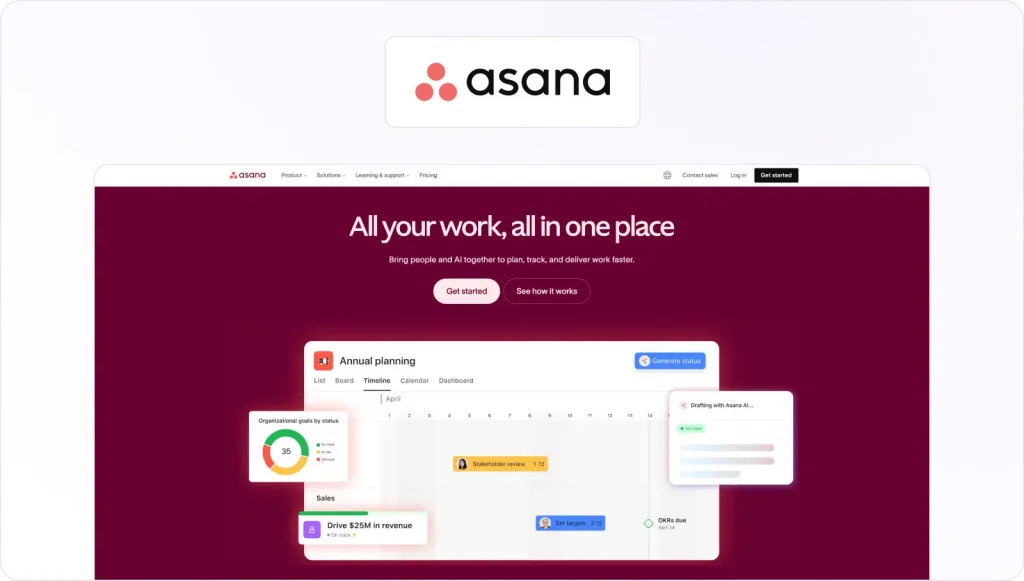
Asana lets you build out creative projects with tasks, subtasks, project timelines, and assignees. Calendar and board views adapt to different team preferences, and the tool handles dependencies well. That’s useful when one deliverable is blocking several others. It connects with Filestage, Slack, and most tools in a creative project management stack, making it a reliable anchor for teams running multiple campaigns at once.
Trello

Trello uses a Kanban board to move tasks through stages visually. It’s fast to set up and works well for smaller creative teams or agencies managing a steady flow of individual projects. The interface is straightforward enough that other team members adopt it quickly, and Power-Ups extend its functionality when the basics aren’t enough.
monday.com
Monday.com combines task tracking with automations, dashboards, and resource planning in one platform. It’s a strong choice for creative directors who need to monitor progress across multiple rounds of work, manage team capacity, and report on delivery status without switching between tools.
Brainstorming and ideation tools
Before production starts, creative directors need space to develop ideas and align the team. These tools support early-stage collaboration, from mind mapping and concept development to building out creative briefs before the work begins.
Miro

Miro is a cloud-based collaborative whiteboard used for remote brainstorming sessions, strategy mapping, and concept development. It supports mind mapping, sticky notes, voting, and diagramming, making it a practical choice for creative teams running ideation workshops across different locations. It connects with Slack, Asana, and most platforms in the creative stack.
FigJam

FigJam is Figma’s built-in whiteboard tool, built for design teams already working inside Figma. Sticky notes, templates, and voting features make it useful for quick alignment sessions before production begins. If your team lives in Figma day-to-day, FigJam removes the need to switch to a separate brainstorming tool entirely.
Notion

Notion works as a flexible workspace for briefs, research, mood boards, and reference material. It’s not a whiteboard, but it gives creative teams a single place to capture ideas, manage creative briefs, and keep everything organized before production starts. Its database features make it especially useful for agencies juggling reference material across multiple clients.
Design and content production tools
Design tools are the core of any creative stack. These are where digital assets get built, refined, and prepared for review. The quality of your team’s creative work is most visible here.
Adobe Creative Cloud

Adobe Creative Cloud is the industry standard for professional creative production. The suite covers Photoshop, Illustrator, Premiere Pro, InDesign, and After Effects, giving teams everything they need for graphic design, video editing, animation, and print production in one ecosystem. For creative directors managing complex projects across multiple formats, the depth and integration across Creative Cloud are hard to match.
Figma

Figma is the leading tool for UI/UX design and digital creative work. It runs in the browser, supports real-time collaboration, and lets multiple designers work on the same file at the same time. Its version control and commenting features mean creative directors can gather feedback early in the process, before a design is fully built out.
Canva

Canva lets non-designers produce on-brand content quickly using templates, vector graphics, and a drag-and-drop editor. Brand kits and shared asset libraries help maintain consistency at scale. It’s most useful when marketing teams need to move fast on social content or supporting materials without pulling from the main design queue.
Review and approval tools
Review and approval is where most creative workflows break down. Feedback lands across email, Slack, and shared documents, version control becomes guesswork, and the approval process turns into a series of manual follow-ups. Dedicated creative approval software replaces that with a structured, trackable review process.
Filestage

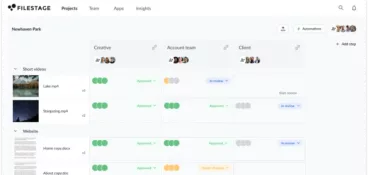
Filestage is a review and approval platform built for marketing teams and creative agencies. Reviewers leave comments directly on videos, PDFs, images, audio, and live websites, with automated workflows replacing manual chasing. Version control keeps teams on the latest file, and a clear audit trail shows exactly who approved what. Filestage connects with Adobe Creative Cloud, Figma, Asana, Slack, and Google Drive, so the approval process stays part of the entire workflow.

“Filestage is a must for marketing agencies. It allows everyone, from our team to our clients, to have all the information they need and know exactly where to find all versions. It keeps everything neat and accessible, so no one’s left scrambling for the right file.”
See all your creative feedback in one place
Bring files, versions, feedback, and approvals together with Filestage.
Markup.io

Markup.io lets teams annotate websites, PDFs, and images with visual comments. It’s a lightweight option for collecting contextual feedback without complex review workflows, and works particularly well for website feedback or straightforward design reviews. Its version control and workflow features are more limited than full review platforms, so it suits teams with simpler approval needs.
Frame.io
Frame.io, now part of Adobe, is purpose-built for video content review. Stakeholders can leave time-stamped comments directly on video files, making feedback precise and version-specific. It integrates tightly with Premiere Pro and After Effects. If video is your primary format and your team is already inside the Adobe ecosystem, Frame.io is a logical part of that stack.
Collaboration and communication tools
Creative teams spend a large part of their day communicating across time zones, with clients, and across departments. The right tools here cut email overload, reduce missed details, and keep both real-time and async collaboration running cleanly.
Slack
Slack is the standard for real-time team communication, organized into project-specific channels. For creative directors, it’s a fast way to share updates, get quick input from other team members, and keep async work moving without scheduling a call. It integrates with Filestage, Asana, and most other tools in the creative stack, so review updates and project changes surface where the team already is.
Microsoft Teams

Microsoft Teams combines messaging, video calls, and file sharing in one platform. It’s a natural fit for organizations running on Microsoft 365, with tight integration across documents, email, and calendar. For creative teams operating within an enterprise environment, it handles both real-time collaboration and file management without adding another tool to the stack.
Zoom
Zoom is a reliable option for video calls, client presentations, and creative reviews that need real-time discussion. Breakout rooms and screen sharing make it practical for workshops and stakeholder alignment. For teams that run Microsoft 365, Teams may cover the same ground, but Zoom tends to be the preference when working with external clients.
Asset management and organization tools
As creative teams grow and creative projects multiply, keeping digital assets organized becomes an operational problem. Searching for the right file, working from an outdated version, or losing track of approved assets all cost time and introduce errors. Good asset management tools prevent all of that.
Bynder

Bynder is a digital asset management (DAM) platform designed for larger organizations. It centralizes creative assets, manages permissions, and tracks which version of each asset is approved for use so teams stop working from outdated files. It’s a more structured solution than a shared drive, suited to organizations managing large and frequently updated asset libraries.
Dropbox
Dropbox handles file sharing and file management reliably, and deals well with the large files that creative work produces. Folder-based organization keeps things navigable, and it connects with most tools in the creative stack. For teams that don’t need a full DAM setup, it offers a practical middle ground between a shared drive and enterprise storage.
Google Drive

Google Drive combines cloud storage with real-time document collaboration. It integrates with Filestage, Asana, and Slack, and fits naturally into teams already running on Google Workspace. For small-to-mid-size creative teams, it covers file sharing, version access, and collaborative documents without the overhead of an enterprise asset management system.
AI tools for creative directors
By 2026, AI tools have moved beyond novelty. They handle repetitive production tasks, accelerate the ideation phase, and help teams generate content variations at scale. That frees creative directors for higher-level strategy and execution.
For a deeper look at this shift, see our guide to creative automation tools.
Midjourney and DALL-E
Midjourney and DALL-E generate images and artwork from text prompts. They’re widely used for early-stage concept development, mood boards, and visual inspiration, which makes them practical for exploring a creative direction quickly before committing to a full production brief. The output quality has improved to the point where these tools are a real part of the ideation workflow for many creative teams.
Adobe Firefly
Adobe Firefly brings generative AI into Creative Cloud, letting designers generate images, vectors, and effects inside the tools they already use. Adobe trains Firefly on licensed and public domain content, making it suitable for commercial use. For creative teams working inside Photoshop or Illustrator, it removes the friction of switching to a separate AI tool mid-project.
Runway

Runway is an AI-powered video creation and editing platform. It’s useful for generating motion content at speed, producing visual elements that would otherwise require significant production resources, or exploring a video direction before committing to a full shoot. As video content takes up a larger share of the creative workload, Runway gives teams a way to move faster in that format.
See all your creative feedback in one place
Bring files, versions, feedback, and approvals together with Filestage.
How to choose and build your creative tool stack
When it comes to selecting the best creative direction software for your team, you should consider the following.
What makes a great creative director tool?
Not every tool belongs in every stack so, when evaluating options, focus on:
- Adoption – A tool your team resists using adds friction, not efficiency. Ease of use matters more than feature count
- Collaboration – Can multiple people work together without creating version conflicts or missed details?
- Integration – Tools that connect reduce manual handoffs across the entire workflow
- Scalability – Does the tool hold up as creative projects grow in complexity or team size increases?
- Workflow fit – Some teams run on async; others need real-time collaboration. Match the tool to how your team actually works, not how you’d like it to work
How to build an effective creative tool stack
A strong stack covers the full creative process, from brief to delivery. Here’s a practical approach:
- Start with the workflow (not the tools) – Map the stages your creative team moves through: briefing, ideation, design, review, approval, delivery
- Find where things break down most often – That’s where new tools will have the most impact
- Limit to one tool per job – Overlap wastes budget and creates confusion about where work lives
- Prioritize integrations – A project management tool connected to your approval process removes a whole layer of manual coordination
- Start simple – Get the core stack working well before adding tools for edge cases
Example of a well-structured tool stack
Here’s a lean, connected stack that covers the full creative workflow:
| Stage | Tool | Purpose |
|---|---|---|
| Project management | Asana | Task tracking, project timelines, and resource planning |
| Ideation | Miro | Visual workshops and concept alignment |
| Design | Figma or Adobe Creative Cloud | Asset creation and real-time collaboration |
| Review and approval | Filestage | Centralized feedback and sign-off across all file types |
| Communication | Slack | Day-to-day team and client updates |
| Asset storage | Google Drive or Dropbox | File sharing and version access |
These tools connect. Asana and Slack both integrate with Filestage, so review updates feed back into project tracking and team communication automatically. No manual chasing required.
Common mistakes to avoid
- Tool overlap – If you’re using Notion, Google Docs, and Dropbox Paper for the same job, pick one and close the others
- Choosing by features instead of fit – A powerful tool your team resists is worse than a simpler one they actually use
- No clear ownership – Every tool needs someone responsible for keeping it organized and maintained
- Expecting tools to fix broken processes – Tools support good processes, they don’t create them
Final thoughts
Most creative directors need tools in four areas: project management, design, review and approval, and communication. That’s the core. Everything else is optional until you’ve genuinely outgrown what you have.
Start with the stage of your creative process that causes the most friction. Missed deadlines, scattered feedback, version confusion, unclear ownership: pick the biggest problem and solve that first. Then build outward. A smaller, well-integrated stack will outperform a sprawling one every time.
Filestage handles the review and approval stage of your creative stack.
Start your free trial of Filestage today →
FAQ
What tools do creative directors use daily?
Most creative directors rely on a combination of project management, design, communication, and review tools every day. In practice that usually means Asana or Monday.com for project tracking, Figma or Adobe Creative Cloud for design work, Slack for team communication, and a dedicated review platform like Filestage for managing the approval process.
What is the most important tool for a creative director?
There’s no single answer. It depends on where your workflow breaks down most. For many creative directors, the most important tool is a review and approval platform, because that’s where the most time gets lost to scattered feedback, version confusion, and manual chasing. For others, it’s project management. Start by identifying your biggest bottleneck, not by replicating what another team uses.
Are free tools enough for creative teams?
For small teams and freelancers, free tiers of Trello, Notion, Google Drive, and Figma can cover the basics. As teams grow and creative projects multiply, the limitations become real around storage, user caps, automated workflows, and integrations. At that point, the cost of workarounds usually outweighs the cost of a paid plan.
How do creative directors manage feedback efficiently?
The most effective approach is to centralize all feedback in one platform rather than letting it spread across email, Slack, and shared documents. A tool like Filestage lets reviewers leave comments directly on the file, keeps feedback version-specific, and shows clearly what’s been approved and what’s still waiting. That one change removes most of the chasing that slows creative teams down.