

TL;DR
If your team is juggling multiple stakeholders and tight deadlines, the right creative approval software can have a direct impact on how fast campaigns move.
The strongest platforms go beyond collecting comments. They help teams keep track of versions, manage approvals, and give precise feedback across everything from documents and designs to video and live content.
This guide compares the leading creative approval software options for 2026, focusing on how they handle feedback quality, integrations, security, compliance, and pricing.
Why creative approvals software is important
Creative teams are under constant pressure to deliver great work fast, but the review stage still slows projects down more than it should. Approvals shouldn’t derail a project. But according to a Filestage survey, 84% of account managers say chasing people for approval slows their work down – long before the real creative pressure even begins. That’s why so many teams are turning to creative approval software.
The right creative review software brings feedback and versions into one organized space, giving your marketing and creative teams a clearer way to move work forward. Instead of losing hours to email threads or scattered comments, everyone can review assets where they live, without the usual hunt for missing input.
And with more channels and stakeholders involved in every campaign, having a tool that simplifies the review and approval process becomes less of a nice-to-have and more of a practical necessity.
In this guide, I’ll explore the best creative approval software for 2026 and break down how each option supports fast, confident reviews across a wide range of creative workflows.
How we evaluated these tools
To compare design approval software and identify the best creative review platforms, we focused on the features that actually affect review speed, clarity, and decision-making once real stakeholders get involved. These criteria reflect how teams review work day to day, not just what looks good on a feature list.
Here’s what we considered:
Supported file types
Creative teams rarely work in one format. We looked at how well each platform handles common review assets, including documents, PDFs, images, social previews, emails, video, audio, live websites, and prototypes.
Tools that support multiple formats in one interface remove friction and keep feedback in context. This is especially important for teams managing complex visual workflows, such as artwork proofing and packaging reviews.
Feedback precision and UX
Clear feedback only works when it’s easy to give and easy to act on. We evaluated annotation depth, timecode, and frame-level comments for video, threaded discussions, and @mentions.
Just as important was usability. Busy stakeholders should be able to open a file, leave feedback, and approve without training or technical hurdles.
Platforms that support structured design approval workflows tend to perform better here, especially when multiple reviewers are involved.
Workflow
Review tools need structure, not just comments. We assessed how each platform supports customizable review steps, serial or parallel routing, automated reminders, and clear status tracking.
Strong platforms act as software for tracking creative project reviews and approvals, helping teams move work forward without manually chasing sign-off at every stage.
Integrations and ecosystem
Creative review rarely lives in isolation. We looked at how well each tool fits into existing ecosystems, including Adobe and Figma, project management tools, chat platforms, DAMs, and cloud storage.
The strongest platforms enhance existing creative project management setups rather than trying to replace them entirely.
Security and compliance
For many teams, especially in regulated industries, security is non-negotiable. We reviewed encryption standards, access controls, SSO support, audit trails, and compliance features such as verified approvals. These capabilities matter most for enterprise buyers, legal reviews, and brand-sensitive campaigns that require traceability.
Time-to-value
A powerful platform still needs to be usable quickly. We considered ease of rollout, onboarding effort, and how simple it is for external reviewers to participate. Tools that work straight from a browser and avoid mandatory accounts tend to deliver faster time-to-value.
Pricing and scalability
Finally, we looked at pricing models and how well they scale. Free plans versus free trials, per-seat pricing versus flat tiers, and clarity around limits all affect the total cost of ownership.
Transparent pricing makes it easier for teams to compare creative content approval software and shortlist tools with confidence.
Hopefully, this shortlist will make your decision-making process easier and help you pick your top two or three solutions to take for a test drive.
As you compare the tools below, it’s worth cross-checking verified customer feedback. You can browse reviews on G2 for the full creative management category to see how each one performs for teams like yours.
Filestage is our product. We’ve included it because it genuinely fits the use cases described, and we’ve positioned it accordingly.
Quick comparison of the best creative approval software
| Tool | Best for | Free plan | Key differentiator | Starting price |
|---|---|---|---|---|
| Filestage | Marketing teams producing high volumes of content | Yes (10 users) | Structured multi-format approval workflows | $199/mo |
| Ziflow | highly customizable, automated proofing workflows | Yes (2 users) | Granular, template-driven workflow configuration | $199/mo |
| PageProof | Strict data-residency requirements | No | Full security stack (SSO, MFA, encryption) on every plan | $249/mo |
| GoVisually | Freelancers & small agencies | No | Lowest-cost dedicated proofing tool here | $20/user/mo |
| Frame.io | Video-first creative & post-production | Yes (2 users) | Camera to Cloud – footage syncs from set in real time | $15/user/mo |
| StreamWork | Large enterprises, asset governance | Yes (2 users) | AI-enabled approval workflows with built-in video transcription | $169/mo (15 users) |
| Wrike | Proofing bundled into project management | Yes (limited) | Broadest non-creative ecosystem (Salesforce, Power BI) | $10/user/mo |
| Adobe Workfront | Enterprises standardized on Adobe | No | Native GenStudio + AEM Assets integration | Custom quote |
| Hightail | Sharing and reviewing large creative files | Yes | Large-file delivery (up to 500GB) plus creative review in one place | $12/mo (review from $24/user/mo) |
| ReviewStudio | Small teams wanting affordable, easy-to-use proofing | Yes | Enterprise-grade security at the lowest price here | $12/user/mo |
| GoProof | Adobe Creative Cloud-native design teams | No | Launches proofs directly from Adobe CC | $129/mo (2 users) |
| Approval Studio | Packaging & branding-focused agencies | No | AI version comparison + barcode verification for packaging | $60/mo (5 users) |
| Markup Hero | Quick, informal screenshot markup | Yes | Lowest cost overall | $3/user/mo |
| Wipster | Lightweight, video-only review | No | Streaming video review, no downloads needed | $19.95/user/mo |
1. Filestage – best for marketing teams producing high volumes of content
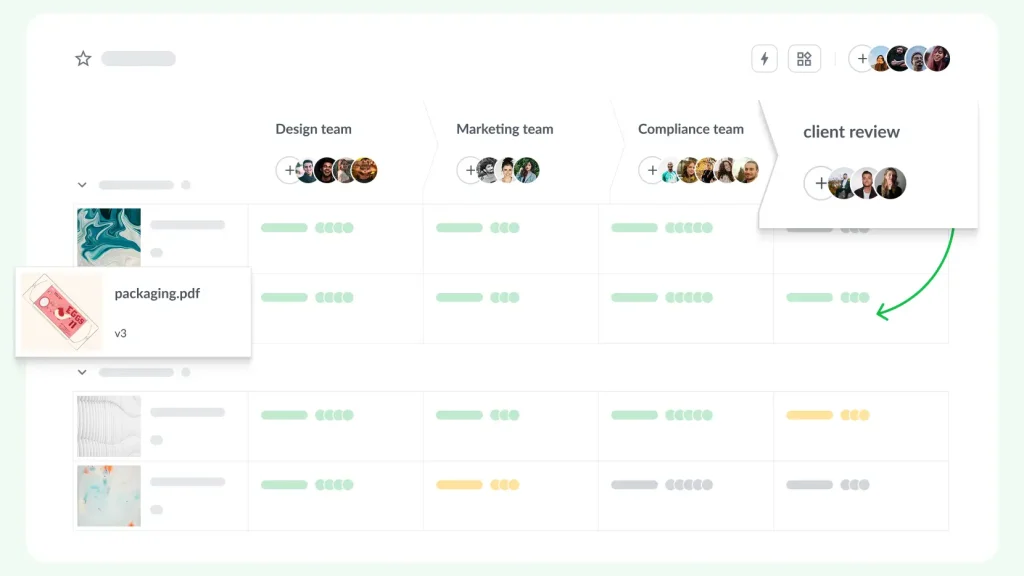
Filestage is dedicated creative review and approval software that centralizes feedback for marketing campaigns, social content, videos, design files, and documents. Stakeholders can leave comments directly on the file and sign off in one place without relying on email or shared drives.
Why we chose it
For teams producing a steady stream of campaigns, Filestage keeps every review in one place, whatever the format.
It handles the messy reality of creative approval, with many stakeholders, several rounds, and a mix of video, design, documents, and live content, without the process slipping back into email threads.
On top of the core review workflow, Review Agents run a first automated check against your brand and content rules, so obvious issues get caught before a human spends time on them.
Pros:
- Comment and annotate directly on video, design, documents, audio, and live websites
- Reviewer don’t need an account
- Side-by-side version comparison helps track changes
- Reviewer groups and multi-step approvals with automated reminders
- Integrates with Slack, Microsoft Teams, Asana, monday.com, Adobe Creative Cloud and cloud storage platforms
- GDPR-compliant and ISO/IEC 27001:2022 certified
Cons:
- Browser-based only – no dedicated desktop app
- Deepest compliance verification (FDA 21 CFR Part 11, EU Annex 11 verified approvals) is Enterprise-tier only
Pricing: Free plan and free trial available. Paid plans start at $199/month for unlimited projects, files, and reviewers.
See how Filestage can speed up your approvals
Enjoy a free, 30 minute consultation with our experts, tailored to your team and use cases.
2. Ziflow – best for highly customizable, automated proofing workflows
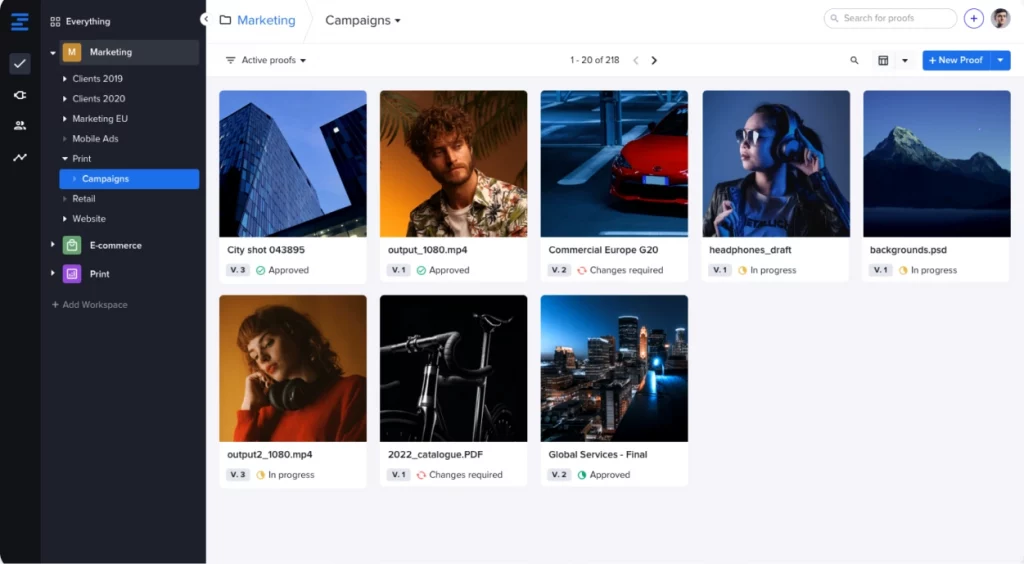
Ziflow is an online proofing platform known for how much control it gives teams over their review workflows. It focuses on streamlining review and approval workflows for design files, videos, and documents across distributed teams, positioning it as a strong creative review software option for larger teams.
Why we chose it
Ziflow stands out for how much you can tailor the review process.
Teams can build detailed, multi-stage workflows with reusable templates and set rules for how each round runs, which suits processes that are complex or need to be standardized across campaigns.
Pros:
- Markup and annotation tools across video, images, PDFs, live websites, and HTML5 ads
- Highly configurable multi-stage workflows with reusable templates
- Integrations with Asana, monday.com, Slack, and Microsoft Teams
- Full audit trail on every comment, approval, and version upload
- SOC 2 Type II and ISO 27001:2022 certified, GDPR compliant, with encryption at rest and in transit and SSO support
Cons:
- Steeper learning curve than simpler tools on this list, per user reviews
- Entry paid plan is one of the pricier options
- Free plan capped at 2 users
Pricing: Free trial and free plan (up to 2 users). Paid plans start at $199/month for up to 15 users.
Check out our complete Filestage vs Ziflow comparison guide for a deeper dive.
3. PageProof – best for teams with strict data-residency requirements
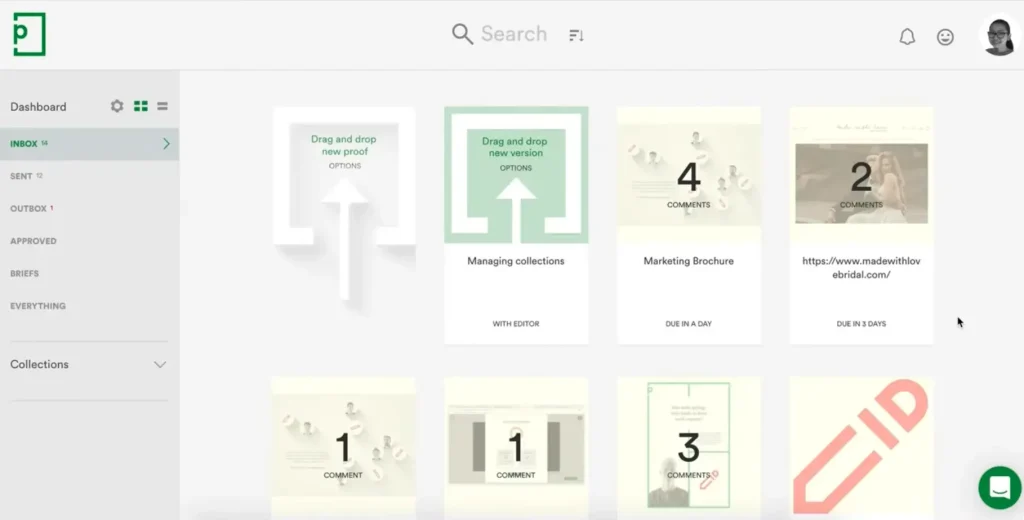
PageProof is a secure online proofing platform for creative and marketing teams. It handles video, images, PDFs, and web content, and pairs standard review features with an unusually complete security and data-residency stack.
Why we chose it
PageProof puts its full security stack – SSO, SCIM provisioning, MFA, multi-layer encryption, and a choice of data-residency location – on every plan, and lets you choose which region your data is stored in (useful if a client or regulation requires EU-only storage, for example).
This means that a team on a lower-cost plan gets the same encryption standard as an enterprise customer, instead of having compliance features held back as an upsell.
Pros:
- Markup, comparison, and commenting tools for video, images, PDFs, and web content
- Automated, multi-stage approval routing
- AES-256 encryption and a choice of global data-residency location (EU, US, and more) on every plan
- SCIM provisioning, SSO, and MFA
- Deep Adobe Creative Cloud integration, including Premiere Pro and After Effects
Cons:
- User reviews report the login experience for external reviewers can be confusing, which adds friction if you work with a lot of partners or freelancers
- Starting price ($249/month) is on par with Ziflow, higher than Filestage’s unlimited-reviewer plan
Pricing: Free trial available, no free plan. Paid plans start at $249/month.
For more, check out our full Filestage vs PageProof comparison guide.
4. GoVisually – best for freelancers and small agencies on a budget

GoVisually is a lightweight creative approval software that lets freelancers and small teams collect quick visual feedback on designs, PDFs, and video.
Why we chose it
GoVisually keeps things simple for teams that don’t need a heavy multi-stage workflow – just a place to drop files and get quick visual feedback at a lower cost.
One of its most interesting features is a real-time AI check that flags issues and suggests edits during the review process.
Pros:
- Point-and-click annotation (drawing, box, arrow) across designs, PDFs, and video
- Real-time collaboration with version history
- SOC 2 Type II-compliant infrastructure
- Integrates with Adobe Creative Cloud, Slack, and Asana, plus 3,000+ apps via Zapier
Cons:
- No free plan
- Version handling is basic – less structured for multi-stage approval workflows
Pricing: Free trial, no free plan. Paid plans start at $20/user/month for up to five users.
5. Frame.io – best for video-first creative and post-production teams

Frame.io is a video-first review platform built around the production pipeline, widely used by filmmakers and post-production teams in the Adobe ecosystem.
Why we chose it
Frame.io is one of the only tools here that goes beyond the video review stage.
We like Camera to Cloud – it gets footage off the camera and into the cloud while a crew is still shooting, so an editor can start cutting before the day wraps. That’s a different kind of speed than frame-accurate commenting, which several other tools on this list now also claim.
Pros:
- Frame-accurate comments and drawing tools tied to the exact timecode
- Native integration inside Premiere Pro and After Effects
- SOC 2 Type II, ISO/IEC 27001, and TPN Gold Shield certified
Cons:
- Video-first design means non-video formats are a secondary use case
- Free plan capped at 2 users
Pricing: Free trial and free plan (up to 2 users). Paid plans start at $15/user/month.
For a deeper dive, read our full Filestage vs Frame.io comparison guide.
6. StreamWork – best for large enterprises needing asset governance at scale
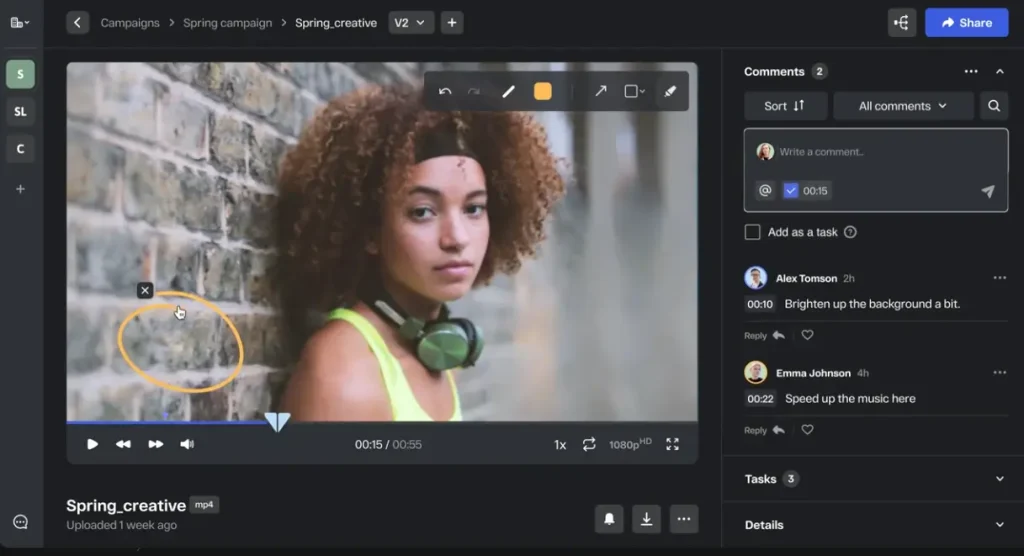
StreamWork is a creative review software for large organizations coordinating brand and marketing content across distributed teams, often within a complex organizational structure.
Why we chose it
StreamWork is a modern, AI-enabled proofing platform aimed at enterprise creative teams.
It handles multi-stage approvals across every common format and leans on automation, with intelligent deadline reminders, bulk approvals, and reusable workflow templates, to cut the manual chasing that slows large teams down.
It’s also the only tool here with AI video transcription, speaker tracking, and caption export built directly into the approval workflow, which is genuinely useful for teams reviewing a lot of video.
Pros:
- Reviews video, layered PSDs, images, PDFs, presentations, documents, and audio, with markup and frame-accurate or time-stamped comments
- Native integrations with Asana, monday.com, and Slack, plus DAM/cloud-storage connectors and API access on higher tiers
- Automatic version control with a full audit trail
- SOC 2 Type II certified
Cons:
- Built for enterprise scale, likely more than small teams need
- Newer and less established than competitors like Filestage or Ziflow
Pricing: Free plan available (2 users, 1 project, 2 GB storage). Paid plans start at $169/month for 15 users (Starter) and $299/month for 20 users (Team). Enterprise pricing on request.
7. Wrike – best for proofing bundled into project management

Wrike is a full project management platform with built-in review and approval features.
Why we chose it
Wrike bundles creative proofing directly into a full project-management platform – useful if your team wants task tracking, timelines, and file approval in one workspace instead of stitching a separate review tool into the mix.
It also connects to a wider set of business tools than any dedicated review platform on this list, including Salesforce, Tableau, Power BI, and the digital asset manager MediaValet, plus a public REST API and Wrike Integrate for custom workflows.
Pros:
- Task management, timelines, and creative proofing in one workspace
- Public REST API and Wrike Integrate for custom workflows
- Proofing supports images, video, PDFs, and documents
- Lowest entry price among the enterprise-oriented tools here, at $10/user/month
Cons:
- Proofing and markup tools are basic compared to dedicated review platforms – comments and approvals live inside tasks rather than a purpose-built review interface
- Advanced workflows, automation, and stronger security controls are reserved for higher tiers
Pricing: Free trial and free plan (limited). Paid plans start at $10/user/month for up to 15 users.
8. Adobe Workfront – best for enterprises standardizing on the Adobe ecosystem
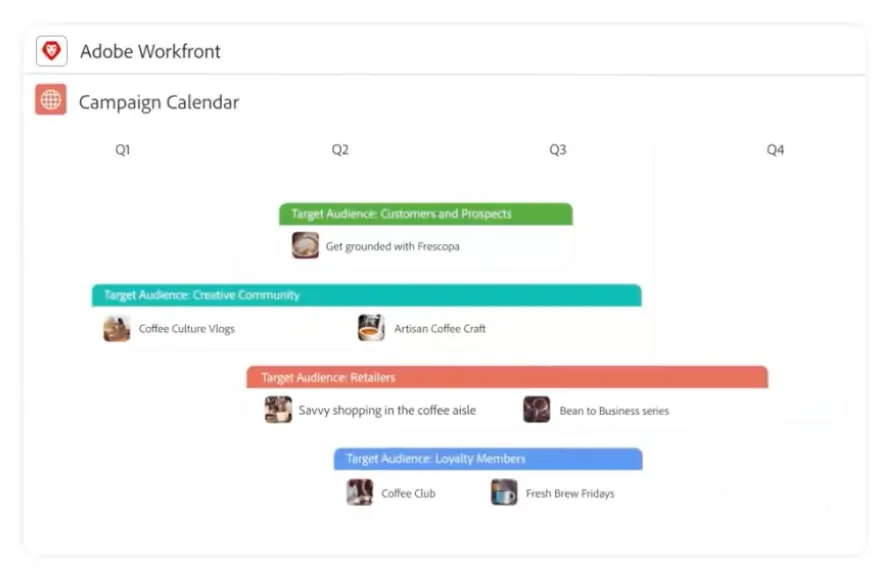
Adobe Workfront is enterprise work management software that ties creative proofing to campaign planning, resourcing, and budgets across the Adobe ecosystem.
Why we chose it
We included Adobe Workfront because it’s the only tool on this list that treats creative proofing as one piece of a larger campaign operation – task management, resourcing, budgets, and timelines – rather than a standalone review step.
Its integration goes deeper into Adobe’s ecosystem than any other tool on this list, connecting Creative Cloud, Adobe Experience Manager Assets, Adobe Express, Frame.io, and GenStudio for Performance Marketing directly into one workflow.
Pros:
- Ties proofing to campaign planning, resourcing, and budget tracking, not just file review
- Version comparison and automated proofing workflows inside the platform
- Strong admin and governance controls for large, multi-team organizations
Cons:
- Setup can take weeks – a real onboarding cost next to tools built to be self-serve from day one
- No publicly listed pricing, free plan, or trial; enterprise sales process required
- Overkill for teams that only need creative review rather than full work management
Pricing: Enterprise solution, pricing on request. No public free plan or trial.
9. Hightail – best for teams sharing and reviewing large creative files
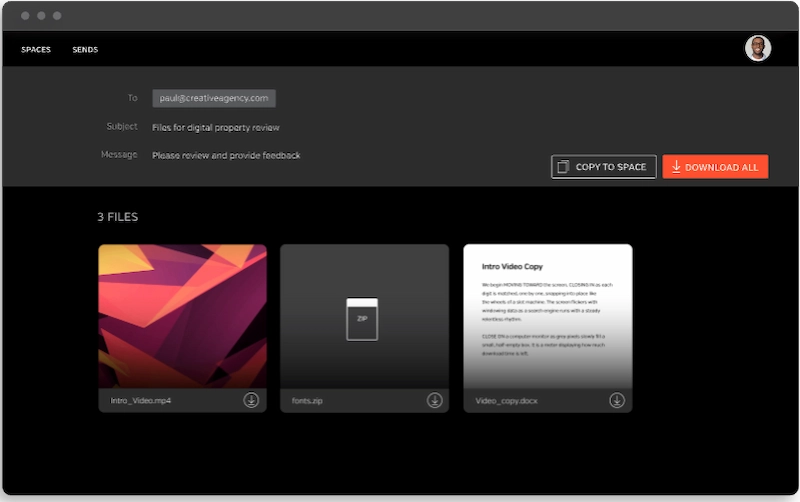
Hightail, part of OpenText, combines large-file sharing with creative review and lightweight project management, so teams can send big assets to clients and collect feedback in the same place.
Why we chose it
Hightail earns its spot for a job most review tools ignore: getting large creative files to clients and back.
It started as YouSendIt, so file delivery is its core strength, with sends up to 500GB and tracking that shows when a recipient has opened a file.
Its Teams and Business plans then add creative collaboration, with precise comments, version control, and approval routing, so review happens alongside delivery rather than in a separate tool.
Pros:
- Sends and shares very large files, up to 500GB on Business, with delivery tracking and notifications
- Precise comments, version control, and side-by-side version comparison for creative review
- To-do lists and approval routing to manage projects alongside review
- Integrates with Adobe Photoshop and Illustrator, Outlook, Dropbox, Google Drive, OneDrive, and Zapier
- Password protection and enterprise-grade security, with SSO on the Business plan
Cons:
- Creative collaboration and approval features require the Teams plan ($24/user/month) or higher; the free and Pro plans are file-sharing only
- Proofing is lighter than dedicated review platforms, with no live-website or interactive-content review
Pricing: Free Lite plan for basic sharing (files up to 100MB, 2GB storage). Pro is $12/month for larger file sharing (up to 25GB). Creative collaboration and approval features start on the Teams plan at $24/user/month, and Business is $36/user/month for files up to 500GB plus SSO.
10. ReviewStudio – best for small teams wanting affordable, easy-to-use proofing
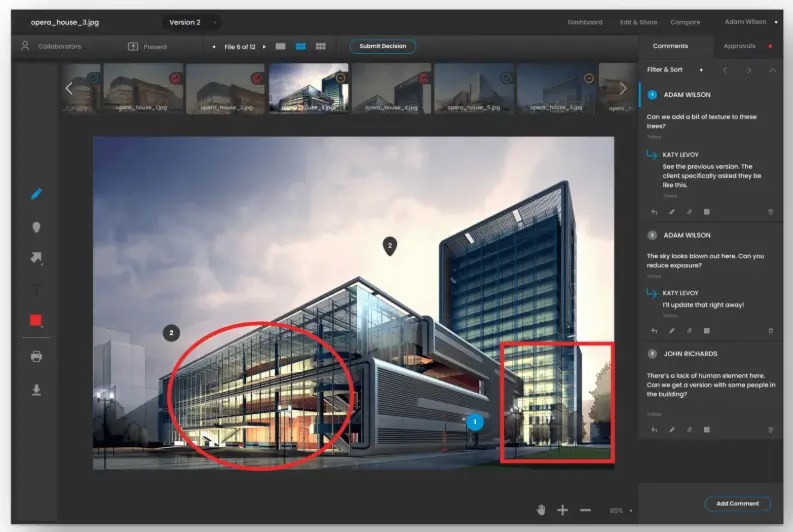
ReviewStudio is an online proofing tool for creative teams to review, annotate, and approve images, video, PDFs, and live websites.
Why we chose it
ReviewStudio is one of the simplest, most affordable ways for a small creative team to get structured visual review – frame-level video comments, PDF annotation, and live website review – without paying enterprise pricing.
It’s built to be easy to pick up, which suits smaller teams and agencies better than the deeper, more complex tools elsewhere on this list.
From our research, it’s also the cheapest tool on this list that still claims a broad compliance surface – ISO 27001 certified, plus stated support for PCI, HIPAA, SOC, and GDPR – at a fraction of what Ziflow or PageProof charge.
Pros:
- Turns any comment directly into an assignable task
- Side-by-side version comparison across review rounds
- Real-time collaboration for internal teams and external reviewers alike
- Free plan with unlimited users, capped by active reviews rather than seats
Cons:
- Workflow automation and integrations are less advanced than more enterprise-focused tools, per user reviews – the flip side of being simple and easy to pick up
Pricing: Free trial and free plan. Paid plans start at $12/user/month.
11. GoProof – best for Adobe Creative Cloud-native design teams
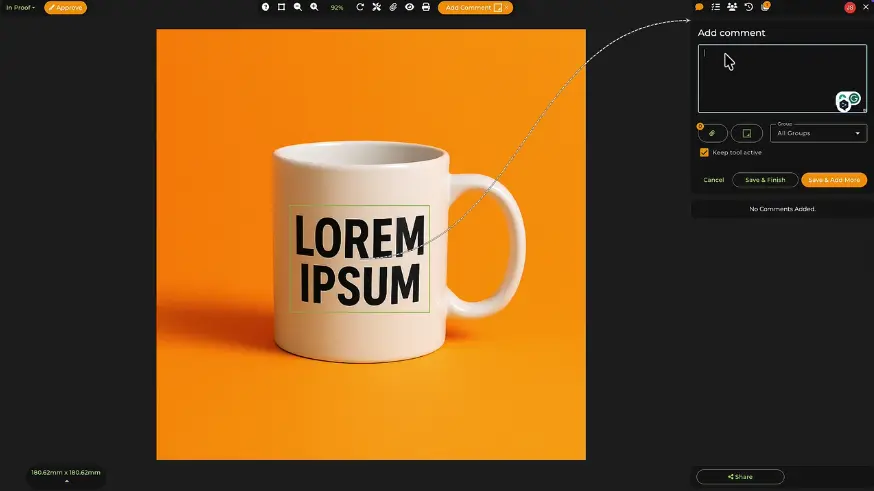
GoProof is an Adobe Creative Cloud-native proofing tool that lets designers launch and manage proofs without leaving InDesign, Photoshop, Illustrator, or Premiere Pro.
Why we chose it
GoProof lets designers launch and manage proofs without ever leaving Adobe Creative Cloud, with proofs starting directly from InDesign, Photoshop, Illustrator, or Premiere Pro.
For design teams that live in Adobe, that removes the constant switching between a design tool and a separate review platform.
Pros:
- Copy-editing tools and role-based review routing built for multi-stage design and artwork approval
- Calendar syncing to manage deadlines across review rounds
- Handles design and video files created across the Adobe suite
- ISO/IEC 27001:2022 certified and GDPR compliant, with encrypted data and permission controls
Cons:
- No free plan (trial only)
- Entry tier is expensive per seat: $129/month covers only 2 users
- No mention of live-website or audio review support, which some competitors on this list do cover
Pricing: Free trial, no free plan. Paid plans start at $129/month for up to two users.
12. Approval Studio – best for packaging and branding-focused agencies
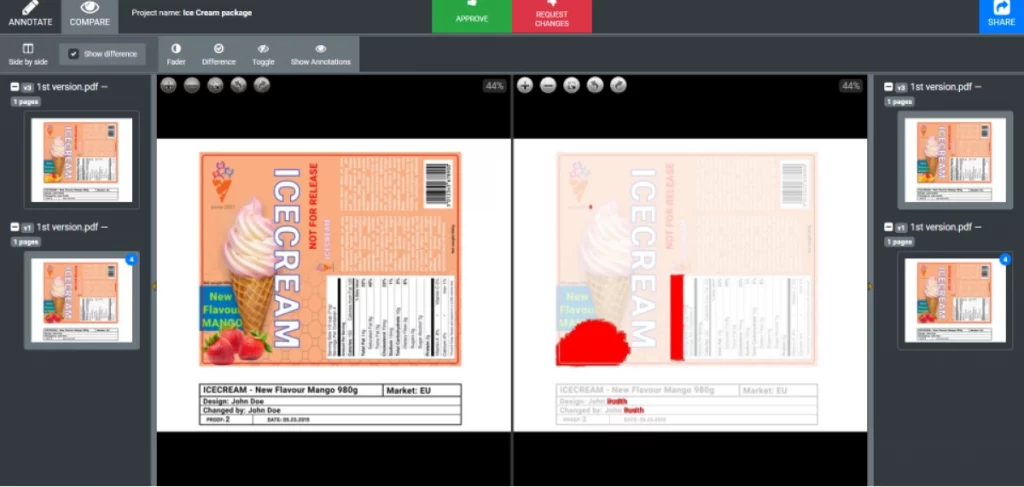
Approval Studio is an online proofing tool built for artwork and packaging approval, with version comparison, barcode verification, and print-ready review features.
Why we chose it
Approval Studio is built specifically for packaging, print, and artwork approval, a niche most tools here only cover as one format among many.
Its review tools are tuned for exactly that work, so anyone signing off on packaging or print-ready files gets checks the general-purpose tools don’t offer.
Pros:
- AI-powered difference finder catches changes between file revisions automatically
- Barcode verification flags scannability issues before print
- On-screen ruler and color-separation view for print-ready checks
- Four version-compare modes: side-by-side, difference, and overlay
- Integrates with Adobe Creative Cloud, Figma, Slack, and Shopify, plus Zapier and REST/GraphQL APIs
Cons:
- Doesn’t appear to hold company-level ISO 27001 certification – worth ruling out if you’re in pharma, finance, or government work that requires a formal cert
- No free plan (trial only)
- Per-user pricing at higher tiers can get expensive for larger teams
Pricing: Free trial, no free plan. Paid plans start at $60/month for up to five users.
For a more in-depth overview, check out our Filestage vs Approval Studio comparison guide.
13. Markup Hero – best for quick, informal screenshot markup
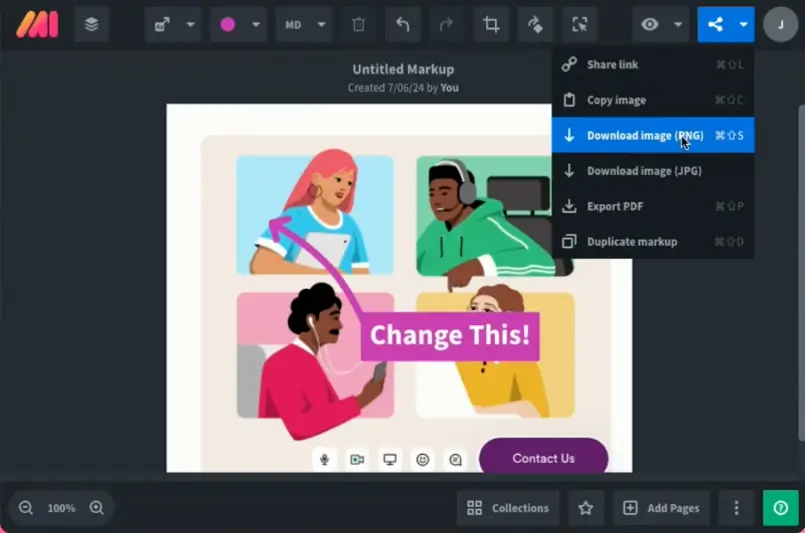
Markup Hero is an annotation tool for informal feedback on live websites.
Why we chose it
Markup Hero is the fastest, lowest-friction option here for one-off screenshot feedback rather than structured campaign approvals.
We tested it ourselves: it’s simple and fast to use, letting you capture just a small area or annotate the whole page, with different tools like text and highlight for marking up exactly what you mean.
Pros:
- Chrome extension annotates any live webpage and it’s free, not gated to a paid plan
- Cheapest tool on this list, at $3/user/month
- Simple integrations with Google Drive, Notion, and Slack for quick sharing
Cons:
- No multi-stage approval workflow
- No published security certifications or compliance frameworks, a risk factor for regulated teams
Pricing: Free plan, no free trial. Paid plans start at $3/user/month.
14. Wipster – best for lightweight, video-only review rounds
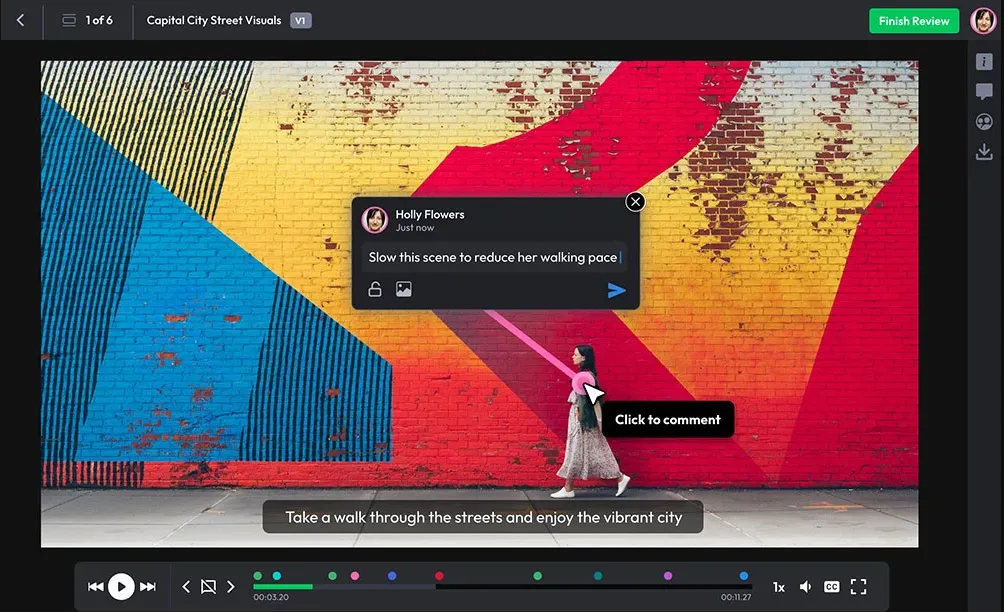
Wipster is a streamlined video review platform that lets reviewers stream and comment on cuts without downloading large files first.
Why we chose it
We included Wipster because it strips video review down to the essentials, without the workflow configuration that heavier tools like Ziflow require.
Streaming previews mean anyone with the link can start watching and commenting right away, instead of waiting on a large video file to download first – useful when you’re sending finished cuts to clients or reviewers outside your team who don’t want to mess with software.
Editors can then pull that feedback straight into Final Cut Pro without switching windows.
Pros:
- Frame-accurate, timestamped comments on video, images, PDFs, and audio
- Side-by-side version comparison across review rounds
- Multi-step approval workflows with a clear audit trail
- Unlimited reviewers on every plan, with no account needed
- Review Panel extensions for editing suites like Premiere Pro, After Effects, and Final Cut Pro
- Hosted on Azure with ISO 27001, SOC 1, and SOC 2 infrastructure certifications
Cons:
- No free plan
- Ecosystem is more limited outside video, per the vendor’s own framing
Pricing: Free trial, no free plan. Team plans start at $19.95/user/month.
How to choose the right creative approval software
The best tool depends less on feature lists and more on what you’re reviewing, who signs off, and where approvals currently break down. Start with these questions.
What formats do you review most?
If your work spans video, design, documents, and live content, choose a multi-format platform like Filestage that keeps every review in one place. If you live in a single format, a specialist may fit better: Frame.io or Wipster for video, Approval Studio for packaging and print, or Markup Hero for quick website and screenshot feedback.
How many stakeholders sign off, and how often?
Occasional reviews from one or two people don’t need much structure, so an affordable tool like ReviewStudio or GoVisually will do. But once campaigns run through several rounds of internal, brand, legal, and client approval, you need reviewer groups, version control, and automated reminders. This is where a dedicated review and approval platform earns its place, especially for in-house marketing teams and agencies producing high volumes of content.
Do you want proofing on its own, or built into a project management tool?
If you already plan work in a broader system, Wrike and Adobe Workfront bundle proofing into task management. If the review stage itself is your bottleneck, a focused review tool is usually faster to roll out and easier for external reviewers to use.
Once you have a shortlist, test three things before you commit:
- External reviewer friction. Clients and partners resist creating accounts, so tools with account-free review links remove real delay.
- Fit with your stack. Check that it integrates with what you already use, whether that’s Slack, Asana, monday.com, or Adobe Creative Cloud.
- Cost at your real size. Watch for per-user pricing, seat minimums, and features locked to higher tiers, then use a free trial to run an actual project through the tool rather than the vendor’s demo.
Final thoughts
Creative approval software only earns its place if it actually keeps campaigns moving. The strongest platforms keep reviews moving, reduce rework, protect brand standards, support compliance requirements, and give creative teams space to focus on ideas instead of admin.
Each tool in this guide has different strengths across the creative review platform landscape. Some platforms make sense when creative review sits inside a broader project management setup. Others shine in specific niches like video-only feedback or lightweight design proofing. But once campaigns span multiple channels, formats, and stakeholders, teams tend to benefit most from a dedicated creative review and approval platform built for that complexity.
That’s where Filestage stands out. It combines precise, in-context feedback with flexible approval workflows, clear version control, and enterprise-ready security, all in one focused workspace.
For teams managing high volumes of creative assets, coordinating internal reviewers alongside clients or partners, working across documents, designs, videos, and live content, or needing reliable audit trails for regulated environments, Filestage consistently covers a broader range of review and approval needs than single-purpose or bolt-on solutions.
If you’re ready to stop chasing approvals and start launching campaigns with confidence, start your free trial of Filestage and see how much smoother creative reviews can be.
Start your free Filestage trial today →
FAQ
What is creative approval software?
Creative approval software is a cloud-based tool that gives teams one place to review creative work, leave feedback, and formally approve assets. Instead of comments living in emails, chat threads, PDFs, and screenshots, everything happens directly on the file itself. Versions are tracked automatically, decisions are recorded, and everyone can see what’s approved, what’s still under review, and what needs attention next.
Which features matter most when choosing creative review and approval software?
The most important features in creative review and approval software are the ones that remove friction from everyday reviews. That usually means reliable version control, precise in-context comments, and approval states that make sign-off unambiguous. For more complex teams, workflow flexibility matters too, especially when reviews involve legal checks, brand approvals, or multiple rounds with different groups.
This is where dedicated tools like Filestage tend to outperform general platforms, because they’re built around the review process itself rather than bolted on as an extra.
How can creative approval software help agencies and in-house teams manage feedback from multiple stakeholders?
Creative approval software gives every stakeholder a single, shared place to review work. Internal teams, clients, legal reviewers, and external partners can all comment directly on the same version, with permissions controlling who can view, comment, or approve. This reduces duplicate feedback, avoids conflicting requests, and makes it much easier to move from draft to sign-off without endless follow-ups.
What security and compliance features should I look for in creative approval software?
Security becomes especially important once sensitive brand, marketing, or regulated content is involved. Look for encryption in transit and at rest, role-based access controls, single sign-on, and clear audit logs. Teams in regulated industries may also need verified approvals and compliance-aligned workflows. Filestage, for example, is built with GDPR compliance, ISO 27001 certification, and enterprise-grade approval records in mind.
When does it make sense to choose a dedicated creative review tool like Filestage instead of an all-in-one project management suite?
All-in-one tools work fine when creative review is occasional or informal. They start to struggle when reviews become central to how work gets shipped. If your team is handling lots of creative assets, juggling multiple formats, or coordinating approvals across departments and external partners, a dedicated review platform is usually the better fit.
Filestage is built specifically for those scenarios, where review clarity, compliance, and momentum matter more than generic task lists.