TL;DR
- Content approval software helps marketing teams and creative agencies manage the review, feedback, and sign-off process for digital content.
- By replacing scattered email chains with structured approval workflows, the right platform reduces bottlenecks, speeds up approval cycles, and keeps every stakeholder accountable.
- This guide covers what content approval software is, how the approval process works, the five best tools for 2026, and the features worth paying attention to.
Why marketing teams need content approval software
Modern content production involves multiple stakeholders, tight deadlines, and multiple rounds of revision before anything goes live. According to CMI’s B2B Content Marketing Benchmarks, Budgets & Trends 2025 report, a third of B2B marketers cite managing workflow issues and content approvals as one of their biggest non-creation challenges.
Manual approval processes create predictable problems: feedback scattered across tools, version confusion, slow stakeholder responses, and unclear approval status. All of this causes delays that compound across campaigns.
Content approval software fixes this by replacing scattered tools with a centralized platform for all review and sign-off activity. Our guide to review and approval software covers the wider category in more detail.
What is content approval software?
Content approval software (sometimes called approval process software or an approval management system) is a dedicated platform for managing the review, feedback, and sign-off process for digital assets.
Unlike general project management tools, content approval platforms are built for creative review. They let teams annotate files directly, configure multi-stage approval workflows, compare file versions side by side, and maintain a full audit trail of every comment and decision.
Key capabilities of content approval software include:
- Custom approval workflows that match your team’s review structure and content types
- Automated notifications so reviewers don’t miss deadlines
- Version control that prevents confusion over outdated files
- Role-based permissions so the right stakeholders review the right content
The result is a more efficient approval process, with better visibility across every active content review and approval, fewer last-minute mistakes, and less time spent chasing sign-offs.
What is the marketing content approval process?
The marketing content approval process is the structured sequence of steps a piece of content follows from first draft to final sign-off, with each stage requiring approval from designated reviewers before moving forward. Whether you’re managing a design approval process or a social campaign approval process, the sequence follows the same basic pattern.
A well-defined approval workflow includes specific roles and responsibilities, defined approval steps, and checks for content quality at each stage.
A typical workflow runs like this:
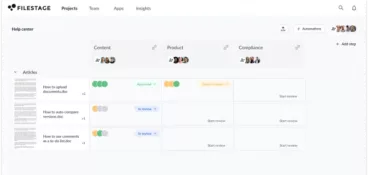
- The creator shares a file in the first reviewer group.
- Stakeholders leave feedback and discuss ideas of improvements.
- The creator revises the content and shares a new version.
- Once the first group has approved the file, it goes to the next review stage (e.g. brand, legal, external partners, or clients) for feedback and approval.
- Repeat this for every reviewer group.
- The final approved asset is published or delivered.

Without approval workflow software managing that sequence, teams run into predictable problems: delayed feedback loops, unclear responsibilities, version confusion, slow stakeholder responses, and compliance risks when content bypasses required approval steps.
Top five content approval tools for marketing teams in 2026
The tools below cover the main use cases for content review and approval: general creative work, social media, video, artwork, and website feedback. The right creative approval software depends on whether your team needs deep creative proofing, integrated task management, or simple approval routing.
1. Filestage – best for documents, designs, videos, and interactive content

Filestage is a content approval platform for marketing teams, creative agencies, and enterprise brands. It supports every major file type, including video, images, PDFs, audio, and live websites, so teams manage their entire approval process without switching tools. Reviewers can annotate files directly, compare versions side-by-side, and leave frame-accurate comments on video and audio files. Internal and external reviewers don’t need an account to leave feedback.
Pros: All major file types supported, automatic version control, and approval checklists, frictionless for internal and external reviewers
Cons: The free plan is limited to one active project and five new files per month
G2: 4.6/5
Pricing: From $199/month. Free plan available.
“Filestage makes my everyday life in online marketing easier and ensures that approval processes run quickly, clearly, and smoothly.” — Maria R. | Online Marketing Manager (G2)
See how Filestage can speed up your approvals
Enjoy a free, 30 minute consultation with our experts, tailored to your team and use cases.
2. Planable – best for social media content

Planable is a social media management and content approval platform built around visual content planning. Teams draft, preview, and approve posts across nine social channels using an intuitive drag and drop interface, with approval workflows scaling from one-click to custom multi-level stages. Unlimited users are included in every workspace, making it a good fit for agencies managing multiple clients.
It doesn’t support other file types, so it works as a dedicated social tool rather than a broader approval platform.
For teams managing social content at scale, see also our guide to social media approval software.
Pros: Visual previews for every platform, unlimited users, and strong client collaboration
Cons: Analytics behind an add-on paywall and post limits per workspace
G2: 4.6/5
Pricing: From $33/workspace/month. Free plan includes 50 posts.
“It is an incredible time-saver. It’s allowed us to service a lot more clients. It’s extremely reliable and has all the features we need.” — Jaden Q. | Director of Social Media (G2)
3. Frame.io – best for video content

Frame.io is a video review platform with deep Adobe Creative Cloud integration, including Premiere Pro and After Effects. Reviewers leave time-stamped, frame-accurate comments without an account. Adobe Creative Cloud subscribers get a limited version at no extra cost, covering two members and five projects. Paid plans extend storage and user capacity. Frame.io is purpose-built for video and handles it exceptionally well, but it’s not a general content approval platform.
Pros: Frame-accurate comments and unlimited free reviewers
Cons: Video-only and per-seat costs grow quickly for larger teams
G2: 4.5/5
Pricing: From $15/user per month. Free plan available.
“I use Frame.io every day to review videos and upload assets for video production. I love the feature to leave comments in videos and how easy it is to share video links in high resolution with clients.” — Alyssa A. | Bilingual Client Success Manager (G2)
4. Approval Studio – best for artwork and packaging

Approval Studio is an online proofing tool built for artwork review and approval. It supports a wide range of design formats and includes specialist tools like a barcode reader, color separation viewer, and AI-powered difference finder, making it particularly useful for packaging design, pharma, and retail teams. A modular pricing system and multi-language support add flexibility.
For teams focused primarily on artwork and design review, see our full breakdown of artwork approval software.
Pros: Specialist artwork tools, modular pricing, and multi-language support
Cons: Limited third-party integrations, some users report a learning curve
G2: 4.8/5
Pricing: From $60/month. Free trial available, no free plan.
“I’ve been using [Approval Studio] for a few months to manage graphical revisions of my products, and I have to say it’s solved a problem I’ve had for years: the classic infernal circle of emails with attachments, randomly renamed versions, and clients commenting on blurry screenshots via WhatsApp.” — Nello C. | Graphic Designer (G2)
5. Marker.io – best for website content

Marker.io is a website feedback and bug reporting tool that lets teams collect annotated feedback directly on live or staging websites. Reviewers click any element to leave a comment, and Marker.io automatically captures technical metadata, such as browser, OS, screen size, and page URL, alongside every report. It routes feedback directly into Jira, Trello, Asana, and ClickUp.
As client approval software for web and digital agencies, it covers a specific part of the content approval process most platforms ignore.
Pros: Auto-captures technical metadata, connects to major PM tools, and offers unlimited free guest reporters
Cons: Website feedback only, not designed for video, PDF, or design file review
G2: 4.8/5
Pricing: Starter plan from $39/month. Free trial available, no free plan.
“Marker.io is easy to implement, and integrates directly with PM tools like ClickUp. My agency uses it for QA and bug tracking during the final phases of website launches.” — Nate F. | CEO (G2)
Key features to look for in content approval platform
Not all content approval platforms are built the same. The following features are what separate the tools that actually streamline your workflow from those that just add another login you’ve got to worry about.

Supported file types
The more file types a platform supports, the fewer approval tracking software tools your team needs. Look for software that can handle video, images, PDFs, audio, and live web pages (along with file sharing for creative assets) within a single approval system.
Workflow automation
Automated approval workflows remove the manual work between review rounds. The best approval workflow tools handle routing, approval stage progression, and automated reminders without requiring someone to manage the process manually.
Look for approval software that supports workflow templates and custom workflows, so creative teams can standardize repetitive tasks across campaigns rather than rebuilding the process from scratch each time. This is one of the biggest time-savers for creative teams running multiple campaigns simultaneously.
Collaboration and feedback
Real-time commenting and annotation tools let reviewers leave precise, contextual feedback directly on creative assets. This kind of in-context content review and approval removes the back-and-forth that slows most teams down. Look for threaded discussions, @mentions, and the ability to request approvals on individual files directly from the platform.
Version control
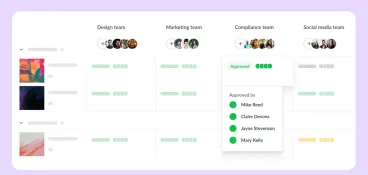
Without version control, teams end up working from outdated files and can’t tell which feedback belongs to which draft. Strong version control lets reviewers compare versions side by side, preventing the kind of confusion that sends whole projects back to the start. You should also be able to track approvals by stage, so you always know which reviewers have signed off and which approval steps are still outstanding.
Notifications and reminders
Automated reminders keep review cycles moving. Reviewers get notified automatically when an approval request lands in their queue, and project owners can monitor approval status across every active project without manually chasing stakeholders.
Integrations
Look for compatibility with the PM tools, creative tools, and communication platforms your team already uses. Good integrations mean approval workflows connect to your broader content production process rather than sitting in isolation.
See how Filestage can speed up your approvals
Enjoy a free, 30 minute consultation with our experts, tailored to your team and use cases.
How AI is changing content approval workflows
AI is starting to handle tasks that previously required manual review. Across content approval platforms, the most common capabilities include automated compliance checking against brand guidelines, grammar and tone review in early draft stages, and AI-powered difference finders that flag visual changes between artwork versions.
For example, Filestage’s Review Agent checks content for compliance based on your custom guidelines and regulations requirements before files reach human reviewers, reducing the volume of back-and-forth in early rounds. Approval Studio’s AI assistant includes a difference finder that identifies changes between artwork versions automatically.
These features don’t replace human judgment, but they reduce the number of revision cycles and help teams reach final approval faster.
FAQ
Who needs content approval software?
Marketing teams, creative agencies, and enterprises managing multi-step content workflows all benefit from structured approval processes inside content approval software. It’s particularly valuable in regulated industries like pharma, financial services, and consumer goods, where audit trails and documented approval status matter for compliance.
Is content approval software the same as project management software?
No. There’s some overlap, but approval software is built specifically for the review and sign-off process. These platforms focus on feedback, annotation, version control, and approval management. While project management tools track tasks and timelines.
Can small teams benefit from content approval tools?
Yes. Even small creative teams see faster turnaround and fewer revision cycles when they replace ad hoc email feedback with a structured content approval workflow. Most platforms offer a free plan or a free trial so teams can test before committing.
What’s the difference between online proofing and content approval software?
The terms are often used interchangeably. Online proofing tools tend to focus on annotation and markup for specific file types. Content approval software is broader, covering automated workflows, approval routing, and approval management across multiple asset types and stakeholder groups.
Choose the right approval management software for your team
If your team is still managing approvals through email, you’re slowing every campaign down. The best approval workflow software brings structure to the process: everyone knows what they’re reviewing, which version they’re on, which approval steps remain, and who needs to act next. That kind of structured approval system is what separates teams that hit deadlines from those that don’t.
For teams that need a platform covering every file type and every stage of the content review and approval process, Filestage handles it all, from video proofing and design review to document approval and compliance checks. It’s built for marketing teams, creative agencies, and enterprise brands that can’t afford to lose track of approvals.