Almost every collaboration tool now wears an “AI-powered” badge. And while some do genuinely earn it, others just bolted a summarize button onto an existing product and updated the pricing page. That gap, between tools where AI changes how work gets done and tools where it’s a marketing layer, is the whole problem you’re trying to solve here.
The thing is, your job is narrower than the marketing makes it sound. You don’t need the tool with the most AI features. You need the one whose artificial intelligence fits where your team collaboration already happens, chasing approvals, running meetings, tracking projects, or finding the document nobody can locate.
McKinsey’s 2026 State of Organizations report suggests that the biggest productivity gains come from redesigning workflows and operating models so teams and AI can work together more effectively, rather than simply layering on another tool.
This is a straight-up, use-case-based shortlist of ten AI collaboration platforms we’ve tested or assessed in depth.
How we evaluated these tools’ AI capabilities
We judged every platform against six criteria, roughly in this order of importance.
- AI use-case fit – Does the AI do a real job, summarizing, routing, drafting, or is it just a novelty? This carried the most weight. The best collaboration tools with AI do one thing well rather than five badly.
- Integrations – Does it connect to what teams already run, from Slack and Google Workspace to Adobe, project trackers, and storage?
- Accuracy and human control – Can you review, edit, and override what the AI produces before it ships?
- Security and compliance – SOC 2, GDPR, whether your data trains someone else’s model, plus audit trails and access controls.
- Pricing transparency – Is pricing public, and is there an actual free plan and not just a trial dressed up as one?
- Ease of adoption – Do the AI features work on day one, or does the team need training and prompt skills first?
We tested six of these hands-on with a free or paid account: Filestage, Asana, Slack, Miro, Zoom Workplace, and Otter. The other four we assessed from documentation, live demos, and verified G2 and Capterra reviews.
One disclosure: Filestage is our product. We’ve included it because it fits the use cases described, and held it to the same honest treatment of limitations as every other tool.
Quick comparison of the best AI collaboration tools
| Tool | Best for | Primary AI strength | Starting price |
| Filestage | Creative review and approval | Review Agents that check content against rules | Free; paid from $199/month |
| Miro | AI whiteboarding and visual collaboration | Generating a full board from a prompt | Free; paid from $8/user per month |
| Notion | AI-assisted docs and knowledge | Ask-anything search across your workspace | Free; paid from $10/user per month |
| ClickUp | An all-in-one AI workspace | One AI layer across tasks, docs, and goals | Free; paid from $7/user per month |
| Asana | AI project and portfolio management | Predicting project risk and surfacing blockers | Free; paid from $10.99/user per month |
| monday.com | Building custom AI workflows fast | AI blocks you drop into any workflow | Free; paid from $9/seat per month |
| Slack | AI-powered team communication | Channel and thread recaps | Free; paid from $7.25/user per month |
| Zoom Workplace | Hybrid meetings and summaries | AI Companion summaries, included free | Free; paid from $14.16/user per month |
| Otter | AI meeting notes and transcription | Near-usable transcripts and summaries | Free; paid from $8.33/user per month |
| Glean | Enterprise AI search across the stack | Generative search across every connected app | Custom / quote-based |
Top 10 best AI collaboration platforms
Here are the 10 platforms that made the cut, starting with our top pick for creative teams and working through the best options for meetings, project management, docs, and enterprise search. Each entry covers what the tool does, why it earns its place, its strongest AI features, an honest limitation, and verified pricing.
1. Filestage – best for creative review and approval workflows

Filestage is a review and approval platform for the messiest part of creative work: turning feedback from a dozen stakeholders into a clear yes. Its Review Agents check content against brand and compliance rules before a human sees it, flagging things like forbidden terms, sensitive language, and broken QR and barcodes. It has built in integrations with popular tools like Google Drive and Slack too.
Why we chose it
Having used it, what stands out is how the Review Agents remove the most tedious review pass without touching human judgment. We like that every flag is reviewable and overridable, nothing gets auto-approved, which for regulated content is the right call.
Pros
- AI agents Review Agents automatically flag routine errors and compliance issues
- Every suggestion is reviewable, with a full audit trail
- Structured, stage-based approval, not scattered comments
Cons
It focuses on review and approval, so it isn’t a project management or chat tool. It works alongside those, not instead of them.
Pricing
Free plan (one active project, two reviewer groups). Paid from $199/month for Starter. Review Agents on Business ($329/month). Enterprise custom. 14-day trial.
Supercharge your project collaboration
Share, review, and approve all your content in one place with Filestage.
2. Miro – best for AI whiteboarding and visual collaboration
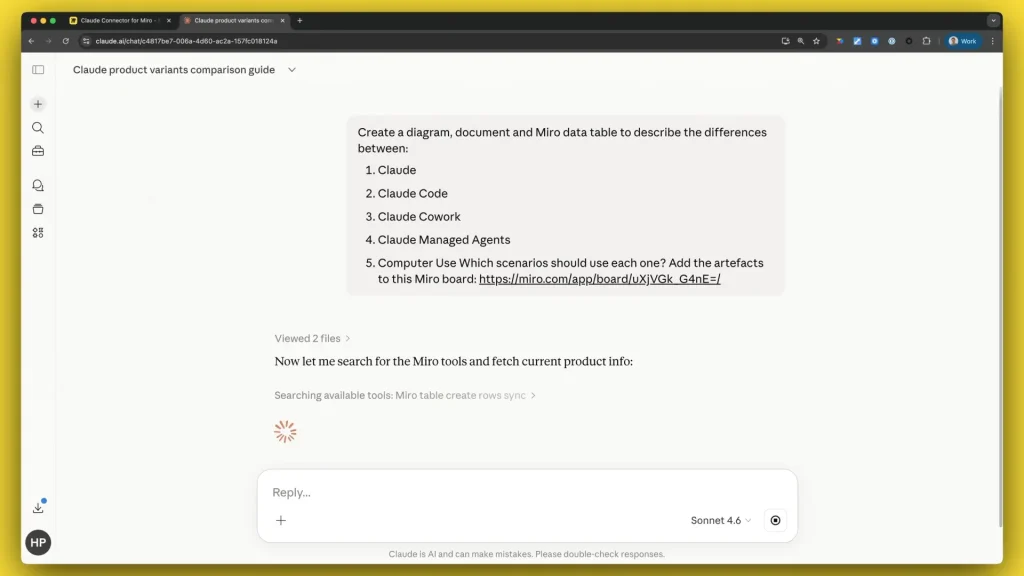
Miro is the visual canvas teams reach for to map a process, run a workshop, or brainstorm in real time collaboration. It repositioned around AI in 2025 and 2026, adding tools that build the board for you.
Why we chose it
We tested this, and the standout was connecting Miro to Claude and generating a whole board just by describing what we wanted. For anyone who’s faced a blank canvas and its learning curve, that collapses the setup work that eats into the first twenty minutes of a session.
Pros
- Generate a structured board from a plain-language prompt
- AI clustering and summarizing of large, messy boards
- Deep integrations across project trackers, storage, and chat tools
Cons
AI runs on metered credits, so heavy users hit the ceiling. The free tier caps you at three editable boards.
Pricing
Free tier. Starter $8/user per month, Business $20/user per month, annual. Enterprise custom.
3. Notion – best for AI-assisted docs and knowledge management
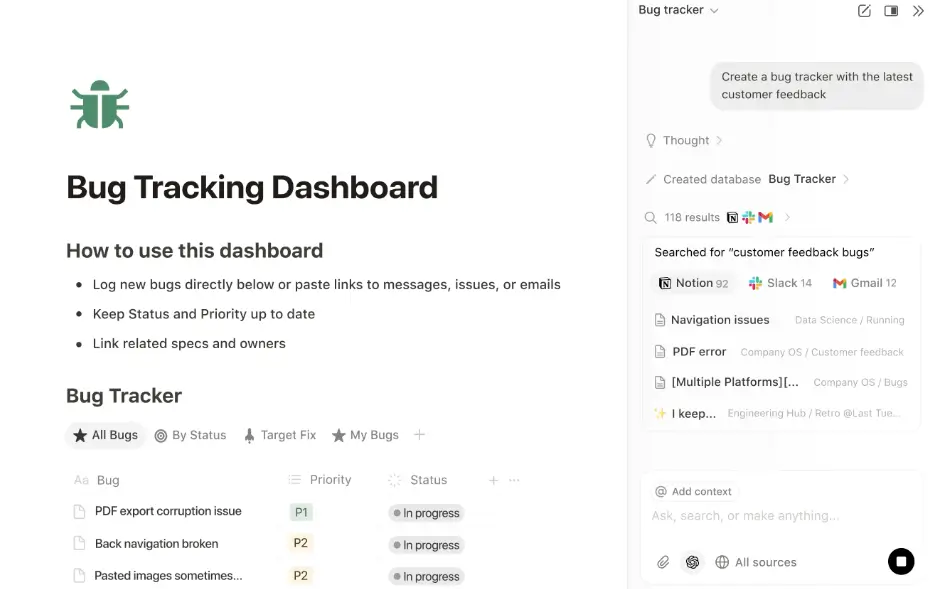
Notion blends docs, wikis, databases, and light project management into one flexible workspace. Its AI layer sits across all of it, letting you draft content and ask questions across everything you’ve built.
Why we chose it
The standout is how customizable it is. You can shape Notion into your own knowledge management system instead of a rigid structure, and Ask Notion searches the whole thing instantly. For a team that documents how it works, that feature turns a pile of pages into something you can query.
Pros
- Ask Notion answers questions using your workspace as the source
- Document collaboration with AI writing and summarizing on every page
- Highly customizable structure that adapts to your team
Cons
Full AI, including custom AI agents and Ask Notion, now requires the Business plan after a 2025 pricing change. The old standalone AI add-on is gone.
Pricing
Free tier. Plus $10/user per month. Full AI on Business, $20/user per month, annual. Enterprise custom.
4. ClickUp – best for an all-in-one AI workspace
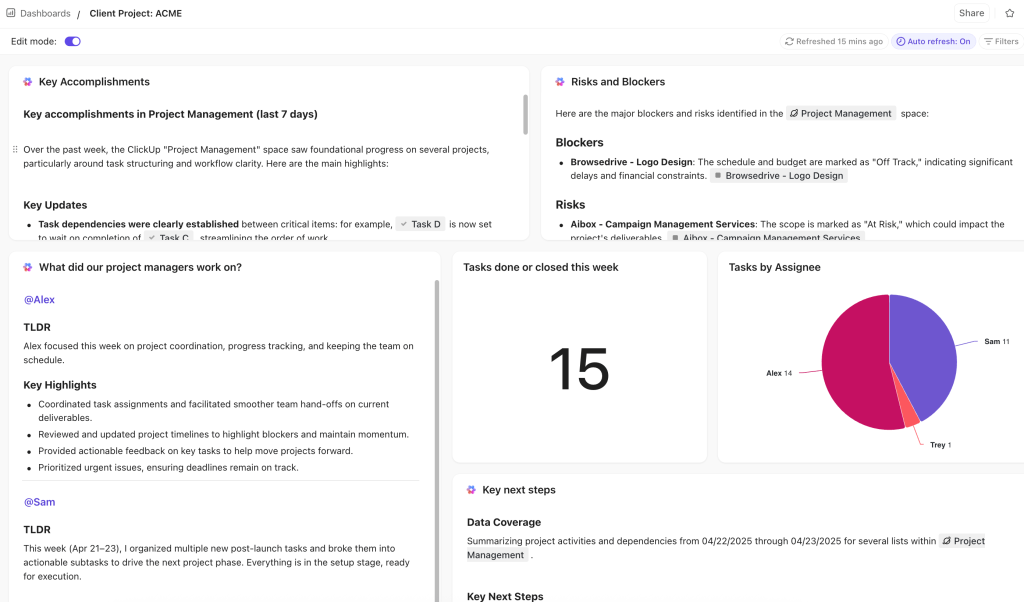
ClickUp wants to be the one app that replaces your stack: project management, docs, goals, whiteboards, and workflow automation in one workspace. As an all-in-one collaboration platform, its AI layer, ClickUp Brain, runs across all of it.
Why we chose it
The appeal is the “one place for everything” feel. Task management, docs, goals, and automations together reduce app switching that fragments a workday, and Brain answers questions across all of it. For teams tired of stitching five tools together, that’s the draw.
Pros
- One AI layer working across task management, docs, and goals
- Broad feature set with workflow automation that replaces several separate task management tools
- Low entry price for the base platform
Cons
Brain isn’t included in any plan. It’s a $9/member per month add-on billed on every seat, so an AI-enabled Unlimited seat is really $16, not $7.
Pricing
Free tier. Unlimited $7/member per month, Business $12/member per month, annual. Brain adds $9. Enterprise custom.
5. Asana – best for AI project and portfolio management

Asana is a mature project management platform for coordinating projects across teams, with project tracking built in. Beyond task management, its AI focuses on predicting risk and surfacing AI insights on what needs attention.
Why we chose it
We use Asana daily, and the standout is Smart Chat. You can ask it to push tasks back, reschedule work, summarize updates, or surface blockers, and it handles those requests accurately without wasting your time. That makes it feel more useful than a lot of competing AI rollouts, especially for someone running many workstreams and complex projects.
Pros
- Smart Chat reschedules tasks, summarizes updates, and surfaces blockers
- AI included on paid plans from Starter up, not sold as a separate add-on
- Strong portfolio and cross-project reporting that improves task visibility and helps you track progress
Cons
Smart Chat and the AI assistant come in at Starter, but the portfolio-level AI, like risk prediction across many projects at once, needs the Advanced plan at more than double the price.
Pricing
Free for up to 10 users, Starter $10.99/user per month, Advanced $24.99/user per month, annual. Enterprise custom.
6. monday.com – best for building custom AI workflows fast
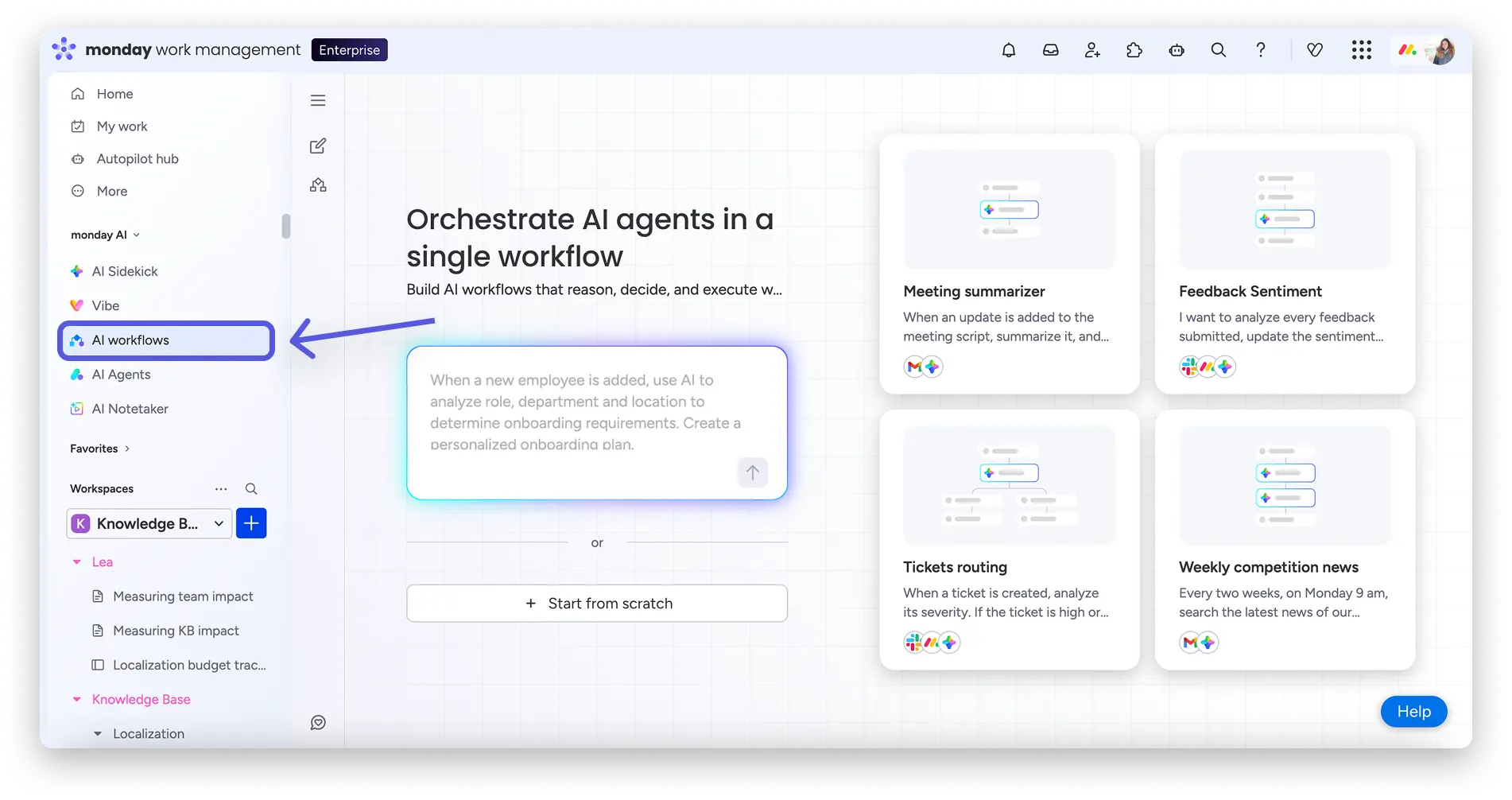
monday.com is a visually driven project management platform for building workflows without much technical setup. Its AI comes as blocks you drop in, automating repetitive tasks like summarizing, categorizing, or filling fields.
Why we chose it
What’s appealing is how fast you assemble a workflow from scratch. It’s the collaboration platform people reach for when they want something visually simple but still adaptable, and the automated workflows slot in like any other step. AI comes as credits on paid plans, not a separate charge.
Pros
- Drop-in AI blocks and automated workflows that fit any process
- Assign tasks with fast, visual workflow building
- AI credits included on paid plans
Cons
All paid plans require a three-seat minimum, so a solo user still pays for three. Heavy AI use can mean buying more credits.
Pricing
Free for two seats. Basic $9, Standard $12, Pro $19/seat per month, annual, three-seat minimum. Enterprise custom.
7. Slack – best for AI-powered team communication

Slack is the channel-based messaging and collaboration platform that pulled team communication away from email. Its AI works on the firehose of messages, summarizing what you missed so catching up doesn’t eat your morning.
Why we chose it
We use Slack every day, and the biggest thing is the AI search. Information gets lost in long channel threads, and being able to pull it back out by asking is what saves the most time. Its ability to summarize long threads is a life-saver too, turning hours of scrollback into a few lines. It connects to Microsoft Teams and over two thousand third party apps, making it a natural hub for a wider collaboration stack.
Pros
- AI recaps for Slack channels and threads that cut catch-up time
- Natural-language search across your message history
- Over two thousand app integrations
Cons
Slack is a communication tool, not a place to manage projects or content. Advanced AI sits on the higher Business+ tier.
Pricing
Free plan with basic AI. Pro $7.25/user per month, Business+ $15/user per month, annual. Enterprise+ custom.
8. Zoom Workplace – best for hybrid meetings and AI meeting summaries

Zoom Workplace is the meeting platform most teams know, now bundled with chat, calendar, and an AI assistant. Its AI Companion handles the after-meeting admin, turning a call into notes and actionable items.
Why we chose it
We tested this, and the most useful thing is that the summary turns a call into something actionable rather than archival. Instead of a recording nobody rewatches, you get action items. AI Companion is included free on every paid plan, while several rivals charge extra, a real advantage for meeting-heavy teams across time zones.
Pros
- AI Companion generates meeting summaries and action items
- Included free on all paid plans, no AI surcharge
- Screen sharing, recording, and transcription built in
Cons
AI Companion has monthly transcription caps, and cross-platform notes for Meet or Teams need a paid add-on.
Pricing
Free Basic (40-minute group limit). Pro $14.16/user per month, Business $18.33/user per month, annual.
Learn more about video collaboration in our guide to the top 10 online video collaboration software for hybrid teams.
9. Otter – best for AI meeting notes and transcription
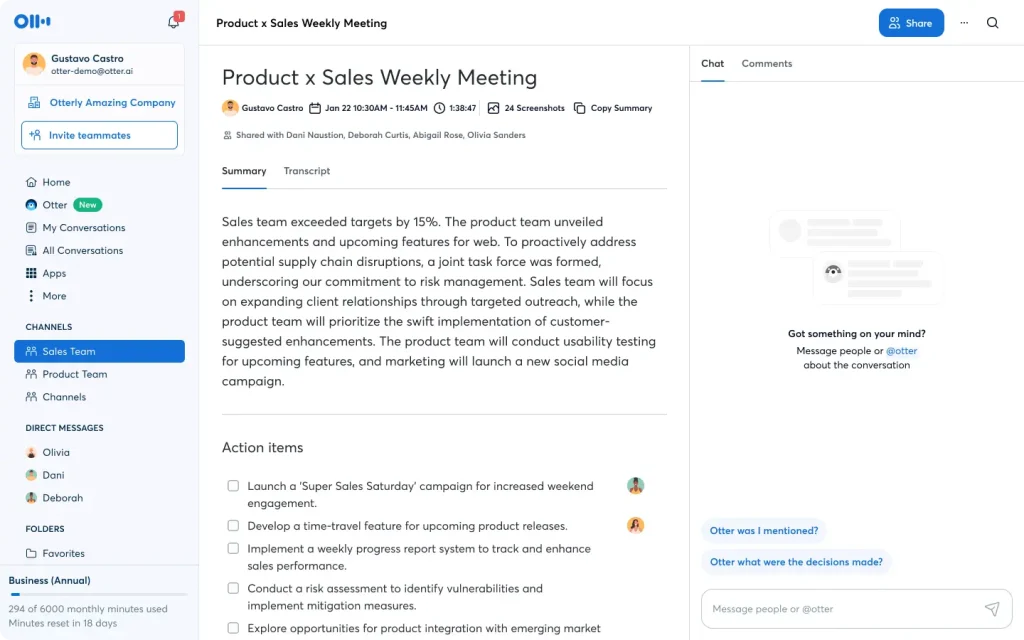
Otter is a dedicated transcription tool that joins your meetings, writes them down, and summarizes them. Where Zoom’s summaries are one feature of a bigger platform, transcription is the whole point of Otter.
Why we chose it
We tested this, and the real win is that Otter gets close enough on transcription and summaries that many teams can use the output almost immediately, with a quick cleanup. That “almost immediately” is the bar most AI transcription fails to clear, and clearing it is what separates a time-saver from busywork.
Pros
- Transcription accurate enough to use with light editing
- Joins Zoom, Google Meet, and Microsoft Teams calls
- Speaker identification and searchable transcripts
Cons
The Pro plan’s allowance was cut to 1,200 minutes a month. Accuracy drops on multilingual meetings.
Pricing
Free Basic (300 minutes). Pro $8.33/user per month, Business $19.99/user per month, annual. Enterprise custom.
10. Glean – best for enterprise AI search across the stack

Glean is an enterprise collaboration platform and search layer that sits across all your company’s apps and answers questions using generative AI. For enterprise teams where knowledge is scattered across a hundred tools, it finds the answer without you remembering where it lives.
Why we chose it
Glean’s cross-app search solves a problem that worsens as a company grows, nobody remembers which app or team had the answer. It connects to over a hundred applications and searches all of them from one bar, synthesizing an answer rather than returning links. For a large enterprise drowning in institutional knowledge, that’s genuinely valuable, and Gartner named it a market shaper in 2026.
Pros
- Generative AI search across more than a hundred connected apps
- Strong security and compliance posture for enterprise use
- Synthesizes answers rather than returning a list of links
Cons
Glean is enterprise-only in practice. Pricing is quote-based with no public rate card, and contracts typically need around a hundred seats.
Pricing
Custom / quote-based. Buyer-reported figures start around $40 to $50 or more/user per month with a roughly hundred seat minimum.
How to choose the right AI collaboration platform
10 collaboration tools, no single winner, because the right one depends on where your work actually happens. Here’s how to narrow it down.
Choose based on your primary workflow
Start with the work, not the AI. If your bottleneck is creative review and sign-off, Filestage fits. If it’s running meetings, Zoom or Otter turns talk into action items. If it’s task management and coordinating projects, Asana or ClickUp is built for project collaboration. If it’s finding information across a big organization, Glean is the specialist. Match the collaboration tools to your most painful existing workflows, and ignore AI that serves workflows you don’t have.
Choose based on your existing tech stack
The best AI-powered collaboration platform is usually the one that connects cleanly to your existing tools. If your company lives in Google Workspace or Microsoft apps, opt for tools that integrate deeply with those. If Slack is your communication hub, its integrations let it anchor a wider collaboration stack. For cross-functional teams, a tool that fights your existing stack creates more context switching, not less.
Choose based on team size and budget
Team size changes the math once you read the AI pricing closely. Some tools include AI in the base price, Asana, monday.com, and Zoom among them. Others charge separately: ClickUp Brain adds $9 per seat on top. Glean starts around a hundred seats. A five-person team and a five-hundred-person company shouldn’t shortlist the same tools, so set your real budget, AI surcharge included, before you fall for a demo.
Regulated industries: what AI collaboration must get right
For most teams, choosing an AI collaboration tool is a productivity decision. For hybrid and distributed teams in regulated industries, finance, healthcare, pharma, legal, the same features that save time can create legal and compliance exposure. The “best” tool is judged on different criteria, and productivity comes second to control.
The questions change:
- Where does your data go, and does it train someone else’s model?
- Is there a full audit trail of who saw, changed, and approved each piece of content?
Most general AI tools cover part of this with SOC 2 (System and Organization Controls 2), access controls, and encryption. But few offer structured, auditable approval, which is what regulated content workflows need. This is where the review and approval category, including Filestage, fits: it produces a defensible record of sign-off, not just faster output.

The practical advice is this: shortlist on compliance first, features second. A tool that’s a joy to use but can’t produce an audit trail is disqualified before its AI features matter. Bring legal or compliance into the decision early, because they’ll ask the questions that determine whether you can use it at all.
Final thoughts: the best AI-powered collaboration tools 2026
The AI collaboration tools category is almost deafening right now, but most of the noise is features that don’t actually change how work gets done. The collaboration platforms worth paying for are the few where AI fits a job your whole team already struggles with, like catching up on a channel or getting content approved without the chaos.
If creative review and approval is where your team loses time, that’s what Filestage is built for, with AI review agents that check content against your own rules and auditable sign-off behind every approval.
Start your free trial of Filestage and see how much faster approvals move when the busywork is handled and the judgment stays with your team.
FAQ
What is an AI collaboration tool?
An AI-powered collaboration tool helps teams work together and uses artificial intelligence to handle part of that work automatically, summarizing a meeting, drafting a document, routing an approval, or searching across your apps. The useful ones embed AI into a job the team already does rather than bolting on a feature you have to remember to use.
What is the best AI collaboration platform for marketing teams?
It depends which part of the work you’re solving for. For creative review and sign-off, Filestage fits directly. For campaign and project coordination, Asana or monday.com works well. Many teams run both: one tool to manage the work, another to review the output. Our guide to marketing collaboration goes deeper.
Are there free AI-powered collaboration tools?
Yes, though free plans vary. Slack, Zoom, Miro, Notion, ClickUp, and Filestage all offer genuine free tiers, several with some AI. The limits differ: Zoom caps group meetings at 40 minutes, Miro at three boards, Otter at 300 minutes. They’re a real way to test whether these collaboration tools fit before you pay. Just check what’s included, since the headline feature often sits on a paid tier.
How is AI used in review and approval workflows?
AI handles the mechanical first pass so humans focus on judgment. Review agents check content against brand and regulatory rules, flagging a missing disclaimer or off-brand logo before a human sees it. People stay in control: the AI surfaces issues, but a person approves the work, with a full audit trail. You can see how this works in Filestage’s Review Agents.
Which AI collaboration tools are best for compliance-heavy industries?
Judge collaboration tools on security and auditability first, not AI features. Look for SOC 2 Type 2 certification, clear answers on whether your data trains external models, access controls, and an approval process that produces an audit trail. Tools like Glean bring strong security, and Filestage adds the auditable sign-off regulated workflows depend on. Shortlist on compliance, then compare key features.