

Content governance automation is how enterprise teams keep quality standards consistent while content output keeps climbing. According to Ahrefs, 69% of marketers say they’re publishing a larger share of AI content than a year ago. Governance teams rarely grow at the same rate.
This guide is for content operations and compliance leads at large organizations who need reviews to keep pace with AI-assisted production. It covers what to automate, how to set it up, and which platforms are worth a look.
What is content governance automation?
Content governance automation is the use of software to apply your governance policies to every asset before it’s published. Workflow rules and AI checks route files to reviewers, flag banned terms, chase stalled approvals, and log every decision for audits.
Content governance defines your governance model: the rules and who’s accountable for them. Automation enforces those governance rules on every asset, at scale.
For example, a designer uploads a product ad. An automated check spots a missing disclaimer, flags it on the file, and routes the asset to Compliance. Compliance still decides what happens next.
Why automate content governance?
Traditional governance relies on manual reviews and periodic audits, which work until volume outruns them. Automating content governance pays off in four ways.
- Capacity – AI systems can draft in minutes what used to take days, but review capacity can’t scale the same way. We dig into the risks that gap creates in our AI content governance guide.
- Consistency – automated governance applies the same rules every time, no matter who’s reviewing. That’s hard to promise when every check depends on human intervention.
- Speed – automatic reminders and handoffs mean fewer chaser emails. Nothing waits in an inbox.
- Audit readiness – evidence builds up in real time. When someone asks who approved what, the answer’s already in your audit logs.
What can you automate in content governance?

You can automate six parts of content governance:
- Review routing
- Pre-checks
- Reminders
- Version control and audit trails
- Publishing controls
- Reporting
Automation moves governance from a single pre-launch checkpoint into continuous enforcement across the content lifecycle.
Content intake and review routing
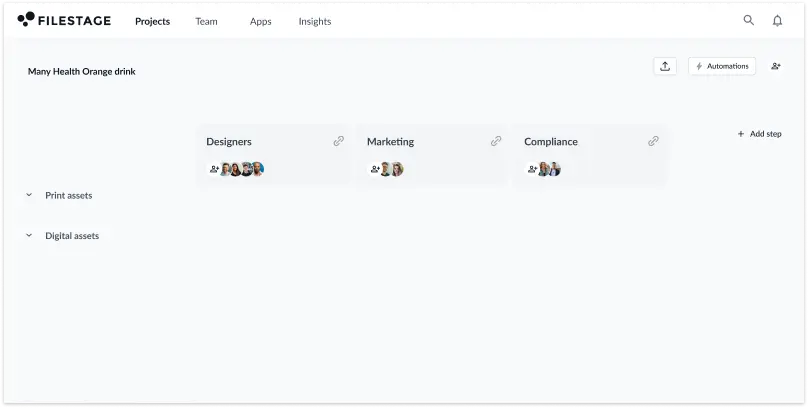
Instead of a project manager deciding who reviews each file, workflow automation assigns reviewers based on content type, channel, market, or risk level.
For example, a promotional asset containing a regulated claim gets routed to Legal automatically, while a routine social post goes straight to the brand team. Project managers stop playing traffic controller, and specialists only see the work that needs them.
In Filestage, you can set this up with project templates. Create a template for each recurring review workflow (like one for social posts that only goes to Marketing and one for regulated claims that adds Legal and Compliance). Each template then saves the reviewer groups, reviewers, permissions, and any automations you add. So when you start a new project, everything is ready to go.
Automated pre-checks (brand, claims, disclosures)
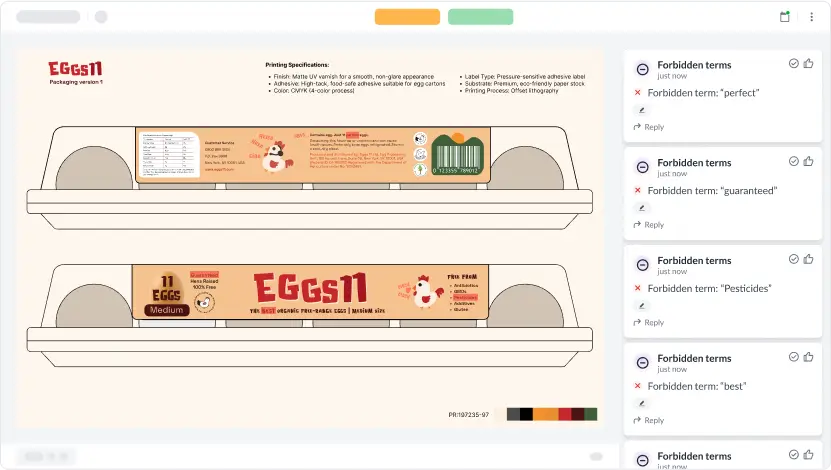
AI systems can catch obvious mistakes before a human opens the file. They scan content for things like brand guideline issues, prohibited terms, missing disclaimers, unsupported claims, accessibility gaps, and off-brand voice.
These checks should flag potential issues for a human to verify. In Filestage, Review Agents check each file before the human review begins, flagging things like forbidden terms, missing logos, and spelling errors so reviewers can focus on judgment calls. For the human side of the process, read up on AI content review.
Review workflows and reminders
Once a file reaches reviewers, automation keeps it moving. You can set sequential or parallel review steps, add due dates, track status in real time, and send automatic reminders as a deadline gets close. If someone still doesn’t respond, an escalation can notify the project owner.
In Filestage, an automation can start the review in the next group once everyone in the first group approves. Automations like these are the backbone of a dependable content approval workflow.

Deliver compliant content with confidence
Set up a consistent and compliant marketing review and approval process with Filestage.
Version control and audit trails
Version control and audit trails belong together, because an approval only means something if you know which version it applies to.
Good systems track every version alongside its feedback, review decisions, and timestamps. Reviewers always know they’re looking at the current file. And when an auditor asks what happened, the answer is ready.
In Filestage, you can export a review report for any file version. You’ll get a PDF that summarizes every comment, reply, and review decision on that version.
Our audit trail software roundup compares the options.

Publishing controls and content expiry
Approval gates and access control stop unapproved content from going live. Where tools support it, an integration can hold an asset until it’s approved.
In Filestage, an automation can move a file to a “Ready for publishing” section once the final reviewer group approves it. So your team only picks up signed-off versions, and nothing unapproved slips into the publishing queue. For extra security, you can also lock downloads or comments once a file is signed off in the review group settings.
Expiry needs the same automated enforcement. Time-sensitive claims, licensed images, event promotions, and seasonal campaigns all have a shelf life. DAM platforms like Bynder and Aprimo store expiry dates in asset metadata, and Aprimo can alert users before usage rights run out.
Reporting
Reporting dashboards show things like approval times, overdue reviews, where files get stuck, and how often content passes or fails your compliance checks. Those metrics support better decision making about where to adjust governance policies or add reviewers in the future.
Filestage’s Insights dashboard gives admins a view of review decisions, approval times, and overdue reviews across projects.

What should you automate vs. keep human?
Automate anything that follows a fixed rule. Keep human judgment on anything that carries accountability.
| Automate | Keep human |
| Terminology and disclaimer checks | Assessing claim accuracy and context |
| Reviewer routing and reminders | Final sign-off on high-risk content |
| Version tracking and audit records | Judging brand fit and tone in context |
| Expiry notifications | Policy exceptions and changes |
Automation works like a safety net. It catches the routine slips, while your reviewers still own the decisions on accuracy and brand fit. That’s why Filestage’s Review Agents flag issues but never sign off on anything.
How to automate content governance in six steps
You don’t need to automate everything at once. These six steps take you from a manual process to a governance model that mostly runs itself.
1. Audit your current governance process
Start by mapping how content moves from creation to publication today, including every handoff. Note the recurring checks, approval bottlenecks, and manual tasks that eat up your governance teams’ time.
2. Turn content policies into automation rules
Next, translate your written compliance policies into checks a system can apply. Policy automation starts with specifics:
- prohibited term lists
- required disclaimers
- mandatory logos
- named approvers for each content type
Vague guidance like “keep claims accurate” needs breaking down into specific, checkable governance rules.
3. Define risk levels and review routing
With rules in place, sort your content into low-, medium-, and high-risk tiers and give each its own workflow. Specify when Legal, Compliance, Medical, or another specialist must approve an asset.
4. Automate the repetitive steps
Then automate the steps that follow clear logic, starting with routing, reminders, version management, and audit logging. These deliver early wins without custom development or complex AI setup. If you need a dedicated tool, compare workflow automation software first.
5. Add AI-assisted and rule-based content checks
Once the basics run smoothly, layer in AI and rule-based checks. Start with AI flagging issues for human review, not blocking anything. Track false positives, missed issues, and overall accuracy before you give any check the power to stop an asset.
6. Measure and improve performance
Finally, measure what changed: review turnaround time, approval delays, number of review rounds, and issues caught before publication. Refine your policies and workflows as the numbers come in. Teams in regulated industries also face extra regulatory requirements around approval evidence (more on that below).
Best platforms for content governance automation
The best platform depends on which part of content governance you want to automate. Each tool below handles a different layer, and most enterprise teams combine a review and approval platform with a DAM or content-checking platform.
| Platform | Primary automation focus | What it automates |
| Filestage | Content reviews and approvals, pre-checks, audit trails | Routing, reminders, pre-checks, approvals, audit trail |
| Markup AI | Content quality checks | Scoring against style, terminology, and regulatory rules |
| Writer | AI content generation | Brand voice and terminology guardrails for AI output |
| Aprimo | Content operations, workflows, and DAM | Workflow routing, AI metadata, rights expiry alerts |
| Bynder | Digital asset management | Auto-tagging, permissions, asset expiry |
| Templafy | Document templates and brand compliance | Brand and disclaimer enforcement in Office and Google Docs |
| Siteimprove | Website content quality and accessibility | Automated quality, accessibility, and SEO monitoring |
1. Filestage – best for content reviews and approvals
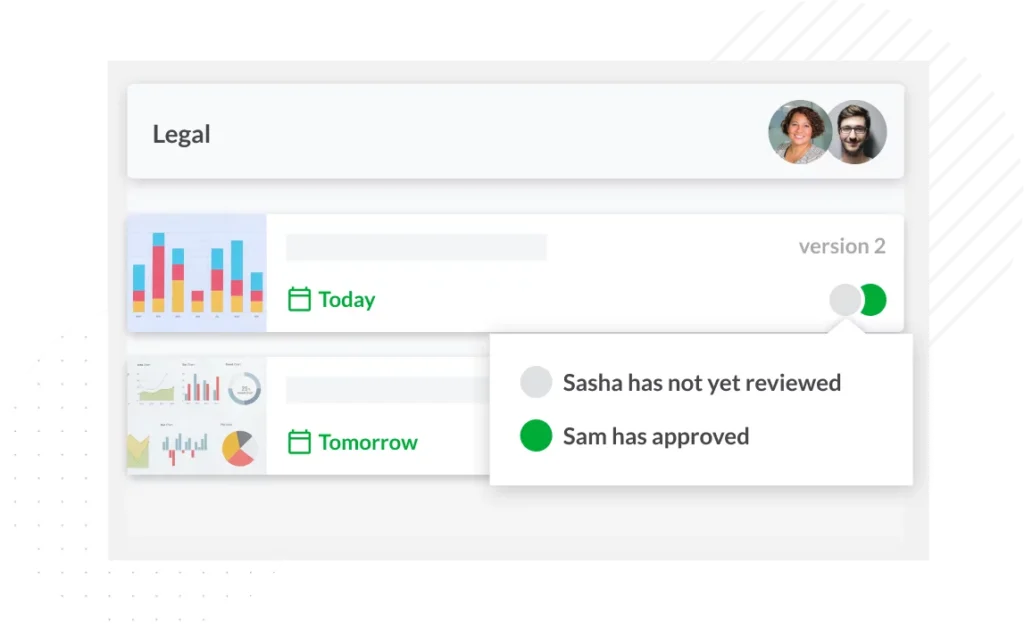
Filestage automates the review and approval workflow. It routes files to reviewer groups, sends reminders, moves work to the next step when everyone approves, and logs every decision with a timestamp. Review Agents add rule-based pre-checks before a human reviewer opens the file.
Example: A campaign asset moves from Marketing to Brand to Legal, with reminders at each stage and a record of who approved which version.
Note: Filestage is our own product. We’ve applied the same evaluation criteria here as to every other tool on this list.
Deliver compliant content with confidence
Set up a consistent and compliant marketing review and approval process with Filestage.
2. Markup AI – best for automated content quality checks
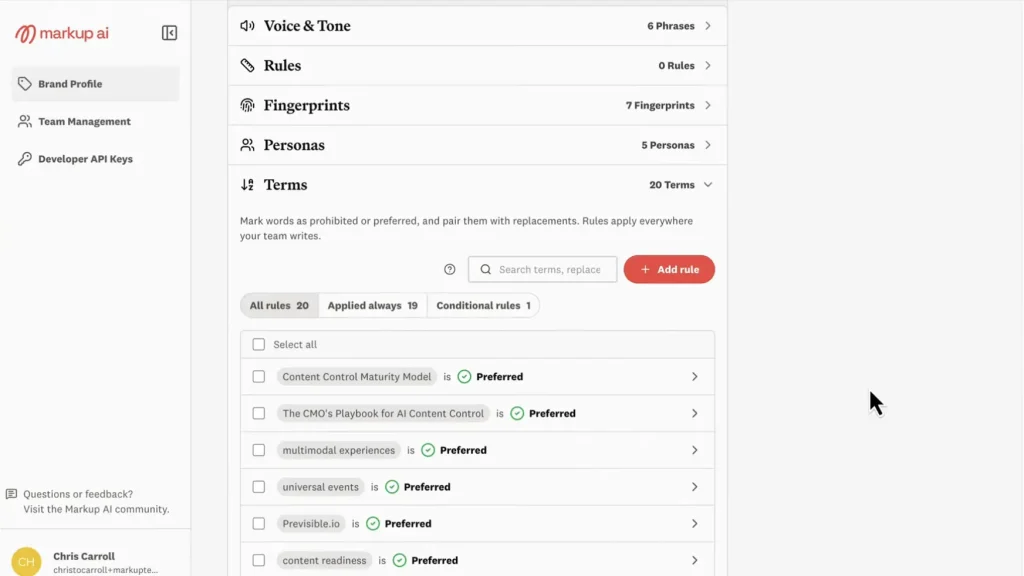
Markup AI (formerly Acrolinx) automates quality checks against your terminology and compliance rules. Its Content Guardian Agents scan, score, and suggest rewrites, and can sit inside writing apps and content pipelines as quality gates.
Example: A documentation team runs every page through Markup AI to catch deprecated product terms before review.
3. Writer – best for AI content guardrails

Writer applies governance at the moment content is generated. Admins encode style guides and terminology lists into voice profiles, so AI-assisted drafts follow your brand voice from the first line.
Example: A marketing team generates product descriptions that already use approved terms and avoid restricted words.
4. Aprimo – best for enterprise content operations
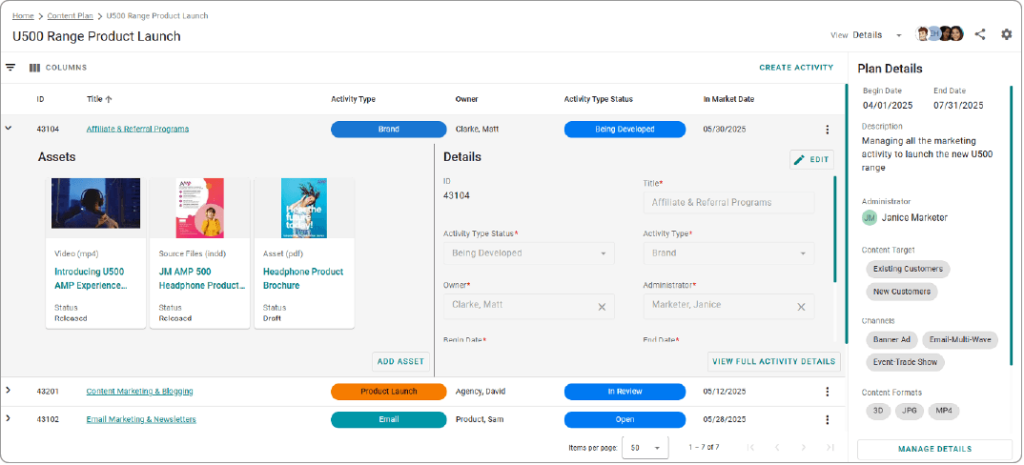
Aprimo automates the operational side of governance across assets and workflows. Its automation framework can trigger workflows, apply AI-generated metadata, enforce role-based access control, and expire content when usage rights end.
Example: A global brand uses Aprimo to detect AI-generated assets and send them for review.
5. Bynder – best for digital asset governance

Bynder governs the assets themselves. AI auto-tagging adds metadata on upload, granular access control decides who sees what, and expiration and embargo dates manage each asset’s lifecycle.
Example: A brand team sets expiry dates on campaign imagery so visuals drop out of use when the campaign ends.
6. Templafy – best for document governance
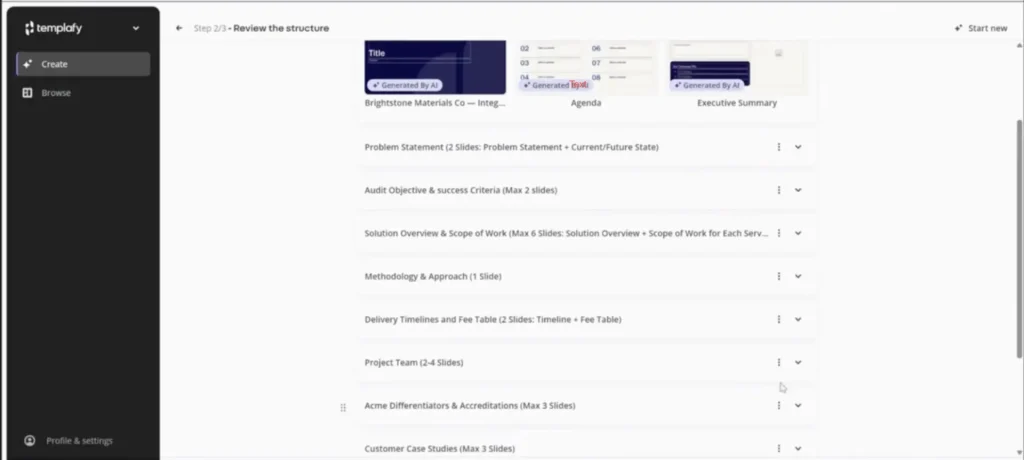
Templafy builds governance into the documents employees create every day. It serves approved templates and legal disclaimers inside Microsoft 365 and Google Workspace, and updates them centrally.
Example: A sales rep builds a client deck in PowerPoint with approved slides and current disclaimers.
7. Siteimprove – best for published content monitoring

Siteimprove keeps watch after content goes live. It continuously monitors websites for accessibility issues against the Web Content Accessibility Guidelines (WCAG), plus broken links, misspellings, and SEO problems.
Example: A web team uses Siteimprove to find accessibility issues across its pages and prioritize fixes.
Connectors like Zapier and Microsoft Power Automate can link these systems where integrations exist. For features and pricing, see our full content governance software comparison.
How to test automation features before buying
Most demos run on clean sample files where everything goes to plan. Ask the vendor to run these five checks end to end on one of your own recent assets instead.
- Routing – does a high-risk asset automatically reach the correct approver?
- AI checks – can the tool flag issues without blocking approval?
- Reminders – can it notify reviewers and escalate overdue tasks?
- Versions – can reviewers tell the current version from previously approved ones?
- Audit logs – can you export a complete record of who approved which version and when?
If a tool fails a check, ask whether the fix is on the roadmap or needs custom development.
Content governance automation in regulated industries
Regulated teams face a higher bar. A non-compliant claim can mean fines or a forced withdrawal, and when a regulator questions an asset, you have to show which version was approved, who signed it off, when, and what evidence backed each claim. That calls for tighter approval controls and full traceability.
- Pharmaceuticals – medical, legal, and regulatory (MLR) review workflows that check every claim and record every approval
- Financial services – approval and substantiation of financial promotions before they reach customers
- Healthcare – specialist review of sensitive health claims and patient-facing content
Automated governance doesn’t remove that regulatory accountability, but it can build the record as work happens.
Most of the EU AI Act’s Article 50 transparency obligations for AI-generated content have applied since August 2, 2026. Our guide to content governance under the EU AI Act covers what that means for reviews.
Final thoughts
Start with the repetitive work, like routing, reminders, version control, and audit logging. Add AI checks carefully, and measure their accuracy. And keep people responsible for judgment calls and final approvals.
Ready to automate your reviews and approvals? Start your free trial of Filestage.
Frequently asked questions
Who should own content governance automation?
Ownership usually sits with whoever owns content governance overall, often a content operations or brand lead. They set the rules with governance teams in Legal and Compliance, while a platform admin configures the automation.
What is the best platform for content governance automation?
The best platform for content governance automation depends on which layer you need to automate. For reviews, approvals, and approval records, Filestage is a strong fit. For automated quality checks, look at Markup AI. DAMs like Bynder and Aprimo handle asset governance. Most organizations combine two platforms.
Can small teams automate content governance?
Yes. Small teams often benefit most, since fewer people share the review load. Start with automated reminders, a simple approval workflow, and one central record of approvals.
Can you automate content governance with tools you already have?
Partly. Project management tools, Microsoft Power Automate, and Zapier can automate basic routing and reminders. But they rarely capture feedback on the file itself or produce a clean audit trail of approved versions. Most teams add a dedicated review tool for that layer.