

TL;DR
- An audit trail is a chronological, date and time-stamped record of who did what to a piece of content, and when, giving regulators and clients the accountability and proof of review they expect.
- Audit trail software falls into four types: security and monitoring tools, version control and document management software, accounting and ERP systems, and review and approval platforms.
- Look for tamper-proof records, user activity tracking, automatic version control, and exportable audit logs, especially as the EU AI Act now expects teams to document human review of AI-generated content.
“Who approved this and when?”
That’s the question a regulator, client, or auditor can ask at any moment. Audit trail software should let you answer in seconds, not a hunt through email threads and Slack messages.
An audit trail answers that question: a chronological, date and timestamped log of who did what to a piece of content, and when. Some industries already mandate this. The US Securities and Exchange Commission (SEC), for example, requires auditors to keep audit records for seven years.
This guide covers what an audit trail is, what one looks like, how audit trail software works, and how audit trails support compliance. It’s written for marketing and creative teams, compliance officers, and anyone responsible for managing approvals and regulatory documentation.
What is an audit trail?
An audit trail is a date- and time-stamped record of events showing who did what, when, and why. Audit trails provide a verifiable record that a process happened the way you say it did, and every audit trail protects data integrity along the way.
For marketing and creative teams, a content audit trail tracks something more specific: every comment, version, and approval on a piece of creative or copy, from upload to final sign-off. You’re not reconstructing the story from memory to prove user activity on a file, and you’re not caught flat-footed the moment someone questions data accuracy.
What does an audit trail look like? (An example)
A content audit trail usually captures six things for every action on a file:
- Timestamp – the exact date and time the action happened
- User and role – who took the action, and their part in the process (designer, brand reviewer, legal, and so on)
- Action – what happened (uploaded, commented, approved, requested changes)
- Asset and version – which file, and which version of it
- Reviewer group – the stage of review (brand, legal, final sign-off)
- Status – where the file stands after the action
Audit trails capture the who, what, when, where, and why of actions.
Here’s an audit trail example, showing what that audit data looks like for a single banner ad moving through review:
| Timestamp | User | Action | Version | Review step | Status |
| 2026-08-14 09:12 CET | Maria (Designer) | Uploaded | Summer_Banner v1 | Intake | Submitted for review |
| 2026-08-14 11:40 CET | Tomás (Brand reviewer) | Commented | Summer_Banner v1 | Brand review | “Logo clear space too tight” |
| 2026-08-15 09:30 CET | Tomás (Brand reviewer) | Approved | Summer_Banner v2 | Brand review | Passed to legal |
| 2026-08-15 14:18 CET | Priya (Legal reviewer) | Requested changes | Summer_Banner v2 | Legal review | “Add required disclaimer” |
| 2026-08-16 16:47 CET | Priya (Legal reviewer) | Approved | Summer_Banner v3 | Legal review | Passed to final sign-off |
| 2026-08-17 11:00 CET | Jonas (Marketing director) | Approved | Summer_Banner v3 | Final sign-off | Locked for publish |
(Illustrative audit trail example, not a real customer file.)
Together, the rows are detailed records you can hand to an auditor or a client without a single “let me check on that and get back to you.”
Why are audit trails important?
Audit trails serve a simple purpose: proof. A good audit trail does five things, whether you’re in finance, healthcare, or marketing:
- Regulatory compliance – it proves a review happened, which matters most in pharma, finance, and healthcare, where a missed sign-off can mean a fine and a longer list of compliance requirements
- Accountability – user activity is tied to a name, so responsibility doesn’t get lost between departments
- Security and integrity – it helps you detect unauthorized access or data changes before they become security incidents, protecting data integrity and data security
- Faster audits – the evidence is already assembled, so audit preparation is much faster, and streamlined audits mean less chasing down old files
- Trust – a verifiable record protects your brand and your client relationships, and supports operational transparency
The regulatory compliance angle is easy to underestimate. A misleading claim that ships without a documented sign-off is a fraud prevention and risk management problem waiting to happen, one that can end in legal investigations.
Internal controls and internal policies exist for exactly this: keep the audit records, and you demonstrate compliance and maintain adequate internal controls without your team feeling the friction. Most of it comes down to human error. Automated audit trails catch what a rushed manual process tends to miss.
What is audit trail software and what does it do?
Audit trail software is essential for proving compliance, ensuring accountability, and streamlining audits in regulated industries. It captures, timestamps, and stores activity automatically, so nobody has to maintain audit trails by hand.
Manual audit trails (a shared spreadsheet or an inbox of approval emails) drift out of sync with reality fast. They work fine for a two-person team, but they fall apart the moment volume grows.
Automated audit trails fix that by logging events in real time, controlling system access, and generating audit logs you can search and export.
Modern audit trail solutions go a step further. They make data usable, enabling organizations to turn raw logs into actionable insights instead of a graveyard of timestamps nobody revisits. A good platform also improves system performance monitoring and keeps data volume manageable through retention rules, so the archive never outgrows the team searching it.
Different tools create audit trail data for different things. Security tools log system errors and system events, accounting systems log financial transactions, and content review platforms log approvals, three flavors of the same idea.
The type of software you need depends on what you’re trying to prove, to whom, and under what industry-specific regulations.
Four types of audit trail software
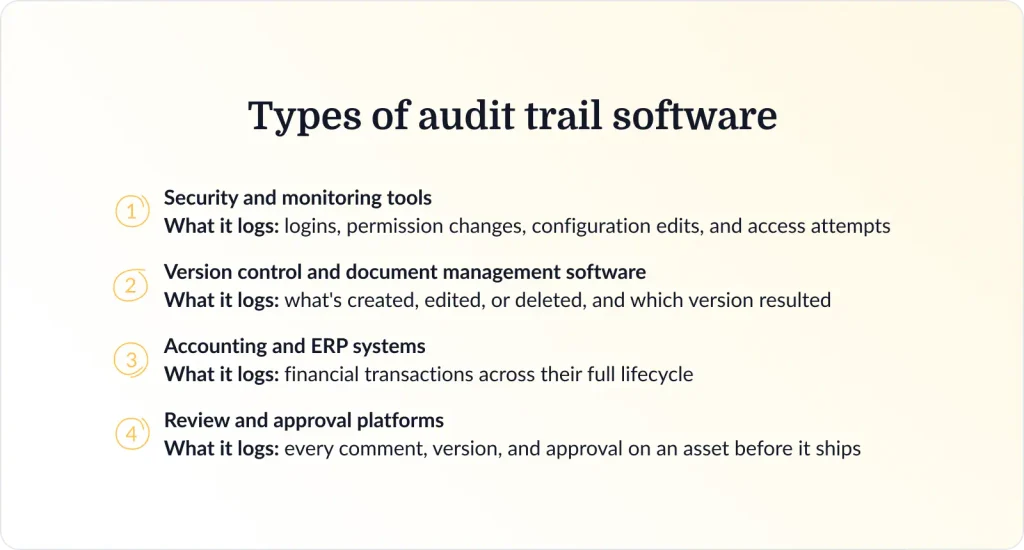
Because an audit trail is defined by what it records, the types of audit trails map directly onto four categories of software.
Security and monitoring tools
Security information and event management (SIEM), observability, and access-management platforms log logins, permission changes, configuration edits, and access attempts, producing audit logs of every change. These tools track user logins, monitor system access, and flag system activities outside normal user behavior. Security teams use security controls and security monitoring to spot security incidents before they spread. Tool examples include Splunk, Datadog, and Microsoft Sentinel.
Version control and document management software
These track what’s created, edited, or deleted in a file or database, and which version resulted. Think Git and GitHub for code, or SharePoint and Google Drive for documents, tracking data changes as they happen. It’s the same document version control principle applied to a whole file’s lifecycle rather than one review cycle.
Accounting and ERP systems
These record financial transactions across their full lifecycle, from initiation to approval to posting. Every step gets logged for financial audits, financial statements, and financial reporting. It’s this transaction record that finance teams and external auditors lean on, especially at publicly traded companies. They act as fraud prevention audit trails too, flagging unusual transactions before a human even has to notice. On the accounting side, check out SAP, NetSuite, and QuickBooks.
Review and approval platforms
This is the category built for marketing and creative work, and it’s where Filestage lives, as compliance-focused audit trail software. These platforms log every comment, version, and approval on an asset before it ships, prints, or goes live, creating the kind of user activity audit trails a brand or compliance team can check without asking around. No separate approval tracking tool bolted on after the fact. It’s just how the platform works.
Most organizations run several types of audit trails software at once, shaped by industry-specific regulations that apply to just one department.
Core features to look for in audit trail software
Good audit trails share a few traits that keep you in audit trail compliance, whatever audit trail software creates them:
- Tamper-proof, timestamped records that hold up as a verifiable record if questioned later
- Every action tied to a named user, for real user activity tracking, not a generic log entry
- Automatic version control, so you’re never guessing which file is current, with data accuracy and data integrity built in
- Captured approvals and sign-off, including digital signatures where a regulation requires one
- Role-based access controls and system access rules, so only the right people see sensitive data
- Searchable, exportable audit logs for when an audit or a client actually asks
- Integration with the tools your team already uses
For a side-by-side of platforms that keep an approval audit trail, see our roundups of review and approval software and content governance software.
How to build an audit trail for marketing and creative content
Here’s what a good approval workflow looks like, and how it moves a marketing asset from request to release.
The review-to-release workflow
Three things happen, in order:
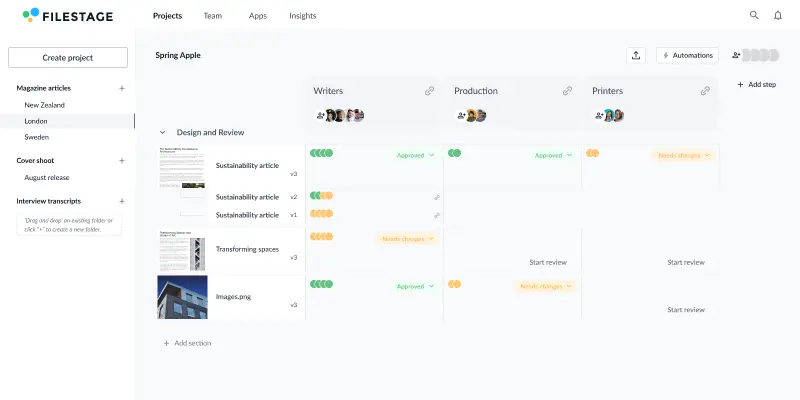
- A brief comes in, reviewers comment directly on the file instead of over email, and each new version gets tracked automatically
- Brand, legal, compliance, whoever needs to sign off, does it in order
- Then the approved version gets locked before it ships, prints, or goes live. No last-minute swap nobody remembers approving
Each of those steps leaves a timestamped record, your audit trail, built without treating audit trail management as a separate task. It’s what you hand over when someone actually asks for proof.
How Filestage builds the trail automatically
Audit trail software built for review and approval work earns its place right here. Filestage keeps a complete history of every comment, review decision, and approval on a file, letting you compare versions side by side without digging through your inbox first.

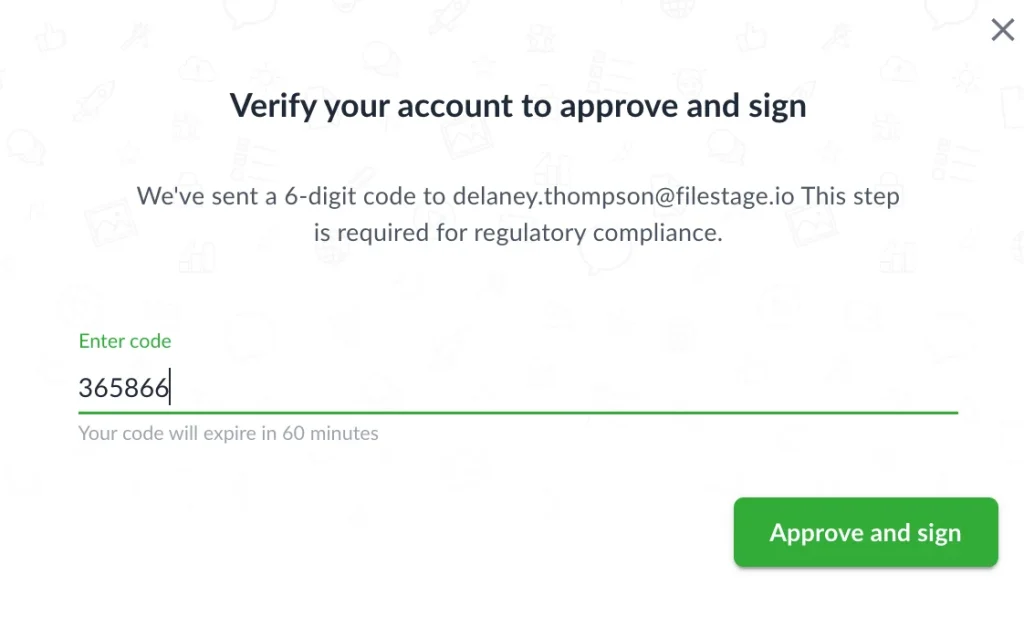
On the Enterprise plan, you can also turn the approve button into a formal, password-verified “approve and sign” step, lined up with FDA 21 CFR Part 11 and EU Annex 11, for teams that need a signed-off chronological record rather than just a comment thread.
Deliver compliant content with confidence
Set up a consistent and compliant marketing review process with Filestage.
When marketing and creative teams need an audit trail
Not every team needs one for the same reason. Here’s where it actually earns its keep, whether that’s clearing a regulator, protecting a client relationship, or catching a rogue AI-generated line before it publishes.
Getting regulated claims approved before they publish
In pharma, finance, and healthcare, a claim has to clear review and get legal sign-off before it goes out. Your audit trail proves that review happened: which version, which reviewer, and when. Automated audit trails make this easier to prove than a manual process ever could, when regulatory requirements are on the line. Ask any marketing compliance team which one they’d rather explain to a regulator.
Proving client sign-off (for agencies)
A timestamped record of approval protects your scope and billing. It shows exactly what the client signed off on, in writing, rather than a scrolled-past email thread months later. Good approval software makes that record the byproduct of doing the work, not a separate admin task.
Enforcing brand governance
You can confirm that brand and legal approved logo usage, messaging, and trademark treatment before a campaign shipped, thanks to internal controls that catch the off-brand asset that skipped review. That’s brand governance doing actual work, not sitting in a slide deck somewhere.
Signing off print and packaging before it’s too late
Print is irreversible, and reprints are expensive. Your audit trail proves the artwork that went to press is the one that was actually approved. Without an audit trail, that’s just memory against memory. Artwork approval software exists precisely so that argument never has to happen.
Documenting AI-assisted content review
As teams use AI to draft copy and visuals, the audit trail records that a human reviewed and approved the output before it shipped. That matters under the EU AI Act. AI-generated text on matters of public interest can skip disclosure if it’s been through human review and your audit trail is the proof. It’s also what an AI review assistant needs to log alongside a human’s sign-off, proof the machine didn’t have the last word.
The future of audit trails: automation, AI, and continuous compliance
Automation and AI transform audit trails from passive record-keeping into active, intelligent risk management. Automated audit trails capture activity in real time, instead of someone writing it down after the fact.
Continuous compliance is a big part of that shift. Automated evidence collection and real-time dashboards are replacing once-a-year audit prep, for better operational efficiency across the review cycle. That means the answer to “was this reviewed and approved?” is always available, not assembled in a panic.
Regulation is catching up too. The EU AI Act’s Article 12 requires high-risk AI systems to automatically log events for traceability, and Article 26 requires deployers to keep those logs for at least six months. For most high-risk systems, both apply from December 2027.
Article 50, which has applied since August 2026, adds transparency rules for AI-generated content. AI providers have to mark synthetic images, video, and audio as AI-generated, and deepfakes must be disclosed. AI-generated text published on matters of public interest must be disclosed too, unless it’s been through human review and someone holds editorial responsibility for it. That’s where your audit trail comes in. It proves who reviewed the AI-assisted content, which version they approved, and when.
See our breakdown of the EU AI Act for brands for what else it covers.
Final thoughts
An audit trail turns “trust us, it was reviewed” into proof. Whether you’re protecting a client relationship or clearing a regulator, the record needs to exist before someone asks for it. It’s also a strategic advantage: the team that can produce a clean audit trail on demand looks more credible than the one that can’t.
Start your free trial of Filestage to set up structured approval workflows with clear audit trails.
Frequently asked questions
Are audit trails required by law?
It depends on your industry, but the pattern repeats everywhere you look. Public company audits fall under the Sarbanes-Oxley Act, which requires auditors to retain the underlying records for seven years. Healthcare data has HIPAA (the Health Insurance Portability and Accountability Act) requiring audit controls for patient records, and card payment data has the Payment Card Industry Data Security Standard (PCI DSS) requiring audit logs kept for 12 months. GDPR doesn’t spell out audit trails, but its accountability principle and security requirements mean you need to be able to show how personal data is handled.
What’s the difference between an audit trail and version history?
Version history tracks changes to a single file. An audit trail is broader: it tracks user activity across a whole process, not just new file versions. There are also several types of audit trails, security logs, financial records, review histories, that all work slightly differently depending on what they’re built to prove.
How do audit trails support compliance?
They give you a verifiable record, your audit trail, that you can hand to an auditor or regulator on request, instead of reconstructing what happened from memory.
Do marketing and creative teams need audit trail software?
If you work in a regulated industry, manage agency or client relationships, or use AI in your content process, yes. The risk isn’t usually fraud, though a solid audit trail does help prevent fraud, since every action is tied to a name.
Does Filestage keep an audit trail?
Every plan keeps a full version history, so you can go back to earlier versions and check the comments. On Business and Enterprise plans, you can also export a review report, a PDF with every review decision, so you have a record of your approval process. Enterprise adds audit logs, a detailed history of account actions like logins, permission changes, and deletions.