
Managing creative projects can be challenging, to put it lightly. Tight deadlines. Endless file versions. Feedback scattered across emails, Slack threads, and shared docs. It’s a lot to keep on top of.
And while most project management tools are great for handling tasks and timelines, they often fall short when it comes to the unique needs of creative teams.
That’s why we’ve rounded up 20 of the best creative project management tools on the market, packed with features that make life easier for creative marketing teams and agencies.
Before we dive in, let’s explore some of the most useful features to look out for when choosing the right tool.
Key features when choosing creative project management software
Here are some of the essential features to look for when choosing the best creative management software for your team.
- Centralized approvals – Make your life easier by keeping all assets and sign-offs in one place.
- In-context feedback – Let reviewers comment directly on creative files for clearer, faster feedback.
- Collaboration tools – Allow reviewers to comment directly on assets so communication doesn’t get lost in inboxes.
- Version management – Track different file versions so no one ends up working on outdated assets.
- Templates – Speed up project setup with reusable or pre-built templates for creative workflows.
- Reporting and analytics – Track project progress and spot bottlenecks early on.
- Scalability – Choose a tool that grows with your team, whether you’re managing a handful of projects or a full portfolio.
- Ease of use – Make sure stakeholders can jump into the tools without a steep learning curve.
- Integrations – Connect with tools your team already uses to keep work flowing smoothly.
- Competitive pricing – Some platforms charge per user, while others charge per project. Look for tiered pricing that lets you scale up or down as needed.
20 best creative project management software
Now that you know what to look for, let’s dive into the 20 best creative project management software solutions that’ll keep your projects running smoothly from start to finish.
1. Filestage – best for creative review and approvals

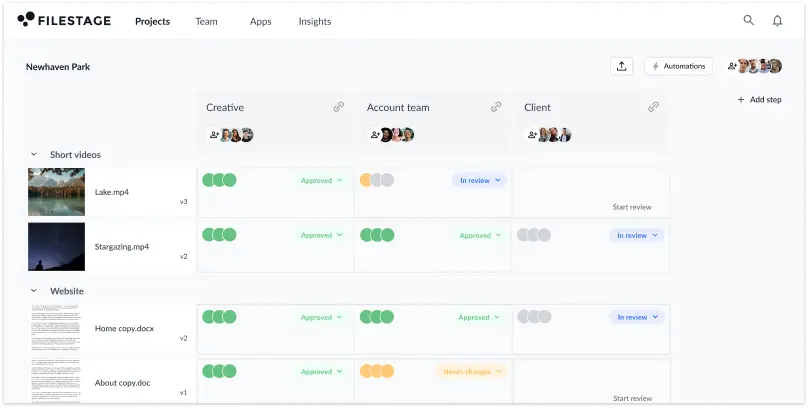
Filestage is an online proofing tool that helps creative agencies and marketing teams speed up the content review and approval process.
Filestage makes it easy to share, review, and discuss files with colleagues or clients. All invited reviewers can leave comments and annotations on the file for everyone to see, helping teams avoid misunderstandings and speed up sign-off.
Main features
- In-context comments and visual annotations
- Version history with side-by-side comparisons
- Real-time collaboration on all file types
- Due dates to keep projects on track
- Structured review steps for approvals
Pros
- Brings clarity and transparency to the feedback process
- Reduces back-and-forth and helps projects move faster
- Makes sign-off smoother by ensuring the right people review files at the right stage
Cons
- Requires internet access (no offline mode)
Customer reviews
Filestage has an overall rating of 4.7 out of 5 stars on Capterra, with an average likelihood to recommend of 9.1/10

“Filestage is one of the only tools that lets our marketing team and agency partners collaborate in one platform. Our internal team sets up the approval workflow, then the agency can upload their content directly to kickstart the review process. This makes sure everything goes through the necessary product managers and technical experts before it goes out the door, no matter whether it was created in-house or externally.”
Karina Berner, Creative Production Specialist at Sartorius
Put missed feedback in the past
Take control of your review process and deliver compliant content at scale with Filestage.
2. monday – best for flexible creative project management

monday.com is a versatile project management platform designed to help cross-functional teams plan, organize and track work in one place. With customizable workflows and highly visual collaborative workspaces, you can manage projects in the way that works best for you.
Main features
- Workflow centralization and customization
- Multiple project views, including Kanban, Gantt, timeline, and calendar
- Custom dashboards for tracking progress
- Code-free automations to save time
- Integrations with 200+ apps
Pros
- Adapts easily to different industries and team needs
- Its clean, colorful interface is easy to navigate
- Saves time by automating repetitive tasks
Cons
- Requires onboarding to unlock its full potential
- Paid plans can be expensive for small teams and startups
- Advanced features are only available on higher pricing tiers
- Creative feedback still needs to be shared outside of the platform
Customer reviews
4.6/5 on Capterra
3. Wrike – best for managing complex, cross-team projects

Wrike is a project management tool designed to help marketing and creative teams streamline workflows and collaborate in real time from anywhere.
With customizable dashboards, templates, and multiple project views, Wrike makes it easier to manage even the most complex projects. Robust features like workflow automation, resource management, and budget tracking make it a strong choice for scaling organizations that need enterprise-grade functionality.
Main features
- Customizable dashboards for personalized project views
- Task tracking and management
- Workflow automation to reduce repetitive tasks
- Resource management tools
- Budget management tools
- Integrations with Slack, Microsoft Teams, and other apps
Pros
- Supports collaboration across multiple teams and locations
- Streamlines workflows with ready-made templates and automation
- Scales easily to meet the needs of growing organizations
- Integrates with Filestage for seamless review and approvals
Cons
- Requires time and training to set up effectively
- Some integrations have restrictions or require extra setup
- Mobile app offers fewer features than the desktop version
Customer reviews
4.4/5 on Capterra
4. Asana – best for task management and team accountability

Asana is one of the most widely used project management tools, known for helping creative teams plan, organize, and track progress for projects of all shapes and sizes.
The tool comes packed with pre-built templates to help you hit the ground running. And its intuitive interface makes it easy to organize tasks, deadlines, and project goals in one place – for everyone to see. This clear visibility helps everyone involved to stay on track and see how their work contributes to the bigger picture, boosting accountability and collaboration.
Main features
- Task assignment with due dates and priorities
- Interactive project views, including Kanban boards, timelines, and Gantt charts
- Real-time analytics for tracking progress
- Workflow automation for repetitive tasks
- Ready-made templates for quick project setup
Pros
- Simplifies project setup with ready-made templates
- Provides flexibility with multiple project views
- Helps teams stay accountable to deadlines and dependencies
Cons
- Lacks advanced file management for creative projects
- Requires time and training to onboard new users
- Not ideal for managing large files like videos
Customer reviews
4.5/5 on Capterra
5. Trello – best for simple, visual task tracking

Trello is one of the most popular project management tools around, loved for its simplicity and intuitive design. Built around Kanban boards, it helps creative teams visualize projects and tasks in a way that feels natural and easy to follow. Its drag-and-drop interface and colorful labeling system help make it even more accessible.
Main features
- Interactive boards, lists, and cards for task organization
- Drag-and-drop editing for easy updates
- No-code automation to save time
- Labels, tags, and comments for context and collaboration
- Real-time notifications for task updates
- Integrations with Google Drive, Slack, and other popular apps
Pros
- Simplifies project management with an intuitive, visually appealing interface
- Adapts easily to different workflows
- Speeds up task management
Cons
- Lacks advanced features for complex, enterprise-level projects
- Can become cluttered with too many boards or cards
- Offers limited reporting and analytics compared to other tools
Customer reviews
4.5/5 on Capterra
6. Teamwork Projects – best for client work and resource management

Teamwork.com is one of the most comprehensive and well-thought-out project management platforms out there, giving you everything you need to track a project from start to finish. With features like resource allocation, time tracking, invoicing, and CRM, it’s especially useful for marketing agencies that need to manage multiple client projects and budgets in one place.
Main features
- Time tracking for billable hours and resource management
- Pre-built project management templates to standardize recurring tasks
- Gantt charts for project planning and scheduling
- Custom collaboration features and CRM integration for improved client management
- Billing and invoicing with multi-currency support
Pros
- Tracks projects end-to-end, including billing and invoicing
- Improves client collaboration with built-in communication tools
- Helps managers allocate resources and monitor team workloads
Cons
- Task organization can get messy, making it hard to stay on top of updates and changes
- The mobile app lacks many key features
- Reporting and customization options are limited unless you upgrade to higher-priced plans
Customer reviews
4.5/5 on Capterra
7. ClickUp – best for centralizing work in one platform

ClickUp is an all-in-one tool that makes managing creative projects a breeze. It’s especially well-known for its customizable workflows and automation features, which save creative teams significant time and effort.
It brings tasks, documents, goals, and communication together into a single platform for seamless collaboration, while giving teams the flexibility to plan and track projects in the way that works best for them.
Main features
- Customizable task management
- Creative workflow automation
- Timelines, calendars, and map views for project tracking
- Notes, folders, lists, subtasks, and checklists for task organization
Pros
- Centralizes tasks, files, and communication in one platform
- Adapts easily to different workflows with highly customizable features
- Reduces tool overload by replacing multiple apps with one
Cons
- Steeper learning curve due to complex settings and views
- Uploaded files can’t be moved between tasks
- New projects appear at the bottom of the list by default
Customer reviews
4.6/5 on Capterra
8. nTask – best for simplified project planning

nTask offers small businesses, independent creatives, and solo project managers a powerful project management solution with an emphasis on simplicity and affordability. The platform supports project planning, task management, time tracking, meeting integration, and risk management, all on a cost-effective scale.
Main features
- Project planning with budgeting, milestones, and dependency tracking
- Interactive Gantt charts and Kanban boards for visual project tracking
- Task and subtask management with notes, attachments, and recurring tasks
- Time tracking, effort logging, and timesheets for resource visibility
- Meeting and risk management, including agendas, minutes, and issue logs
Pros
- Stands out as an affordable yet powerful tool for smaller design teams
- Simplifies project planning, tracking, and management
- Brings clarity with visual tools that show progress and workloads at a glance
Cons
- Navigation and dashboards can feel a bit clunky
- Mobile apps don’t always deliver the smoothest experience
- Free tier is quite limited in terms of features and storage
Customer reviews
4.2/5 on Capterra
9. Paymo – best for project management and billing in one

Paymo is a complete time tracking, project management, and invoicing solution designed for small client-focused creative teams. From planning tasks and managing schedules to sending invoices and getting paid, Paymo helps small agencies stay organized and profitable without the need for multiple tools.
Main features
- Task management with lists, filters, and priorities
- Timesheet management with built-in time tracking
- Team scheduling with calendar and workload views
- Estimates, invoices, and online payment options
- Timesheet reporting with live updates
Pros
- Streamlines agency workflows by combining project planning, time tracking, and invoicing in one platform
- Helps teams stay profitable by tracking hours and billing clients accurately
- Makes collaboration smoother with real-time scheduling and updates
Cons
- Free plan limited to 10 projects and 1 GB storage
- Advanced tools like Gantt charts and task dependencies only available on paid plans
- May feel limited for larger teams or more complex project requirements
Customer reviews
4.7/5 on Capterra
10. FunctionFox – best for reducing admin in creative teams

FunctionFox is a straightforward tool that helps creative and marketing teams spend less time on admin and more time on the fun bits. It combines time tracking, scheduling, budgeting, and reporting in one place, so you don’t have to juggle spreadsheets or multiple apps to keep projects on track. This helps agencies and creative professionals deliver projects on time, on budget, and with less stress (and boredom!).
Main features
- Time and expense tracking with simple entry options
- Estimates and budget planning for projects
- Real-time project reports and insights
- Charts, schedules, and email alerts to monitor deadlines
- Resource management tools for team capacity planning
Pros
- Cuts down on paperwork with quick time entry and built-in timesheets
- Saves hours of admin by automating reports and deadline alerts
- Keeps teams organized by combining tracking, scheduling, and budgeting in one tool
Cons
- Dashboard layout can feel clunky and segmented
- Privacy features are less robust compared to enterprise tools
- May lack the depth larger organizations need for complex projects
Customer reviews
4.5/5 on Capterra
11. ProProfs Project – best for simple client collaboration

ProProfs Project is an easy-to-use creative project management software that helps creative teams and their clients stay on the same page. With a clean dashboard for project tracking, it makes collaboration simple and keeps things moving steadily toward project completion with no fuss.
From planning tasks and sharing files to managing invoices, ProProfs Project offers an all-in-one workspace. And because it’s mobile-friendly, you can stay connected to your projects wherever you’re working.
Main features
- Real-time file sharing, discussions, and idea exchange
- Gantt charts for project progress and scheduling
- Reporting to identify risks and bottlenecks
- Invoicing tools for smooth client billing
- Mobile-friendly platform for access on the go
Pros
- Simplifies client collaboration with easy sharing and updates
- Helps teams stay proactive with clear progress tracking
- Combines project management and invoicing in one platform
Cons
- Reporting and analytics are fairly basic
- Mobile app lacks many desktop features
- Limited customization options for complex workflows
Customer reviews
4.7/5 on Capterra
12. Workzone – best for creating task templates

Workzone is a creative project management tool that combines powerful features with hands-on support to help creative, marketing, and project management teams work smarter.
Its USP is templates, with a whopping 500+ of them ready to help you launch faster and stay consistent project after project. Once workflows are in place, Workzone keeps everything moving smoothly from start to finish. It also offers unlimited training and responsive support so that you’re never left figuring things out alone.
Main features
- Project templates for repeatable workflows
- Gantt, Kanban, calendar, and board views for visual tracking
- File and document management with version control and approvals
- Resource and time tracking with workload reports
- Dashboards and alerts for real-time project visibility
Pros
- Saves time with ready-to-use templates
- Makes progress clear with visual tracking and reports
- Supports teams with unlimited training and responsive help
Cons
- File storage can be tricky to organize when managing multiple projects
- Limited automation for repetitive tasks
- Mobile version is less smooth than desktop
Customer reviews
4.8/5 on Capterra
13. Planview AdaptiveWork – best for large creative teams and agencies

Planview AdaptiveWork (formerly Clarizen) is an enterprise project management platform built for large creative teams and agencies. It gives leaders visibility across campaigns, budgets, and resources so they can keep projects on track and clients happy.
Its strength is resourcing. You can assign designers, copywriters, or video editors based on skills and availability, then adjust workloads in real time. Portfolio views and reporting make it easier to manage multiple campaigns at once, while automation cuts down on admin.
Main features
- Portfolio and marketing campaign planning for large creative teams
- Advanced resource scheduling with skills-based allocation
- Document sharing and centralized file repositories
- Timesheets and expense tracking
- Workflow automation and collaboration tools
Pros
- Gives leaders full visibility across campaigns and resources
- Reduces admin with built-in automation and reporting
- Matches the right creative skills to the right projects
Cons
- Interface feels dated compared to newer tools
- Requires time and training to set up
- Best suited to enterprise teams, not small agencies
Customer reviews
4.3/5 on Capterra
14. Zoho Projects – best for affordable all-in-one project management

Zoho Projects is part of Zoho’s wider suite of business apps, and offers an affordable yet powerful way to plan, organize, and track projects to completion. It’s a good fit for small and mid-sized creative teams that need task management, collaboration, and reporting without breaking the bank.
Main features
- Task and subtask management with milestones and dependencies
- Customizable project views, including Gantt charts and Kanban boards
- Timesheets for billable and non-billable hours
- Issue tracking to monitor and resolve project blockers
- Real-time collaboration with comments, mentions, feeds, and forums
- Integrations with Zoho’s ecosystem and 100+ third-party apps
Pros
- Brings task management, collaboration, and reporting into one affordable tool
- Adapts to different workflows with flexible project views
- Fits neatly into existing setups with Zoho and third-party integrations
Cons
- Advanced features may require setup and customization
- Limited customization options for reports and analytics
- Limited financial management features without Zoho Books
Customer Reviews
4.5/5 on Capterra
15. Basecamp – best for simple team communication and collaboration

Basecamp is a creative project management tool that keeps tasks, files, and conversations together in one place. It’s a popular choice for creative teams that want a simple, centralized way to stay organized without juggling multiple apps.
The platform includes to-do lists, message boards, schedules, file storage, and automatic check-ins to cut down on back-and-forth emails. Intuitive Hill Charts give you a visual way to track progress, while mobile and desktop apps make Basecamp easy to access from anywhere.
Main features
- To-do lists for task management
- Message boards for team discussions
- File storage and document sharing
- Scheduling with calendar integration
- Automatic check-ins for daily or weekly updates
- Hill Charts for visual project tracking
Pros
- Keeps project work and communication in one simple platform
- Cuts down on status meetings with automatic check-ins
- Supports remote collaboration with apps for desktop and mobile
Cons
- Limited customization compared to other tools
- Lacks built-in time tracking and advanced reporting
- No built-in video conferencing
Customer reviews
4.3/5 on Capterra
16. ActiveCollab – a powerful and simple project collaboration tool

ActiveCollab is a productivity and project collaboration tool that brings task management, time tracking, invoicing, and teamwork together in one place. Alongside its core project management features, it also offers estimates, notes, calendar views, and personal to-do lists. This makes it easy for creative teams to plan projects, track progress, and manage client work from start to finish.
Main features
- Task and project management with clear overviews
- Time tracking and invoicing to bill clients accurately
- Budgeting and profitability tracking
- Workload management and capacity planning
- Team and client collaboration in one workspace
Pros
- Combines project, time, and billing management in one tool
- Helps agencies balance workloads and prevent burnout
- Keeps client communication organized in a single space
Cons
- Interface feels dated compared to newer platforms
- Limited integrations with third-party tools
- Advanced features may be more than small teams need
Customer reviews
4.5/5 on Capterra
17. Robohead – best for in-house marketing and creative teams

Robohead is a project management tool built specifically for in-house marketing and creative teams. It helps you organize projects, balance workloads, and keep creative deliverables on track. With customizable creative request forms, creative asset management, and robust reporting, Robohead gives teams everything they need to take projects from intake to delivery.
Main features
- Customizable request forms and creative briefs
- Resource and workload management with charts and schedules
- Asset management for organizing project files
- Robust reporting and dashboards for tracking progress
- Campaigns and surveys to collect feedback
Pros
- Speeds up project intake with structured request forms
- Keeps creative teams balanced by making workloads visible
- Gives managers clarity on progress and risks with detailed reporting
Cons
- Occasional glitches and bugs reported by users
- Templates can be tricky to customize
- Limited flexibility for non-marketing teams
Customer reviews
4.6/5 on Capterra
18. ProofHub – best for all-in-one creative project management

ProofHub is an all-in-one project management platform that helps teams plan, organize, and deliver projects efficiently. Managers get a bird’s-eye view of tasks and workloads, while teams can switch between Gantt, Table, or Kanban views to track progress with clarity.
ProofHub also includes timesheets, file sharing, and light proofing features to keep creative projects moving forward without the need for many extra tools.
Main features
- Task and workflow management with Gantt, Kanban, and Table views
- Timesheets and time tracking with manual and automatic timers
- Threaded discussions, team chat, and announcements for easy communication
- File sharing and centralized document management
- Customizable templates, workflows, and reports
Pros
- Intuitive interface with comprehensive features
- Helps managers stay on top of workloads with a bird’s-eye view
- Boosts clarity with flexible project views for teams
Cons
- Limited integrations with third-party software
- Limited customization options for Gantt charts and calendars
- No built-in budget or expense tracking
Customer reviews
4.5/5 on Capterra
19. Milanote – best for visualizing creative projects

Milanote is a creative management tool that helps you organize your creative projects into beautiful visual boards. It feels a lot like working on the wall of a creative studio – visual, tactile, and sometimes a bit messy. You can add notes, images, links, files, and to-do lists to the flexible interface, and arrange content using the drag-and-drop functionality.
It’s a great fit for designers, marketers, and other creatives who need to brainstorm, plan, and collaborate visually.
Main features
- Visual project boards with drag-and-drop navigation
- Notes, to-do lists, and simple text editing
- Uploads for images, files, and documents
- Real-time collaboration on shared whiteboards
- Built-in templates to get projects started quickly
Pros
- Creates a visual, studio-like space for creative projects
- Makes collaboration easy for remote teams
- Helps teams get started faster with ready-made templates
Cons
- Mobile apps can be buggy compared to desktop
- Limited advanced project management features
- Free plan has strict limits on storage and boards
Customer reviews
4.7/5 on Capterra
20. Redbooth – best for fast project setup

Redbooth is a project management tool that helps teams get started at lightning speed. Its library of pre-built templates covers everything from social media campaigns and web design to PR and CRM. All you need to do is pick a template, and Redbooth sets up the tasks and workflows so your team can start working right away.
Main features
- Pre-built project templates for a wide range of projects
- Kanban boards and drag-and-drop task management
- Gantt charts and timelines for scheduling
- Conversations, team chat, and HD video meetings
- Reporting dashboards for project analytics
Pros
- Gets teams moving quickly with ready-made templates
- Combines task management, scheduling, and communication in one tool
- Integrates with popular apps for smoother workflows
Cons
- Templates have limited customization options
- Reporting features may lack depth for complex projects
- No option to set dependencies between tasks
Customer reviews
4.4/5 on Capterra
Why traditional project management software doesn’t cut it for creative work
Project management tools alone often fall short for creative work. Here’s why:
- Feedback still gets lost in Slack threads or email chains
- Comments lack context when they’re not pinned to the file (especially for designs and videos)
- Large creative assets are tricky to share and preview
- Limited design annotation tools for detailed feedback
- No version history, so teams risk working on outdated files
- Approvals still happen outside the tool, slowing projects down
- Difficult to involve external stakeholders in the review process
- Lack of clarity on who needs to review what, and when
The best option is to pair your project management software with an online proofing tool to keep feedback, versions, and approvals in one place.
Six reasons to integrate Filestage with your project management tool
Here are six of the main benefits of integrating Filestage with your project management tool, for full creative control:
- Save time – Speed up approvals by keeping all feedback in one place.
- Improve visibility – See who’s reviewed what, compare versions side by side, and check approval status at a glance.
- Enhance collaboration – Bring teammates, clients, and stakeholders into one shared space for a more seamless and collaborative creative approval workflow.
- Scale your creative content – Use templates and automations to keep every project organized and efficient as your workload grows.
- Reduce errors – In-context comments and version control mean nothing gets lost in translation.
- Keep clients happy – Give clients a simple, stress-free way to leave feedback and approve content.
You can find more best practices in our creative project management playbook.
How to manage creative projects in Filestage
Here’s how to manage creative projects in Filestage in six simple steps:
- Sign up to Filestage for free
- Create and name your new project
- Upload files and set deadlines
- Invite reviewers via link or email
- Collect feedback in the comments
- Repeat the process until final approval

Final thoughts
Creative projects come with enough challenges. Your tools shouldn’t be one of them. By choosing the right project management software and pairing it with a robust proofing tool like Filestage, you can keep feedback clear, approvals simple, and projects moving forward seamlessly.
Ready to take full control of your creative projects? Start your free Filestage trial today.