
TL;DR
Great design is rarely the work of one person alone. It takes a team of graphic designers, marketers, stakeholders, clients, and reviewers to create visuals that are both creative and effective. Clear processes, structured feedback, and collaborative tools help your team deliver stronger work faster.
In this article, we show you how to best structure your design process. You’ll learn simple ways to collaborate better with your team and clients, including:
- Set up a central hub for collaboration
- Give clear, actionable feedback
- Keep communicating
- Make space for creativity
- Set clear timelines and responsibilities
Why graphic design collaboration matters
When a piece of graphic design misses the mark, it’s easy to blame the graphic designer. In face, 89% of designers say they’ve even been blamed for poor sales. But more often than not, the real culprit is actually a messy design process.
Strong design doesn’t sit neatly with one person. It takes a cross-functional team and some serious design collaboration to turn a creative idea into something that helps businesses achieve their goals.
Simply put, if your teammates know how to work together efficiently, projects move faster and the final work usually performs better. If not, the results will probably speak for themselves.
Supercharge your design reviews
Manage every comment, version, and approval in one place with Filestage.
What is graphic design collaboration?
Design collaboration is the process of multiple people working together to create, review, refine, and approve visual content.
This could involve marketers, copywriters, project managers, developers, creative directors, legal or compliance reviewers, and at the centre of it all, the graphic designers.
Graphic designers don’t just make things look slick. They interpret business objectives, solve communication problems visually, and guide stakeholders through creative decisions. Effective collaboration gives graphic designers the space and clarity to do just that.
Collaboration should ideally happen at every stage of your design project:
- During briefing and research
- During the creative process through concepting and development
- After delivery through feedback, revisions, and approvals
But like anything, creative collaboration doesn’t always go to plan. Challenges can pop up at any point in the process, including common culprit like:
- Vague or incomplete briefs
- Conflicting stakeholder feedback
- Too many decision-makers
- Inefficient communication channels
- Scope creep and unclear expectations
If any of these sound familiar, you’ve clicked on the right article. Keep reading to find out how to build a smoother graphic design process.
How to structure your design process for better collaboration
A clear design process makes collaboration a lot easier. When everyone in your team knows what happens at each stage and where they need to step in, they can focus on making great work rather than putting out fires.
To help get your next project off to a smooth start, I’ve put together a simple process that you can implement straight away.

Step 1: Prepare a clear creative brief
Every effective design starts with a comprehensive brief. Without a solid foundation, graphic designers are forced to make assumptions, which almost always leads to misalignment and extra revisions later on.
A solid creative brief should include:
- Project goals and objectives
- Information about the target audience
- Brand guidelines and assets
- Visual references or inspiration
- Required deliverables and formats
- Success criteria or KPIs
Depending on the size and nature of your project, it’s a good idea to have a briefing meeting to kick things off. That way, your graphic designer has space to ask questions and align on timelines, responsibilities, and approval processes.
Step 2: Create the designs
Once the brief is approved and everyone’s on the same page, it’s time to start the design work. This is where a lot of collaboration processes quietly start to crumble, but I’ve got a few tips to keep your team on the right track.
One mistake many designers make is waiting too long to share the work. I know it’s tempting to work on concepts until they feel polished, but this can backfire if the design isn’t going in the right direction.
To avoid wasted work, clarify some realistic expectations for the first review round. That could be:
- rough concepts
- wireframes
- moodboards
- layout directions
- early typography explorations
It’s also important to keep bringing the work back to the original objective. Once multiple people get involved, projects can easily drift into a world of personal preferences and subjective opinions instead of solving the problem outlined in the brief.
Oh, and don’t underestimate the value of good file organization. Clear naming conventions, tidy layers, shared libraries, and properly documented assets make collaboration way smoother.
Step 3: Share the design for review and collect feedback
I mentioned earlier that creating your designs can be a chaotic process. Without a solid review workflow, this stage will be 10 times messier…
Feedback arrives through emails, Slack messages, video calls, screenshots, and verbal comments. Stakeholders contradict each other. Graphic designers waste time trying to interpret vague requests. Total carnage.
Here are a few pointers to help improve collaboration during reviews:
- Present designs with clear context
- Explain the thinking and design principles behind key decisions
- Ask specific questions (if you’re reviewing)
- Keep feedback in one place
That last point is super important. A centralized review platform will make it much easier to gather and track design feedback.
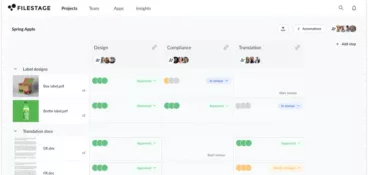
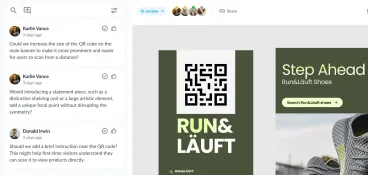
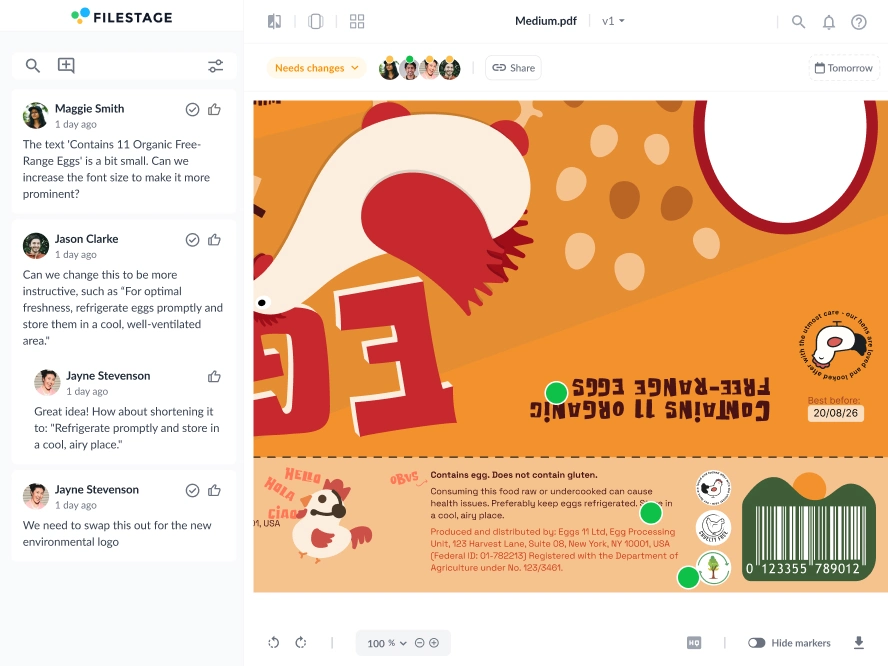
Filestage is a popular review and approval tool that can transform (big claim, but hear me out) the way you collaborate on design projects. A few favorite features include:
- In-context commenting: Leave feedback directly on designs, videos, PDFs, Wireframes, and pretty much any type of file.
- Version control with comparisons: Upload new design versions and compare them side by side, so changes are easy to track and nothing gets missed.
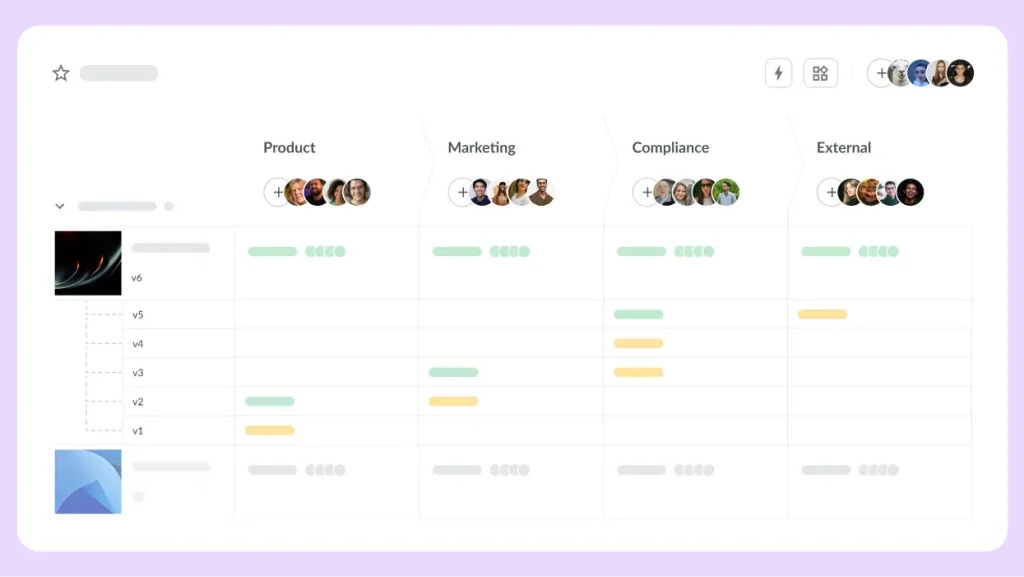
- Structured approval workflows: Set up clear reviewer groups, so feedback happens in the right order.
- Automated reminders: Keeps review and approval timelines moving without needing to follow-up manually.
- One-click approvals: Once all feedback has been addressed, you can approve a file with one click and move onto the next thing.
Supercharge your design reviews
Manage every comment, version, and approval in one place with Filestage.
Step 4: Revise the design based on feedback
Once feedback is collected, you’re ready to start with the revisions.
Chances are you’ll run into conflicting opinions at some stage during the design workflow. It’s much quicker to get these cleared up before the graphic designer works on the next version.
Getting a lot of comments and opinions can feel overwhelming. So one a useful approach is to group feedback into themes, like:
- Branding
- Layout
- Messaging
- Accessibility
One thing to remember is that good collaboration doesn’t mean blindly implementing every request. It’s about working together to find the strongest solution. So graphic designers should be there to give guidance as well as apply changes.
Step 5: Get final approval and sign-off
Before delivery, teams should complete an official approval stage to make sure nothing gets missed in the last minutes.
I’ve put together a simple checklist that you can use to get files approved faster:
- Confirm all project requirements have been met
- Double-check formats and deliverables
- Make sure each stakeholder has signed-off their review round
- Lock finalized files where possible

5 pointers for successful collaboration with colleagues or clients
Even with a solid plan, successful graphic design collaboration still depends on day-to-day communication and team habits. Here are five things you can start doing today to deliver quality work fast.
1. Create a central hub for collaboration
If you want to derail your design projects, working across multiple different platforms is a good way to go. Otherwise, get yourself a reliable hub that keeps everything in one place.
- Design files
- Feedback
- Comments
- Versions
- Approval status
- Communication history
Filestage is a design collaboration tool that’s great for busy teams that want to do more work with less tools. It makes it easy to upload files, track feedback in the comments, and keep up to date with project progress. All without needing to send a single email.
2. Give clear and precise feedback
Vague feedback is bad news for any type of project, but this is especially true for design.
If you have a creative vision in mind, take a second to think about how you can make it as specific and actionable as possible.
Here are a few examples of A+ constructive feedback:
- “Increase the contrast between the text and background”
- “Use a brighter color for the call-to-action”
- “Reduce the amount of whitespace above the headline”
Bonus tip within a tip: Instead of focusing purely on personal preference, tie comments back to business goals, usability, or audience needs. Also check out our guide on how to ask for and give great design feedback.
3. Keep communicating
Effective communication doesn’t mean constant meetings (usually, it’s the opposite). You just need to have clear visibility into project progress and potential issues throughout the project.
Here are a few things you can do to effectively communicate across design projects:
- Share updates at key project milestones
- Flag delays or risks early
- Summarize decisions after meetings
- Clarify next steps after reviews
4. Make space for creativity
The best design ideas often come about through discussion, iteration, and constructive feedback rather than isolated work. This is especially true in cross-functional teams where different perspectives can help you make stronger work.
Here are a few simple ways to make space for creativity in your design workflow:
- Brainstorming sessions
- Early idea sharing
- Open discussions
- Respectful critique
Most importantly, have fun with it! Cross-functional collaboration works best when people feel comfortable sharing ideas without worrying about harsh criticism or dismissive responses.
5. Set clear timelines and responsibilities
Without defined timelines and ownership, projects can drag on. Reviews take too long, stakeholders miss deadlines, and graphic designers are left waiting for approvals.
To keep projects moving, define:
- Deadlines for each project stage
- Who is responsible for providing feedback
- How long reviews should take
- Who has final approval authority
Clear responsibilities reduce bottlenecks and help everyone understand their role in the process.
This becomes even more important when working with remote teams, freelancers, or multiple departments.
Final thoughts
Design collaboration is ultimately about alignment. The better teams communicate, structure feedback, and manage design approvals, the easier it becomes to create designs that stand out for the right reasons.
Thanks for reading this article, I hope it was helpful. And if you’d like to see how Filestage can help you collaborate and get the best work approved faster, start your free trial now.