
TL;DR
Learn how to ask for feedback from clients clearly, in two key situations: when you’re reviewing creative content as an agency, and when you’re collecting feedback from customers on your products or services. This guide shows you how to run a structured content review process in Filestage, and when it makes more sense to use external feedback forms or quick surveys. You’ll learn how to avoid common mistakes and foster open dialogue so clients feel confident in their decisions.
Why effective client communication and feedback matter for every project
Seeing eye to eye with your clients when working on a project is essential to its success. And the stakes are high: recent B2B research shows that 40% of B2B buyers globally changed suppliers – including agencies and other service providers – in the past year, largely because of poor customer experiences and breakdowns in communication.
That’s why understanding how to communicate efficiently and formulate your request for feedback from clients will help you avoid potential conflict and yield better results.
So stay with me as I walk you through the best free tools for your feedback process. Plus tips and templates to help you obtain customer feedback or gather feedback from clients.
Best free tools to get valuable feedback from clients and customers in 2026
The key to gathering customer feedback is a tool that’s built for the job. From getting actionable feedback on creative content to getting users to provide feedback on your website, I’ve got all your bases covered.
Here are my top three recommendations for requesting feedback:
- Filestage – best free feedback tool to request client feedback on creative work
- Google Forms – best free tool for simple, high-volume feedback
- Hotjar – best free tool for getting customer feedback on your website
Let’s look at each tool one by one to go over some of the finer details of what they offer.
1. Filestage – best free tool to request client feedback on creative work

Filestage is a client feedback tool that makes analyzing customer feedback easy on creative assets like videos, designs, documents, and websites.
Perfect for freelancers and small teams, the Free plan lets you send an email feedback request to your clients. Then they can view your content in their browser, add feedback immediately, and discuss changes in context.
Here’s what’s included in the Free plan:
- 5 new files and unlimited versions to upload to your project
- Unlimited reviewers to give feedback on your files
- Comments, markers, and annotation tools
- 1 active project – archive an unlimited number of projects to free up space for new ones
- 2 GB secure storage
- 2 reviewer groups – create a separate reviewer group for internal reviewers and clients to keep feedback organized
- Support for all file types
- Basic integrations with Slack, Microsoft Teams, and Google Drive
Filestage also offers paid plans, starting at $199/month for unlimited active projects, 10 team members, and 1 TB secure storage. This price is based on a yearly plan.

Filestage is a must for marketing agencies. It allows everyone, from our team to our clients, to have all the information they need and know exactly where to find all versions. It keeps everything neat and accessible, so no one’s left scrambling for the right file.
Melissa Abrini, Creative Director at Story
Is poor communication losing you time (and accounts)?
See how top agencies cut feedback costs and roll out campaigns 30% faster with our client feedback tool.
2. Google Forms – best free tool for simple, high-volume feedback
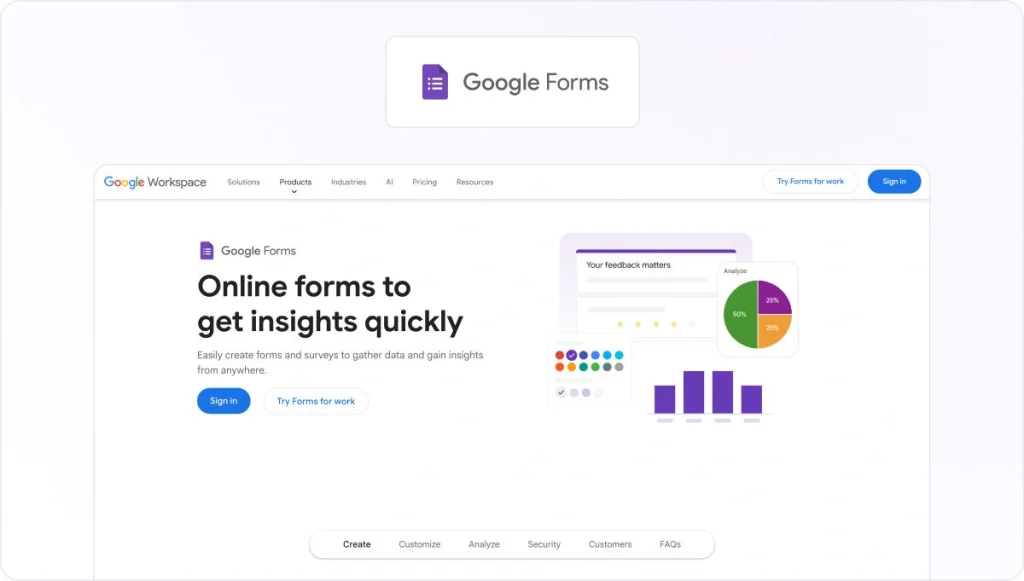
Google Forms is a straightforward survey platform that focuses on efficiency and ease of use. It’s the go-to choice for anyone who needs to collect data quickly without worrying about hitches or hidden costs.
In just a few clicks, you can build a clean, functional feedback form that integrates seamlessly with the rest of your workspace. Because your data is automatically synced with Google Sheets, it is the premier option for those who prioritize data accessibility and rapid collaboration over flashy design.
Here’s what you get with the free plan:
- Unlimited forms – create as many surveys and feedback requests as you need
- Unlimited questions – add as many questions as necessary to get the full story
- Unlimited responses – collect an unlimited number of submissions without hitting a monthly cap
- Response validation – ensure you get the right data by setting rules for answers (e.g., email formats or number ranges)
- Basic skip logic – send users to specific sections of the form based on their answers
- Automatic data syncing – instantly export and update responses in Google Sheets for real-time analysis
- Collaboration tools – invite teammates to build and edit forms with you simultaneously
- File uploads – allow respondents to upload documents or images directly to your Google Drive
- Email notifications – get an alert every time a client submits a new response
Google Forms is completely free for anyone with a Google account. For businesses looking for advanced security and administrative controls, it is included as part of Google Workspace, with Business Starter plans typically beginning at $6/user per month.
3. Hotjar – best free tool to gather customer feedback on your website

Hotjar is a customer satisfaction platform that lets you go beyond the numbers to learn what’s happening on your website and why.
If you’re running an online business, this is a great way of collecting customer feedback on your home page or in your digital product. You can then use these insights to optimize your website and brief customer service teams on your biggest friction points.
As part of the Hotjar Ask Free plan, you get:
- Up to 200,000 monthly sessions
- Session Replay and unlimited heatmaps to see how people actually use your site
- Funnels to understand where users drop off
- Standard filters to slice and dice your data
- 7 integrations to connect Hotjar with your existing tools
- Dashboards to track your key metrics in one place
On top of this, you’ll also get access to the Observe and Engage Basic packages, which include heatmapping and customer interview features.
Hotjar also offers paid plans, starting at $48/month for up to 7k monthly sessions. This price is based on a yearly plan, which includes a 20% discount.
Five tips to get more meaningful feedback from clients
The role of client feedback is to align your visions, ideas, and concepts with your client and make sure the project meets specific standards.
In this attempt, thinking about how to ask your clients for feedback will help you make sure you end up with valuable insights and are ready to make improvements.
Here are the top five tips to help you ask your clients for feedback and make the process more effective. Watch this video or read the tips below.
1. Remind your clients of the brief
Though the project you work on is constantly at the top of your mind, your client will probably need a little memory refresh to remember all the details from the brief.
To avoid any confusion and ensure their feedback is on point, you can remind your clients of the brief before leaving their feedback.
Here are two ways Filestage can help you refresh your client’s memory about the brief:
- Include a link to the brief in the comments, and give your client everything they need to give informed feedback in one place
- Introduce your work by recording and attaching a Loom that talks through how your content meets the brief
2. Be enthusiastic about what you like
Whatever the project you’re working on, there are always some parts you’re most proud of and passionate about. Don’t be shy to pinpoint those parts of your work to your reviewers. You’ll focus their attention on it, spark great conversations, and encourage more positive feedback!
Here’s how you can use Filestage to emphasize specific parts of your work:
- Zoom, rotate, and drag to hone in on every detail of your work
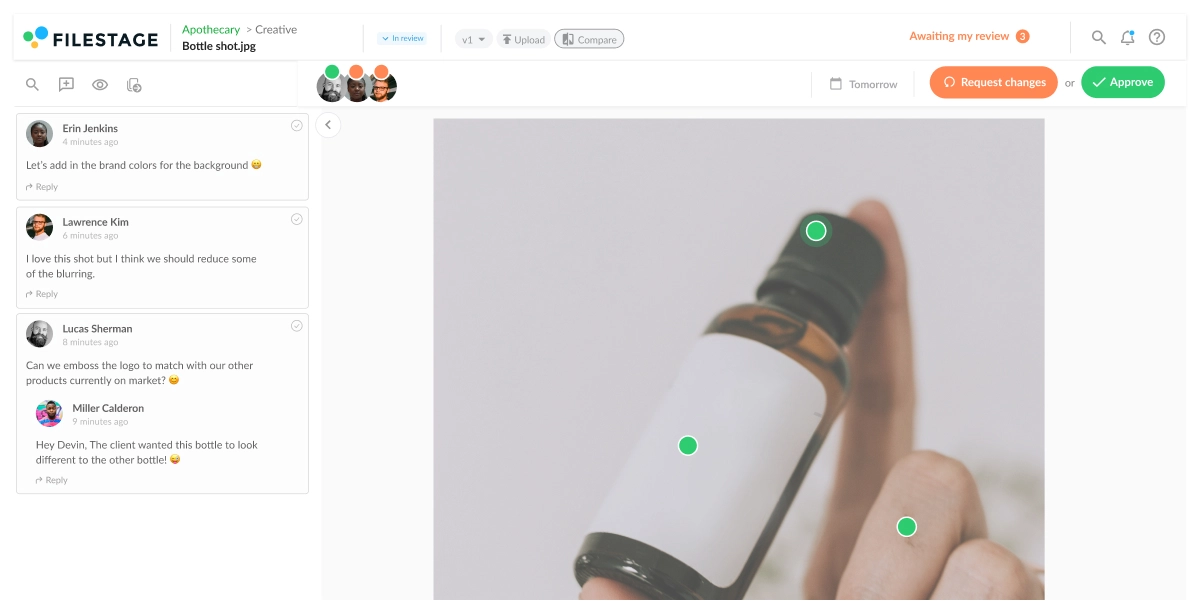
- Click anywhere to create a marker and add a comment
- Highlight a specific word or sentence
- Draw annotations to make it clear exactly which parts you’re talking about
3. Make it clear which parts you want their opinion on
Every project carries some difficult parts that take more time and client input to polish. By knowing how to ask for feedback from your clients on those specific areas of your work, you’ll make sure your vision for the project is in line.
Here are some things you can ask your clients to pay more attention to when giving feedback:
- Is your work in line with the brand guidelines?
- Will your client achieve the right goals with the current form of work?
- Are you solving the right problems for your clients?
- Are there any compliance or regulatory constraints to have in mind?
4. Give your clients a transparent way to provide feedback
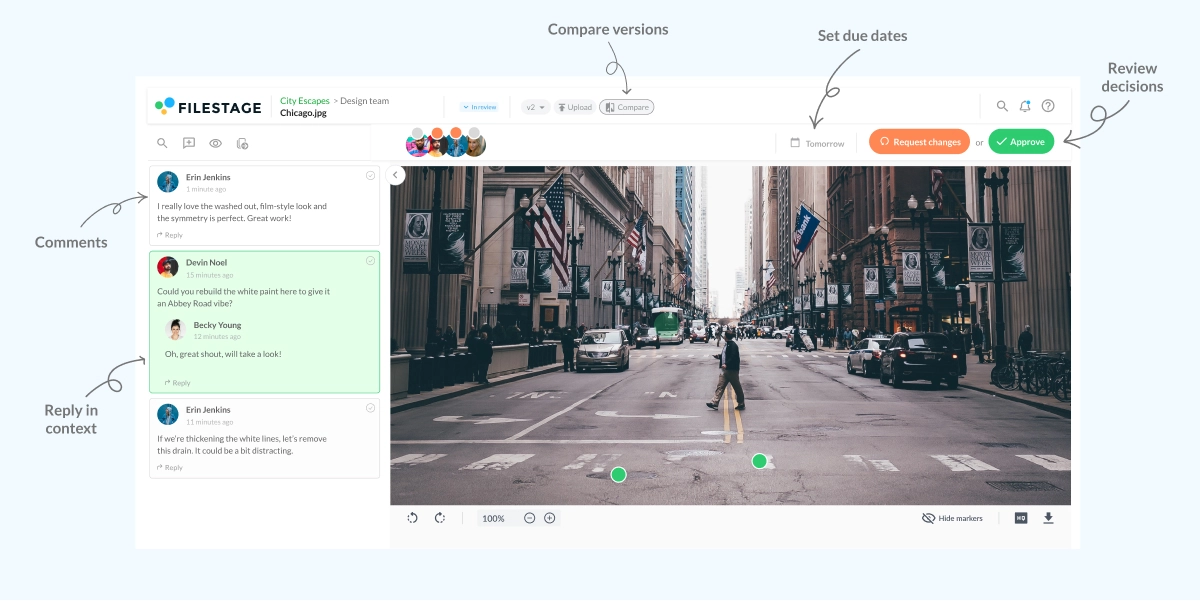
Though everyone appreciates good feedback, giving and receiving feedback can be tiresome – especially when it’s scattered across dozens of tools and email chains. By using a dedicated markup tool, your clients will be able to share feedback in a transparent and visual way.
With Filestage, your clients can leave their feedback right on top of your work so everyone can see the feedback and follow up on it by leaving additional comments or replies.
Is poor communication losing you time (and accounts)?
See how top agencies cut feedback costs and roll out campaigns 30% faster with our client feedback tool.
5. Set due dates to make sure feedback and approval arrive on time
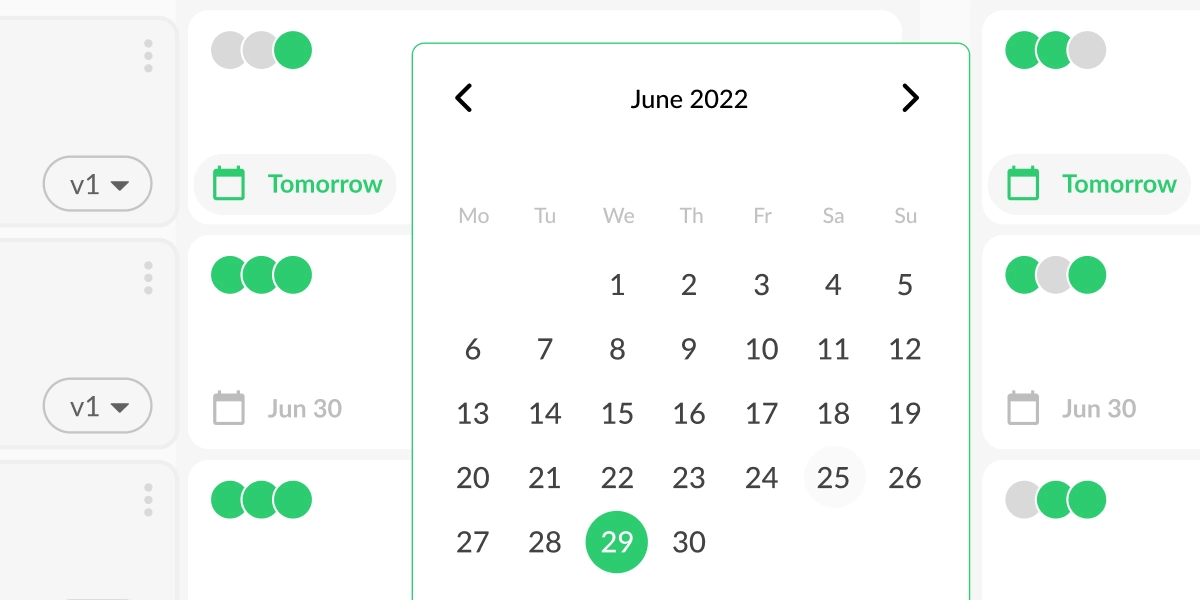
If your client review process is well set up, there will be multiple review rounds before reaching client approval. And for the project to meet the deadline, it’s essential to get all feedback in time so you can make changes and share new versions of your work.
In Filestage, you can plan the review process timeline and define due dates for each version of your work. This way, your client will receive reminders to leave their feedback before the deadline, and you’ll be able to manage the review process without any stress.
Three things you should never do when you ask for feedback from clients
A good client review process will help you avoid getting useless feedback and save you a tonne of time aligning your work with the client’s vision for the project.
But to create a client review process that makes sense and yields amazing projects, it’s essential to know what not to do when asking your clients for feedback.
Here are three things you should avoid at all costs when asking for client feedback.
1. Letting reviewers choose how to share feedback
One of the most important things when collecting feedback is setting the ground rules for your clients on how to share their feedback. Your clients shouldn’t share their thoughts through different channels whenever they feel like it, and without any context.
With client review software like Filestage, you and your clients will have a transparent and collaborative place to discuss all feedback and ideas for improvement.
This way, everyone avoids the stress of juggling email chains, chat threads, screenshots, timecodes, and long descriptions and can focus on creating the best possible project.
2. Using transfer links that time out after seven days
If you’re working on a bigger project, the chances are you’ll need to give your clients the ability to share feedback over a longer period. But with tools like WeTransfer, you’ll only have links that support downloads for the first seven days.
This can be embarrassing and frustrating for clients and means you have to waste time sharing content again.
With Filestage, you can share your projects with all your clients as you need and allow them to:
- Revisit every version of the project at any time
- Check the previous comments for more context
- Compare versions and see the improvements that were made in the project
3. Adding new stakeholders midway through the process
One thing you should always make sure you do is to define your stakeholders upfront and avoid adding new ones midway through the process. This helps you avoid negative feedback just when you’re about to get your work over the line.
With Filestage, you can easily invite all your stakeholders to review your project and make sure all the files in your project are reviewed and approved by the right people.
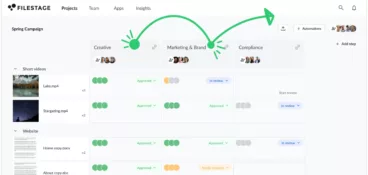
You can create different review steps for different groups of reviewers and keep your peer reviewers and client feedback separate and well-organized.
How to request feedback over email (with free templates)
To help you gather client and customer feedback, I’ve put together a couple of free templates. Feel free to steal them and make tweaks to perfectly suit your needs.
Template 1: Asking clients for feedback on a document or creative project
This template is the perfect way to ask for feedback on creative assets like videos, copy docs, and designs.
Right from the subject line, it sets clear expectations for when your clients need to share their feedback. And by focusing on things like “progress” and “momentum”, you’ll encourage your client to share feedback faster.
Subject line
Feedback request: Due January 10
Email body
Hi Name,
Great news – I’ve been making really good progress on < Project Name >. To keep up the momentum, I’d love to get your feedback by January 10. If you can do it sooner, that’s even better!
Looking forward to hearing your thoughts.
Thanks,
Name
Template 2: Requesting feedback about your product or services
This template is ideal for requesting client or customer feedback about your products and services – from software to landscape gardening.
Personal reach-outs like this are a great way to build strong customer relationships. And if they come from a CEO or another leader in your company, they can also be a great way to drive customer loyalty.
If you want to go a step further, you could also include a discount or free gift to encourage people to share their thoughts.
Subject line
Got 1 minute to share some feedback?
Email body
Hi Name,
I’d like to thank you personally for choosing to use < Company Name > for < key benefit >.
Would you mind taking a minute to tell me about your experience? (It really will only take one minute!)
You can use this form to share your feedback – or reply to this email directly if you’d prefer.
Thanks so much,
Name
How to request feedback from clients with a link
In modern workplaces, the most efficient teams communicate using chat and project management tools like Slack, Microsoft Teams, and Asana. So you need an easy way to share your review link in these tools.
With review software for videos, designs, and other content, you can copy and paste a review link to any tool and quickly receive feedback on top of your work.
Here are some tools you can use to share your link and ask for client feedback:
- Slack
- Asana
- Jira
- Monday
- Trello
- Microsoft Teams
Why asking for feedback is so important
Feedback is important for lots of reasons, which we’ll come to in a second. But what it all really comes down to is making your work (and your business) better.
Below, we’ll dive into the benefits of gathering feedback from clients.
The benefits of gathering feedback from clients on creative work
- Check that your work meets the brief: Every creative project has a goal or job to do, but it can be easy to lose sight of this when focusing on the finer details of your craft. Collecting feedback on your work acts as a sanity check to help you refocus on your original goal.
- Make sure it’s on brand: Marketers are passionate about maintaining the look and feel of their brands. They’ll give feedback on things like imagery, messaging, fonts, and colors to make sure your content feels right for them.
- Verify that it’s accurate: When you’re working on content like marketing brochures or product ads, you need to be sure that everything you’re saying is accurate. This is especially true if you’re working on clients in regulated industries like finance or legal. By gathering feedback from topic experts, you can rest assured that everything is on point before it’s sent out into the world.
- Avoid mistakes: How many times have you read something you’ve written thinking it’s fine, only to spot a glaring error later? From typos to dodgy design layouts and video glitches, we all make mistakes. But sometimes, all you need is a second pair of eyes to help put you right.
The benefits of getting feedback from your clients
- Find out where things went wrong: If you had a difficult experience with one of your clients, feedback can help you get to the root of what went wrong. Not only does this give you the opportunity to resolve the situation for that client. It also helps you solve the problem for good before it happens to another client.
- Learn what you’re doing well: As well as getting negative feedback from your detractors, it’s also important to get positive feedback from people who had a great experience. This helps you learn which features or services to learn in the future.
- Use feedback to promote your business: If you use online reviews to collect feedback from existing customers, you can use the most positive reviews to promote your business.
Final thoughts
Client feedback is an essential piece of the puzzle for delivering great projects. So you need to create a good client review process and gather valuable feedback every step of the way.
With Filestage, none of your clients’ feedback will ever get lost or misinterpreted. If you want to see Filestage in action, start a free trial →
FAQ
How do you ask clients for feedback professionally?
The client feedback process can be frustrating (and slow). But there are some effective ways to gather valuable insights from your clients without descending into chaos or adding extra effort for your team.
– Set a clear purpose and highlight why their honest feedback is so important for the project and its success with your audience
– Make it easy by using a client feedback tool to streamline the process
– Manage client expectations from the start with clear deliverables and workflows
– Use a client feedback tool with annotation features to make it easy to leave nuanced feedback on creative assets
Over time, this kind of simple system for collecting feedback helps you create more consistent, high-quality work for your clients.
How do you seek feedback from customers and clients?
The answer to this question depends on the type of feedback you’re looking for. Here are some common examples and how to approach them:
– Consumer surveys, NPS survey questions, and interviews – ideal if you want feedback on the overall customer experience, their preferences, or how website visitors feel about your brand
– Usability tests – best for collecting feedback on your product or service
– Client feedback tools – perfect for agencies looking to set up continuous feedback loops for clients to review creative work
You can also back this up with light customer research, like quick polls or short follow-up emails, to get deeper insights when you need them.
When is the best time to ask clients for feedback on content?
Timing often decides whether you get useful feedback or no reply at all. For creative projects, ask for feedback right after each clear milestone, like a first draft, new version, or final delivery, while the work is still fresh in your client’s mind.
Keep your request short, remind them of the brief, and set a due date. Share one simple review path – for example, a Filestage link where they can see the latest version, add comments, and approve everything in one place.
When is the best time to ask customers for feedback on your product or services?
For customer feedback, ask right after the interaction, when the experience is still top of mind. This could be:
– After visiting your website
– After buying a product or using a service
– After signing up for a trial
– After contacting your support team
Offer one easy way to respond – like a short survey link, simple form, or quick in-app or text message, so people can complete it in seconds. If you have in-person touchpoints, a QR code that leads directly to your survey can also lift response rates and improve the conversion rate for people who start and finish your feedback form.
What is the best way to respond after you ask for feedback from clients and receive negative feedback?
Negative feedback is easier to handle when you treat it as constructive criticism instead of a personal critique. One common mistake is to become defensive instead of staying curious.
After you request feedback, reply quickly, confirm you understand their concerns, and ask one specific question to clarify what “better” looks like. This keeps open dialogue, avoids back and forth, and creates great customer experiences over time.
Then document what you will change, who owns it on the team, and when you will follow up. Closing the loop matters more than defending the work – and it can even lead to stronger testimonials and word-of-mouth when clients share the positive outcome with colleagues or friends.
Why does the way you ask for customer feedback affect your online reviews and purchase decisions?
Many customers won’t leave a review unless you ask at the right moment with a clear, simple message. There are many reasons people stay silent, but the way you ask can determine whether they take action.
When you know how to ask for feedback, you can guide satisfied customers toward online reviews that create social proof, build trust, and influence purchase decisions. Keep it simple: ask for one specific action, like leaving a Google review, and use the same link every time instead of relying on typical surveys buried at the bottom of a page.
If you receive negative reviews, respond calmly, acknowledge the issue, and offer a clear next step. That approach shows other consumers that every opinion matters and that you care about the overall customer experience.
How do you collect clear feedback when a project has multiple versions?
If your review workflow includes many rounds, collecting feedback needs structure, or the latest version gets buried. You need a clear system for gathering and organizing comments.
Start by setting a single review link per version, then separate internal and client input so comments stay readable. In Filestage, teams can create separate reviewer groups for stakeholders, share unlimited versions, and keep feedback in context with comments, markers, and annotation tools. That setup makes it easier to compare versions, track what changed, and avoid repeating the same discussion.
How can you keep a clear approval trail after you ask clients for feedback?
In regulated work, the risk isn’t just making a mistake – it’s being unable to prove what was reviewed and approved. Once you know how to ask for feedback clearly, keep every version, comment, and decision tied to the file.
In Filestage, secure storage, browser-based reviews, and organized reviewer groups help compliance teams identify who reviewed what, when, and why. In these projects, every opinion matters for demonstrating quality and protecting the overall client experience, so a clean approval trail cuts confusion and saves time when auditors need to retrace decisions later.