
TL;DR
Project feedback can feel simple until you’re chasing comments, untangling opinions, and trying to keep your project team on the same page. The right feedback process fixes that and helps with poor performance. It helps you deliver feedback in a timely manner, maintain a healthy feedback loop, and turn received feedback into clear next steps. You’ll learn how to give effective feedback that blends positive feedback with constructive feedback, avoids unnecessary negative connotations, and supports project success. Use it to reduce errors now and run future projects with less friction.
Why project feedback management gets chaotic fast
If you’re responsible for project feedback management, you’ll know just how chaotic things can get. Messy email chains. Conflicts galore. Missed deadlines.
Adobe reports that content demand has doubled for 96% of marketers, while timelines keep shrinking, making getting project feedback right more important than ever.
You’ve got to have the organizational skills of a creative project manager (regardless of whether or not that’s your job title), the mediation skills of Gandhi, and the patience of a saint!
But with an effective project feedback process in place and the help of online proofing software, things become a whole lot easier. Review steps are clearly defined, feedback is transparent, and reviewers are held accountable. Team members’ performance can improve.
In this guide, I’ll walk you through the consequences of poor feedback management and the best practices that will transform your project feedback process. All that, plus the best software to help you get your creative projects reviewed and signed off in the most efficient way possible.
What is project feedback management?
Project feedback management is the process of collecting, analyzing, and implementing project feedback to deliver the best possible work. This process is also called a feedback cycle or feedback loop in project management.
An effective feedback process is structured, organized, and easier to run with the help of feedback management tools. It helps the project manager and team members stay on the same page, deliver feedback on time, and deliver a successful project.
Eight consequences of poor project feedback management in 2026
If any of the following points resonate with you (and trust me, I’ve been there), then it sounds like your feedback management needs an overhaul. Poor project feedback hurts more than timelines. It can reduce employee engagement, create confusion in team meetings, and make it harder to deliver a consistent desired outcome.
1. You have to constantly chase reviewers for feedback
Funnily enough, chasing and hassling weren’t part of your original job description. Yet you find yourself constantly chasing reviewers for feedback while missing important deadlines.
2. You waste time consolidating feedback manually
You’ve got feedback coming at you from just about every angle. Email. Slack. WhatsApp. Paper airplanes are chucked at you from across the office.
OK, that last one might be a slight exaggeration, but when multiple stakeholders send you feedback through different avenues, things get confusing, and you waste far too much time making heads or tails of it all.
Surely things could be easier!
3. Important feedback gets lost in messy email chains
Your email request for feedback quickly descends into chaos, with some stakeholders replying to the group, some replying privately, and some starting a brand-new thread with a completely irrelevant subject line that makes it impossible to find.
Next thing you know, you’ve got a 99-message-long email thread plus a handful of offshoots. It’s no surprise that important feedback gets lost in the mix.
4. Reviewers disagree with each other without noticing
You’ve eventually received feedback from your reviewers and worked through it all, only to find it’s full of conflicting recommendations. Yet more time is wasted as you work out who to listen to and how to move forward.
5. Discussing feedback takes days of back and forth
Without a clear and obvious list of changes to implement, you spend days going back and forth, discussing feedback with different stakeholders to make sure they’re all aligned before you can move on.
6. You have to guess which part of your work people are talking about
This is particularly painful when you’re getting feedback on visual content. It can be hard for reviewers to explain exactly what they want to say in an email, or even with words at all. And without context, how on earth are you supposed to know what they’re referring to?
7. Feedback keeps coming while you’re working on the next version
There you are, hard at work on the next version, when – BAM – in comes some long-overdue feedback on an older version. You’ve spent hours consolidating feedback and sorting out conflicts, so the last thing you need is for yet another spanner to be thrown in the works.
8. Versions and review rounds spiral out of control
When you’re creating multiple versions of the same file and sharing them at different stages of the feedback process, it can get confusing. Not just for you, but for your review team too. One missed email, and chaos descends: some wonder which is the latest version, give feedback on outdated documents, and make copies; others edit the content directly and share it with the team as if your version never existed.
Five best practices to instantly improve your project feedback management process
I feel your pain. But rather than dwell on the bad stuff, let’s jump straight into how you can instantly improve your feedback management process with the help of an online proofing tool.
1. Invite all relevant reviewers to give feedback in the same place
Save yourself the time and stress of collating feedback from email chains, Slack threads, and who knows where else by collecting feedback all in one place.
Enter Filestage.
With Filestage, your reviewers can add comments and annotations right alongside your document. Everyone in the review step will be able to see their feedback and discuss it there and then, ironing out any disputes so that you know exactly how to progress.
2. Define clear reviewer groups that involve all the right people from the start
Review steps help you to clearly define who needs to give feedback at each stage of the process. By working out exactly who needs to be involved upfront, you’ll avoid having people join the process late only to confuse everything.
You can invite different stakeholders to each review step. For example, one step might include the marketing team, while another might include the legal team. You can also gather customer feedback to improve customer satisfaction. This helps to keep discussions focused on specific topics.
3. Use annotations and highlights to keep feedback in context
Goodbye screenshots! See ya, long-winded descriptions!
With Filestage, reviewers can use annotation tools to highlight, strike through, add shapes and emojis, and even draw freehand directly on top of your content.
And for video content, reviewers can simply click and comment, and their feedback will be attached to that timecode. Simply click on their comment, and you’ll jump to that frame in the video.
4. Draw a clear line between versions so people know when to stop giving feedback
In Filestage, you can stop late-to-the-game reviewers from swooping in with extra feedback by disabling comments on a particular file. Your review team still has access to the file and all the previous comments, but they can’t add anything extra.
Which means you can get on with implementing feedback in peace.
5. Set clear project feedback deadlines to make reviewers accountable
Setting deadlines for every step in the process helps your reviewers prioritize, keeping your project moving forward.
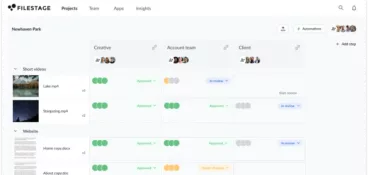
With Filestage, you can add due dates to each of your files, and little status indicators in your dashboard show who still needs to review or approve your document. That way, it’s easy to hold them accountable. As the due date approaches, your reviewers will receive automated reminders to keep this task top of mind.
The best feedback management software for creative projects in 2026
Here are the three best feedback tools to help you manage feedback on your creative projects.
Filestage – best enterprise feedback management system

Filestage is a project feedback management system that helps you collect feedback on your creative projects from your teammates and other internal and external stakeholders, all in one place.
From sharing to sign-off, it speeds up the process, streamlines it, and makes it less stressful. For you and your reviewers, too!
Key features:
- Due dates to keep your projects on track and help you meet deadlines
- In-context comments for clear feedback that shows up in real time
- Visual annotations to bring comments to life and make it clear what needs changing
- To-do lists to give your team a clear picture of what needs amending
- Version history to help you keep track of what’s changed
- Review steps to get files approved by the right people at the right stage of the process
- Project dashboards to help you keep track of who you’re still waiting to hear from
- Integrations with Dropbox, Google Drive, Slack, Microsoft Teams, and more
- Automations reduce manual tasks and speed up content reviews

“Since we have managed our review processes with Filestage, our review turnaround time has significantly improved. As Filestage offers many file formats, we can easily review all kinds of content formats without any issues.”
Zsolt Arnodi, Digital Communication Specialist
Approval Studio

Approval Studio is a feedback tool built specifically for design teams, especially those that work with external teams and clients. The feedback management tool helps creative teams gather feedback on artwork and designs, track changes and versions, and compare iterations.
Key features:
- Real-time communication with clients
- Four comparison modes to check different versions and edits side by side
- Dashboard to keep track of the status of projects and tasks
Frame.io

Frame.io is specifically designed for video feedback management. It allows you to share videos with teammates and reviewers, collect their feedback, and collaborate as you implement amendments.
Key features:
- Pause videos, add comments, and draw annotations
- Discuss feedback in the comments section before sharing the next version
- Compare versions side by side to see what’s changed
- Integrations for Adobe Premiere, After Effects, and Final Cut
The best customer feedback management platforms
And here are the three best platforms for collecting and managing customer feedback on your projects.
Typeform

Typeform specializes in online form building and surveys. The platform is known for its beautiful, conversational, and user-friendly forms that help you to see what your customers think about a specific design or project.
Key features:
- Create forms, surveys, quizzes, and more
- Incorporate different types of media to bring questions to life
- Get a shareable report in a couple of clicks, or sync responses to your favorite tools
SurveyMonkey

SurveyMonkey is another powerful survey tool that lets you collect customer data from survey respondents worldwide.
Key features:
- Create attractive and branded surveys quickly
- Share those surveys rapidly and easily with a single link
- Create rules to analyze data and decide next steps for your creative project
Google Forms

If you already use the G Suite, then Google Forms is a great choice. It’s a simple online survey tool that makes it easy for you to collect feedback via surveys quickly and in style.
Key features:
- Choose from a large set of curated themes and incorporate your own branding
- Collect and sort through data in an intuitive way with charts and automatic summaries, or open the raw data for deeper analysis
Final thoughts
With some tweaks to your feedback management process and the right software, collecting, analyzing, and implementing feedback on your creative projects is a breeze.
If you’d like to see for yourself how Filestage could help you with feedback management, start a free trial →
FAQ
1. What is good project feedback?
Effective project feedback is specific and tied to project goals and the desired outcome. It is easy to act on and time-bound. It avoids negative connotations by focusing on the work rather than the person. Good feedback helps the project team stay aligned and make informed decisions, especially when it comes from multiple team members during team meetings.
2. How can a project manager deliver feedback on time without slowing project progress?
Keep feedback short, structured, and linked to what matters most. Run a quick feedback session at key milestones instead of waiting until the project is closer. Capture feedback received, decide on next steps, and assign owners so the project team can keep moving. This creates a feedback loop in project management that strengthens future projects.
3. How do you balance positive and constructive feedback when giving project feedback?
Start with honest feedback on what is working, then move into constructive feedback with clear suggestions. Positive feedback reinforces good work and helps keep momentum. Constructive feedback explains what to change and why it matters. End by agreeing on an action plan, so team members know the next step and the timeline for improvement.
4. What are common mistakes when providing feedback on a project?
The most common mistakes are being vague, over-criticizing, delaying feedback, and mixing opinions with requirements. Another mistake is turning feedback into a debate instead of a decision. Poor communication can make constructive criticism feel personal, especially in group project feedback. Smart feedback is specific feedback. It stays focused, references the work, links back to project goals, and helps create a good company culture.
5. What are a few project feedback examples a team lead can use in creative reviews?
Use meaningful feedback that points to a specific moment and a clear fix. Here are a few constructive feedback examples you can adapt that avoid negative feedback and encourage continuous improvement:
– “Strong concept. The headline is not yet clear to the target audience. Can we simplify it to one benefit and test two options?”
– “The design feels on brand. The CTA gets lost on mobile. Please increase contrast and move it higher so it supports the desired outcome.”
– “The edit is smooth. The pacing drags in the first five seconds. Can we cut one shot and tighten the intro to improve engagement?”
These also serve as examples of project feedback for other team members because they remain concrete and action-focused.
6. How do feedback loops in project management increase performance?
A feedback loop is a repeatable feedback process that captures input, applies changes, and checks results. In project management, feedback loops keep the team aligned throughout the work, not just at the end. Over time, continuous feedback leads to clearer communication and better performance reviews because you are improving in real time rather than relying on memory later. Feedback loops also benefit the next project and ideas.
7. What should a simple project feedback form include to get better input?
A project feedback form should make it easy to give useful feedback fast. Ask what is working, what is unclear, and what should change first. Include one project feedback question that connects to project goals, and one that checks the desired outcome for the target audience. A short project feedback form also helps teams compare positive and negative input without turning the review into a long thread.