TL;DR
Content creation in 2026 takes more than new ideas. It requires a clear content creation process and the right tools. This guide walks you through six steps, from defining your target audience to publishing and analysis. It also provides tools for keyword research, graphic and video creation, and approvals. Use these tools to create content for search engines and social media platforms, including social media posts, graphics, and short-form videos.
Why content creation matters in 2026
“Content is King.” This quote is even more true today than it was in 1996 when Bill Gates described the future of the internet as a marketplace for content.
Globally, the average person spends more than four and a half hours per day looking at a mobile or computer screen. And with so much time spent online, it’s no wonder that 30-39% of the overall marketing budget is allocated to content marketing.
With so much content competing for attention, only the most relevant, consistent, and well-executed pieces actually get noticed. That’s why a strategic content creation process matters. It helps you stay focused on your goals, create content that resonates with your audience, and make sure every piece has the best chance of cutting through the noise.
In this article, I’ll walk you through six simple steps to build a failsafe content creation process. I’ll also share nine useful tools that can help your team every step of the way.
But first…
Why do you need a content creation process?
The best way to explain this is by looking at what happens when you don’t have a content creation process in place.
When content is created without a process – no strategy, no roadmap, no clear goals – it’s little more than guesswork. And you’ll end up with a whole load of random, unfocused content that doesn’t quite resonate with your audience and struggles to deliver results.
Not to mention, you’ll waste hours hunting down the latest version or be stuck in endless email back-and-forths trying to understand stakeholders’ feedback.

A content creation process fixes that. It helps you:
- Set clear objectives that align with business goals
- Define your target audience and what they actually care about
- Map out a detailed plan for creation, including content formats and timelines
- Built-in promotion and distribution so your content reaches the right people
- Measure performance and refine your approach over time
And the good news is that once you’ve set up your content creation process, it scales with you. So every piece of content you create from here on out is valuable and something you’re proud to publish. And it doesn’t take all year.
Find out more about how to scale content production without sacrificing quality.
Six-step bulletproof content creation strategy
Ready to build a streamlined process that you can use again and again? Here’s how to create a strategic content creation process in six simple steps.
1. Define your content objectives
The first step is to think about what you want your content to achieve. Clear objectives give your content direction and purpose. So instead of creating something for the sake of it, you’re creating with intent.
That might mean:
- Driving traffic to your website
- Building brand awareness in a new market
- Generating leads for your sales team
- Nurturing existing customers with helpful resources
- Positioning your company as an industry thought leader
These goals will help to guide every decision throughout the rest of your content creation process.
2. Be clear about your buyer persona(s)
If your content doesn’t speak to the right people, it won’t land, no matter how well it’s written or designed. That’s why it’s essential to be clear about your buyer personas before you start creating content.
A buyer persona is a detailed profile of your ideal customer. It covers who they are, how they behave, what challenges they face, and what motivates their decisions. The better you understand them, the easier it is to create content that feels relevant and valuable.
Start by mapping out all the information you already have about existing customers. Factors such as age, gender, language, and location may already be in your database. Then dig deeper by asking questions like:
- Why did you choose our product or service?
- How do you use it day-to-day?
- What challenges or frustrations do you still face?
In addition to direct feedback, use other sources, such as analytics, social media posts and conversations, customer reviews, and input from your sales or support teams. Together, these paint a fuller picture of your target audience’s behavior, motivations, and pain points.
These insights give your content strategy real direction, helping you spot gaps and opportunities so that you can create resources that genuinely add value to your audience.t.
3. Decide on the types of content to create
Armed with your objectives and audience personas, it’s time to think about the types of content that will help you achieve your goals.
Here are some of the most common types of content
- Website content – From your company description and mission statement to product pages and FAQs, your website is the foundation of your content strategy.
- Product videos – A powerful tool for showcasing features and building trust. In fact, 96% of marketers agree that videos have helped increase users’ understanding of their product or service.
- Blog content – Great for attracting new visitors, improving SEO, and building authority around topics your audience cares about.
- Email content – Email marketing is perfect for nurturing relationships and driving action, whether that’s clicks, sign-ups, or sales.
- Social media content – Social media is one of the most important outlets for sharing insights, starting conversations, and building communities.
- Podcasts – An often overlooked means of marketing, yet the global number of podcast listeners is expected to surpass 600 million listeners worldwide in 2026.
- Physical and print materials – Brochures, flyers, and other marketing collateral still play a role in some industries where in-person engagement matters.

4. Create a content calendar
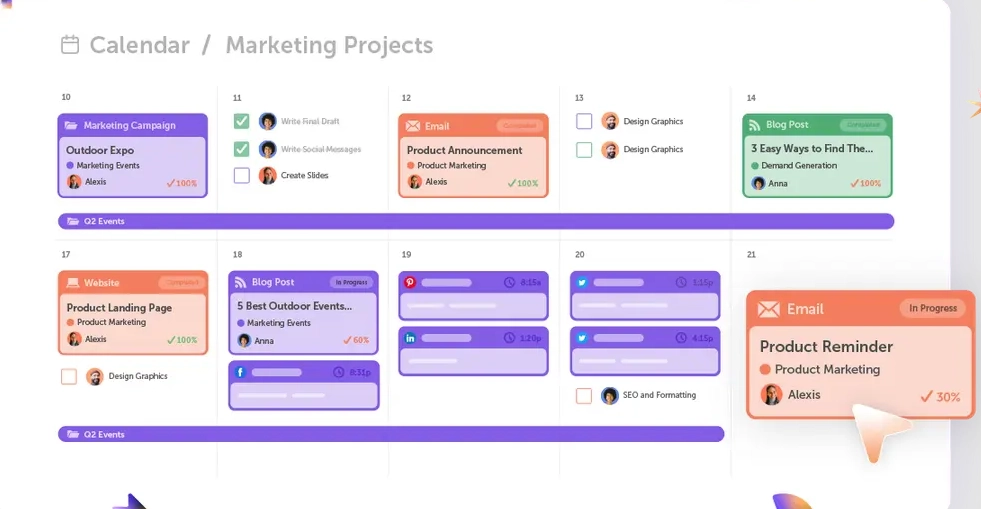
Some of the most successful content creators use content calendar when organizing your content A content calendar (also known as an editorial calendar) is essential for organizing your content development process. It clearly lays out what you’re creating, when it’s due, and who’s responsible, giving your team a clear roadmap from idea to publication.
A good content calendar should include:
- Deadlines for drafts and approvals
- Planned publication dates
- Key milestones along the way
- Owners and collaborators for each task
The benefits are huge. A calendar gives you a bird’s-eye view of everything in progress, so you can balance workloads, spot bottlenecks early, and avoid last-minute panics. It also keeps smaller tasks – like refreshing old articles or updating seasonal content – from slipping through the cracks.
And while it’s not a full collaboration tool, a shared calendar still makes teamwork easier. By keeping everyone aligned on timelines and responsibilities, you can reduce long email chains and keep content projects moving smoothly from start to finish.
Content calendar sorted, it’s time to get those creative juices flowing and create that content! And once that’s done …
5. Decide on content promotion channels
Once all those creative ideas are brought to fruition and your content is ready, you need to ensure people actually see it. That’s where your promotion plan comes in.
Here are some powerful distribution channels to consider:
- Pay per-per-click (PPC)
- Facebook Ads
- Social media platforms like LinkedIn, Facebook, or Instagram
- Google Ads
- Medium
- Quora
- SEO
Dedicated content creators will promote content across multiple channels to expand the content’s reach. But try not to spread yourself too thin. Instead, focus on the channels where your audience is most active and where your content can make the biggest impact.
Here’s some advice from our recent chat with expert strategist Tyler Hakes from Optimist.
6. Measure and analyze your content
You can only know if your content ideas were successful by measuring the right metrics. It’s that simple.
Here are some commonly used key performance indicators (KPIs) for different types of content.
Website content KPIs
Here are the KPIs you can use to measure the success of your organic website traffic:
- Number of sessions
- Time spent on the page
- Number of leads generated
- Conversion to customer rate
Blog content KPIs
Blog KPIs can be similar to those for website content. For instance, pages/sessions in combination with time spent on a page are positive signals for a copywriter.
But here’s what else you can track to find out whether you managed to create engaging content:
- Number of returning visitors
- Leads
Email content KPIs
With the help of automation tools, it’s possible to track the behavior of the recipients of your email campaigns. This tracking leads to measurable KPIs, like:
- Number of opened emails
- Click-through-rate
- Conversions
Social media content KPIs
Social media can serve multiple purposes: increase customer loyalty, spread the word about your latest product, or generate leads for your e-commerce page. All of these objectives require different metrics, for example:
- Number of views
- Cost per conversion
- More subtle metrics (such as the like-to-dislike ratio for a particular post) may indicate whether you meet your target market’s expectations.
Audio content KPIs
Did your audience like or dislike the content? You can determine the answer via the completion rate and time spent listening.
Plus, the traffic to your website through links (pointing to your website) in the description section is an indicator of the lead generation capacities of your audio content. Google Analytics refers to backlinks from sources outside the search engine as referral traffic.
Physical content KPIs
How did previous generations measure success? This question is slightly more complex but not impossible to calculate.
If you’ve started a new campaign in the form of print ads, you can check whether sales have increased during this period. Although this tactic is less precise than digital tracking, you can still draw conclusions about the distributed campaign’s success.
Another important metric here is ROI. How much did sales increase in relation to the cost of the campaign?
Top 9 content creation tools for every stage of your content creation process
Here are some helpful tools for managing your content creation process from start to finish.
1. Filestage for review and approval

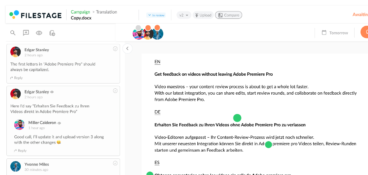
Filestage takes the stress out of content reviews by bringing all your feedback into one place. Instead of chasing comments across email, chat, and docs, your team and stakeholders can review and approve content directly in the platform.
Here’s how it helps at different stages:
- Drafts and edits – Upload files, get clear feedback with comments and annotations, and make changes quickly. All content versions are neatly stacked on your dashboard.
- Collaboration – Keep everyone aligned, from writers and designers to managers and clients. Reviewers can leave context-specific comments directly on files to speed up turnaround time.
- Approval – Get sign-off from all stakeholders with a clear audit trail to ensure nothing slips through the cracks. You can see who has approved every content piece and when, all from the dashboard.
By streamlining review and approval, Filestage accelerates the content creation process, helping you meet deadlines and deliver high-quality content every time.

“Filestage has made our approval process much simpler and clearer. After the first revisions with the content creators, we turn it over to the client for the next round of reviews. Then we can easily pass on the client comments to the content creator for the next revision.”
Rain Balares, INCA Lead at GroupM
Supercharge your content reviews
Share files, get feedback, and manage approvals all in one place – with Filestage.
2. Google Sheets for ideation

Google Sheets is useful in the ideation phase. In this phase, the focus is not on collaboration but on developing your own creative ideas. Google Sheets helps you outline your content ideas and share them with the entire team early.
In addition to Google Sheets, other cloud services (such as Microsoft 365, WPS Office, or iWork for Apple devices) offer similar services.
3. Asana for project management
Asana is a project management tool that helps capture and organize new content ideas during the ideation phase on a dedicated board.
There are also numerous powerful Asana alternatives on the market, including Workzone, Trello, and Jira.
While project management tools are excellent for task tracking, they can fall short when it comes to giving and receiving creative feedback. Reviewers often have to send screenshots and timecodes, and there’s insufficient context. Fortunately, you can integrate your project management tool with Filestage to streamline your content creation workflow.
4. Ahrefs for keyword research

Ahrefs is an SEO tool that helps you identify and analyze SEO keywords to boost your visibility in search engines.
Ubersuggest, SEMrush, and Monitor Backlinks are powerful alternatives for SEO content production.
5. Canva for creation

Canva is an easy-to-use graphic design platform that specializes in creating basic visual content, such as social media graphics, presentations, or posters. This visual content tool is particularly useful for creating images for blog articles.
Canva is the most popular DIY graphic design platform, but other content creation platforms include Easi, Stencil, and Picmonkey.
6. Figma for creation

While Canva works well for simple images and can be used by people without design knowledge, you’ll occasionally need a more sophisticated approach to your website.
At this point, Figma comes into play. Figma is a web-based collaborative vector graphic and prototyping tool. Competitors include InVision, Axure RP, and Lucidchart.
7. WordPress for publishing
Once content is ready, WordPress is useful for publishing blog posts. WordPress is the most commonly used software for creating blogs and websites, but competitors include Wix, Weebly, and Medium. These tools do not require any coding knowledge to create a compelling website presence.
8. Google Analytics for measuring content efforts

After publication, Google Analytics helps us measure campaign performance by providing reports on all our KPIs.
Competitors include Matomo, Woopra, and GoSquared.
9. Hotjar for measuring content efforts

Hotjar helps us gain insight into visitor behavior on our webpage. Hotjar provides heatmaps that show which parts of the webpage or blog post are popular and which need improvement.
Alternatives to Hotjar include Matomo, Mouseflow, and Smartlook.
Final thoughts
With a clear, strategic process in place, you can tackle content creation with confidence and create resources that resonate with your audience, deliver value, and spark engagement.
And with the right structures, workflows, and tools in place, you can free up your marketing team’s time for out-of-the-box thinking and big, creative ideas, so that every piece of content stands out. Ready to speed up reviews and approvals, too? Start your free Filestage trial and keep every piece of content moving smoothly from draft to sign-off.
FAQ
1. What are content creation tools?
Content creation tools are software and resources that help you plan, create, review, publish, and improve content. This includes online content creation tools for writing, design, video editing, and analytics. In practice, a content creation tool can range from a basic tool like Google Docs to a specialized tool like an SEO platform or design suite.
2. Which key features matter most when picking the best content creation tools?
Focus on tools that fit your workflow and are easy to adopt. Look for a user-friendly interface, real-time collaboration, version control, and simple sharing. For performance, prioritize keyword research, keyword suggestions, and reporting that helps you improve high-performing content for search and social. The best content creation tools also integrate with third-party tools, so your entire process and resources work as a single system.
3. Which free content creation tools are actually useful?
Free tools for content creation are great for getting started and covering everyday tasks. They can support drafting, planning, and basic design, especially for social media graphics and simple layouts. Tools like Google Docs and Canva Free help you create content, while a specialized review and approval platform like Filestage (free trial) makes it easier to collect, organize, and approve feedback on your files. Many platforms offer a free plan or version that works well for solo creators or small teams. If you are comparing options, look for the best free content creation tools that do not block core features like exporting, collaboration, or file storage.
4. When should you upgrade from a free to a paid plan?
Upgrade when you hit limits that slow your process down. Common triggers are more team members, more storage, premium templates, stronger permissions, and better reporting. Paid plans are also worth it when you need smoother reviews, clearer feedback, and faster stakeholder sign-off. Tools like Filestage are often added here to streamline review and approval of written, video, and visual content.
5. How should content marketers use AI tools without losing quality?
Use AI as support, not as the final author. AI can help generate content ideas, outlines, and early drafts, and speed up content creation for repetitive formats. It can also help with image generation and first-pass edits. Then a human should refine the accuracy, voice, and relevance so the final result is useful and on-brand. This keeps AI content creation fast without sacrificing quality.
6. What tools help most with video content and short-form videos in 2026?
Choose video editing tools that make it easy to edit videos, add captions, and export versions for different social media platforms. An AI-powered tool can speed up cuts and create variations for multiple channels. If your videos need feedback from creative, legal, or clients, Filestage helps collect frame-accurate comments and keep approvals tied to the right version.
7. How do I avoid tool sprawl when choosing online content creation tools?
Pick one main online content creation tool per stage, then fill gaps only when needed. Keep writing, designing, and publishing in one place. Make sure each tool has a clear owner and purpose. The best tool for content creation is often the one your team will actually use consistently, not the one with the longest feature list.