
Do your marketing materials need more consistency? If so, it’s worth taking a closer look at brand asset management (BAM) software.
Brand asset management software enables your organization to structure all your digital assets more efficiently and reduce the workload of your marketing and design teams.
In this guide, we’ll explain how BAM works, compare the 10 best tools across asset organization and search, brand guideline features, workflow and collaboration capabilities, and pricing, and show you where each one fits.
How does brand asset management work?
A brand asset is a category of your marketing assets that includes documents, images, videos, and any other visuals that support your brand management. In many cases, individual brand assets, such as logos, are used to create your marketing materials.
Common brand assets include:
- Brand name/brand logo
- Brand taglines and slogans
- Brand images
- Brand videos and commercials
- Communication material, such as newsletters, press releases, or point of sale (POS) material
- Internal brand guidelines
Coca-Cola is one of the best-known companies thanks to its successful branding strategy. Over more than a century, Coca-Cola’s brand name, logo, and image have undergone only minor changes.

How does Coca-Cola – a globally operating business with hundreds of thousands of brand assets – ensure brand consistency and reduce redundant work across different locations? This is where brand asset management (BAM) comes into play.
BAM is the process of creating, storing, and distributing your brand assets. One of its main goals is to establish and implement brand guidelines to ensure the best possible output at the highest consistency, while reducing work duplication and other inefficiencies.
For example, globally operating mobility fleet operator Sixt uses a centralized digital media library so its videos, images, and other media can be tagged and easily found by staff worldwide.
Before that, Sixt and its partners transferred brand content manually through file-transfer services, which was inconvenient and time-consuming.

As we can see from the previous example, BAM is dependent on the right brand asset management system in order to reap the desired results.
What is brand asset management software?
Brand asset management software applies the principles of digital asset management to create a solution for managing all of your brand assets more efficiently. Typical BAM software includes the following features:
- Asset creation and approval – streamline content creation with basic review and approval options
- Indexing – thorough tagging and search so assets are easy to find
- Version control – prevent staff from accidentally using or deleting outdated files
- Access control – restrict sensitive files to authorized people, markets, or regions
- Distribution features – share assets easily with third parties
- Brand collaboration features – work on projects together in a single interface
These features set the foundation for a successful BAM process, with positive spillover effects on your content governance and content workflow.
How we evaluated these tools
We assessed each tool on four criteria:
- Asset organization and search
- Brand guideline features
- Workflow and collaboration capabilities
- Pricing transparency – based on product documentation, G2 reviews, and hands-on experience where available
Most vendors in this category use quote-based pricing, so where no public pricing exists, we say so rather than guess.
Filestage is our product. We’ve included it because it genuinely covers the review and approval stage of brand asset management – and we’re explicit below about what it doesn’t do: it’s not a DAM, and most customers pair it with one.
Quick comparison of the best brand asset management software
| Tool | Best for | Free plan | Key differentiator | Starting price |
|---|---|---|---|---|
| Papirfly | On-brand content creation at scale | No | Branded templates anyone can produce from | Quote-based |
| Brandfolder | Asset performance insights | No | AI-powered usage and performance analytics | Quote-based |
| Filestage | Review and approval process for brand assets | Yes | Structured approvals before assets enter your library | $199/month |
| Frontify | Brand guidelines + DAM in one | No (trial) | Living brand guidelines connected to assets | Quote-based |
| Bynder | Enterprise DAM | No | Scalable DAM and brand guideline modules | Quote-based |
| Monotype Connect | Small/medium teams, fonts | Font management and asset library combined | Quote-based | |
| Filecamp | Budget DAM with unlimited users | No (trial) | Unlimited users on every plan | ~$29/month flat |
| MarcomCentral | Franchises and local branch networks | No | Template customization for field teams | Quote-based |
| Canto | Easy-to-adopt DAM | No (trial) | Fast rollout, AI visual search | Quote-based |
| Seismic Content | Enterprise sales content | No | Brand content governance for sales teams | Quote-based |
Overview of the 10 best brand asset management software
In the following section, we are taking a look at the best BAM tools, which all contribute to your successful brand asset management strategy.
1. Papirfly – best for on-brand content creation at scale

Papirfly is a cloud-based brand management platform combining brand guidelines, asset management, and template-based content creation.
Why we chose it
Papirfly is built for one job: letting non-designers create on-brand materials themselves.
Local teams open a locked template, swap the text and images, and export a finished file. Fonts, logos, and colors stay fixed – the template won’t allow off-brand changes.
Designers set the rules once, and regional markets handle their own production. It made this list because it removes the design team as a bottleneck without giving up brand control.
Pros
- Branded templates for self-service content creation
- Brand guidelines, DAM, and creation in one platform
- Strong fit for multi-market organizations
Cons
- Quote-based pricing – no transparency without a sales call
- More platform than small single-market teams need
Pricing: Quote-based
2. Brandfolder – best for asset performance insights
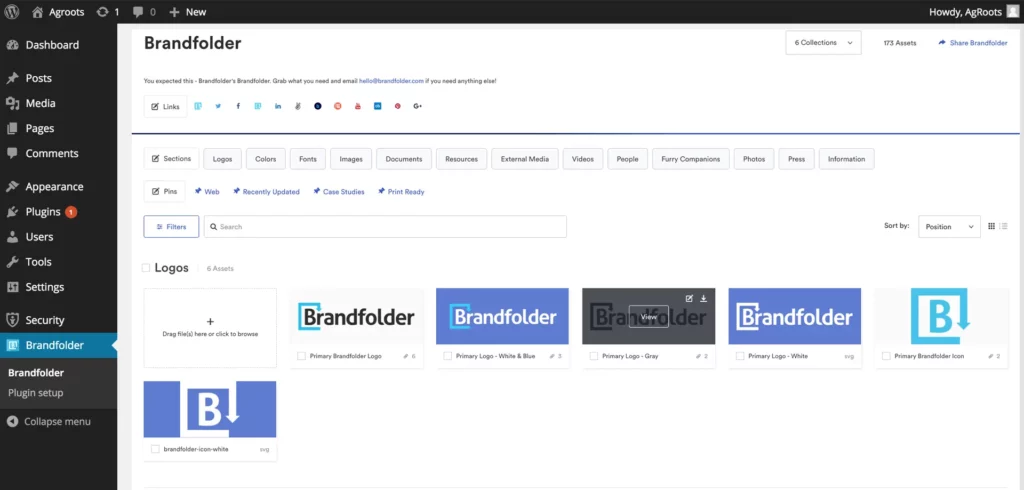
Brandfolder, now part of Smartsheet, helps marketers and creatives manage and distribute their assets, with AI-driven insights into how they perform.
Why we chose it
Most DAMs tell you what assets you have; Brandfolder tells you which ones work. Its analytics show who is using your brand assets, where they’re used, and which perform best.
What we particularly liked in our evaluation is that this turns asset production from guesswork into resource allocation – you can finally see which formats and campaigns deserve more budget.
The Smartsheet ownership adds workflow muscle for teams already in that ecosystem.
Pros
- Asset usage and performance analytics
- Clean UX with strong search
- Smartsheet integration for workflows
Cons
- Quote-based, enterprise-oriented pricing
- Analytics depth matters most at scale. Smaller teams may not use it
Pricing: Quote-based
3. Filestage – best for brand asset review and approval
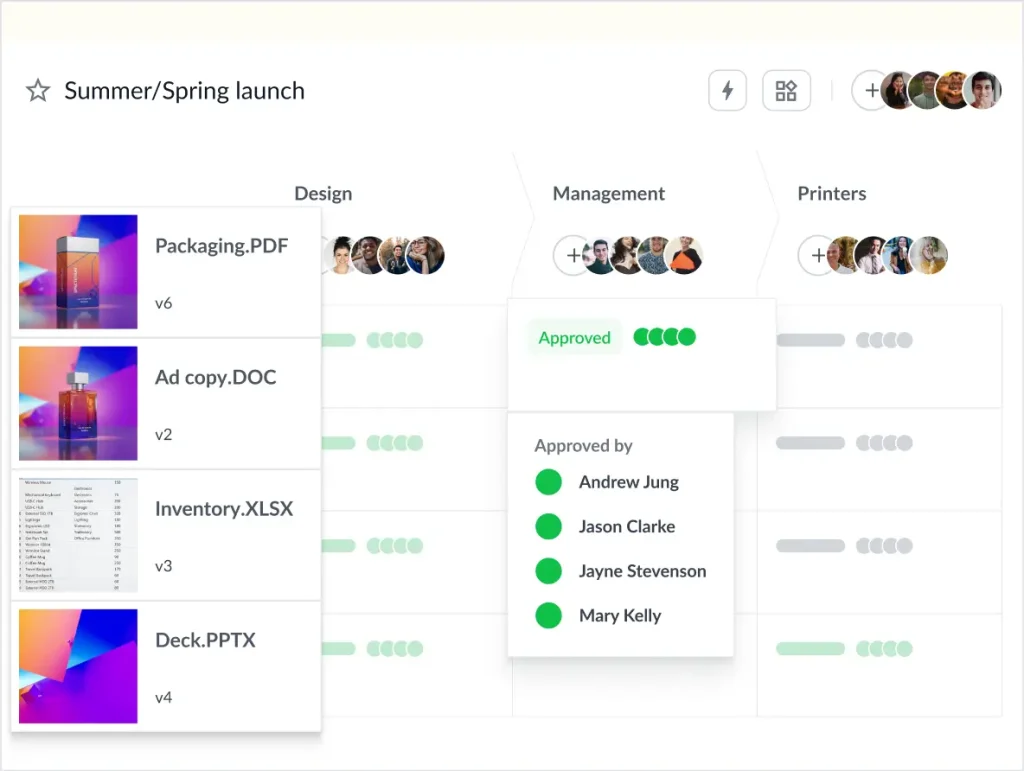
Filestage is a review and approval platform that covers the stage before assets enter your brand library: sharing drafts, collecting feedback in context, and recording formal approval decisions.
Why we chose it
Filestage is our product, and its role in this list is specific: every asset in your DAM needs to be approved by someone, and that’s the stage where consistency is actually won or lost.
Filestage structures this process with reviewer groups for brand, legal, and compliance sign-off, comments directly on the file, automated reminders, and a full version history. Review Agents can even check files against your brand guidelines automatically.
To be clear about the scope: Filestage is not a DAM. It won’t store and index your finished asset library at scale, but it makes sure everything entering that library has been approved by the right people. Most customers pair it with one of the DAM platforms on this list.
Pros
- Structured, multi-step approvals with a full audit trail
- Reviewers need no account – easy for agencies and external partners
- Supports all major formats: designs, videos, documents, websites, audio
- Review Agents can check brand and compliance criteria automatically
Cons
- Not a DAM – no large-scale asset storage, tagging, or distribution library
- Browser only, no desktop or mobile app
Pricing: Free plan (1 active project, 5 files/month). Starter plan for $199/month including unlimited active projects and files, Business plan for $329/month including more advanced features; Enterprise plan with custom pricing and more security features.
Supercharge your marketing reviews
Share, review, and approve all your content in one place with Filestage.
4. Frontify – best for brand guidelines plus DAM in one
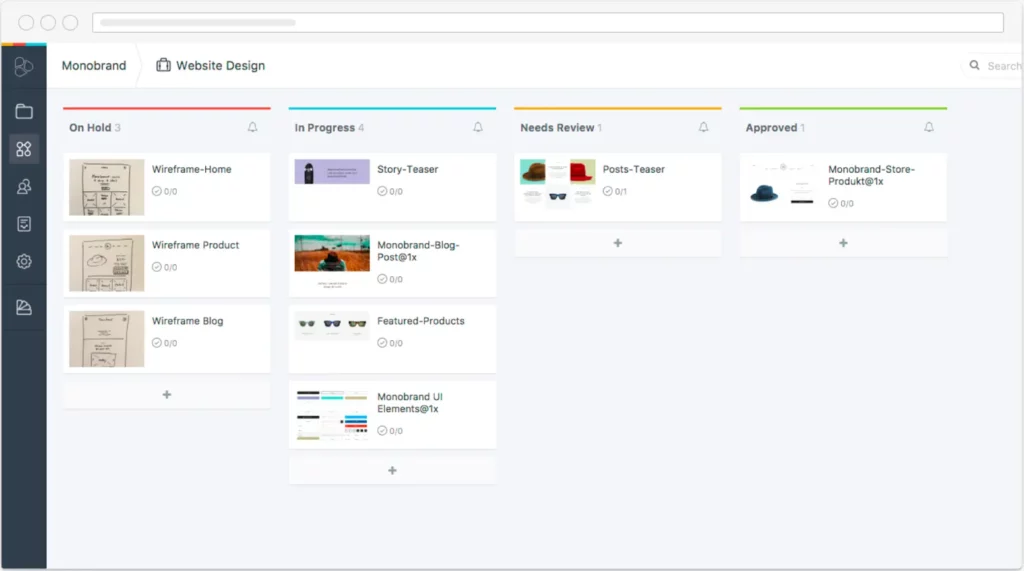
Frontify combines living brand guidelines, a DAM, and creative collaboration in one brand platform.
Why we chose it
Frontify has become the reference point for modern brand platforms, and its core idea is the one BAM was always about: guidelines and assets living in the same place.
Update a logo or color in the guidelines, and that’s what everyone downloads from that moment on. The rule and the file can’t drift apart.
In our evaluation, this was the feature that stood out most: agencies and partners pull assets from the same portal that tells them how to use them, which quietly kills the “old logo from a desktop folder” problem.
Pros
- Living, always-current brand guidelines connected to assets
- Strong templating and portal experience
- Wide integrations (Figma, Adobe, office suites)
Cons
- Quote-based pricing; costs scale with modules
- Weak on video – video-heavy teams will need a dedicated tool alongside it
Pricing: Quote-based
5. Bynder – best for enterprise digital asset management

Bynder is a leading DAM and brand platform for centralizing assets, with brand guideline modules and automated video creation tools.
Why we chose it
Bynder is the enterprise option on this list. It’s a mature DAM used by global brands, built to handle thousands of users across many markets. Permissions and governance are its real strength: you control exactly who sees, edits, and downloads every asset.
What stood out most was the automation. With templated video and design creation, one approved template can produce hundreds of localized versions – no extra designers needed.
However, getting Bynder running is a real project. Plan for a proper implementation phase, and give someone clear ownership of the rollout.
Pros
- Mature, scalable DAM with strong governance
- Brand guidelines and templating modules
- Automated creative production tools
Cons
- Enterprise pricing, quote-based
- Meaningful implementation and admin effort
Pricing: Quote-based
6. Monotype Connect – best for smaller teams (and fonts)
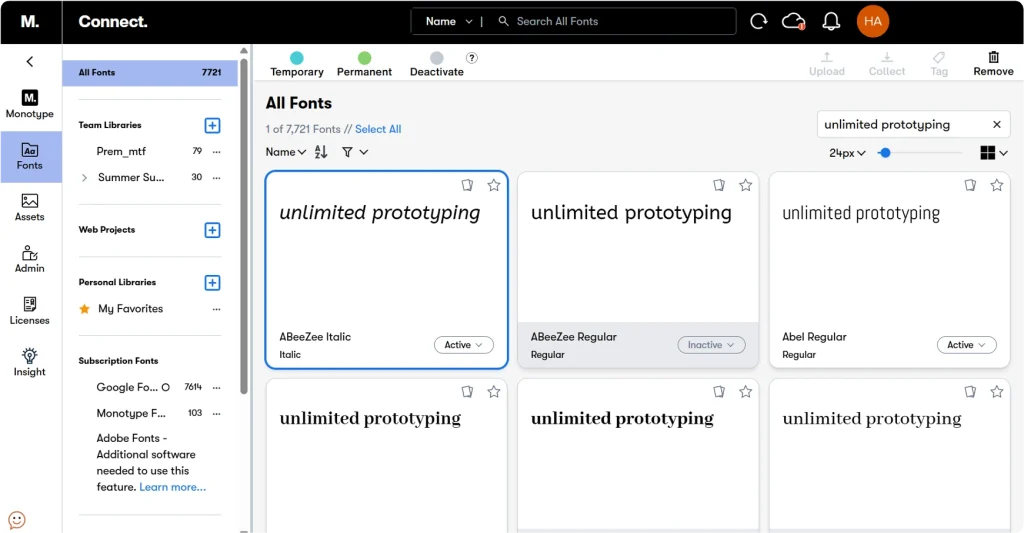
Monotype Connect is the new home of Extensis Connect, the asset and font management platform for small and medium teams – rebranded after Extensis’s integration into Monotype.
Why we chose it
This tool earns its place through an asset class everyone else on this list ignores: fonts. Font licensing violations are a real brand and legal risk, and this is the only platform here managing fonts and creative assets in one system – a specialty Extensis built over 30 years, now backed by direct access to Monotype’s 250,000+ font library inside the platform.
For small teams whose “DAM problem” is really a scattered files and fonts problem, it remains the easy fix.
Pros
- Font management and asset library in one, unique on this list
- Font license compliance reporting reduces genuine legal risk
- Direct access to the Monotype font library within the platform
Cons
- Lighter brand-guideline and distribution features than full brand platforms
Pricing: Custom quote
7. Filecamp – best budget DAM with unlimited users

Filecamp is a low-cost, cloud-based DAM with tagging, search, custom branding, and file sharing.
Why we chose it
Filecamp’s pricing model is the story: flat monthly price, unlimited users on every plan.
For companies with many occasional users – franchisees and partner agencies – per-seat DAM pricing is a dealbreaker, and Filecamp removes it. You give up the AI features and analytics of the premium platforms, but for organized, branded, searchable asset storage, it covers the essentials at a tenth of the price.
Pros
- Unlimited users on all plans
- Custom branding per client or team
- Simple tagging and search
Cons
- No usage analytics or AI tooling
- Basic workflow features
Pricing: From ~$29/month flat
8. MarcomCentral – best for franchises and local branch networks
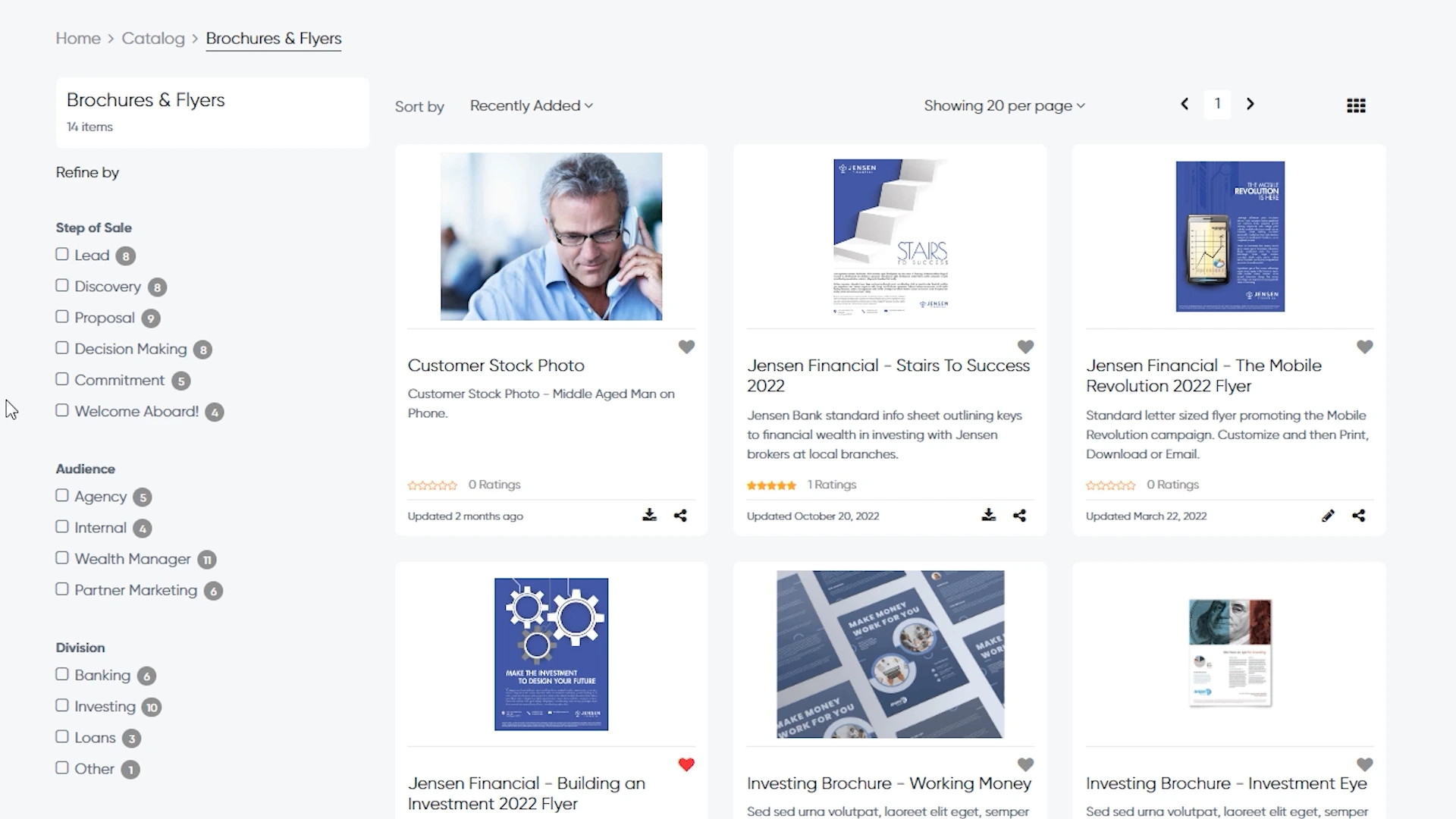
MarcomCentral centralizes brand assets with custom metadata tagging, AI-assisted organization, and customizable templates that local teams can adapt and share.
Why we chose it
MarcomCentral solves a specific problem: keeping your brand consistent when hundreds of local players do their own marketing. Think franchisees, branch offices, or field sales reps.
Central marketing creates the templates. Local teams customize them – their address, their offer, their photo – but the brand elements stay locked. Usage tracking then shows headquarters what’s actually being used in the field.
If your brand risk comes from local offices improvising their own flyers, this is the control layer for it.
Pros
- Template customization within brand guardrails
- Custom metadata and AI-assisted tagging
- Per-asset usage tracking
Cons
- Specialized – most valuable for distributed/franchise models
- Quote-based pricing
Pricing: Quote-based
9. Canto – best easy-to-adopt DAM
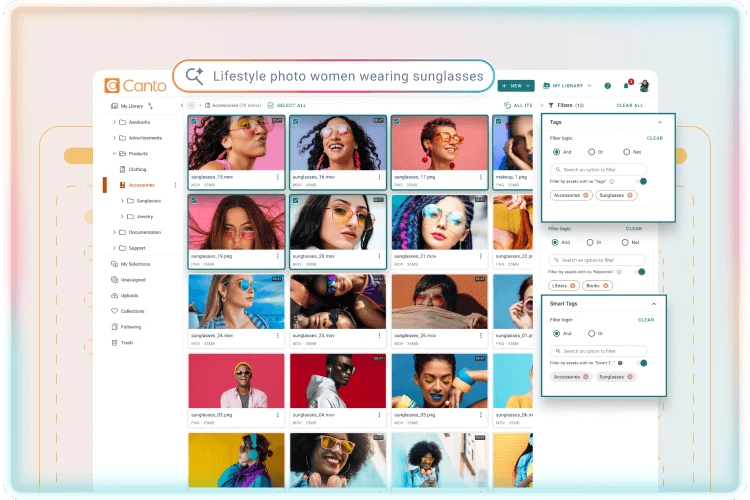
Canto is a widely used DAM known for fast rollout, an intuitive interface, and AI-powered visual search.
Why we chose it
Canto’s strength is adoption. Most DAM projects fail because people don’t use them; Canto is built to prevent exactly that. Teams are typically up and running in days, not months.
What impressed us most is the AI visual search: you type “red packaging on white background,” and it finds the asset, even if nobody ever tagged it.
Facial recognition does the same for people – every photo of your CEO, found instantly. That matters because it removes the highest hidden cost of a DAM: relying on everyone to tag everything correctly, forever.
Pros
- Fast rollout and high user adoption
- AI visual search and auto-tagging
- Broad integrations
Cons
- Quote-based pricing
- Brand-guideline features lighter than Frontify/Bynder
Pricing: Quote-based
10. Seismic Content – best for enterprise sales content governance

Seismic is an enterprise enablement platform whose content module governs how brand-approved materials are used by sales and client-facing teams.
Why we chose it
Seismic is here for a governance gap the marketing tools miss: sales teams.
Even when marketing approves a deck, reps are still sending their own edited copies – old pricing, outdated claims, stretched logos. In regulated industries, an outdated compliance claim in a sales deck is a legal risk.
Seismic fixes this. Reps pull materials from one governed library, directly inside their CRM or email. When marketing updates a slide, it updates in every deck that uses it.
Reps can only personalize what they’re allowed to. And the analytics show which content actually gets used and closes deals, so marketing finally learns what the field needs.
Pros
- Brand governance where it’s weakest – sales-created content
- Content usage and engagement analytics
- Enterprise-grade permissions and compliance
Cons
- Enterprise pricing and implementation effort
- Overkill if sales enablement isn’t a priority
Pricing: Quote-based
How to choose the right brand asset management software
The best BAM tool depends less on feature counts and more on which gap you’re actually trying to close. Start there, then check its pricing and fit:
- Storage, search, and distribution – if the core problem is that assets are scattered and hard to find, you need a true DAM. Bynder (enterprise), Canto (fast rollout), and Filecamp (budget, unlimited users) are built for this.
- Guidelines that stay current – if teams keep using outdated logos and colors, a brand platform that ties brand guidelines to the assets themselves, like Frontify, keeps the rule and the file in sync.
- On-brand creation at scale – if local or non-design teams need to produce their own materials without going off-brand, template-driven tools like Papirfly and MarcomCentral remove the design bottleneck.
- Knowing what works – if you want to see which assets actually get used and perform, Brandfolder’s usage analytics turn production into a data-informed decision.
- The approval stage before assets go live – if inconsistency is really creeping in before files reach your library, that’s a review-and-approval gap. Filestage structures brand, legal, and compliance sign-off so only approved assets enter your DAM.
Most vendors offer a trial or demo. Shortlist two or three that match your primary gap and test them against your real workflow before committing.
7 benefits of brand asset management software for your business
Let’s take a look at the most common advantages that asset management software can bring to your business.

Avoid duplicate work
Imagine a scenario where each business function or regional unit needs to produce its own digital asset as there is no centralized business communication software accessible to all team members.. This would create a lot of additional work. Since asset management software serves as a valuable marketing resource management tool it helps your business avoid duplicate work, saving valuable work hours of the marketing and design teams.
Streamline processes
Features such as review and approval functions, collaboration tools and a unified interface allow all team members to work more efficiently on any brand-related task.
High-quality output
BAM software enables your team members to collaborate more efficiently, which usually results in higher quality output to reach your key performance indicators (KPIs).
More consistency
As all assets are available in one centralized place, BAM software helps you implement your brand guidelines and delivers higher brand consistency among all your assets.
Better collaboration between team members
Since all your team members across different functions can access a single platform and make use of integrated collaboration tools, your staff can work much more efficiently within and even outside your organization.
Enhanced security
Features such as version and access control contribute to the security of your company. You can be assured that only approved staff are able to access sensitive data without the risk of losing important brand material.
Improved content planning
Having all your assets in one centralized place lets you make better decisions, e.g. how many assets need to be produced for a specific marketing campaign.
It should be pretty clear by now that brand management software has many positive effects on your business, which will directly and indirectly contribute to the bottom line of your business.
With the right BAM software, your staff can find all brand assets in one centralized place, which alone saves thousands of working hours across your organization. Furthermore, your brand guidelines can finally be implemented.
How to create brand assets in four simple steps
Now that you understand brand asset management and the necessary software, we outline the brand asset creation process in four easy steps.
1. Ideation and briefing
No matter what kind of brand asset you need, the first stage consists of the ideation process. Ideation is a creative process that aims to generate innovative ideas for your next marketing assets.
To get started with your ideation process, take inspiration from the 7 all-time greatest ideation techniques. Once you’ve envisioned your idea for a new post, video or branding campaign, you need to brief all content creators involved (which usually consists of the design and marketing teams).
2. Creation
Depending on the project’s size, the creation process might take days to weeks and sometimes even months. Huge projects might involve even more team members, such as copywriters or videographers, and much coordination.
You need to make sure to add a buffer between the creation deadline and the delivery date because, in most cases, the first draft needs further revisions. If you do not have an appropriate review and approval tool at hand, this buffer period needs to be very large to safeguard for potential bottlenecks.
3. Review and approval
Everyone who has experienced bottlenecks due to numerous revisions, chasing decision-makers and lost information inside various email threads knows that the review and approval process can be quite complex and nerve-wracking. Software such as Filestage is an invaluable asset to help streamline this process.
With Filestage, all stakeholders can view the assets and leave comments in one centralized platform. Content editors can easily access feedback and ask questions if something is unclear. This ensures an easy communication flow between content creators and reviewers.
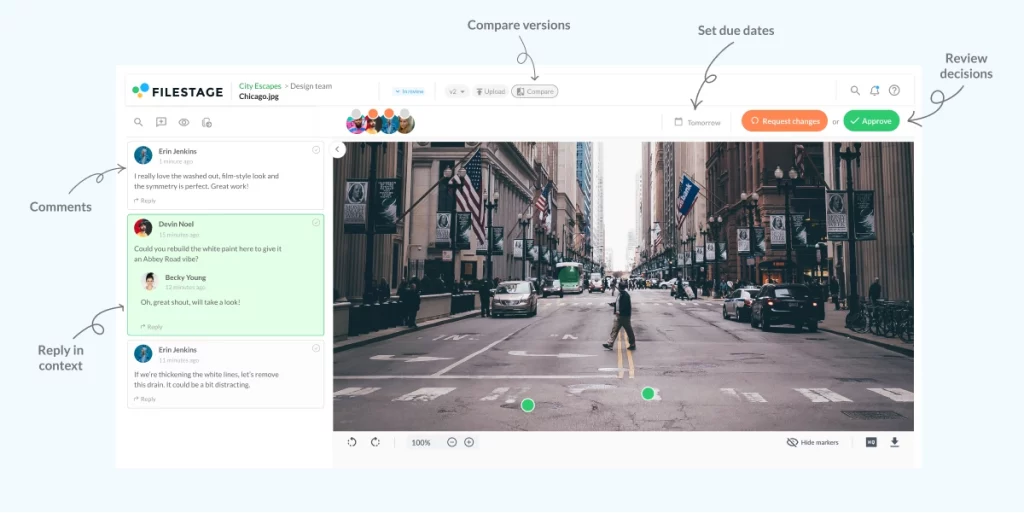
Online proofing software also saves valuable time, which is one of the scarcest resources in any brand-related project management task. In addition to saving time, approval software also ensures that you can produce better content at a much higher consistency, as the platform enables your team members to share ideas and uncover even the smallest mistakes in your marketing and design outputs.
4. Upload, share, publish with your brand asset management software
Once the final version has been approved by all stakeholders, you can easily upload, save and publish your brand assets with your brand asset and graphic design project management software.
Final thoughts
Brand asset management software offers many advantages that directly or indirectly contribute to your bottom line: better results, more brand consistency, and streamlined workflows across every asset.
Match the tool to your actual gap – storage and search (DAM), guidelines (brand platform), creation at scale (templates), or the approval stage before assets go live – and trial your shortlist before committing.
If you’d like to take a closer look at Filestage’s solution for approving your brand assets, start a free trial.
FAQ
What is brand asset management?
Brand asset management (BAM) is the process of organizing, storing, and managing all of a company’s brand assets in a centralized system. This includes logos, images, videos, templates, documents, and other marketing materials. The goal is to ensure that assets are easily accessible, consistently on-brand, and used efficiently across all teams and channels.
How does BAM software help maintain brand consistency across all marketing materials?
BAM software ensures brand consistency by centralizing all approved brand assets in one accessible location. Teams can quickly find and use the correct logos, fonts, templates, and visuals, reducing the risk of off-brand or outdated content. Many platforms also allow managers to set guidelines, restrict access to certain files, and provide templates that enforce brand standards.
Can BAM software integrate with other tools like design software, content management systems, or project management platforms?
Yes, most modern BAM platforms offer integrations with popular design, marketing, and project management tools – for example Adobe Creative Cloud, Canva, CMS platforms like WordPress, or project management tools like Asana and Trello. These integrations reduce manual uploading and downloading and ensure the latest versions are always used.
Do BAM tools support version control and track changes to avoid confusion over outdated files?
Yes, version control is a core feature of most BAM platforms. Every time an asset is updated, the system keeps a record of previous versions, making it easy to revert if needed. Some platforms also show who made changes, when, and what was modified, improving accountability and transparency.
Can BAM software streamline review, feedback, and approval workflows?
Most BAM systems don’t support advanced review and approval workflows. However, they can be easily integrated with platforms like Filestage, where the entire review and approval process can be managed efficiently. In Filestage, stakeholders can leave comments, request changes, and approve assets in one centralized platform. Once the final version is approved, it can be stored back in your BAM system, ensuring your centralized brand library is always up to date.