Creative teams rarely lose time to the creative work itself. They lose it to resizing assets, chasing feedback, routing approvals, and hunting for the latest version. Monotype’s Scaling Creative Operations report found that 57% of creative teams spend more than a quarter of their week on non-creative tasks.
This guide is for creative and marketing teams looking to make the most of creative workflow automation. It covers what to automate, which tools handle each stage, where AI agents fit, and how to roll it out.
What is creative workflow automation?
Creative workflow automation is the use of software to handle repetitive tasks in design and marketing production, so your team spends its time on creative work instead of coordination. It applies rules and triggers to move work between stages without anyone chasing it.
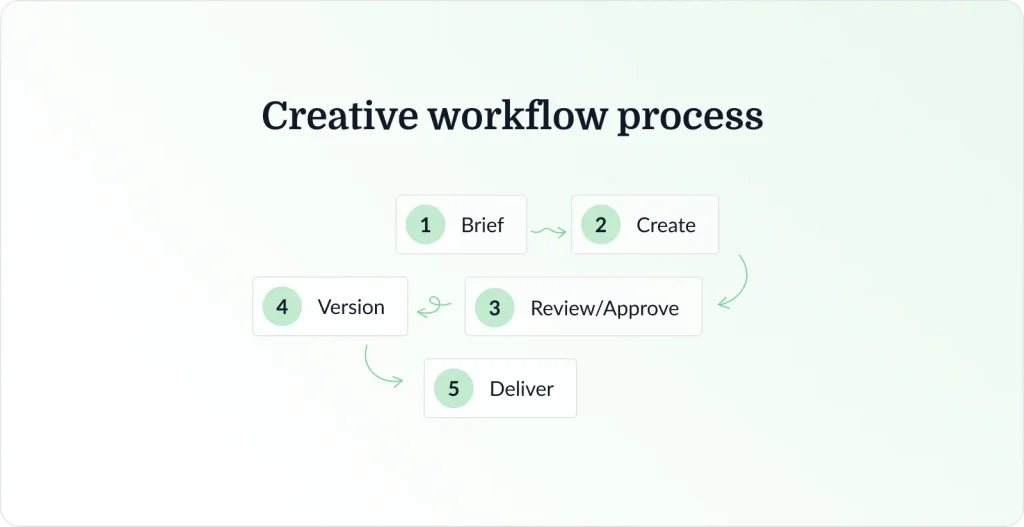
Automation spans the whole creative lifecycle rather than the design stage alone, covering intake, production, review and approval, versioning, and final delivery.
How creative workflow automation works
The underlying creative workflow runs from brief to creation, then review and approval, versioning, and delivery. Automated workflows sit on top as rules. A trigger such as “asset uploaded” fires an action such as “notify reviewers.” That is rule-based automation, and none of it needs AI to work.
Why automate your creative workflow?
Automating the coordination layer changes what marketing teams can produce, and how quickly. Monotype found 62% of organizations using AI and automation report gains in efficiency and creativity.
- Faster time-to-market – Automated handoffs shave days off the gap between a finished asset and a live campaign.
- Scale without more headcount – One approved master generates variations for every channel and market, so automation scales output without increasing headcount.
- Less manual work and fewer errors – Reducing manual effort removes the manual errors that come with it, since automation executes tasks consistently and accurately.
- Stronger brand consistency – Locked templates and automated checks keep variations on brand at enterprise scale.
- Faster review and approval cycles – Routing and reminders cut the dead time that makes approvals the slowest stage.
- Better visibility – Status is visible without asking, improving resource allocation and giving managers real performance data for decision making.
- More time creating – Less coordination means more hours on the work your team was hired for.
Our guide to workflow automation examples walks through specific setups.
Now that we’ve covered the benefits, let’s look at what you can automate in your creative workflow.
What you can automate in your creative workflow
Not every stage is worth automating. These pay back.
- Intake and briefing – Standardized forms capture specs, deadlines, and brand rules upfront, so creative briefs arrive complete.
- Task assignment and routing – New requests route to the right team members by skill or capacity, with no manager triaging a queue.
- Asset versioning – Uploads stack as new versions, so nobody works from a superseded file.
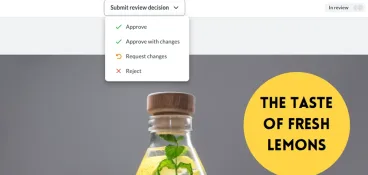
- Review and approval routing – Approval workflows move files through defined steps, notifying each group when it’s their turn.
- Reminders and status updates – Overdue reviewers get chased automatically and stakeholders see progress.
- Reporting – Cycle times, bottlenecks, and approval process turnaround compile themselves.
- Distribution – Approved assets push to your DAM, ad platforms, or CMS in the right format.
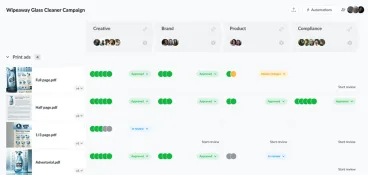
Approvals are where most creative processes stall. A file can be finished for a week and still not be live because two people haven’t clicked approve. That’s the stage tools like Filestage automate, and the fastest bottleneck to fix. Our guide to approval software covers it.

With a clear understanding of what can be automated, let’s review the best creative workflow automation tools by category.
Best creative workflow automation tools by category
No single tool does all of this. In practice it’s a stack, and each category solves a different part of the problem.
We built this list around the five jobs that come up most in creative production, naming the leaders in each rather than every option.
| Category | Tools | Best for | Starting price |
| Project management | Asana, monday.com | Task routing and structured intake | From $9/seat per month |
| Review and approval | Filestage | Routing approvals, reminders, and version control | $199/month |
| Digital asset management | Bynder, Canto | Centralizing and distributing approved assets | Custom / quote-based |
| Creative automation and templating | Storyteq, Celtra | Scaling asset variations across channels | Custom / quote-based |
| Automation and integration | Zapier, Make, n8n | Connecting the stack and triggering actions | From $12/month |
Project management tools for intake, routing, and resourcing
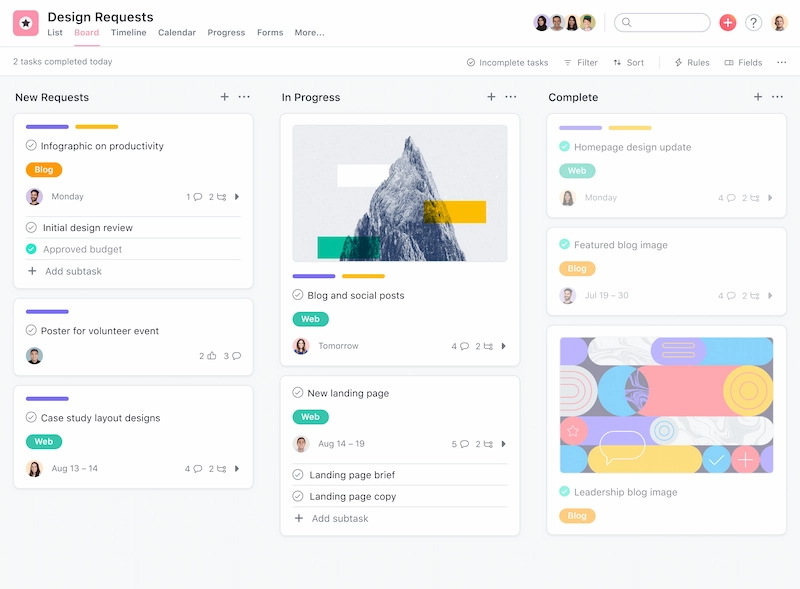
Project management is where intake and routing live. A project management tool turns scattered requests into a structured queue and assigns work by rule.
Asana and monday.com both do this well. Intake forms capture briefs properly, rules assign work by project types or capacity, and dashboards give the resource allocation view spreadsheets never deliver. Automating repetitive tasks saves real time in project management.
Creative agencies juggling multiple teams gain most, since it lets you consolidate project management instead of running trackers per client.
Our roundup of creative project management software compares the options.
Pricing
monday.com offers a free plan with up to two seats. Paid plans start at $9/seat per month for Basic, billed annually, rising to $12 for Standard and $19 for Pro .
Asana has a free Personal plan for up to two users. Paid plans start at $10.99/user per month for Starter, billed annually, and $24.99/user per month for Advanced. Enterprise pricing is custom.
Review and approval tools for faster feedback and sign-off
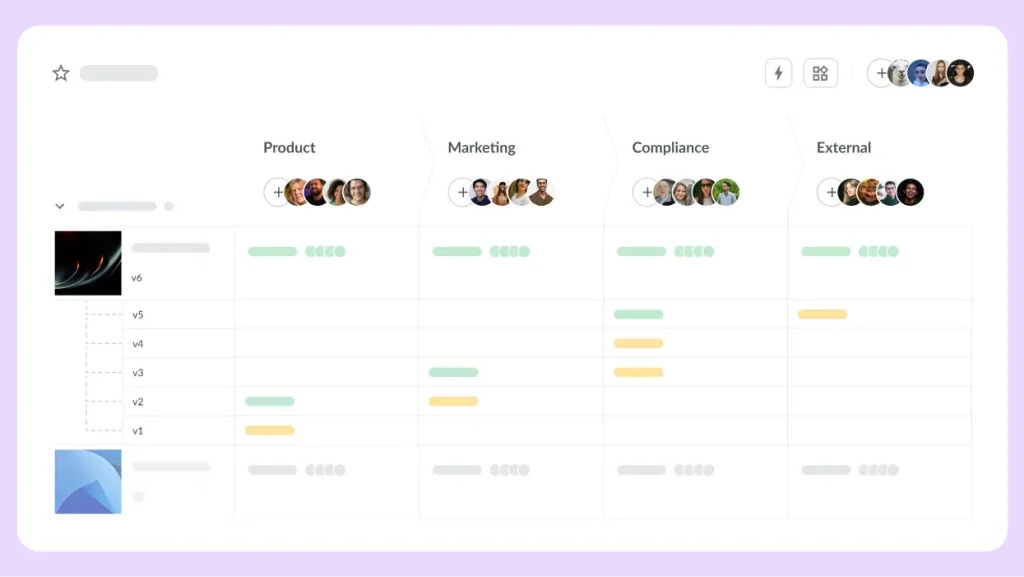
If work sits waiting for sign-off, fix this category first. A review and approval tool replaces email threads with defined review steps, so a file moves on the moment the right people approve it. Filestage handles routing, reminders, version control, and the audit trail.
Routing and review steps
- Manage your reviewer groups: Set up sequential steps with their own reviewers, so an approved step passes the file to the next automatically
- How to use automations: Triggers and actions that move work along on their own
Due dates and reminders
- Set up and manage due dates: Set a due date per step and reminders go out automatically to reviewers who haven’t responded, so nobody chases feedback
Version control
- Manage different versions of a file: New uploads stack alongside earlier ones, reviewers always land on the latest, and comments stay tied to their version
Audit trail
- Export file reports: Every comment, decision, and approval is timestamped, giving a full record of who approved what and when
Pricing
Filestage has a free plan, and paid plans start at $199/month for Starter, with Business at $329/month and custom pricing for Enterprise.
Note: Filestage is our own product. We’ve mentioned it here because it genuinely fits this need, and we’ve held it to the same treatment as every other tool on this list.
Supercharge your marketing reviews
Share, review, and approve all your content in one place with Filestage.
Digital asset management tools for storing and distributing approved assets
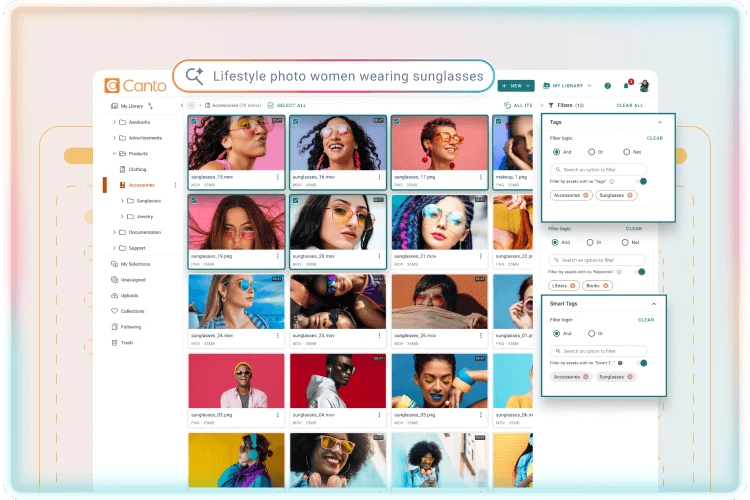
Once approved, work needs somewhere to live that isn’t a designer’s desktop. A digital asset management tool (DAM) centralizes approved assets with metadata, permissions, and search, then distributes them.
Bynder and Canto lead this category. AI tools handle auto-tagging on upload, formats convert for different destinations, and expiry dates apply to anything with a licensing limit. Enterprise organizations get access controls and enterprise-grade security.
Our guide to creative asset management covers how this fits the wider stack.
Pricing
Custom / quote-based for both. Neither publishes rates, so budget means talking to sales.
Creative automation tools for asset production at scale
When one campaign needs 200 assets across channels, formats, and markets, manual production stops being viable.
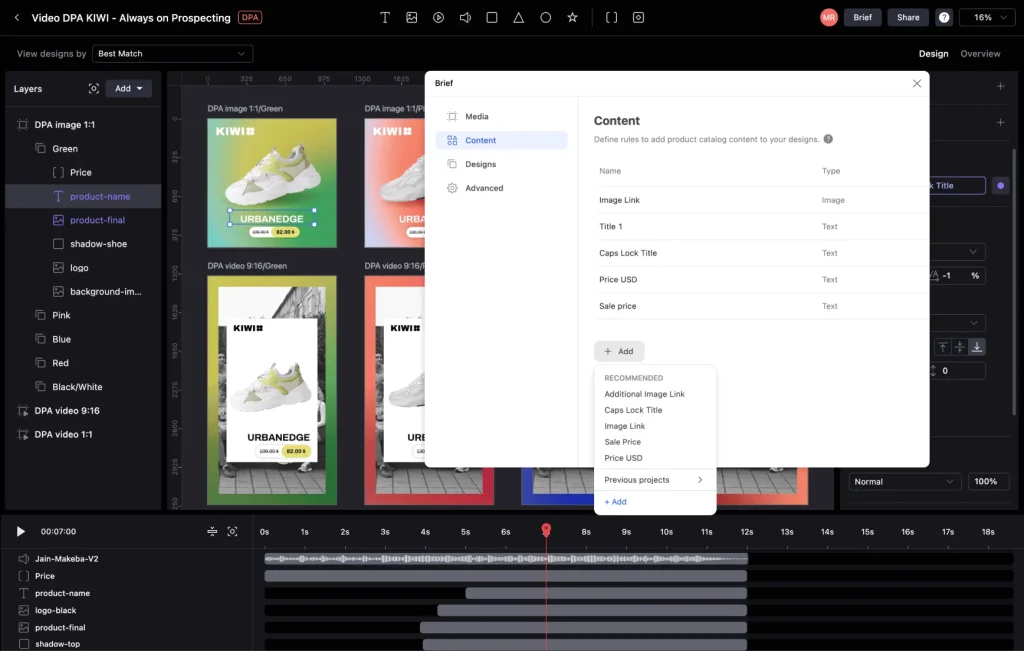
Templating tools take an approved master and generate every variation, with brand rules locked so nothing drifts off-brand. Both Storyteq and Celtra are built for this.
Dynamic templates output video, HTML5 banners, and statics in multiple formats from one file, then hand the creative assets to your DAM or ad platforms.
Pricing
Custom or quote-based for both. Storyteq lists Professional and Enterprise packages as price on application, and Celtra builds a bespoke package after a demo.
Integration platforms for connecting your creative workflow
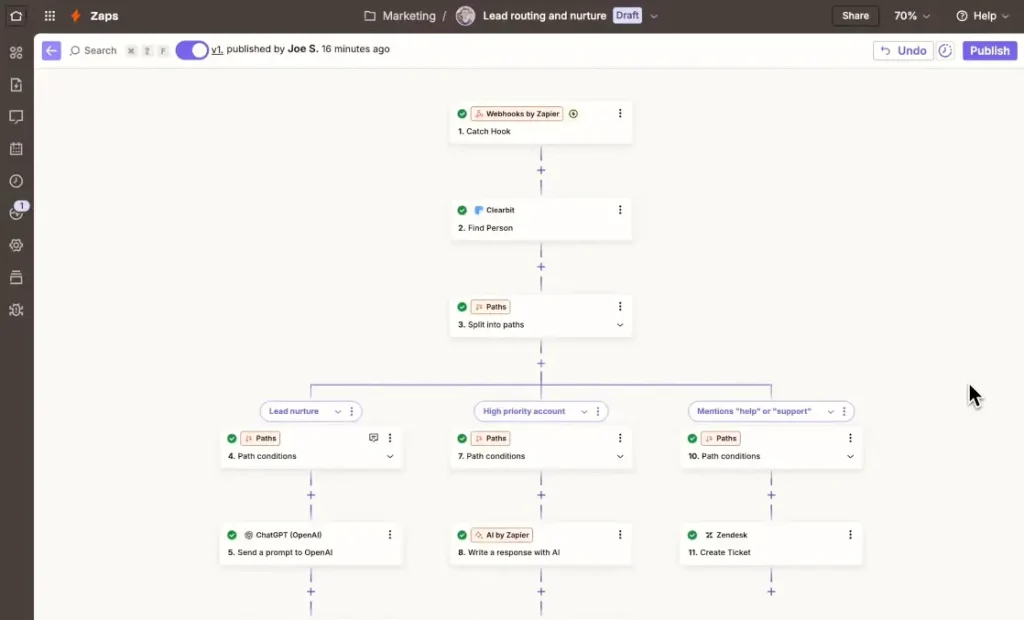
The other four categories each solve one stage. An automation platform connects them, so an approval in one tool triggers an action in another without anyone copying data.
Zapier, Make, and n8n all do this, and they differ more than their feature lists suggest.
Zapier has the largest app catalog at 9,000+ against Make’s 3,000+, and the shallowest learning curve. Make’s visual canvas handles complex workflows and complex scenarios better. n8n is open source and self-hostable, the pick for engineering teams wanting control, though it carries a steeper learning curve.
All three connect to Adobe Creative Cloud, your DAM, and your project management platform, so they integrate seamlessly with enterprise systems you run.
Pricing
Entry tiers look similar and bill very differently.
- Zapier has a free plan with 100 tasks, then $19.99/month for 750 tasks, $129/month for 10,000 tasks, and so on, charged per task.
- Make has a free plan with 1,000 credits, then $12/month for 10,000 credits, $129/month for 100,000 credits, and so on, charged per operation.
- n8n’s paid plans start at $20/month for 2,500 executions, $50/month for 10,000 executions, charged per whole workflow run with unlimited steps.
All prices are annual billing. That matters more than the headline price: a 10-step workflow run 1,000 times burns 10,000 Zapier tasks or Make operations, but only 1,000 n8n executions. n8n also offers a free self-hosted Community Edition on GitHub, though its cloud plans have no free tier.
For larger rollouts, our guide to enterprise workflow automation covers governance and scale.
With the right tools in place, let’s see how AI agents are changing creative workflow automation.
Use cases of AI agents for creative workflow automation
Traditional automation follows fixed rules for task execution. It fires the same action every time and can’t interpret anything it wasn’t told about. Modern AI agents represent a different model, automating complex workflows autonomously and interpreting the unstructured data a fixed rule can’t read.
Here’s where that helps.
- Auto-tagging and organizing assets – Reading an image and applying metadata with no human typing it.
- Generating and resizing variations – Producing channel-specific crops, with artificial intelligence handling reframing decisions a fixed rule gets wrong.
- Drafting briefs – Turning a rough request into a structured brief the team can work from.
- Routing work – Reading an incoming request and sending it to the right person rather than following a rigid rule.
- Summarizing review feedback – Clustering 40 scattered comments into the changes that need making.
- Automated brand and QA checks – Flagging off-brand colors, wrong logos, or missing disclaimers before a human opens the file.
Handing repetitive tasks to AI agents also cuts the operational costs attached to manual work. Some things stay human, though. Creative concepting is the work itself, not overhead. Final approval needs someone accountable, and anything touching regulatory compliance needs human intervention.
Implementing AI agents well means these adaptive systems reduce the volume of work reaching a reviewer, not replace the reviewer.
Now that you know how AI agents fit in, let’s walk through how to implement creative workflow automation step by step.
How to implement creative workflow automation (step by step)
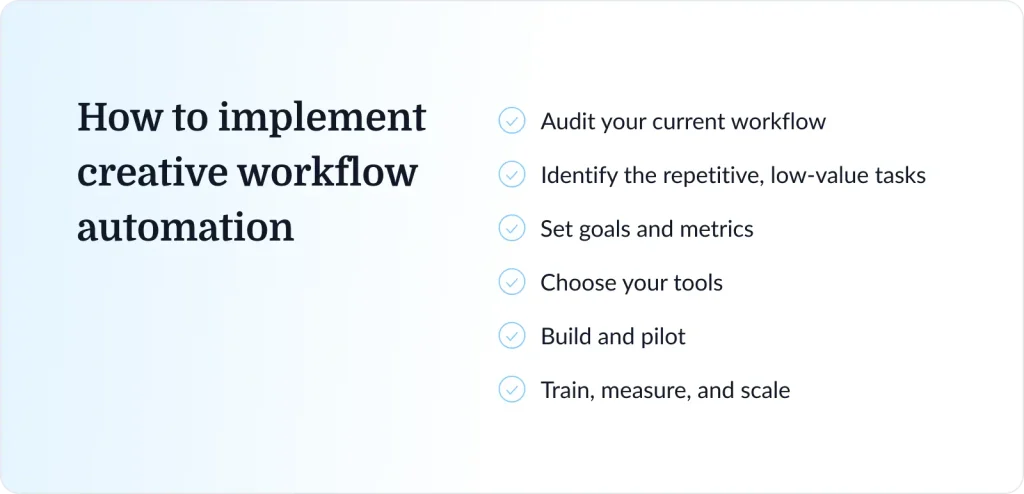
Automation fails when bolted onto a process nobody has mapped. Work through these six steps in order.
1. Audit your current workflow
Audit and map existing processes before automating them. Map every stage an asset passes through and who touches it. Include the informal steps, the Slack nudges and desk visits, since that’s where the delay usually lives. You can’t automate existing workflows you haven’t written down.
2. Identify the repetitive, low-value tasks
Go through the map and identify the repetitive tasks worth automating for efficiency: the resizing, the chasing, the routing, and the version tracking. Rank them by hours they eat across the team, not by how annoying they feel. Repetitive tasks spanning multiple teams pay back first.
3. Set goals and metrics
Pick a number to move, such as cutting approval turnaround by 30% or doubling output. Measure your baseline first, or you can’t tell whether anything improved. Approval turnaround and team satisfaction are both worth tracking.
4. Choose your tools
Start with your biggest bottleneck rather than a whole stack. Prioritize integrations over feature lists, since the right tools are the ones that talk to what you already run. Different tools that can’t connect create another silo.
5. Build and pilot
Run one workflow through the new setup rather than switching everyone at once. Gather user feedback from the people using it, and expect to change the design once real work hits it.
6. Train, measure, and scale
Document the process, then train team members properly rather than sending a link. Review metrics against the baseline, fix what isn’t landing, and expand. Treat it as continuous improvement, not a project with an end date.
Five creative workflow automation best practices
Most failures here are predictable, clustering in the same five places.
- Don’t over-automate – Protect the stages needing human creativity and judgment. Automating a creative decision produces work that looks automated
- Avoid rigid templates – Templates allowing no deviation produce a templated look. Build in room to move
- Keep quality and brand checkpoints – Including a human approval step before anything ships. Automation should shorten the path to a decision, not remove it
- Prioritize tools that integrate – Every tool that doesn’t connect becomes a new silo, trading one coordination problem for another
- Manage the change – Involve creative and marketing teams early. Automation imposed on people gets worked around, and adoption makes it stick
Our guide to creative workflow management goes deeper on the process.
Final thoughts
Automating your creative workflow isn’t about removing creativity from it. It’s about removing the busywork wrapped around it, so your team ships faster and stays on brand. That’s the part of digital transformation that reaches the people doing the work, and where continuous improvement compounds.
If you only fix one stage, fix review and approval. It’s where most teams lose the most time, and the most straightforward thing to change.
Start your free trial of Filestage and see what automating approvals does to your turnaround.
Frequently asked questions
How do you automate a creative workflow?
Map your current process and identify the repetitive tasks inside it. Then pick automation tools for your biggest bottleneck, usually review and approval, and set up triggers and actions that move work between stages. Pilot on one campaign.
What can AI automate in a creative workflow?
AI handles work needing interpretation rather than a fixed rule: tagging assets, resizing variations, drafting briefs, summarizing creative review feedback, and running brand checks. AI agents can also route incoming work by reading context, not matching a condition.
What should stay manual in creative work?
Creative concepting, final approval, and anything with regulatory or legal exposure. Automation tools should reduce how much reaches a human, not take the decision making away. Keep someone accountable for the last sign-off.
Which tools are best for creative workflow automation?
It depends which stage is slowest. Filestage for review and approval, Storyteq or Celtra for scaling variations, Asana or monday.com for intake, Bynder or Canto for approved assets, and Zapier, Make, or n8n to connect them. Most teams need workflow automation tools from two categories, not five.
Our roundup of creative workflow software compares them.
How does review and approval fit into an automated creative workflow?
It’s the gate between production and delivery, and where automation pays back fastest. Automated routing sends files to the right reviewers, chases late feedback, and records every decision. Without it, your automated workflows deliver work to a queue faster.