
TL;DR
- A structured review and approval process helps teams collect feedback, manage revisions, and move projects toward final approval without delays.
- Most workflows involve several stages, from initial proposals and draft reviews to final sign-off and publication.
- Defining stakeholders, setting review deadlines, organizing file versions, and tracking approvals are key steps for keeping projects on schedule.
- Clear workflows reduce confusion, prevent version control issues, and help teams collaborate more effectively across departments.
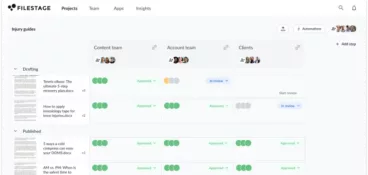
- Tools like Filestage centralize feedback, track approvals, and streamline review cycles so teams can move from draft to final version faster.
Introduction
The success of creative and marketing projects relies on the harmonious workflow of various moving parts. Many disciplines come together to collaborate according to an established schedule.
It’s not easy, and its success ultimately hinges on a structured workflow and an effective marketing approval process. A well-defined approval process ensures that stakeholders involved in creative work can provide feedback, maintain quality standards, and move projects toward final approval without unnecessary delays.
In most approval lifecycles, stakeholders review submissions to check accuracy, brand alignment, and overall quality before moving to the next stage.
Before looking at the full nine-step example later in this guide, here are four practical ways to improve your review and approval workflows right away.
Manage every approval in one place
Request approval without sending a single email with Filestage.
Four essential steps to improve your review and approval process
Many approval workflows become slow and frustrating because responsibilities, deadlines, and feedback channels aren’t clearly defined. By introducing a few simple approval steps, project managers can create a more efficient approval process and help teams save time during every review and approval cycle.
1. Define who needs to be involved in the process
One of the big challenges of digital review and approval involves managing the number of stakeholders involved who see the given material and request a change.
So before you start sharing content for reviews, take the time to clearly define who needs to review and approve the document and restrict the process to other people. This step helps create a structured approval chain and prevents unnecessary steps in the review and approval cycle.
With a dedicated approval tool like Filestage, you’ll be able to share your files with everyone that needs to see them via link and receive all their feedback directly on top of your content.
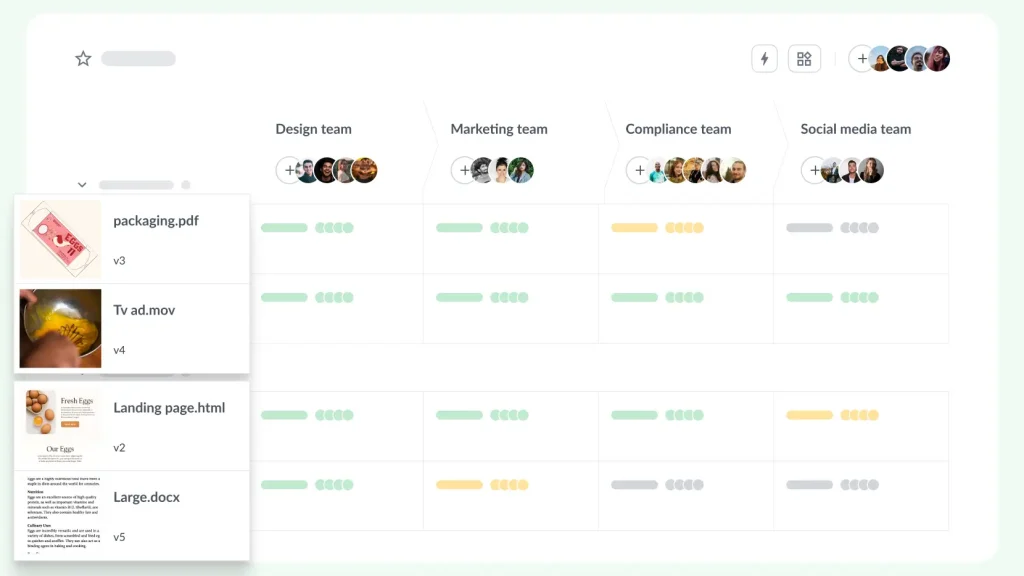
Plus, you can group reviewers into different approval steps and allow reviewers from the same review step to collaborate by leaving comments and replies. This creates a collaborative environment where multiple stakeholders can participate in the decision making process without slowing progress.
2. Set your review dates
It’s important that your project timeline establishes a definite, distinct time when your materials will go for review. Setting clear expectations early helps project managers guide the approval workflows and ensure that the stakeholders involved in the communication process are prepared.
And for that, you can specify a due date in an email or you can lean on software to help you out.
With Filestage, you can add due dates to your files. As the due date gets closer, your reviewers will get automated reminders through email notification. This helps prevent pending approvals from delaying the next stage of the project plan and helps teams save time during several rounds of review.
3. Keep all your file versions organized
It takes a number of versions and feedback rounds before your content is done and ready for publishing. And when there are multiple people and file versions involved, the entire review and approval cycle can easily turn into a mess.
That’s where having feedback and approval software gets particularly helpful. In Filestage, all the versions of your document are neatly stacked together, so everyone in your approval workflows knows which version is the latest. Strong version control makes it easier for stakeholders to add comments, track progress, and provide feedback without confusion.
You can also use the file comparison tool to view any two versions side by side, including all the comments.
And if someone opens an old version by mistake, they’ll see an alert letting them know it’s out of date.
4. Track stakeholder sign-off
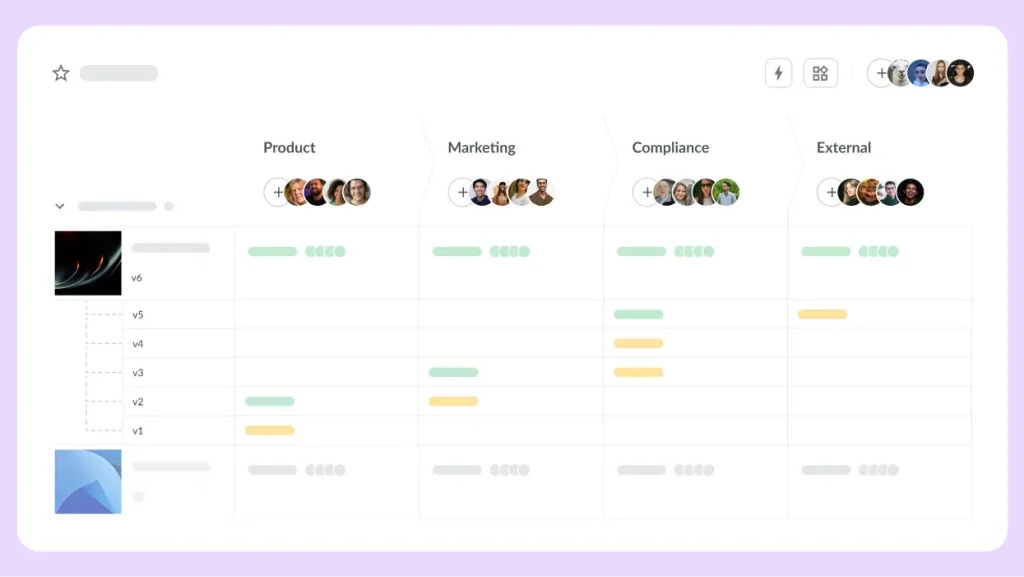
At the end of the day, you need a way to track approvals through each review round to make your approval process as efficient as possible.
This will help you see which content is ready to publish and which still needs work. On top of that, it helps project managers track pending approvals and keep stakeholders accountable for the content they need to approve.
With Filestage, you can easily track approvals by seeing exactly who has approved each version in your dashboard. This streamlined process allows teams to move forward confidently toward final approval.
The typical nine-step review and approval process
There’s no doubt that working on digital projects is challenging. Version control is a big potential pitfall. And gathering feedback from both internal and external stakeholders can test the patience of everyone involved.
Thankfully, you can follow established approval steps to create an efficient approval process. Here’s an example approval process you can adapt to meet the needs of your team.
Less time chasing feedback, more time on creative strategy
Online proofing software can cut review cycles by 30%, freeing up time for high-stakes work. Read our guide to see if it’s the right solution for your team.
To help you define your review and approval process, here’s a closer look at what a general outline might look like:
1. The team makes initial proposals
The creative team will get things started by submitting project proposals to the management team, who will then be responsible for choosing the best proposal.
2. The manager assigns tasks
Once the team has accepted a proposal, the manager will be responsible for assigning tasks to the various team members and creating deadlines.
3. The team receives the tasks
After the tasks have been assigned, team members will receive a notification. These members will then review the assignment and answer any questions they have.
4. The team submits initial drafts
The creative team starts creating an initial draft that the relevant stakeholders will closely review.
5. The team requests changes
After the team receives the initial drafts, there is a round of suggestions and changes. Generally, there will just be one round of edits. But if this round isn’t necessary, the submission is approved.
6. The team submits the final version
Once the team makes the final amendments, it’s time for them to implement the rest of the changes and submit the final version.
7. The team brings the elements together
Depending on the project, the team may need to incorporate a range of elements. Imagine this scenario: A video requires input from a designer, copywriter, and editor. In this stage, the team combines these elements and submits them for approval.
8. The submission is approved or rejected
Once the final draft has been submitted, stakeholders will decide whether the submission is approved. If the work is approved, it’s ready for submission. If it’s rejected, further edits will need to be implemented until the stakeholders are satisfied with the project.
9. The project is completed
Once the final version has been submitted and approved, the project is ready to be published. Following these approval workflows helps organizations maintain quality control and ensure that all stakeholders participate in the decision making process.
How to master every review and approval process
The general review and approval process has been outlined above, and it’s a serviceable reference. But the process will vary depending on the type of creative work you’re going to review.
Here are further tips to help you master each type of approval process.
Video review and approval
It’s challenging to work with video reviews and approvals. The most common barriers organizations face are large file sizes, slow internet speeds, and a lack of technical understanding from various stakeholders. Here are ways to resolve these issues:
Tip #1: Find the right tools.
First and foremost, you want to make things as simple as possible for everybody involved in the review and approval process. In other words, you should use simple file formats, reduce file sizes, and eliminate the use of complex software.
Online proofing software like Filestage can help make life easier for everyone in the review and approval process, regardless of their level of technical ability. Plus it can help dramatically speed up your approval workflows and create a more streamlined process for collecting feedback.
Tip #2: Encourage common vocabulary.
Video engineers may struggle to implement feedback because it’s unclear, and it fails to accurately articulate a thought. To make life easier, you should do your best to make sure that everyone uses a clear, common vocabulary.
Your video engineer might understand what a bridging shot is, but if everyone is using technical language, confusion may occur. Establishing clear criteria and encouraging effective communication will help different stakeholders provide feedback more clearly.
Tip #3: Craft clear feedback.
You should collect feedback throughout the review and approval process, and it should be simple, accurate, and clear. In other words, you need to find a way to package feedback and deliver it to the video engineer in a predictable way.
With Filestage, your colleagues and clients can add comments directly on top of videos and request changes or reject the file whenever needed. This way, no one needs to worry about timestamps.

Document review and approval
Document review can be particularly challenging if the copy is simultaneously reviewed by various stakeholders. Therefore, these stakeholders are responding to copy that has already been altered, which can cause real headaches for copywriters. Here are tips for cleaning up the process:
Tip #1: Source the best tools.
It’s critical that your stakeholders use the correct tools in the right way. If a single stakeholder fails to track their changes, you could lose lots of time, since other stakeholders will edit the incorrect versions of the copy.
Using the right system can help project managers maintain version control and guide the approval chain more efficiently.

Tip #2: Define a review order.
Simultaneous editing can be problematic, despite the software you’re using. If your stakeholders are reviewing and suggesting changes at the same time, it can create confusion for everybody involved.
If you’re using Word documents, you’ll want to make sure the document is passed from one stakeholder to the next, rather than dispatched en masse. This mistake can make it impossible to track and implement all the requested changes. If you decide to use a collaboration app such as Filestage, simultaneous editing won’t be a problem you have to worry about. Your colleagues and clients can easily leave change requests at the same time without struggling with overlapped feedback.
Tip #3: Don’t neglect version control.
When compared to video and graphic content, most stakeholders will have opinions about how to improve the copy. This fact can be challenging, so you should be sure to accurately track the different versions of your copy.
Once a stakeholder has requested a change, it’s common for another stakeholder to request that an older piece of copy replace it. So you should store all changes in a logical way.
Graphic review and approval
It can also be challenging to review the design of printed and digital materials. Without a clear idea of the review and approval process, you might find that some stakeholders will make suggestions about copy, and vice versa. This fact can disrupt your working process and frustrate your team. Here’s a look at ways to make this step go smoothly.
Tip #1: Rely on appropriate tools.
Again, it’s essential that you use a tool that’s capable of collecting accurate and specific feedback. This tip can expedite the speed of the implementation of requested changes.
If your graphic designer and art director are using printouts etched with markings in pen, it can be difficult to know where to start. Some stakeholders may fail to realize that this feedback is very difficult to interpret and implement.

Tip #2: Avoid large changes.
Graphic design is a laborious task that requires a lot of time. This tip is especially relevant if your coding was involved in your digital project, so your project timeline should accommodate regular review. Then when you reach the final review and approval process, no one will request large changes.
If someone requests a large change at this stage of the game, it can be very disruptive and threaten to derail the entire project. Then someone would have to readjust the copy according to those changes, and the quality of the work would suffer.
Tip #3: Monitor version control.
Remember, it’s very important for your designers and visual professionals to encourage everyone involved to track all of the versions and retain all of the files associated with the project. This tactic will help them undo any changes, and it also serves as a record of the implementation of requested revisions.
By keeping track of versions in this manner, you can keep the project moving along smoothly, and you can make sure that your team is happy with their work, rather than frustrated.
How to speed up review and approvals with AI
Review cycles can be long and frustrating. Not to mention the repetitive routine tasks involved in checking the same things like barcode positions, branding, language use, and compliance requirements over and over again.
Filestage’s AI reviewers can help streamline this process by checking each content asset against brand guidelines and quality standards.
You can assign AI reviewers to different stages of the review and approval cycle and use them as an extra pair of eyes to flag:
- Typos and errors
- Content that doesn’t align with brand guidelines
- Claims that go against industry regulations

Conclusion
If you spend the time to fine-tune your review and approval process, it can really pay dividends. It helps reduce the possibility of losing time on a process that can often be cumbersome. It can also protect your team and boost the final results of your project.
Check out how Filestage helps you speed up your review and approval process and start a free trial →
FAQ
Why is a structured review and approval process important?
A structured review and approval process ensures that all stakeholders involved in a project can provide feedback in an organized way. It helps maintain quality standards, supports clear decision making, and prevents unnecessary delays caused by unclear communication or missing approvals.
What are different types of review and approval processes?
Different approval workflows can vary depending on the project. Some teams use sequential approval steps where each stakeholder reviews content in order. Others use parallel workflows where multiple people review creative work at the same time. Both approaches can support an optimized approval process when managed with clear criteria and proper tools.
Which tools help streamline review and approval workflows?
Specialized approval software helps teams manage feedback, track versions, and monitor progress throughout the review and approval cycle. Tools like Filestage provide a structured system where stakeholders can add comments, track approvals, and move projects toward final approval more efficiently.
Check out our dedicated blog on approval software to learn more.