
Collecting stakeholder feedback is essential for any business. If you seek feedback from diverse perspectives, you’re sure to see continuous improvement in your work. And the more streamlined and efficient you can make this process, the more profitable you’ll be.
But from creating simple social posts to running packaging redesign projects, gathering feedback is notoriously chaotic. This often leads to missed feedback, project delays, and a very stressful work environment.
So, over the next few minutes, we’re going to set out to fix all that for you and your team. Here are our five pro tips to fix your stakeholder feedback process and improve organizational performance – plus suggestions on how feedback tools can help.
1. Define your stakeholder groups upfront
One of the biggest issues people face when managing stakeholder feedback loops is the sheer number of people involved. When your feedback rounds are a free-for-all, you end up drowning in comments from designers, legal experts, and everyone in between.
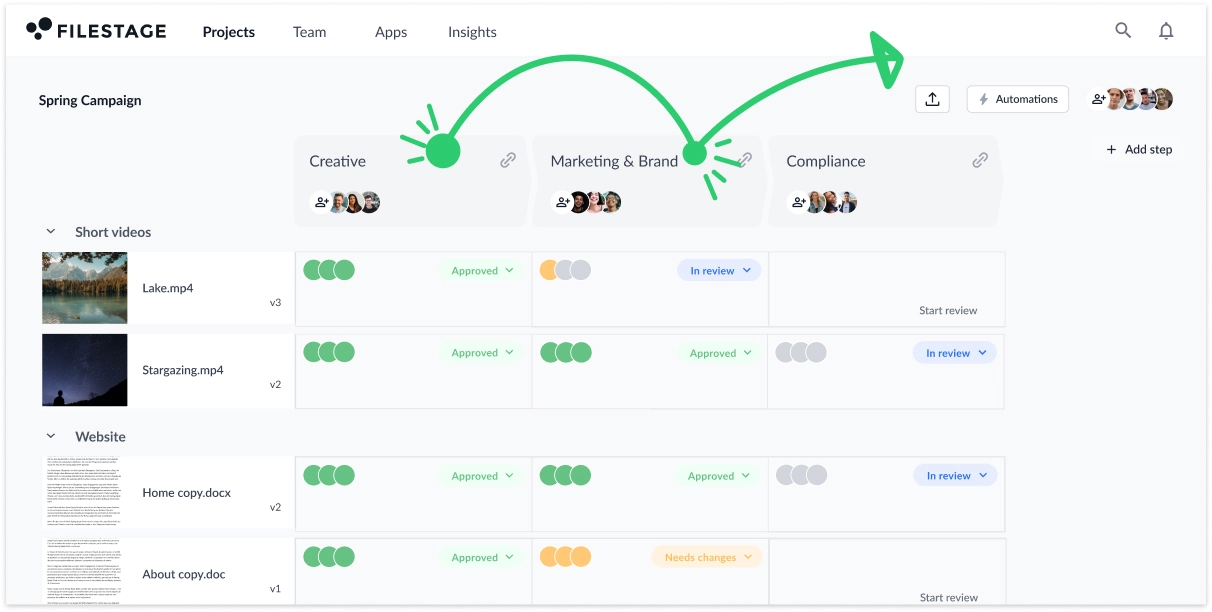
So, before asking anyone for feedback, divide everyone into a few different stakeholder groups. Somewhere between two and five should work for most feedback loops. But if your review and approval process is especially complex, you may need more.
Here’s an example of how a global brand may define their stakeholder groups for marketing projects:
- Creative – copy and design experts give feedback to help improve the quality of the content
- Marketing – marketing specialists give feedback to check the content meets the team’s goals
- Brand – brand experts give feedback on adherence to tone and visual guidelines
- Compliance – legal experts give feedback on any claims made in the marketing content
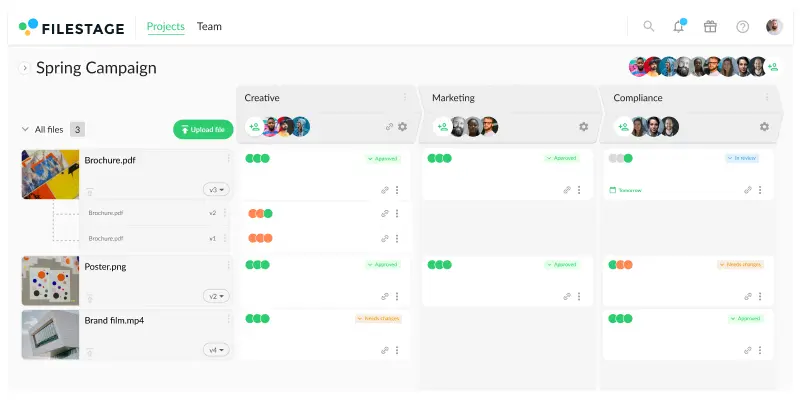
Once you’ve set up your groups, your content should move seamlessly from one group to the next. And because there are far fewer people involved at each stage, you’ll be able to reach the finish line much faster!
With Filestage review and approval software, you can set up reviewer groups, invite stakeholders, and share files for feedback. Check out the video below for a quick walkthrough.
2. Give stakeholders a shared space to discuss feedback
Another major problem when dealing with stakeholder feedback is consolidating everyone’s comments. On any given project, you could be getting feedback from:
- Emails
- Slack or Microsoft Teams messages
- Project management tools
- Comments in tools like Word, Docs, or Figma
- Meetings
- Loom recordings
- Pen-and-paper scribbles (yes, they still happen)
Then, at the end of each feedback round, you’re left with the world’s worst jigsaw puzzle trying to piece everything back together. And, unless you’re some sort of Sherlock Holmes, something inevitably slips through the net.
Here’s a better way.
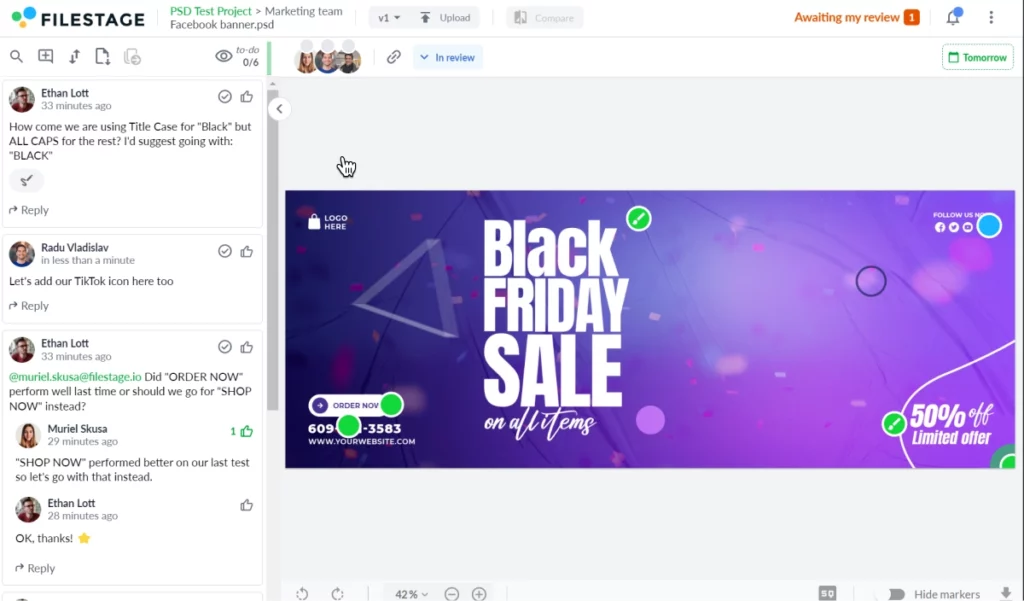
When you share any files for feedback, be specific about how and where you want that feedback shared. With Filestage, for example, everyone can share comments and annotations right alongside your content – whether it’s a video, design, documents, whatever!
This helps to keep each feedback loop nice and tight, allowing you to collect feedback and get valuable insights before moving to the next group.
Want to see what I mean? Check out this demo file →
Say hello to clearer, faster feedback
Get collaborative feedback right on top of your work with Filestage.
3. Set due dates for feedback to hold stakeholders accountable
Ever find yourself chasing internal stakeholders or clients for feedback or moving deadlines because feedback arrived too late?
This is a huge issue in all kinds of review processes. Stakeholders take their time and seem to just give feedback when it suits them. So the people actually making the content (you and I) are left rushing around to try and get things back on track.
But, luckily, there’s a simple fix. In the same way that we get deadlines for delivering content, we need to set stakeholder expectations for delivering feedback too.
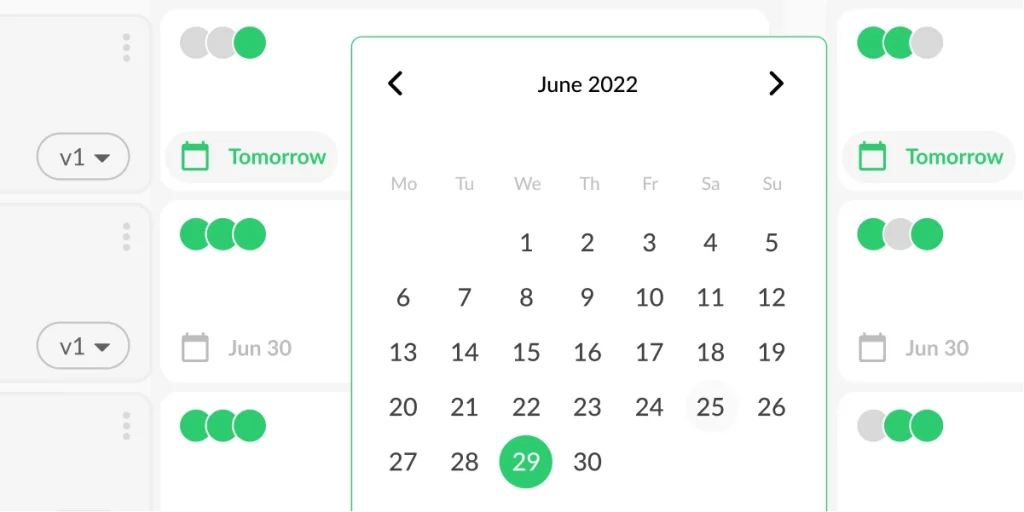
You could do this by assigning a task in your project management tool or adding something to your stakeholders’ calendar. Or, if you’re using Filestage, you can add due dates for each file and stakeholder group in your project. Then, as the due date approaches, stakeholders will get automated email reminders from Filestage to make sure they give feedback on time.
We call this type of stakeholder a Forgetful Phil. But they aren’t the only character in the review process that you need to look out for! Check out our full guide to stakeholder management and communication.
4. Keep a clear and uneditable version history
The fourth conundrum we’re going to crack today is the issue of versioning.
Here are just a few issues you can face when trying to gather feedback without proper version control:
- Stakeholders duplicate and edit documents directly instead of adding comments
- Reviewers give feedback on previous versions by mistakes
- People forget what they said about a previous version
In many cases, this leaves people like us with no choice but to pull all the stakeholders involved into a meeting to get aligned.
So how do we get around this problem? First, we need to make it impossible for stakeholders to edit content directly. Then, for anyone who opens an old version by mistake, we need to make it crystal clear that there’s a newer version available. And finally, we need to give stakeholders a way to view versions and comments side by side whenever they’re sent a new version to review.
Here’s the good news: Filestage can take care of all three of these things for you. Check it out in the video walkthrough below.
5. Get definitive approval after collecting stakeholder feedback
The fifth and final problem we’re going to solve today is arguably the most important – and it involves the issue of stakeholder approval.
At what point can you regard a piece of work as approved? If none of your stakeholders come to you with feedback, does that mean it’s approved? Maybe. If someone sends a quick reply saying “Looks great”, does that mean it’s approved? Also maybe. But when you’re putting anything out into the world – and especially when you’re putting marketing budget behind your work – you really need a way to turn that maybe into a definitely.
So let’s talk solutions.
If you’re working with documents, you could add a list of your stakeholders at the top. Then, when they’re happy, you can ask them to tick a box next to their name and add a timestamp as a mark of approval.
But what about if you’re working on videos and designs? Or what if your stakeholders don’t follow the process you’ve set up? Filestage has another solution.
In the top-right corner of every file review, stakeholders have a choice of two buttons:
- Request changes
- Approve
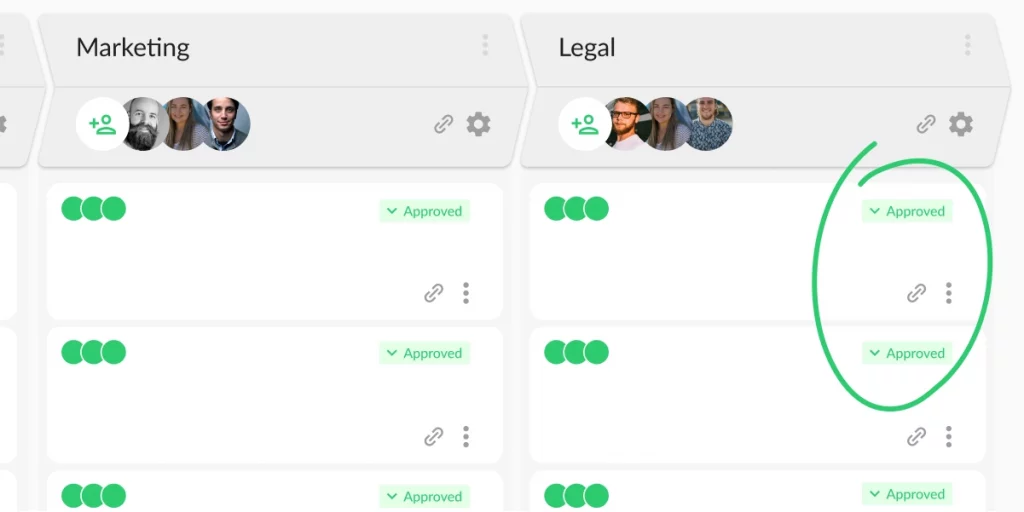
As soon as the button is clicked, a timestamp is captured and the stakeholder’s status is updated on your project dashboard. So when files are marked as approved, you and your collaborators can publish them with confidence.
Your Stakeholder feedback FAQs, answered
What is an example of stakeholder feedback?
A common example of stakeholder feedback is when an advertising agency needs to get creative work approved by the client. The agency creates a first draft of the asset and then shares it with the client to get their feedback (or approval).
During this process, the client typically has different internal stakeholders review the work with different objectives. For instance, the brand team first makes sure it aligns with voice and messaging guidelines, then QA teams fact-check the content. Finally, the legal team checks it against compliance regulations.
Using a client feedback tool makes it easy to manage large volumes of external stakeholder feedback.
How do you gather stakeholder feedback?
You can gather stakeholder feedback in a number of ways. If you are dealing with a small number of stakeholders, let’s say two or three, email can work well. That said, this can quickly descend into chaos. Stakeholders are sending their feedback across email, Slack, or teams. Versions get lost in email threads. Someone always reviews the old version. And you waste too much time consolidating comments.
If you’re a brand or agency, the best way to gather stakeholder feedback is with an online proofing tool like Filestage. That way, you have a centralized hub to manage all stakeholder comments, content versions, and approval decisions.
How to measure stakeholder feedback?
Generally speaking, stakeholder feedback is measured by analyzing both quantitative and qualitative data:
- Quantitative data – this includes metrics like survey ratings and percentages
- Qualitative data – this includes open-ended responses analyzed using AI tools for sentiment detection and issue tagging
How do you respond to negative stakeholder feedback?
Receiving critical feedback from internal and external stakeholders can be tough to hear, but it’s an important part of the process. Here are some best practices to follow when you receive constructive stakeholder input (or feedback you don’t agree with).
- Acknowledge the feedback and thank stakeholders for their comments
- Ask follow-up questions to get additional context and improve alignment
- Find ways to better manage stakeholder expectations in the future to avoid nasty surprises
- If stakeholders are giving feedback on aspects outside of their scope, provide clear instructions of what you want their opinions on
- Use online proofing software to make sure creative feedback is contextual, clear, and centralized
Final thoughts
I hope you found these stakeholder feedback tips valuable for you and your team.
In the end, it’s all about optimizing your approach to stakeholder engagement, so you can gather honest feedback without letting your projects descend into chaos.
If you’d like to put them to the test with Filestage, you can start a free trial here →