TL;DR
Video proofing is the review and approval process that happens after your first cut is done. To keep it efficient, you need clear roles, a centralized place to collect feedback, and the right video proofing software to manage versions and approvals without the chaos.
Why creative teams need a video proofing process
Most video projects don’t fall apart during production. They fall apart during review. I’ve seen it happen far more often than problems during production itself. Feedback arrives in emails, Slack messages, and shared docs. Stakeholders contradict each other. Editors work from the wrong version. By the time you reach sign-off, the team is exhausted and the video is over-revised.
A structured video proofing process fixes this. It gives your entire team one place to review videos, leave precise feedback, and track approvals so nothing slips through the cracks.
According to Wyzowl’s State of Video Marketing report, 91% of businesses use video as a marketing tool, which means the pressure to produce high-quality content, fast, has never been higher.
What is video proofing?
Video proofing is the review phase of your video production process. It happens in post-production, once a rough cut exists, and involves sharing video files with stakeholders, collecting feedback, making edits, and getting final approval before the video goes live.
It’s more complex than reviewing static assets. Changes to one scene can affect subsequent ones, and feedback on audio, color grading, and pacing is harder to communicate without the right tools.

There are two distinct types of video proofing worth understanding:
1. Technical video proofing
Technical proofing checks that your video meets production standards. This includes audio-video synchronization, resolution, color accuracy across devices, file format, and sound quality. It’s usually handled by the editor or a technical lead before the video clips go to broader stakeholders.
2. Editorial video proofing
Editorial proofing is about content, messaging, and brand. Does the video tell the right story? Is the pacing right? Does the copy match your brand guidelines? This is where clients, creative directors, and marketing leads weigh in.
Both types need to happen, ideally in sequence, to avoid feedback loops that send your team back to square one.
See how Filestage can speed up your approvals
Enjoy a free, 30 minute consultation with our experts, tailored to your team and use cases.
How to set up a streamlined process for video proofing
A good video proofing process has five clear steps. Here’s how to build one that your whole team can follow.

Step 1 – Define roles and responsibilities
Before anyone reviews anything, be clear about who does what. Start off by assigning a project lead who owns the process and a point of contact for each stakeholder group. Make it explicit which reviewers are decision-makers and which are providing input only. Without this, you’ll end up with conflicting feedback and no clear path to approval.
Step 2 – Share your video file with all reviewers
Upload your video to a centralized hub where everyone can access it without downloading large files. Use a review link rather than sending the file directly, so you control access and can update the version without resending anything. This also means you avoid the classic problem of reviewers watching different versions at the same time.
Dedicated video proofing tools like Filestage let you share a single review link with internal and external stakeholders, so the entire team is always looking at the same file.
Learn more about how video review and approval works in practice.
Step 3 – Collect feedback and discuss changes
This is where most processes break down. Feedback scattered across email, PDF, and chat makes it nearly impossible to track what needs to change and why.
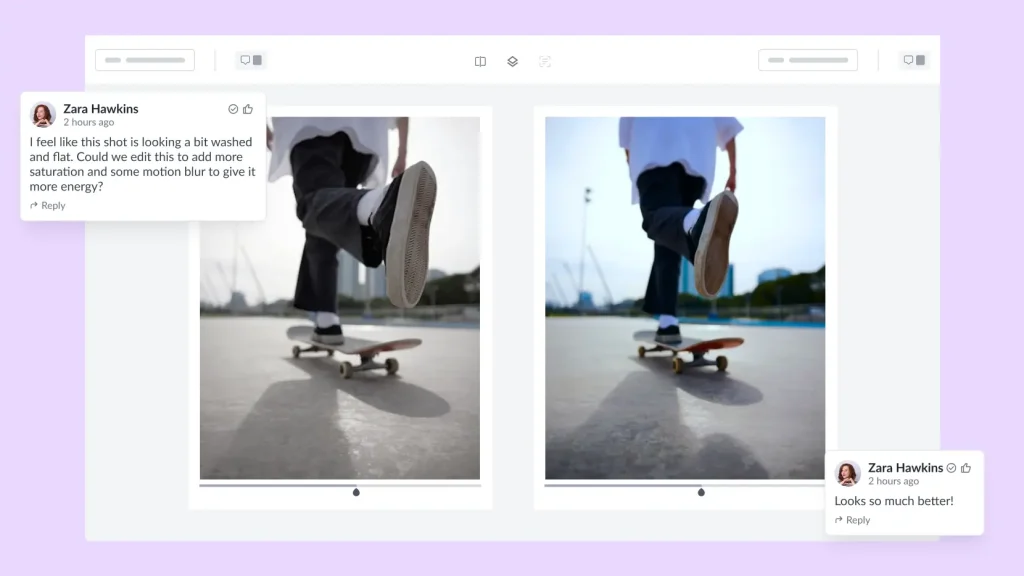
You can prevent this by using video proofing software that supports timestamped comments and visual annotations directly on the video frame. This gives editors precise, actionable feedback tied to an exact moment in the clip, rather than vague notes like “the middle bit feels off“.
Also, be sure to set a clear deadline for the review round. If you leave it open-ended, it will drag on. Video annotation tools make this stage significantly faster by keeping all comments in one place and eliminating back-and-forth clarification.
Here’s an example of how giving video feedback looks in Filestage.

Step 4 – Edit and start a new review round
Once feedback is collected, the editor makes changes and uploads a new version. The key here is version control. Reviewers should be able to compare the new cut against previous versions to confirm their feedback has been addressed, without hunting through email chains to find what they asked for.
Good video proofing software handles this automatically, flagging resolved and unresolved comments as the process moves through review rounds. This removes a huge amount of manual admin from your video production process.
For instance, Filestage stacks all video versions neatly in your dashboard so you can never have to go digging through old email or Slack threads. Plus, you can view the latest versions side-by-side to see what’s changed.
Step 5 – Get approval from all stakeholders
The final step is getting a confirmed sign-off, not just silence. Use an approval workflow that prompts each stakeholder to actively approve or request changes. This creates a clear audit trail and prevents the dreaded “I thought someone else approved it” conversation.
Automated approval workflows take this further by moving the file to the next reviewer automatically once the previous one approves, saving time and reducing errors across large video projects.
See how Filestage can speed up your approvals
Enjoy a free, 30 minute consultation with our experts, tailored to your team and use cases.
Key features to look for in video proofing tools
Not all proofing software is able to handle video clips and large files well. Here’s what I’d recommend looking for when evaluating your options.
Frame-accurate comments and annotations
The ability to leave a comment tied to a specific video frame is non-negotiable. Vague feedback wastes everyone’s time. Look for tools that let reviewers add comments directly to the frame they’re referring to, with timestamped precision.
Supported file types
Make sure the tool supports the formats your team actually uses. MP4 and MOV are the baseline, but if your team works with MXF, AVI, or other formats, check compatibility before committing.
Playback speed controls
Reviewers need to slow down or speed up playback to catch technical errors. Playback speed controls are especially important for motion graphics, animation, and anything where timing is critical.
Version control and compare mode
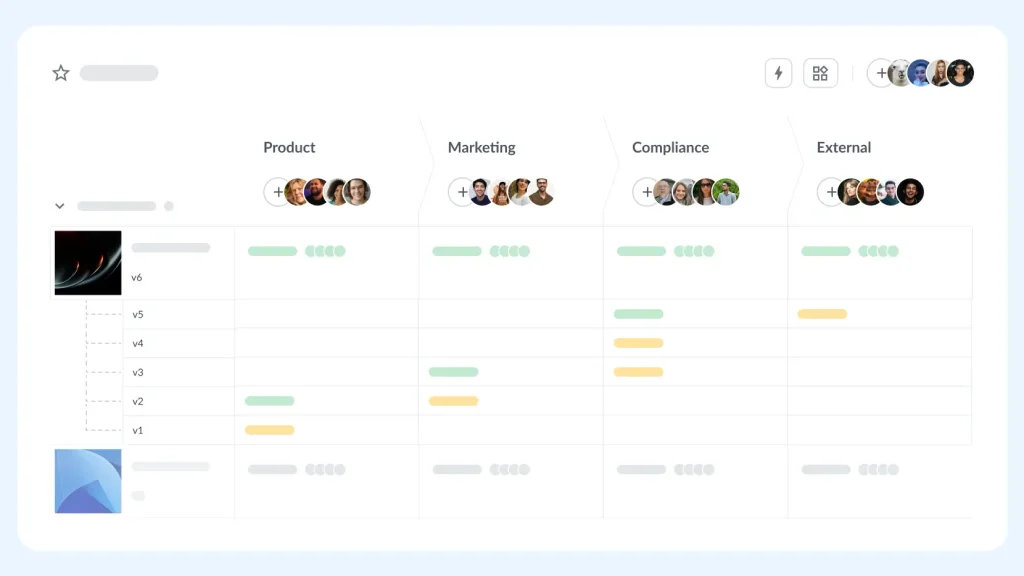
A version history lets you track every iteration of a video file. Compare mode lets you put two versions side by side, so reviewers can confirm changes have been made. Both are essential for managing multiple review rounds without confusion.
Reviewer groups
Large video projects often involve multiple approval stages: internal team, client, legal, and compliance. Reviewer groups let you manage these separately, so you’re not showing client feedback to your internal team or routing legal comments to the creative director.
Integrations with video editing tools
If your editors work in Adobe Premiere Pro, After Effects, or Final Cut Pro, look for video feedback tools that integrate directly. This cuts down on the time spent exporting, uploading, and switching between apps.
To-do lists and task management
To-do lists tied to feedback help editors work through changes systematically and give project leads visibility into progress without chasing updates. After all, comments are only useful if someone acts on them.
Three best practices for more efficient video proofing
Follow these three best practices to make your video proofing process faster and less frustrating.

1. Use dedicated video proofing software
If I had to pick one change that makes the biggest difference, it’s switching from email-based feedback to dedicated video proofing tools. Email and shared drives weren’t built for video review. They don’t support frame-accurate feedback, version control, or approval tracking. Online video collaboration becomes dramatically more manageable when everyone’s working in one place.
Need more convincing? Filestage has helped global brands like Sixt cut feedback time by 30% and reduce miscommunications in their video proofing process.
See how Filestage can speed up your approvals
Enjoy a free, 30 minute consultation with our experts, tailored to your team and use cases.
2. Establish a clear process with defined review steps
The most common cause of endless revision cycles is an undefined process. Before a project starts, document your review steps, who’s involved in each, and what “approved” actually means.
Ask yourself:
- Who needs to sign off on this?
- Who should be involved in the feedback process, but doesn’t need to sign off?
- Who should be involved at each stage for maximum visibility without excess noise?
Document it, then share it with your team and your clients. A process your team can follow every time removes ambiguity and speeds up the entire cycle.
3. Use online proofing automations and integrations
Automations eliminate the repetitive tasks that slow down review cycles: manually notifying reviewers, chasing approvals, and updating project statuses.
Set up automated reminders when a review deadline is approaching, and use integrations to push approved files directly to your digital asset management system or your project management tool. Less admin means more time for creative work.
A final word on video proofing
Video proofing doesn’t have to be the most stressful part of your video production workflow. With the right process, clear roles, and dedicated video review software, you can reduce errors and get your video assets to market faster.
Filestage is built specifically for this. It handles frame-accurate feedback, version control, and automated approval workflows in one place, so your team spends less time chasing sign-offs and more time making great work.
Start your free trial of Filestage →
FAQs
What are common challenges in video proofing?
The most common challenges include fragmented feedback across multiple channels, reviewers watching different versions of the same file, unclear sign-off processes, and a lack of frame-accurate tools for giving precise feedback. These issues combine to create lengthy revision cycles and missed deadlines.
What are the benefits of video proofing for creative teams?
A structured video proofing process reduces the number of revision rounds, allows editors to gather feedback that’s clear and actionable, and ensures all stakeholders have approved the final product before it’s published. It also creates an audit trail, which is useful for regulated industries or when working with external clients.
What is video proofing software and how does it work?
Video proofing software is a cloud-based tool that lets teams upload video files, share them via a review link, and collect timestamped, frame-accurate feedback from multiple reviewers. It tracks versions, manages approvals, and keeps all feedback in a centralized hub so nothing gets lost in email.
How do I choose the best video proofing software for my team?
Start with your workflow. If your team works with large video files and multiple external stakeholders, prioritize tools with strong version control, reviewer groups, and integrations with your editing software. Test a few options using a free trial before committing, and make sure the tool is easy enough for clients and non-technical reviewers to use without training.