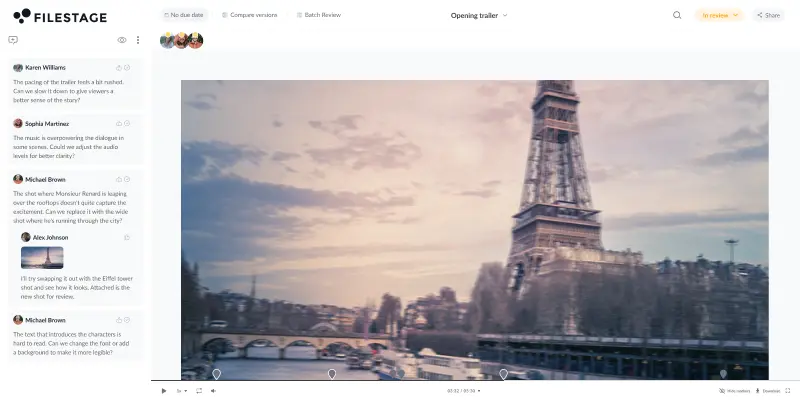

Hybrid work has quickly shifted from a temporary arrangement to the operating reality for most creative teams. According to the May 2026 Survey of Working Arrangements and Attitudes (page 5), around 25% of all paid workdays in the US are now worked from home, and workers in the arts and entertainment sector average nearly two of those days per week.
This has led to a boom in demand for online video collaboration tools. It’s easy enough to hop into a doc and add some comments. But when you need to review video content with different stakeholders every day, email, PowerPoint, and Zoom calls just don’t cut the mustard.
That’s where video collaboration software comes in. They make it easy to share video online, discuss feedback, manage versions, and get approval – all in one place.
What is online video collaboration software?
Online video collaboration software is any tool that helps teams create, share, review, and approve video assets together, without the chaos of email chains and version mix-ups. Different tools solve different parts of that workflow: some focus on media management and cloud storage, others prioritize review with frame-accurate feedback, and some are built for creation. What they all share is replacing scattered, on-site-or-nothing work with something that works for distributed teams.
Video creation tools
Before you can review or approve anything, someone has to make it. These tools are for creative teams who need to produce polished video content without a full post-production setup. Think animated explainers, social clips, training videos, and branded presentations, ready to go without touching DaVinci Resolve or a professional editing suite.
1. Powtoon – best video collaboration software for video content creation
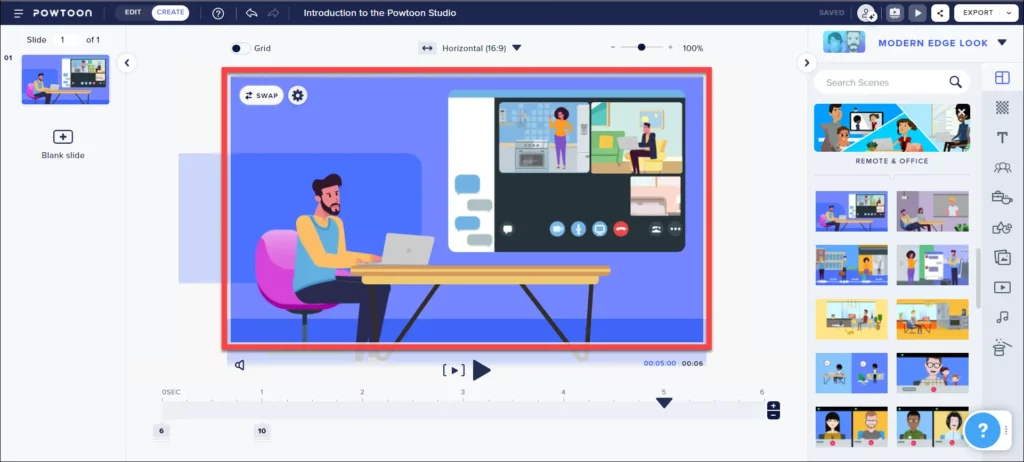
Powtoon is an online video creation platform for engaging short videos and presentations. This visual communication platform allows its users to create engaging content with the help of their easy-to-use video maker, which contains millions of stock images, clips, and music tracks.
Powtoon helps teams to become faster and more successful at video content creation by simplifying the entire video production and editing process.
Choose Powtoon for marketing and training content
Powtoon is a solid pick for marketing teams and HR departments that need to produce explainer clips, onboarding videos, and internal communications without a video editor. The template library and drag-and-drop timeline mean non-technical team members can turn around polished animated content fast, without touching other software like a traditional editing suite.
The trade-off is range. Powtoon’s output style leans toward animated and presentation-style clips, so it’s less useful for teams handling live-action footage or complex projects that need granular editing control. For creation-only needs at speed, though, it’s a practical choice.
Pricing
Powtoon offers Lite (starting at $15 per month), Professional ($40 per month), and Business packages ($125 per month).
Professional and Business packages offer bigger stock libraries and unlimited video exports per month, making them more suitable for larger teams that regularly create and publish video content.
2. Mindstamp – best video collaboration software for personalized videos
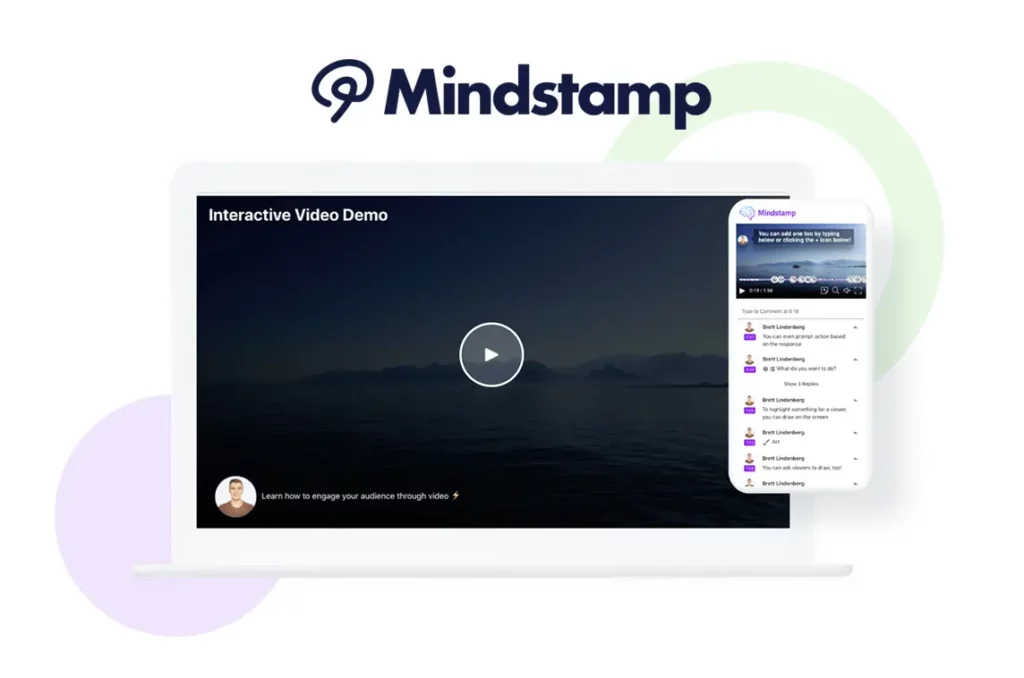
Mindstamp software helps users turn content into an intelligent and interactive viewer experience. They can do this by creating personalized interactive videos or by adding buttons, hotspots, questions, images, and video clips to any video.
This video collaboration tool can be used to drive viewer action and increase engagement.
Choose Mindstamp for interactive and personalized video
If your goal is engagement rather than just delivery, Mindstamp earns its place. It turns a standard clip into an interactive experience, letting you add branching choices, embedded questions, clickable hotspots, and personalized variables. That makes it genuinely useful for sales outreach, e-learning, and client onboarding content where passive viewing isn’t enough.
It’s worth being clear about what it isn’t, though. Mindstamp is a specialist tool for interactive video assets, not a general video collaboration platform for review and approval. Teams that need frame-accurate feedback or multi-stage sign-off workflows should look elsewhere for that side of things.
Pricing
Mindstamp pricing ranges from $99 per month for the Basic package to $499 per month for Pro customers. Users can also go for a middle ground with the Core package for $299 per month. Enterprise pricing is custom.
The packages differ in the streaming minutes and the number of videos users can create. Bigger and more expensive packages also include additional features that make video collaboration easier.
Video review and approval tools
These tools are built for one thing: getting video assets approved as fast as possible, with a clear record of every note along the way. If scattered input and endless revision rounds are slowing your team down, this is where to start. They work equally well for small teams sending cuts to a handful of clients and large teams running structured multi-stage approvals.
3. Filestage – best video collaboration software for faster review and approval
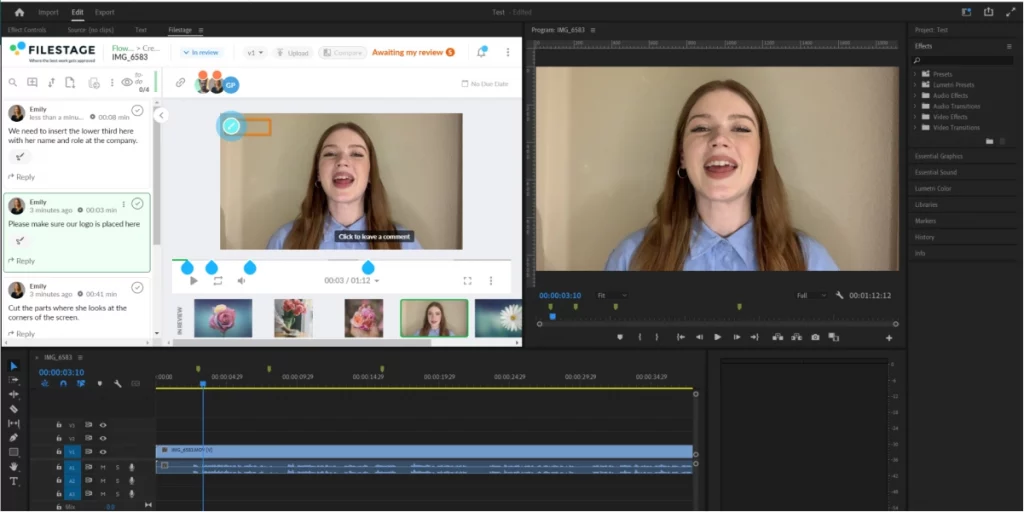
Filestage is a video collaboration platform that frees teams from chaotic approval processes, making work more joyful and productive. Multiple reviewers can simultaneously annotate videos and leave comments for a seamless experience.
It’s extremely popular with marketing teams, creative agencies, and video production companies – including Capri-Sun, AB InBev, and Publicis Health. Its range of features make it a great all-round content automation tool.
How to collaborate on videos and get fast approvals with Filestage
Here’s how to share videos with Filestage in a few simple steps:
- Sign up to Filestage – this will give you access to a free Professional trial for seven days, then you’ll automatically roll back to the Free plan
- Once you land in the product, click “Create project” and give it a name
- Drag and drop your videos into your project
- Then share the link with your stakeholders or invite them to your first reviewer group (more on that in a second)
Your stakeholders will then be able to view your videos in their browser without needing to download anything or create an account. And if you upload more content or new versions later, they’ll be able to access everything and leave their feedback using the same link!
Choose Filestage for video collaboration and approvals
As soon as you’ve uploaded your videos, Filestage transforms into a powerful and collaborative video approval tool. This replaces all the pains of consolidating video feedback over email, helping you to deliver better quality videos in less time.
Here are a few ways Filestage helps to speed up your video collaboration:
- Markers and timestamps – Click anywhere on a video to create a marker and add a note with an automated timestamp
- Video annotations – Draw on content with a pen tool, lines, arrows, and boxes to make your input crystal clear
- Comment threads – Discuss notes, tag teammates, and add attachments to keep everything in context
- Version control and comparison – Create smooth hybrid collaboration by keeping a clear version history so you can revisit previous edits and annotations, and compare versions side by side to verify changes
- Approval workflows – Set up approval workflows for your project, so you can make sure every video gets signed off by the right people
- Adobe Creative Cloud integration – Render sequences from Premiere Pro and After Effects directly to Filestage, and see notes in real time in your project timeline
Discover more great markup tools for keeping feedback in context.
Pricing
Filestage’s Free plan gives you 2 GB secure storage with one active project, two reviewer groups, and unlimited reviewers. You then have three paid options if you need more projects and space:
- Starter: $199/month – unlimited projects and 1 TB storage
- Business: $329/month – 3 TB storage plus advanced collaboration features
- Enterprise: Contact sales for pricing – 10 TB storage plus advanced security features
See Filestage in action
We’ll give you a personalized tour to help you choose the best online proofing tool for your brand or agency.
4. Frame.io – best video collaboration software for production companies
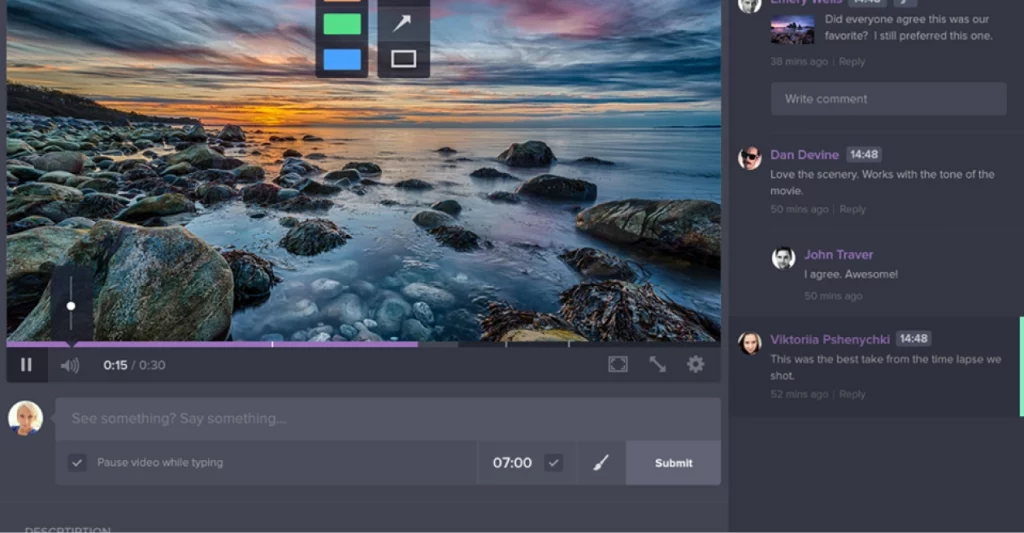
Frame.io is a video collaboration platform designed to support the video editing process. Creative teams can use Frame.io to accelerate their sharing and approval process with time-stamped comments, annotations, and hashtags. Multiple people can edit content at once for real-time collaboration.
Plus, they can use integrations with popularly used editing tools to enhance their editing and collaboration process. If you’re looking for a tool like Frame.io, check out our overview of the best Frame.io alternatives.
Choose Frame.io for creative teams living in Adobe
Frame.io is the strongest choice for post-production teams whose editing lives in Adobe Premiere Pro, After Effects, or Final Cut Pro. Notes from collaborators and clients sync directly to your timeline as markers, which means you can address them without ever leaving your editing application. That tight integration sets it apart from more general-purpose video collaboration platforms when production speed is the priority.
One thing worth knowing: cloud storage limits can feel tight on the Pro plan, and adding seats on the Team plan gets expensive quickly. If your team is small and client-facing, the free plan (two users, two projects) is a decent starting point before committing to paid plans.
Pricing
Frame.io offers free packages for up to two users. From there, you can upgrade your package to $15 or $25 per user/month, depending on your team size. Enterprise customers are offered custom pricing in conversation with sales.
5. QuickReviewer – best video collaboration software for smaller teams
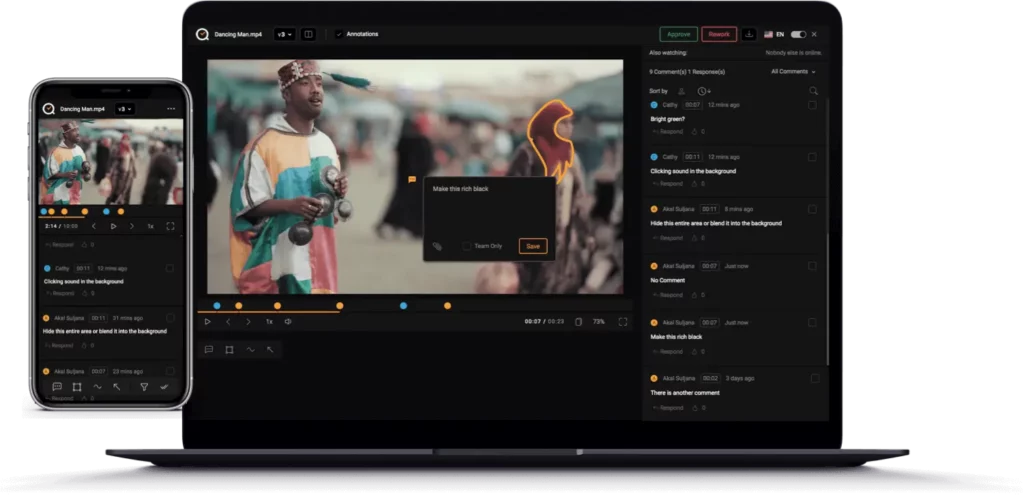
QuickReviewer is a cloud-based collaborative proofing and review tool that helps creative advertising and marketing teams manage various clients and projects at once.
With QuickReviewer, teams can get reviews and comments directly in a centralized platform without dreading long email feedback chains.
Choose QuickReviewer for straightforward client review
QuickReviewer does one thing well: it gives small teams and freelancers a clean, centralized place to collect client notes on video content, designs, and PDFs without a steep learning curve or a heavy monthly bill. If you’re spending too much time chasing input over email and need a simple upgrade, it’s worth a look.
It’s a lightweight video solution by design, which is both its strength and its ceiling. Teams managing high-volume campaigns or complex projects with multiple approval stages will likely outgrow it fairly quickly. But for agencies running straightforward client review cycles, the free basic plan and low-cost paid plans make it an easy first step away from email chains.
Pricing
QuickReviewer offers Forever Free, Pro, Premium, and Enterprise versions. The Pro version starts at $79/month for up to 10 users.
Video recording and async messaging
Not every conversation needs a meeting. These tools let you record your screen, your camera, or both, then share a link so the other person can watch and respond in their own time. They’re the backbone of async communication for remote teams and a favorite of marketing teams doing client walkthroughs, product demos, and internal updates. Both integrate neatly with Microsoft Teams, Slack, and other collaboration tools your team already uses.
6. Vidyard – best video collaboration software for supporting sales

Vidyard is a video collaboration software that allows sales teams to easily create and share personalized videos throughout their sales cycle. The tool offers in-depth insights and robust integrations with different CRM and marketing automation platforms.
Vidyard helps improve business communication with prospects, customers, and teams resulting in more leads and closing more deals.
How to share videos with Vidyard
- Sign up for a Vidyard account
- Upload an existing video or record your own with the Vidyard Screen and Webcam Recorder
- Select Share next to a video in your library
- Select Copy link and paste it anywhere you’d like to share your video with others
This way you can easily screen record videos and share them with colleagues or prospects in a couple of clicks.
Choose Vidyard for sharing personalized videos throughout your sales cycle
Choose Vidyard for personalized sales videos because it offers user-friendly video creation tools, robust analytics, and seamless integration with other sales platforms.
The tool will help you boost engagement, build trust with the potential clients, and accelerate deals by delivering tailored video messages at every stage of the sales cycle. This way your sales efforts will soon become more effective and efficient.
Pricing
Vidyard offers three different pricing packages depending on the size of your team, including:
- Free package for basic features with a limited number of videos per month
- Starter package for $59/month (billed annually) with unlimited videos and analytics
- Teams and Enterprise packages with custom storage limits and pricing
7. Loom – best video collaboration software for screen recordings

Loom is a screen recording tool that allows users to effortlessly record their screen and instantly send the video with a link. Businesses use Loom to generate marketing materials, create customer tutorials, and boost their internal communication.
This video collaboration tool is handy for remote teams to practice asynchronous communication with video messaging.
How to share videos with Loom
- Sign up for a Loom account
- Once you’re in the app, click the Loom icon in the lower-right hand corner of the screen
- Select “Screen” to record just your screen, or “Screen + Cam” to record your screen and camera
- Once you finish recording, you’ll be taken to a preview of your video where you can edit the title and copy the link to share
Choose Loom for screen recording
Loom is the best option for sharing screen recordings because it provides a simple and efficient platform for creating and sharing videos.
Its user-friendly interface, real-time webcam overlay, and direct integration with communication tools make it ideal for quick and effective sharing of screen recordings which improves your overall collaboration and communication.
Pricing
The tool offers starter, business, and enterprise packages with the following pricing:
- Starter plan is free and has a limit of 25 videos per person
- Business plan is priced at $18/user per month and includes unlimited videos with unlimited recording length
- Enterprise plan has custom pricing with additional features and unlimited storage
Enterprise and production management
When your productions involve hundreds of shots, dozens of artists, and strict delivery pipelines, you need something built to match. These platforms go well beyond basic video collaboration software, handling everything from project management and scheduling to high-quality secure streaming. They’re the picks for studios, broadcasters, and enterprises running large scale teams on complex projects, often on site and remote at the same time.
8. Kaltura – best video collaboration software for enterprises
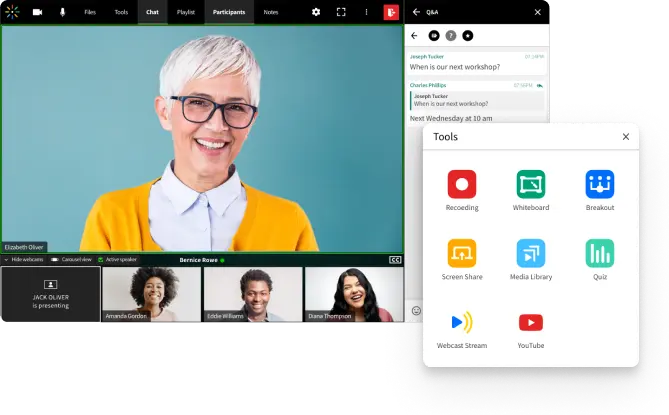
Kaltura is a video cloud platform that offers enterprise or large-scale video storage, streaming, and distribution. The tool supports a variety of purposes such as video conferencing, enterprise video portal, interactive video, and virtual classroom, or podcasting.
The two features that Kaltura’s users love the most are:
- The possibility to create multiple users and sessions
- Hosting multiple events at the same time
Choose Kaltura for enterprise-scale video management
Kaltura is built for organizations that need to host, stream, and distribute video content at a scale most tools can’t handle. Whether that’s a company-wide all-hands broadcast, a video conferencing setup for virtual events, or a searchable internal video library that the entire company can access, Kaltura treats media management as a serious operational requirement rather than an afterthought.
The flip side is complexity. Kaltura is a feature-rich platform whose full range of features comes with custom pricing, which means it requires a proper evaluation and sales conversation before you can budget for it. Small teams or individual creators will almost certainly find it more than they need. It’s priced and built for large scale teams with dedicated IT support and real cloud infrastructure requirements.
Pricing
Kaltura offers a free trial with customized pricing for all paid users.
9. Evercast – best video collaboration software for remote teams
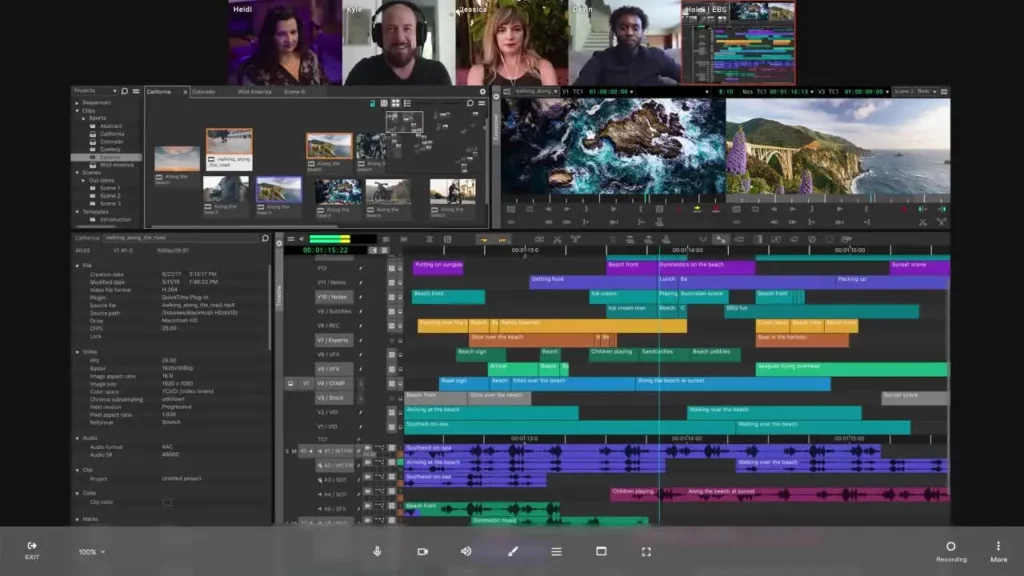
Evercast is a video collaboration platform for remote creators. Creative teams can use Evercast to stream media in HD, video chat with their team, and engage in live collaboration, all in one place.
Most importantly, the tool focuses a lot of its attention on security which helps global teams effortlessly collaborate live and in real-time without fearing for the safety of their content.
Choose Evercast for live remote collaboration on sensitive content
Evercast was built specifically for the problem that general video chat tools can’t solve: streaming high-quality, color-accurate footage to a remote collaborator so you can review it together in real time, frame by frame, as though you were in the same room. That’s a different proposition from async review, and it’s what makes Evercast the go-to for sound mixing sessions, color grading reviews, and editorial collaboration between studios.
Security is a core part of the pitch too, which matters when you’re streaming pre-release media files with an external collaborator. The pricing reflects its professional positioning, so it’s squarely aimed at production studios rather than small teams looking for a lightweight video solution.
Pricing
The tool offers a Studio package of $549/month (commitment based) or $849/month (month to month). For larger clients, they designed the Premium Suite at $1249/month or the Enterprise plan with custom pricing based on clients’ needs.
10. Flow Production Tracking (formerly ShotGrid) – best video collaboration software for game creation studios
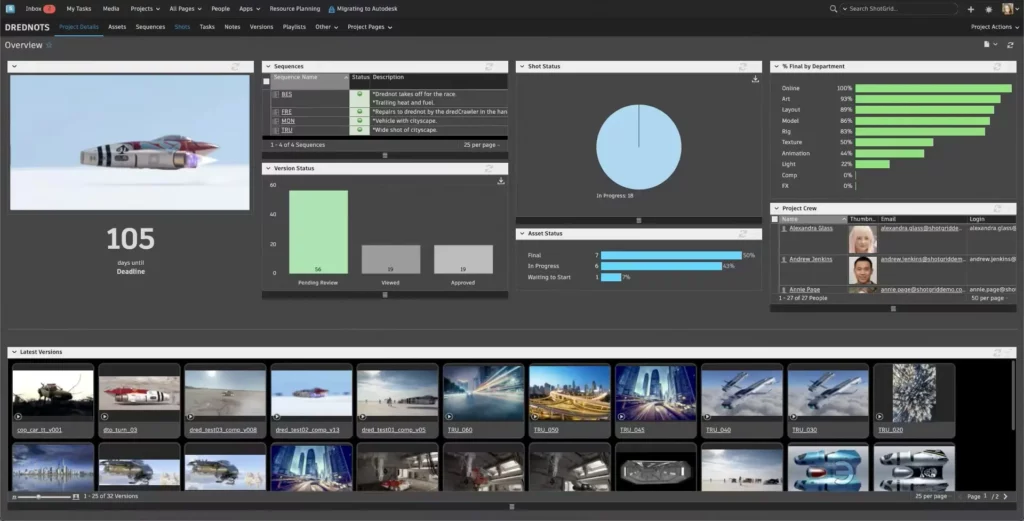
Flow Production Tracking (formerly ShotGrid) is a video collaboration software for visual effects and game creation studios. The tool helps agencies streamline their creative workflows and become more efficient in their content production process.
Some of the features that users love are:
- Team scheduling helps teams know who is working on what and when
- Visual timeline for tracking the progress of a project
- A mobile platform that makes checking projects quickly and easily on any mobile device
- Transferring files across the platform
Choose Flow Production Tracking for studio-scale production pipelines
Flow Production Tracking is what studios reach for when a project management tool isn’t enough. It’s built to track thousands of shots and video assets moving through a production pipeline simultaneously, from brief through animation, VFX, and final delivery. For game studios, VFX houses, and animation companies running complex projects across multiple departments, the depth of tracking and scheduling tools here is hard to match.
It integrates with creative software across the pipeline, including Maya, 3ds Max, and Unreal Engine, as well as review tools, keeping notes and version history connected to production data rather than siloed in a separate app. It’s not a tool you spin up in an afternoon, though. Like any enterprise-grade system, it takes time to configure to your workflow and train your team members on. But for studios at scale, that investment pays off.
Pricing
Plans start at $33/user per month, billed annually (with a 30-day free trial). A monthly option is also available at a higher rate.
How online video collaboration software improves creative workflows
Getting content across the line is hard enough without your video workflow working against you. The right tools don’t just make things tidier, they fundamentally change how your team members work together. Here’s what you can expect.
Real-time collaboration without the meeting
The biggest win is simple: your team stops emailing files and starts working in the same space. Real time collaboration means designers, editors, and stakeholders can view, annotate, and discuss the latest cut simultaneously, whether they’re on site or scattered across time zones. No more “which version did you send?” No more competing notes arriving in waves.
Faster feedback loops
Real time feedback collapses review cycles from days to hours. When a stakeholder can click directly on a frame and leave a note, you get actionable input in minutes rather than days. The review function that used to take a week of back-and-forth email collapses into a single session. For teams managing complex projects with multiple rounds of revision, that time saving adds up fast.
Tighter security and access control
The better platforms give you granular control over who sees what. You can assign permissions at the project, folder, or file level, so the right people access the right content at the right time. Many enterprise-grade tools also offer end-to-end encryption for your media files, which matters when you’re sharing sensitive pre-release content with external partners or clients.
Version control that actually works
Every time you upload a new cut, a good video collaboration platform keeps the full history alongside it. That means version control is built into the workflow, not bolted on with a naming convention like “final_v3_REALLYFINAL.” Anyone on the team can go back to a previous version, compare it with the latest, and track exactly what changed and why.
Fewer tools, better workflows
One of the quieter benefits is consolidation. The right tools replace a patchwork of cloud drives, chat apps, and email threads with a single hub. That gives everyone clearer visibility, reduces the media management overhead, and frees your team members from toggling between different features across too many apps.
5 ways Filestage helps with online video collaboration
Here are the top five ways Filestage helps with online video collaboration:
- File sharing links never time out
- Point and click to add comments and annotations
- Approve a video or request changes in one click
- Set due dates to keep reviews moving forward
- Review designs, websites, and other formats too
See Filestage in action
We’ll give you a personalized tour to help you choose the best online proofing tool for your brand or agency.
1. File sharing links never time out
“Hey, you know that video edit I hassled you for last week? Yeah, the one you worked late to finish. Funny story! I didn’t actually download it. So, umm, could you send it again please? ”
If you’re a video editor or project manager, you’ve probably been sent this email more times than you can count. Unless it’s your first day, in which case, good luck to you!

“Filestage makes things easy. We no longer need to send heavy files around or set up box folders to exchange content.”
Sarah Chen, Medical Director at Publicis Health
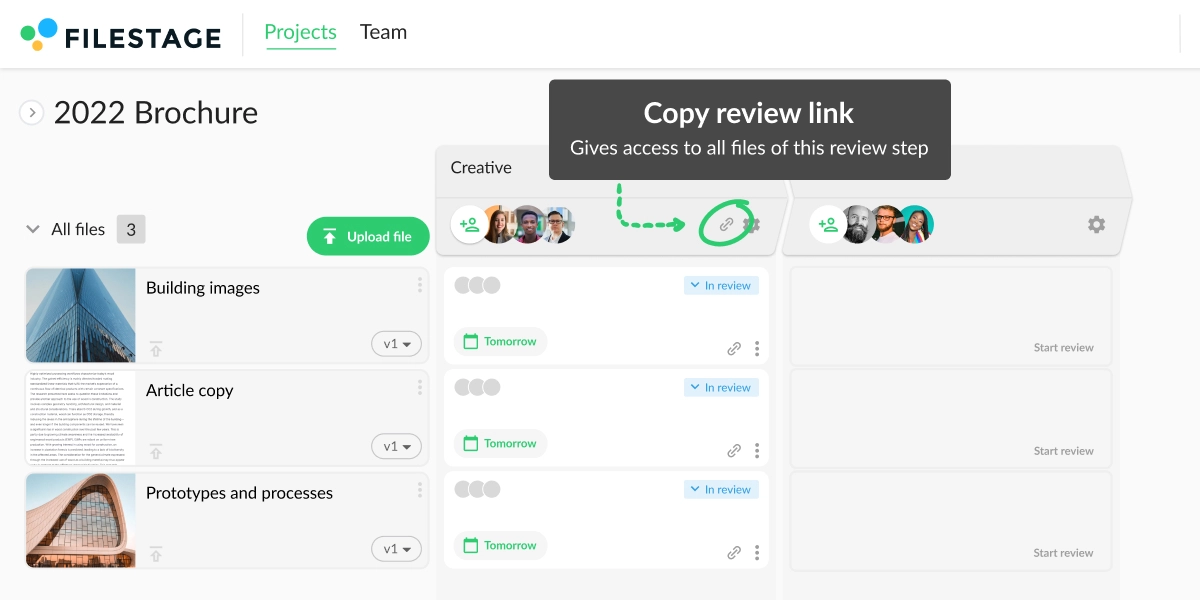
Get one link to all the videos in your project
With Filestage, you don’t just upload files to projects rather than folders. Once you’ve shared a link, your reviewers can access everything in one place, including new versions you upload later. No resharing, no “could you send that again?”
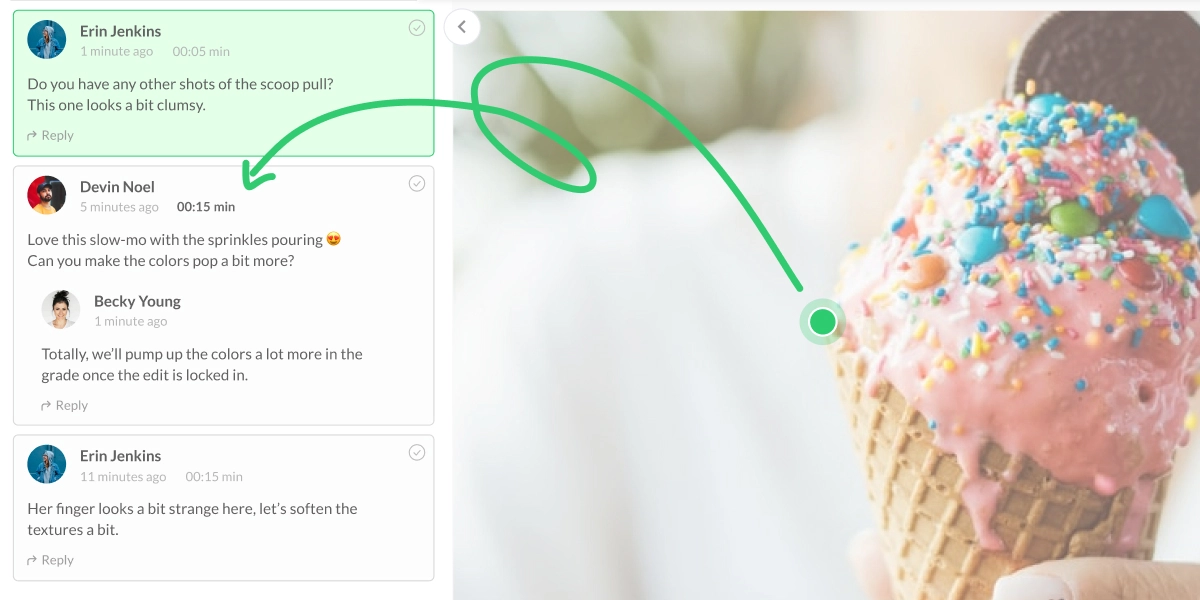
2. Point and click to add comments and annotations
Video content and email rounds are a match made in hell. Reviewers take screenshots, and write long-winded descriptions, and rarely read each other’s notes.
This leaves video editors with a mountain of conflicting input and no clear way through it.

“In Filestage we appreciate that you can place feedback with markers exactly where it is needed. This saves us an enormous amount of time and avoids misunderstandings.”
Marcel Martin, UX Director at Oddity
Give and receive clear feedback with full context
With video feedback tools like Filestage, giving notes on content is quick and easy.
Here’s how it works:
- Click play to start watching a video
- Tap anywhere on the video to pause it and create a marker
- Write a comment, draw annotations, and share attachments as references
Every annotation is attached to a timestamp, so everyone knows exactly what you’re talking about.
3. Approve a video or request changes in one click
Our Year In Review report found that 1 in 5 people occasionally lose track of who’s approved their content. And 1 in 10 marketers have published mistakes because important review steps were skipped.

“Filestage helped us to reduce the miscommunication in video approvals since feedback can’t get lost over a series of emails.”
Angelika Schneider, Executive Creative Direction Motion Design
See everyone’s review status from your dashboard
Once your reviewers have watched the latest cut, they choose one of two buttons:
- ✓ Approve
- ↻ Request changes
Their status updates on your dashboard in real time, so you can see exactly where things stand without sending a single chaser.

See Filestage in action
We’ll give you a personalized tour to help you choose the best online proofing tool for your brand or agency.
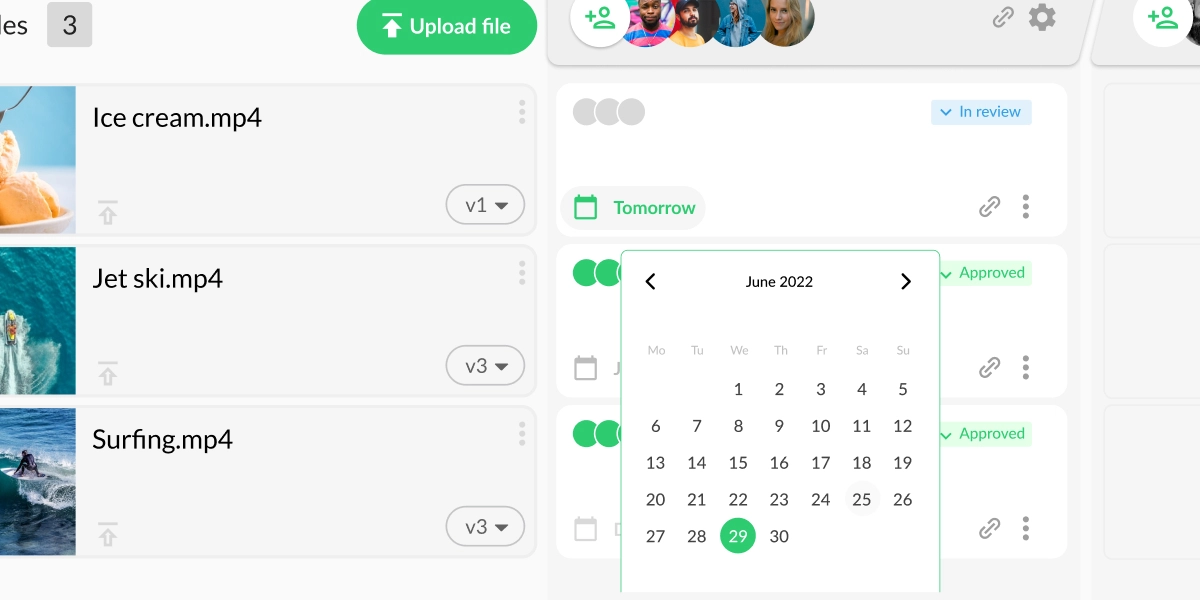
4. Set due dates to keep video reviews moving forward
According to our Year In Review report, 48% of advertising and marketing professionals have to chase their reviewers for input and approval. That’s time your team could be spending on actual work.
Send automated reminders instead of chasing people for input
Each time you share content with your reviewers, you can set a due date. And as the deadline approaches, Filestage sends reminder emails automatically. And, if you use Slack, Microsoft Teams, Asana, or Trello, you can integrate them so all your updates go to the right channels without lifting a finger.
5. Review designs, websites, and other formats too
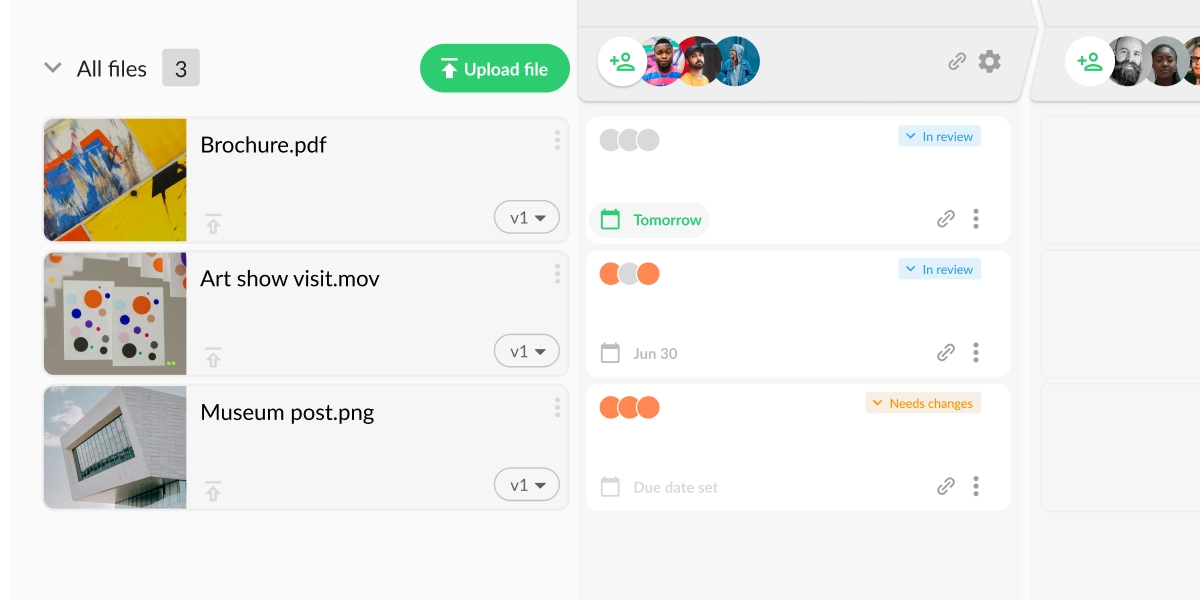
Video is rarely the only format your team is working on. Switching between different tools for different file types creates friction for reviewers and makes it harder to track what’s been approved and what hasn’t.
One platform for all your content
Filestage supports videos, designs, live websites, documents, interactive HTML, animations, images, audio, and more. Your reviewers get one place to see, annotate, and approve everything, whatever format it comes in.

“We love the flexibility to work across different formats such as images, videos, or PDF files – as we work with a mix of these formats for all campaigns.”
Rain Balares, GroupM
Final thoughts
Getting video content across the line is a huge challenge, especially when you have to jump through different hoops for different types of stakeholders.
But by using Filestage for video collaboration throughout the review process, you can make feedback faster, clearer, and easier for everyone involved. So instead of chasing people for feedback or trawling through email chains to check who’s approved what, you can focus on making your next video project the best yet.
Want to put it to the test with your team? Request a free trial of Filestage today.
FAQs about video collaboration
What is online video collaboration?
Online video collaboration is where a group of teammates, stakeholders, or a mixture of both work together on video content using cloud-based software. As more and more people are working remotely, teams are looking for new ways to take video collaboration online.
One example of online video collaboration software is Filestage. It allows you to share videos, collect feedback, and collaborate in the comments until you’ve delivered a version that everyone is happy with. And it also supports designs, websites, and other file formats.
How do you collaborate on videos online?
You can collaborate on videos online by sharing your content in a centralized platform like Filestage. This gives your teammates and reviewers one place to watch your videos, add comments, and discuss ideas for the next version.
But that’s just the tip of the iceberg. You and your reviewers can also draw annotations and upload attachments to illustrate your feedback. Or you can tag a teammate to get a second opinion.
How does online video collaboration make review rounds faster?
Online video collaboration makes feedback faster because your reviewers simply have to click on your video to add a comment. They don’t have to worry about writing out timecodes, taking screenshots, or writing long descriptions to give context.
And that makes things faster for video editors too. Instead of juggling a bunch of email chains and chat threads full of timecodes, they can see everyone’s comments in one place. And with Filestage, they can even use the comments as a to-do list while working on the next version.